FLUJO
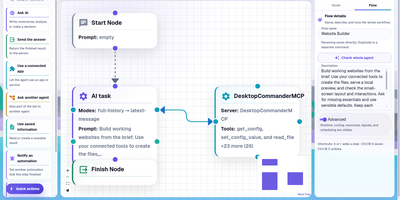
Building an AI agent in FLUJO means saving a model connection once, adding plain-language steps or dragging nodes onto a visual graph, and attaching tools from any MCP server, all inside one open-source workspace you host yourself. Connections cover OpenAI, Azure OpenAI, Anthropic, Google Gemini, xAI, OpenRouter, and local Ollama models, with ordered fallback connections for rate limits and outages plus a built-in connection test. The Connected Apps screen imports MCP servers from curated apps, the MCP Registry, a remote URL, a GitHub repository, or a local command, then lets you call their tools and read their resources before an agent touches them. Easy mode assembles an agent one recipe step at a time, Expert mode exposes Start, AI, connected-app, Static, and Subflow nodes with branching handoffs and loops, and both open the same saved agent. Talk runs agents in a live chat with a context-window meter, optional tool approvals, file and audio attachments, message editing, and a visual debugger that sets breakpoints and steps through nodes. Triggers start flows from schedules, webhooks, file changes, polled MCP tools, changed websites, or another flow finishing. Experimental Personas keep memories and goals between sessions, and Meetings seat several agents in one conversation. Any saved flow answers as a model on an OpenAI-compatible /v1 endpoint, so Cline, Cursor, or SDK clients can call it. Running on a dedicated VPS on RepoCloud with guaranteed CPU, RAM, and SSD, full root SSH access, and a browser serial console. MIT licensed.
Deploy