PenguinHarness
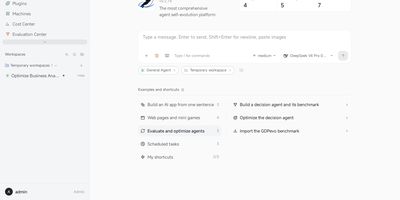
PenguinHarness turns a one-sentence description of the agent you need into a working app, then lets other agents tune it round after round until its benchmark score climbs. Nine self-improvement algorithms ship as plugins, including OPRO, APE, ACE, and AWM, and every candidate becomes a snapshotted version with its score recorded in an Evaluation Center. Seventeen ready-made benchmarks cover data analysis, repository fixes, workflow automation, and terminal science tasks. Agents read and act on web pages through a built-in browser panel or your own Chrome, and each agent can grow a hot-reloaded workbench page like a contract review desk with uploads and downloadable reports. Add a machine over ssh and conversations in that workspace run there, inside the same window. A Cost Center breaks down spend per run, trajectories show every turn on an execution timeline, and replies can carry forms, charts, and live widgets. An Agent API streams runs to outside apps, and agents can be reached from Feishu, QQ, Telegram, or WeChat. Running on a dedicated VPS on RepoCloud with guaranteed CPU, RAM, and SSD, full root SSH access, and a browser serial console. Apache-2.0 licensed.
octo-agent
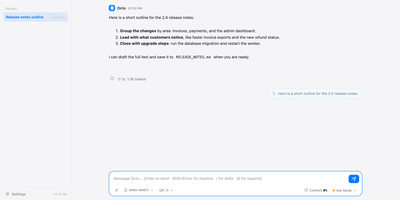
One download gives you a coding agent and personal assistant that is ready to work after a single message. The agent runs shell commands, reads and edits files, searches the web, calls MCP servers over stdio or HTTP with OAuth, and splits work across parallel sub-agents. Chat from the terminal, the web dashboard, a desktop app, VS Code, Obsidian, an Android app, or IM bridges for Telegram, Discord, Feishu, DingTalk, WeCom, and WeChat. Bring DeepSeek, Kimi, Qwen, Anthropic, OpenAI, or any compatible endpoint, with prompt caching tuned for each provider to keep token bills predictable. Skills use the Claude Code SKILL.md format, so an existing skills folder works unchanged. Cross-session memory, scheduled tasks, reusable multi-agent workflows, and Chrome automation that records, replays, and repairs browser steps cover the repetitive jobs. Light Apps are small agent-built tools that run in the browser with no further tokens. Safety is built in: catastrophic commands are hard-denied, deleted or overwritten files go to a recycle bin first, and an OS sandbox can confine the terminal. There is zero telemetry, and the web dashboard loads no outside fonts or scripts. Expose the server on a VPS behind its auto-generated access key and reach the same sessions from any device. Running on a dedicated VPS on RepoCloud with guaranteed CPU, RAM, and SSD, full root SSH access, and a browser serial console. MIT licensed.
Tiny File Manager
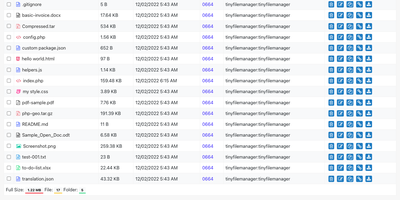
Browse, upload, edit, preview, and archive the files on your server from any web browser, with no FTP client, no shell session, and no database to set up. Tiny File Manager lists every folder in a sortable table showing size, modified date, permissions, and owner, with a search box that filters as you type. Drag files into the upload zone, send several at once, or paste a URL for the server to fetch. Rename items, select several to copy, move, delete, or pack into a zip or tar archive, and extract uploaded archives on the server. Click any text file to open the built-in editor, which offers syntax highlighting for 150+ languages and 35+ color themes, so quick fixes to configs and scripts happen where the files live. Images, audio, video, and text open in a preview without downloading, and every file has a copyable direct link. Give teammates or clients their own accounts, each locked to a root folder you choose, mark accounts read-only, and limit uploads to approved file extensions. Hide folders you never want listed, restrict access with IP allow and block lists, switch between light and dark themes, pick from 35+ interface languages, and use the responsive layout on a phone. Setup is one file copied to a web server, or one Docker container. Running on a dedicated VPS on RepoCloud with guaranteed CPU, RAM, and SSD, full root SSH access, and a browser serial console. GPL-3.0 licensed.
DbGate
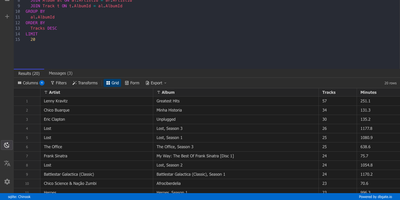
One browser tab can hold every database you manage, from MySQL and PostgreSQL to MongoDB and Redis, so there is no separate client to install for each engine. Connections are unlimited, and each can use its own SSH tunnel or SSL certificates. Tables open in an Excel-like grid where you edit cells inline, filter rows with expressions, and sort by any column. The SQL editor offers schema-aware code completion, a formatter, a join helper that builds clauses from foreign keys, query parameters, and a history of past runs, while result sets appear in separate tabs that you can filter, sort, and export. ER diagrams chart tables and their relations. The table editor creates columns, keys, and indexes and previews the SQL before anything is applied. Import and export move data between databases and files as SQL, CSV, JSON, XML, NDJSON, Excel, DBF, or YAML. Administrators can preconfigure connections through environment variables, mark them read-only, and protect the interface with logins that carry per-user permissions. Light and dark themes, customizable keyboard shortcuts, and translations into many languages keep daily work comfortable. Running on a dedicated VPS on RepoCloud with guaranteed CPU, RAM, and SSD, full root SSH access, and a browser serial console. GPL-3.0 licensed.
ivfi
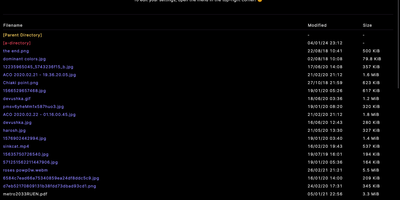
IVFi-PHP turns folders on your server into browsable media galleries: drop one PHP file into a web root and every directory of photos, videos, and audio becomes a polished, searchable index page. Hovering a filename previews the image or video inline, and clicking opens the gallery view where you can move through a whole directory's media, download originals, or reverse-search an image. Audio files play in place with a live visualiser, seeking, and their own volume control. Finding things is instant: filter filenames or file types with plain text, wildcards, or full regular expressions, sort by name, date, or size with settings that persist between visits, and dates automatically match the visitor's timezone. Select any set of files and download them as a single ZIP archive, or share direct download links file by file. Directories can render their README files as documentation pages, listings can hide sensitive entries through server-side filters, and optional Digest authentication keeps a listing private without any account database. Themes and per-visitor display preferences restyle the index, basic listings work even with JavaScript disabled, and the whole application also ships as a Docker image for a one-container deployment. Running on a dedicated VPS on RepoCloud with guaranteed CPU, RAM, and SSD, full root SSH access, and a browser serial console. GPL-3.0 licensed.
FoxProfile
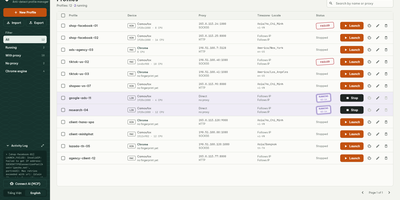
Every account you run deserves its own browser identity, and FoxProfile keeps those identities permanently separate instead of letting them bleed into one another. Create a profile once and it remembers its device: screen, GPU, CPU cores, fonts, and canvas noise are generated on first launch and reused on every later one, so the fingerprint a site saw yesterday is the fingerprint it sees tomorrow. Sessions stick too: history, cookies, and logins live in the profile directory, and the tabs you left open reopen where you left them. Each profile carries its own proxy (HTTP, HTTPS, SOCKS4, or SOCKS5, with a built-in checker) while timezone and locale follow the exit IP automatically or stay pinned to your choice, and the Check IP button compares the exit address across three services and flags mismatches or datacenter addresses. Cookies move in and out as standard editor JSON or Netscape files, whole profiles travel as ZIP archives, and bulk actions launch, stop, or delete fleets at once. On a server, the web panel runs profiles headlessly so you can manage them and view their screens from anywhere, the REST API scripts everything, and the MCP server lets AI agents drive the browsers directly. Running on a dedicated VPS on RepoCloud with guaranteed CPU, RAM, and SSD, full root SSH access, and a browser serial console. MIT licensed.
Wolfcha
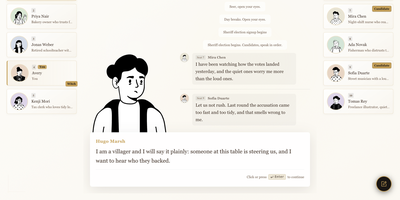
Nobody free on a Tuesday night to play Werewolf? Wolfcha fills the empty chairs for you, seating you at an 8 to 12 player table where every opponent is an AI character with a stable personality, a hidden role, and a memory of who said what. Pick Villager, Werewolf, White Wolf King, Seer, Witch, Hunter, Guard, or Idiot, and the game walks you through each phase with role art, short guides, and prompts that appear when it is your turn. Nights belong to the wolves and the special roles. Days open with a sheriff election, then speeches in order, free discussion, and a vote with a live tally of who backed whom. AI players accuse, defend, bluff, and shift their reads as deaths and votes pile up, and the retro visual style adds day and night transitions, eye-blink effects, and lip-synced avatars. Optional AI voice playback reads speeches aloud, and spectator mode offers a front-row view of a table of AI personalities colliding without taking a seat. Scenario backdrops, from a class reunion to a New Year dinner, change the backstory the characters are generated from. Settings cover volume, sound effects, auto-advance dialogue, and exportable game logs. Running on a dedicated VPS on RepoCloud with guaranteed CPU, RAM, and SSD, full root SSH access, and a browser serial console. Apache-2.0 licensed.
Ogcode
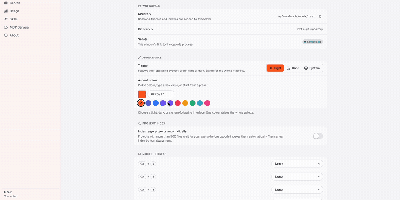
Ogcode puts a full AI coding agent in a browser tab pointed at your own server, where it maps your codebase semantically before reading it, plans changes across files, runs your builds and test suites, and answers with diagrams and documents alongside the shipped code. Before reading files it maps the project with a semantic index, outlines what matters with exact line ranges, and reads only the parts that count, so unfamiliar code becomes navigable in one session. Ask it to implement a feature or chase a failing test and it plans the work, edits across files, runs your builds and test suites, and investigates failures instead of retrying blindly. You stay in control through per-session permission modes: Ask approves each step, Auto gates by risk, and Yolo lets it run, with every decision remembered when you want it to be. Past decisions are recalled instead of replaying whole transcripts, so long sessions stay focused and affordable, and the agent can research as it goes with built-in web search, reusable SKILL.md workflows, and external MCP servers. Answers come back richer than text when the work calls for it, with diagrams, rendered documents, charts, and downloadable artifacts in the same session. Connect Anthropic, OpenAI, OpenRouter, or a local Ollama endpoint and start working. Running on a dedicated VPS on RepoCloud with guaranteed CPU, RAM, and SSD, full root SSH access, and a browser serial console. AGPL-3.0 licensed.