Doca
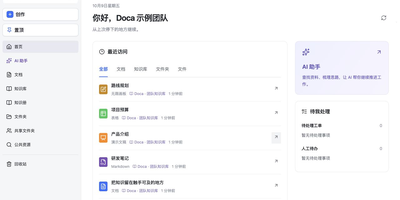
Doca puts rich text, Markdown, spreadsheets, slides, and an infinite canvas under one login and one permission model, giving individuals and small teams a self-hosted workspace for writing together. Every format supports real-time co-editing with presence, comments, saved history, and manual snapshots, and rich text and Markdown documents can be restored to an earlier version. Documents live in knowledge libraries with tree navigation, invitations, inherited permissions, share links, and trash, while personal files and shared folders sit on local disk or S3-compatible storage. Knowledge books go further: they subscribe to sources, run an editable workflow, keep source evidence, and route results through human review. A personal AI assistant, powered by whichever model you configure, searches authorized documents, reads PDF and Office attachments, edits images, and prepares browser drafts. MCP services let external AI clients such as Codex use those tools under your permissions. Sign in with a password, OIDC, Google, GitHub, WeChat, or QQ, review registrations before they go live, and send webhooks to other systems. A plugin SDK and marketplace add business modules, and a browser extension clips pages into documents. The interface ships in Chinese and English. Running on a dedicated VPS on RepoCloud with guaranteed CPU, RAM, and SSD, full root SSH access, and a browser serial console. MIT licensed.
GROWI
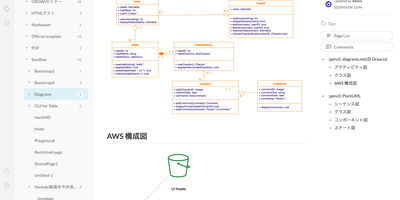
Every manual, meeting minute, and runbook your team writes lands in one searchable tree of Markdown pages with GROWI, a self-hosted wiki that several people can edit at once. Engineers file runbooks under paths such as /projects/new-project and draw diagrams in draw.io, Mermaid, or PlantUML. Writers get a spreadsheet-style table dialog, highlighted code, math formulas, emoji, footnotes, and checkboxes. When two people change the same page, drafts autosave, a conflict dialog settles the clash, and history shows what changed between versions. Readers browse by page tree, breadcrumbs, tags, bookmarks, and a heading outline. Someone hunting for an old procedure searches paths, bodies, and tags, quotes an exact phrase, excludes a word, or narrows by prefix. Each page can be public, link-only, author-only, or limited to a user group synchronized from LDAP or Keycloak, and people sign in through LDAP, Active Directory, SAML, OIDC, or OAuth. Colleagues comment under pages, follow them for bell notifications, and run /growi commands in Slack to create and search pages. Meeting hosts present pages as slides, and templates standardize recurring documents like daily reports. An optional GROWI Vault serves readable pages as a read-only Git repository. Once an administrator enables AI, GROWI AI Agent answers questions from pages the asker may view, and through the MCP server Claude Desktop can search, create, and update pages. Running on a dedicated VPS on RepoCloud with guaranteed CPU, RAM, and SSD, full root SSH access, and a browser serial console. MIT licensed.
Hocuspocus
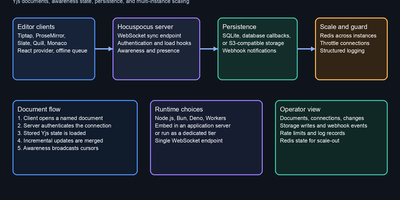
Hocuspocus is the WebSocket backend that turns a regular editor into a multiplayer one: two people open the same document, type at the same time, and watch each other's words appear in place, with every keystroke merged cleanly and no save conflicts to untangle later. The server speaks the Yjs synchronization protocol, so clients built with Tiptap, ProseMirror, Slate, Quill, or Monaco editors connect over a persistent connection and exchange small updates that the conflict-free data type orders correctly regardless of arrival sequence, and awareness messages carry cursor positions and presence so collaborators see who is in the document. Teams that outgrow one process add the Redis extension to balance connections across multiple server instances, reaching very large numbers of simultaneous editors on the same documents. Persistence extensions store documents in SQLite for small deployments or in a database or S3-compatible storage through your own fetch and store callbacks, the webhook extension notifies your application when documents change, throttling guards against abusive connections, and hooks for authentication and document loading let you enforce per-document permissions before anyone joins. Developers embed the server into an existing Node.js, Bun, Deno, or Cloudflare Workers runtime, or run it as the collaboration tier beside their main application, and offline-first clients queue changes locally and synchronize when the connection returns. Running on a dedicated VPS on RepoCloud with guaranteed CPU, RAM, and SSD, full root SSH access, and a browser serial console. MIT licensed.

DumbPad
With a deliberately minimalist design philosophy and zero database dependencies, DumbPad delivers a self-hosted notepad that stores notes as plain text files with real-time auto-saving every 10 seconds and keyboard-shortcut manual saves. The Node.js Express backend serves a vanilla JavaScript frontend that supports multiple named notepads with direct URL linking and shareable links for instant access to specific notes. The split-view editor displays markdown source on the left and rendered preview on the right with a draggable resize handle, while the full preview mode renders complete markdown with GitHub-style alert blocks for Note, Tip, Important, Warning, and Caution callouts, extended table formatting, fenced code blocks with syntax highlighting via highlight.js covering approximately 180 programming languages, collapsible details sections, and checklist support. Fuzzy search matches across both filenames and file contents for fast navigation across large collections. Optional PIN protection secures access with configurable 4 to 10 digit codes, constant-time comparison to prevent timing attacks, brute force lockout after 5 failed attempts with 15-minute cooldown, and IP-based tracking. The Docker container runs as non-root UID 1000 by default with multi-architecture support, CORS origin restrictions for reverse proxy deployments, and persistent data volumes. Notes can be downloaded as text or markdown files, printed with auto-expanded collapsible sections, and imported by placing text files directly into the data directory. On RepoCloud, deploy DumbPad on a dedicated VPS with Docker, root SSH access, and complete control over your note-taking infrastructure, all under the GPL-3.0 license.