Cryptpad
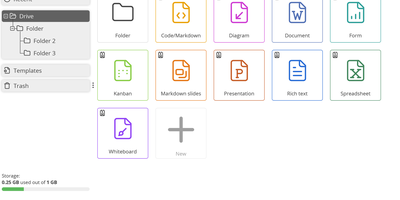
End-to-end encrypted by design, CryptPad is a real-time office suite where teams write documents, plan on kanban boards, collect answers with forms, and draw diagrams without the hosting server ever seeing their content. Rich text pages come with comments, replies, @mentions, and a document outline, while the Markdown editor adds a live preview, Mermaid diagrams, mind maps, and math. Kanban columns hold colored, tagged cards with Markdown bodies, and the diagram editor exports PNG, JPG, SVG, or PDF. Optional ONLYOFFICE editors add spreadsheets, word-processing documents, and presentations that several people can edit together. The form builder offers text, choice, grid, date, ranking, and poll questions, conditional sections, and separate author, auditor, and participant roles. Documents can be shared with contacts or teams, by link, or as embed code, with view, edit, present, or view-once access. Passwords, expiry dates, owner lists, and access lists limit who gets in, and every edit lands in a history you can step through, restore, or pin as a named snapshot. CryptDrive keeps files in folders, tags, templates, and a trash bin, while teams get their own drive, chat, and member roles. Running on a dedicated VPS on RepoCloud with guaranteed CPU, RAM, and SSD, full root SSH access, and a browser serial console. AGPL-3.0 licensed.
EdenText
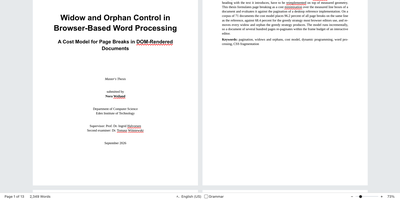
EdenText is a full word processor, from quick notes to full-length books, that opens the docx and odt files you already have and keeps them looking the way Word or LibreOffice made them. Pages are real pages: A4 or Letter sizes, margins, headers and footers, footnotes, columns, and watermarks, with mirrored margins and chapters opening on the right-hand page when you are laying out a book. Paragraph, character, table, and list styles cascade with inheritance and chapter numbering, and tables sort rows and compute spreadsheet-style formulas. The academic toolbox is complete: table of contents, captions, cross-references, citations with bibliography, an alphabetical index, and LaTeX formulas. Reviewing works the way editors expect, with tracked changes, threaded comments in margin balloons, printable markup, spell checking in eight languages, and grammar checking for English. An optional AI assistant answers questions about the document and proposes edits as tracked changes through your own model provider. Nothing waits on a server: documents autosave in the browser, the app installs and works offline, and your words never leave the machine. Running on a dedicated VPS on RepoCloud with guaranteed CPU, RAM, and SSD, full root SSH access, and a browser serial console. AGPL-3.0 licensed.
OnlyOffice
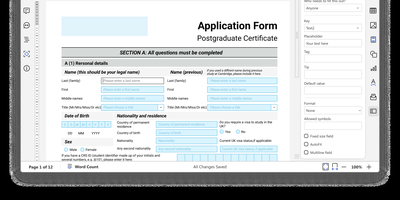
With 6,800 GitHub stars and over a decade of development since its 2014 release, ONLYOFFICE Docs delivers a self-hosted Microsoft Office replacement with pixel-perfect OOXML rendering and real-time collaborative editing supporting both Fast (character-by-character) and Strict (manual save) co-authoring modes. The suite encompasses five full-featured editors — Document Editor for DOCX/ODT/EPUB/HTML, Spreadsheet Editor with 500+ functions and pivot tables, Presentation Editor with animations and transitions, Form Creator for fillable PDF forms with field validation, and PDF Editor for annotation and conversion — all operating within a unified web interface. Format support spans 50+ types including DOCX, XLSX, PPTX, ODT, ODS, ODP, PDF, CSV, RTF, TXT, and Markdown with server-side conversion between any supported pair. The JavaScript plugin API enables extending editor functionality through a marketplace of ready-made plugins for ChatGPT integration, speech-to-text, OCR, Zotero citations, and Thesaurus. Ready-to-use connectors integrate with Nextcloud, ownCloud, Seafile, Moodle, Odoo, Confluence, SharePoint, Alfresco, Liferay, and Chamilo, while WOPI protocol compliance enables integration with any WOPI-compatible platform. JWT authentication secures all API communications between host applications and the document server. Deploy via Docker with a single command or DEB/RPM packages on Ubuntu, Debian, CentOS, or RHEL. Running on a dedicated VPS on RepoCloud with guaranteed CPU, RAM, and SSD, full root SSH access, and a browser serial console. GNU AGPL v3 licensed.
LibrePaper
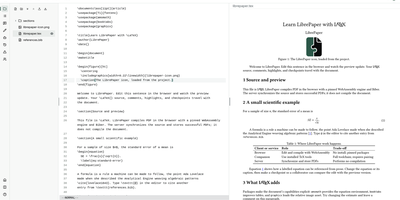
Emailed copies of the same document, each with a different filename and a different set of edits, are where collaborative writing goes to die. LibrePaper keeps one living document in the browser instead: start a project in HTML, Markdown, Typst, LaTeX, or Quarto, or upload an existing one, and the editor renders the compiled result beside the source as you type. Readers highlight the exact passage they mean and comment on it, suggested edits land as tracked changes, and threads resolve on the text in real time. Finished work publishes to its own separate host, so scripts and interactive figures inside a document can never reach a reader's sign-in session. Nobody manages another password: sign-in runs through GitHub, Google, Microsoft Entra ID, ORCID, or any OpenID Connect provider, per-provider lists decide who may publish and who may only comment, and anonymous comments can be switched on for outside reviewers. Every project exports as a complete, independent copy from the command line, which also administers the deployment and can serve a document's tools to an AI agent over MCP. Operators get graphs, account management, and moderation, with per-account storage quotas, upload limits, and retention rules keeping a public instance under control. Four Docker containers behind Caddy with automatic HTTPS, one configuration file, and nightly backups of database and files complete the deployment. Running on a dedicated VPS on RepoCloud with guaranteed CPU, RAM, and SSD, full root SSH access, and a browser serial console. MIT licensed.
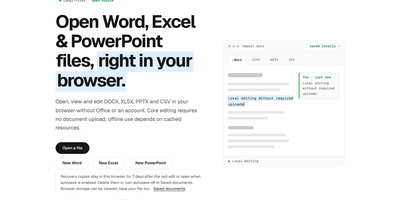
Online Document Editor
Open a browser tab and a full office suite appears, with no account to create and your files kept on your own device. Start a new Word document, spreadsheet, or presentation, or drop in a file, and edit with the familiar ribbon: styles and bullets in documents, formulas and charts in sheets, slides with layouts and notes. PDFs open for reading, commenting, highlighting, and filling, then save back out. Convert Word, Excel, and PowerPoint files to PDF, or move spreadsheets to CSV and back, without uploading a byte. An optional AI assistant, off by default, can rewrite, summarize, or translate a passage, fill spreadsheet cells, draft slides, or answer questions about a PDF page, using an on-device model or an AI service you connect. WebMCP tools let compatible browser agents open, convert, and export documents. Recovery copies stay in the browser for seven days, autosave can be switched off, and the site installs as a PWA for offline use. Host it as one static container or embed the editor in your own app through an iframe API. Running on a dedicated VPS on RepoCloud with guaranteed CPU, RAM, and SSD, full root SSH access, and a browser serial console. AGPL-3.0 licensed.