Pages CMS
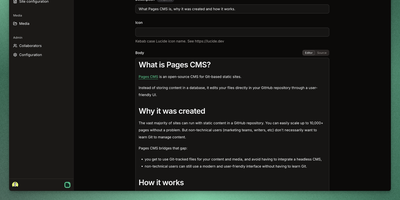
Editors can update a static website without learning Git, because Pages CMS puts a visual editor on top of the repository itself. A single .pages.yml file defines what is editable: collections of Markdown files that share a schema, standalone files such as site settings, and nested groups that organize the sidebar. Fields cover strings, rich text, code, dates, numbers, booleans, selects, images, files, references, objects, and repeatable blocks, with front matter stored as YAML, JSON, or TOML. Plain text files like robots.txt open in a raw editor, redirect files in a code editor, and CSV files as an editable datagrid. Collection lists can be searched, sorted, and shown flat or as a folder tree. The media manager supports drag-and-drop uploads, multi-file selection, allowed extensions, and safe or random renaming. People without GitHub accounts join through email invitations and edit content and media, with their saves committed through the GitHub App. Custom action buttons dispatch GitHub Actions workflows after a confirmation dialog or input form, so one click can rebuild a preview or deploy the site. Commit message templates and a choice of app or user commit identity shape how each save appears in Git history. The responsive interface works on mobile screens, and suits Jekyll, Hugo, Astro, Next.js, Eleventy, VuePress, and similar site generators. Running on a dedicated VPS on RepoCloud with guaranteed CPU, RAM, and SSD, full root SSH access, and a browser serial console. MIT licensed.
DevTrack
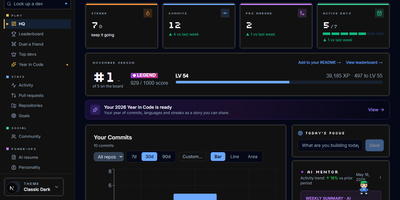
DevTrack turns your GitHub activity into a living dashboard of commit streaks, pull-request analytics, and goals that quietly update themselves. Sign in with GitHub and your last year appears as a contribution heatmap you can filter by repository and language, next to the streak you are protecting and the freeze you are saving for a holiday. Pull requests get the honest treatment: merge rate, average review time, and open-versus-closed breakdowns that show whether reviews or authors are the bottleneck. Weekly and monthly goals fill themselves in from live activity, while the consistency score and activity rings tell you whether your rhythm is steady or heroic but rare. When you want the story told back to you, an AI mentor who knows your history offers guidance, a résumé generator builds an ATS-friendly CV from merged pull requests for the role you name, and a weekly summary explains your own graphs in plain words. Opt into the public leaderboard to rank your streak, commits, and PRs against other developers, or keep everything private and share only the profile page and embeddable badges you choose. Running on a dedicated VPS on RepoCloud with guaranteed CPU, RAM, and SSD, full root SSH access, and a browser serial console. MIT licensed.
Proval
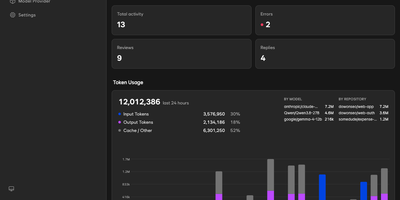
Proval is a self-hosted AI code review agent that reads every pull request on your GitLab, Forgejo, or GitHub server and posts a consolidated, severity-grouped review with inline comments, using a model you run yourself. When a pull request gets a meaningful push, a planning agent groups changed files into review units and dispatches specialist sub-agents in parallel, each exploring the codebase so cross-file issues surface. A writing agent merges their findings into one review, with comments on the affected lines, including multi-line ranges. Reply to any Proval comment and it reads the thread context and answers, and it works on issues too, greeting new ones and answering follow-ups on every message or only when mentioned. Choose per repository whether reviews run on first push only, every push, or not at all, skipping drafts until they are marked ready. Every review, reply, and issue comment is logged with its token usage, so each model's cost shows in the dashboard instead of hiding in an API bill. Your code is never stored; review context goes only to the LLM endpoint you configure, whether that is a cloud API or a local Ollama or llama.cpp server on your own network. Connect GitLab or Forgejo with an access token and webhooks, or GitHub through a GitHub App; Gitea and Codeberg use the same Forgejo-compatible path. Running on a dedicated VPS on RepoCloud with guaranteed CPU, RAM, and SSD, full root SSH access, and a browser serial console. AGPL-3.0 licensed.
Pi Pocket
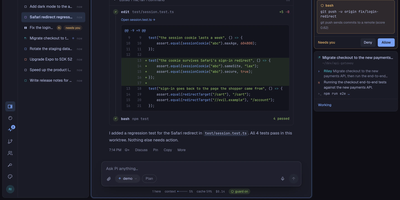
Pi Pocket puts the Pi coding agent in your phone browser, so you can start, steer, and review real coding sessions from anywhere while the work stays on your own server. Open a folder, a fresh Git worktree, or a GitHub repository, pick a model per session, and watch streamed replies with tool calls, queued follow ups, and a stop button when a run wanders. Sessions survive crashes and restarts because every model call, tool call, and subagent step is stored as it happens, and forks let you retry any reply with a different model on another branch. Invite teammates into a live session with presence, roles, and a side chat the agent never sees, or let PiP, the built in assistant, follow your other sessions and report back. GitHub watches and webhooks wake the agent when pull requests, issues, or workflows change, while scheduled messages and cron style goals keep routine work moving overnight. Spend views show cost per person and per session, and owner set limits pause new work instead of quietly burning budget. On a phone you get push notifications, dictation, share sheet intake, and a home screen app, and live reloadable extensions add routes, modules, and commands without a build step. Running on a dedicated VPS on RepoCloud with guaranteed CPU, RAM, and SSD, full root SSH access, and a browser serial console. MIT licensed.
ghstats
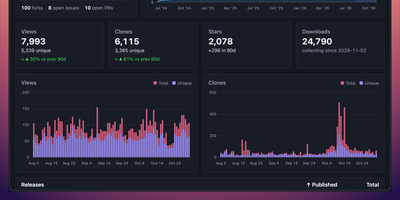
GitHub forgets your traffic after fourteen days; ghstats remembers it for years. This self-hosted dashboard polls the GitHub API every hour and keeps views, clones, stars, forks, issues, and pull requests for every repository in its own database, long after the built-in traffic tab has rolled over. Open a repository to see its charts for stars, clones, and views next to top referrers and popular paths, filter the list by owner, name, forks, or archived status, and include private repositories when your token allows it. Public stats pages and portfolios reuse the same numbers through a JSON API, embeddable SVG badges for views, clones, and star velocity, and cards ranking your top repositories or showing star history across projects. Release download counts accumulate as daily snapshots too, so a launch spike stays visible months later. The whole service is one small Docker image on port 8080 with a single file for storage, easy to back up and easy to move. Running on a dedicated VPS on RepoCloud with guaranteed CPU, RAM, and SSD, full root SSH access, and a browser serial console. MIT licensed.
Codra
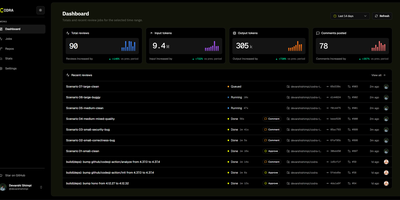
Your GitHub pull requests get reviewed by your own models, with inline findings posted in the merge flow: Codra is a self-hosted AI code review engine, so your diffs and credentials stay inside infrastructure you control. Connect a repository once and every opened, synchronized, ready-for-review, or reopened pull request starts a queued review job automatically; mention Codra for an on-demand pass instead. Findings arrive as inline GitHub comments, a summary review, and check run updates that fit the normal merge flow. Each repository gets its own review personality: triggers, skipped paths, draft handling, mention reviews, labels, custom rules, and a review budget are all tuned from the dashboard, and model routing follows global defaults, per-repository chains, fallbacks, and size-based overrides for larger pull requests. Providers from OpenAI, OpenRouter, Anthropic, Google, NVIDIA, and Cloudflare are managed behind GitHub OAuth sign-in. The operator dashboard tracks totals for reviews, input and output tokens, and comments posted, then drills into job history, webhook deliveries, failed queue runs, and model usage, so a stalled review is debuggable instead of invisible. Deploy the whole loop (GitHub App, web server, queue, database, and dashboard) on Cloudflare Workers, on Node.js 24, or with Docker on your own server. Running on a dedicated VPS on RepoCloud with guaranteed CPU, RAM, and SSD, full root SSH access, and a browser serial console. AGPL-3.0 licensed.
Octobox
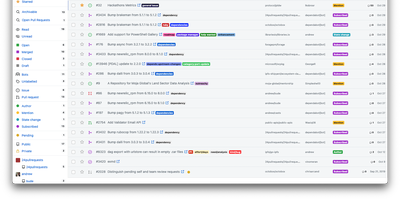
What Gmail did for email, Octobox does for GitHub notifications: an ephemeral, unmanageable stream becomes an inbox you can actually triage. GitHub marks notifications read the moment you glance at them and lets old ones vanish days later; heavy maintainers end up building elaborate Gmail filter systems just to cope. Octobox - a Ruby on Rails app over PostgreSQL - syncs your notifications into a persistent inbox with an explicit archived state: mark a thread done, and if the issue or PR sees new activity, it pops back automatically, so nothing silently falls through. Triage is keyboard-driven with Gmail-style shortcuts (j/k to navigate, e to archive, m to mute, s to star), and multi-select clears noisy repositories in bulk. Filtering is where it earns its keep: slice by repository, organization, type, action, state, reason, CI status, labels, author, assignee, or bot origin, combine prefix search filters, and pin favorite searches to the sidebar. The optional GitHub App enriches entries with live PR/CI status and labels so you can decide without clicking through. Auto-archive rules clear merged PRs and closed issues; muting and snoozing silence the rest. A REST API supports integrations. Self-hosting keeps your notification metadata - a map of everything you work on - on your own server.
Zoomies
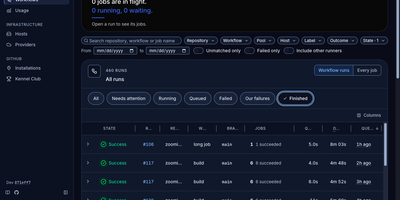
Zoomies converts servers you already own into an ephemeral GitHub Actions runner fleet, creating a clean runner for every queued job and destroying it the moment that job ends. Why rent CI minutes by the second while those machines sit idle? Point it at a GitHub organisation or a repository on a personal account and it watches for queued work through workflow_job webhooks, with polling as a fallback, then provisions capacity only on hosts matching the labels your workflow requested. One controller drives any number of agents across Ubuntu, Debian, Fedora, and Rocky Linux on amd64 and arm64, and agents connect outbound only, so a host behind NAT needs no inbound firewall rule. Registration needs no pasted tokens: Zoomies signs in as a GitHub App and mints single-use just-in-time runner registrations itself. Busy runners can borrow idle CPU and memory from quieter neighbours under rules you set. The live web UI shows pools, jobs, queue waits, and streaming logs in place, with a command palette for jumping anywhere and an audit row recorded for every change. Nightly backups seal themselves with your passphrase and ship to S3-compatible storage, restores are staged from the same tab, and you can ask the built-in assistant about your builds or connect your own tools through MCP. Running on a dedicated VPS on RepoCloud with guaranteed CPU, RAM, and SSD, full root SSH access, and a browser serial console. AGPL-3.0 licensed.
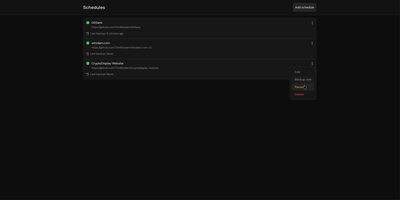
GitSave
A deleted account or a force-pushed branch should not erase your code history: GitSave copies your Git repositories to storage you control, on a schedule you set. Add a repository link, pick a routine (every few minutes, hours, or days), and GitSave copies the repository and refreshes the copy in the background. It works with GitHub, GitLab, and other Git platforms, and you decide how many backups to keep before older copies are pruned. Schedules can be paused and resumed from each repository card, and a Backup now action starts an immediate copy when you want one before a risky change. The history page records every run with its time and result, and the overview shows the last backup state of each repository at a glance. Backups can land on a local volume or an SMB share, and sign-in supports your own authentication provider for shared servers. Running on a dedicated VPS on RepoCloud with guaranteed CPU, RAM, and SSD, full root SSH access, and a browser serial console. Apache-2.0 licensed.
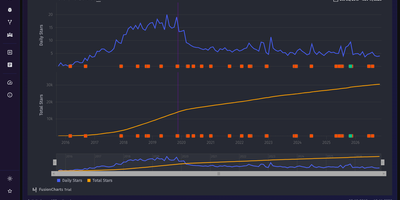
Daily Stars Explorer
From a one-day Hacker News spike to a decade of steady growth, Daily Stars Explorer charts any GitHub repository's star history day by day, next to the releases and mentions that explain it. Type an owner and repository name, and daily and cumulative stars appear. Range shortcuts: 10Y, 5Y, YTD, QTD, MTD, and All. Zoom with a draggable lower navigator, switch to a Log Y axis, and read the stars gained inside the selected window. Transforms reshape the series. A trend line projects 30 days ahead. Yearly, monthly, or weekly grouping. Peak normalization. LOESS smoothing. Running average and median. First and second derivatives. Weekly growth rate. Feed overlays, enabled by optional provider credentials, mark releases and mentions from Hacker News, Reddit, GitHub, and YouTube right on the curve. Compare two already-fetched repositories on shared axes, with an aggregate selector, Log Y, and optional star milestones, then copy the link. With a GitHub token, separate pages chart commits, with the longest gap highlighted on demand, plus pull requests, issues, forks, and contributors. Global activity counts the public repositories or pull requests created on GitHub each day. Featured repos lists Hacker News and Reddit posts that link to GitHub projects, sortable by points, comments, or date. Star history, commit, and activity charts export to CSV or JSON. Favorite repositories can be pinned. Running on a dedicated VPS on RepoCloud with guaranteed CPU, RAM, and SSD, full root SSH access, and a browser serial console. MIT licensed.
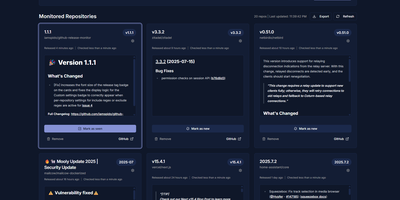
GitHub Release Monitor
GitHub Release Monitor turns release day into a notification instead of a discovery, watching GitHub, GitLab, Codeberg, and self-hosted Forgejo repositories in the background and reporting each new release to the channels you already read. Your watchlist is the whole interface. Add the projects your stack depends on, and scheduled checks compare what is published against what you have seen. Email carries the full notes over SMTP. Apprise carries them further, to Discord, Telegram, Slack, and dozens of other services, either one message per release or bundled into a digest for each check. Filtering happens at two levels. Global rules decide which release types count, and any repository can override them with its own channels, its own include and exclude regular expressions on tags, and its own choice of alpha, beta, or release candidate lines. A pattern the current engine no longer supports is flagged in settings rather than silently passing nothing. The list itself is portable JSON, ready to export from one install and import into another. When the alerts stop, the diagnostics page separates suspicion from evidence by testing forge connectivity, SMTP, and Apprise in one place. Accounts protect the app, dark mode and nineteen languages shape it, and the layout works on a phone. Running on a dedicated VPS on RepoCloud with guaranteed CPU, RAM, and SSD, full root SSH access, and a browser serial console. AGPL-3.0 licensed.
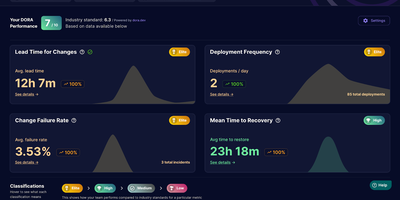
Middleware
Middleware turns the pull request history your team already has into live DORA metrics, so engineering leads can see deployment frequency, lead time, recovery time, and change failure rate without building a reporting pipeline. Connect GitHub with a personal access token, group repositories into teams, and the dashboard starts charting how often you ship and how long changes take to reach production. Lead time is not one opaque number; it breaks into first commit to pull request, first response time, rework time, merge time, and merge to deploy, so the actual bottleneck is visible instead of guessed at. Merged pull requests count as deployments and revert pull requests count as incidents, which means recovery time and change failure rate appear even if your team has no separate incident tool wired up. You can exclude bot and dependency pull requests, define which branches count as production, and filter incidents in settings, so the metrics match how your team actually ships rather than how a generic template assumes. Bring it to a weekly engineering review to catch a review queue quietly doubling merge times, or open it after an incident to see if failure rate is trending the wrong way across a team. Running on a dedicated VPS on RepoCloud with guaranteed CPU, RAM, and SSD, full root SSH access, and a browser serial console. Apache-2.0 licensed.