Workbench
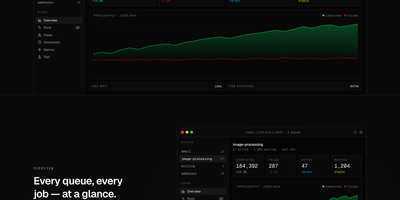
For teams running BullMQ, Workbench makes the inside of your job system visible, searchable, and fixable from a single browser dashboard. Live counters track completed, failed, active, and waiting jobs per queue alongside p50 and p95 latency and throughput, so a backing-up queue announces itself before your users do. Every run sits in a filterable table where you can expand the full payload and attempt history, retry with a keystroke, or click a line in a failed job's stack trace and land on that exact file in your editor. Failures are grouped by error class and ranked by frequency with a 24-hour trend, which makes a fresh regression obvious the moment it spikes. Parent and child jobs render as a real graph you can drill into and replay subtree by subtree, schedulers can be paused or edited without a redeploy, and new jobs can be enqueued from a form that validates the payload first. Running on a dedicated VPS on RepoCloud with guaranteed CPU, RAM, and SSD, full root SSH access, and a browser serial console. MIT licensed.
bullstudio
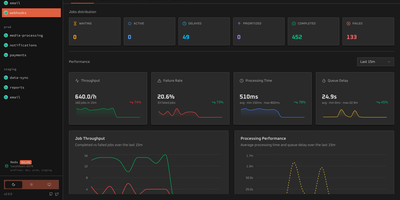
bullstudio turns a pile of opaque Redis keys into a live control panel for your BullMQ and Bull queues, so you can see what is stuck, failing, or delayed without opening a Redis CLI. Point it at a Redis URL and it discovers every queue and prefix on its own, including Redis Cluster setups. The overview page tracks waiting, active, delayed, prioritized, completed, and failed counts next to throughput, failure rate, processing time, and queue delay charts. Open any job to read its input data, logs, return value, and stack trace, then retry, promote, or remove it in one click. Flow view draws parent and child jobs as a color-coded dependency graph, which makes it easy to spot the step where a multi-stage job stalled. Separate screens list connected workers with their concurrency and heartbeat, and show repeatable and cron schedules with their next run time. Pause, resume, drain, or clean a queue directly from the header. Basic authentication, a read-only mode, and a base path for reverse proxies keep access under control. Running on a dedicated VPS on RepoCloud with guaranteed CPU, RAM, and SSD, full root SSH access, and a browser serial console. MIT licensed.