M3E Canvas
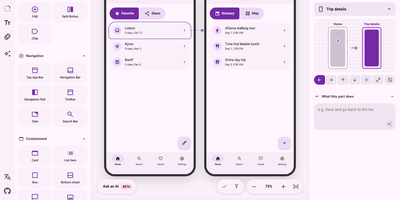
Why describe an app in words when M3E Canvas lets you sketch its screens, tap through the flow, and hand your AI coding tool a ready prompt? Drag real Material 3 Expressive parts such as buttons, FAB menus, chips, app bars, tabs, cards, sheets, sliders, and carousels onto phone or desktop screens, where they snap to a 4dp grid and nearby buttons fuse into groups. Switch any screen between a 412 by 892 phone and a 1280 by 800 desktop layout, link taps and swipes to other screens with slide, fade, or expand transitions, and press Preview to play the whole flow. One theme panel sets color from seven palettes or your own seed color, plus light or dark mode, three contrast levels, corner shapes, fonts, and expressive spring motion. The Prompt view turns the design, or one screen, into a concise brief in English, Japanese, Chinese, or Korean for Android or the web, with your notes on each part, ready to paste into Claude Code, Codex, Gemini CLI, or Cursor. It all runs in the browser with no account and autosaves as you go, an optional AI helper drafts designs from a sentence with your own OpenAI, Claude, Gemini, or DeepSeek key, and share links reopen any design on another canvas. Running on a dedicated VPS on RepoCloud with guaranteed CPU, RAM, and SSD, full root SSH access, and a browser serial console. MIT licensed.
Deploy