Zomboid Control Panel
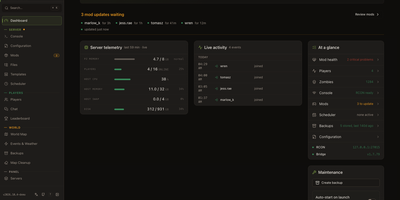
Friends are joining your Project Zomboid server, a mod just broke, and the log is scrolling faster than anyone can read. Zomboid Control Panel puts the fix in a browser tab. Start, stop, restart, and save the server from a dashboard that shows status, uptime, players online, host memory and CPU, disk space, and mods waiting for updates. A setup wizard installs a fresh Build 41 or Build 42 server through SteamCMD, or connects to one that already exists locally or over RCON. The mod manager tracks Workshop items, flags updates, imports Steam collections, scans for file conflicts, duplicate mod IDs, and missing dependencies, and sorts the load order. A structured INI editor covers server settings, sandbox options, spawn points, and regions, with a raw view for power users. Player pages handle kicks, bans, whitelists, access levels, and notes, and the live world map shows who is where. Events and weather controls trigger storms, hordes, and sounds. A scheduler runs timed restarts with countdown warnings, backups keep restorable world snapshots, and a Discord bot relays chat and answers slash commands. Admin, technician, moderator, and custom roles, plus OpenID Connect sign-in, decide who touches what. Community servers with several moderators, friends-only worlds, and hosts managing multiple servers from one panel all fit. Running on a dedicated VPS on RepoCloud with guaranteed CPU, RAM, and SSD, full root SSH access, and a browser serial console. MIT licensed.
Deploy