Monbooru
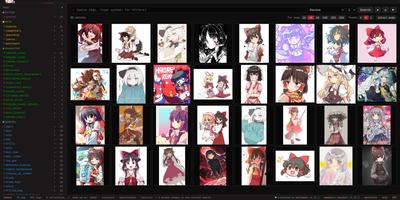
Monbooru is a private, tag-based gallery for your own image, video, and manga collection, searchable the way booru sites are, but hosted entirely on your server. Drop files into watched folders and they appear within seconds, with browser uploads, SHA-256 deduplication, and an inbox where new arrivals wait until you have reviewed and tagged them. Local auto-tagging runs ONNX models such as WD14, JoyTag, Camie, and PixAI on CPU or GPU, so a collection gets searchable labels without sending a single image to a cloud service. Tag management covers merges, aliases, implications, and custom categories, while rating tags with an SFW ceiling keep sensitive material hidden until you choose otherwise. Search combines wildcards, OR terms, and exclusions with filters for folder, date, size, dimensions, and AI generation settings, and saved searches keep favorite queries one click away. Batch actions retag, move, delete, or auto-tag whole selections at once, and the built-in manga reader opens CBZ and ZIP archives as single items. Image pages record sources, artist commentary, and your own notes, and near-duplicate detection lines up lookalikes side by side for cleanup. Multiple galleries can live in one instance, each with its own folders and database, and an optional password plus scoped REST API tokens control who and what can connect. Running on a dedicated VPS on RepoCloud with guaranteed CPU, RAM, and SSD, full root SSH access, and a browser serial console. AGPL-3.0 licensed.

Blombooru
Tens of thousands of saved images become useless the moment you cannot find the one you want, and Blombooru turns that private pile into a searchable, tag-organized library on your own server. Its Danbooru-style tagging uses familiar categories like artist, character, and copyright, with tag-based search and negative exclusion to slice a huge collection down to exactly the post you remembered. A dedicated tag gallery lets you browse and manage the vocabulary itself, and CSV imports bring existing tag lists in through the admin panel. Albums organize media with nested sub-albums and manual sorting, while parent-child relationships and a TF-IDF similarity engine surface variations, multi-page comics, and near-duplicates. Getting media in is flexible: upload files, compressed archives, filesystem scans, or paste a Danbooru or Gelbooru post URL and let it fetch media, tags, rating, and source automatically. AI-generated images keep their SwarmUI, ComfyUI, A1111, or NovelAI metadata viewable, optional WDv3 or PixAI auto-taggers suggest tags with one click, and tag implications and aliases keep everything consistent. Secure mode, share links, thumbnail blurring, scoped API keys, and custom themes from the admin panel finish the picture. Running on a dedicated VPS on RepoCloud with guaranteed CPU, RAM, and SSD, full root SSH access, and a browser serial console. MIT licensed.
Pictaria Server
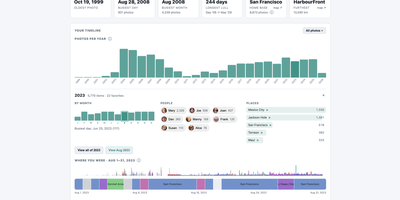
Pictaria Server sits beside your Immich instance and makes a photo library of thirty thousand images legible again, surfacing the trips, people, and best shots buried under duplicate bursts and forgotten folders. It starts with Insights: a clickable timeline of your years, detected trips, a people constellation linked by who appears together, place and camera rankings, and records like your busiest day. Click any number and you land on the actual photos, ready to open in Immich, turn into an album, or send onward. Enrich puts an AI to work describing what it sees, writing captions, menu-driven tags, and quality scores for every photo using a local model through Ollama or LM Studio, or a cloud provider with your own key, on a scheduled daily budget. Those tags can sync back into Immich, so searching improves everywhere, not just here. Curate then collapses bursts and near-duplicates into stacks with a suggested keeper, and one keystroke keeps the best and skips the rest. Smart Albums compose rules from people, places, dates, cameras, and tags, preview the result count, and maintain real Immich albums on a schedule. Frame owners get remote control, display metrics, and voice photo questions, while the Activity feed and runtime-editable Settings keep the whole box manageable from the browser. It connects with a limited-permissions API key and cannot delete a single photo. Running on a dedicated VPS on RepoCloud with guaranteed CPU, RAM, and SSD, full root SSH access, and a browser serial console. AGPL-3.0 licensed.
Damselfly
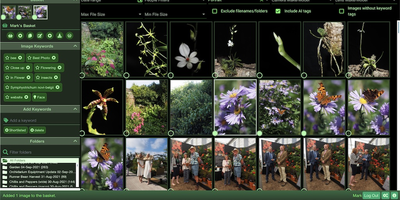
Damselfly puts a searchable brain over a folder-based photo archive, so a library of hundreds of thousands of images stays browsable from any browser. Point it at your existing folders and it indexes everything in the background, generating thumbnails and reading IPTC keywords, EXIF camera data, and file names into one catalogue. Search returns results in under a second even across 500,000 photographs, and advanced filters narrow by date range, camera or lens model, file size, orientation, detected objects, or recognized faces. Face detection and recognition run locally and offline, so you tag a person once and Damselfly finds them in other shots without sending family photos to a cloud service. Keyword tagging writes metadata with ExifTool without re-encoding JPEGs, keeping originals byte-identical while tags travel with the files into DigiKam, Photoshop, or other tools. The Picasa-style basket collects picks from search results for download, watermarked export for social media or email, or upload to WordPress, and baskets can be personal or shared between users. Photos with location metadata appear on a map, visually similar images can be found from a single example, and untagged shots can be listed so nothing stays unlabelled. Accounts with role-based permissions let everyone browse while only editors tag or reorganize, and an optional desktop client syncs basket selections to a laptop for editing. Running on a dedicated VPS on RepoCloud with guaranteed CPU, RAM, and SSD, full root SSH access, and a browser serial console. GPL-3.0 licensed.