Home Screens
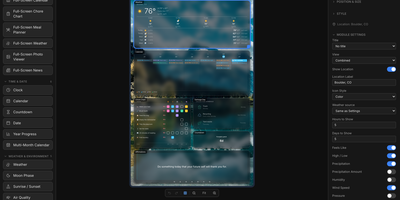
The family calendar is split across phones, the meal plan lives in someone's head, and the chore chart fell off the fridge: Home Screens turns a spare screen into a self-hosted family command center that puts calendars, weather, chores, meal plans, and photos on one shared display. You compose each screen in a drag and drop editor, placing any of 46 built in modules on a configurable canvas: clocks in 18 styles, weather in 14 views, calendars, to do lists, news, stock and crypto tickers, sports scores and standings for 15 leagues, traffic, air quality, and moon phases. Screens rotate through seven transitions, and a hub and spoke setup lets one server drive several physical displays, each with its own layout, dimensions, rotation, and scheduled profile. The phone remote wakes or sleeps displays, adjusts brightness, starts visual timers and morning routines, and runs the family organizer: chore charts with rewards, a meal planner with grocery list, shared to do lists, school timetables, and a notes board. Calendars arrive from Google, iCloud, or any iCal feed, weather from nine providers, and backgrounds from your uploads, Unsplash, NASA, Immich, Google Photos, iCloud, or OneDrive. Modules can appear or hide based on live conditions, plugins add new module types from a directory or a URL, and everything is stored locally with no cloud account. Running on a dedicated VPS on RepoCloud with guaranteed CPU, RAM, and SSD, full root SSH access, and a browser serial console. MIT licensed.
dinkydash
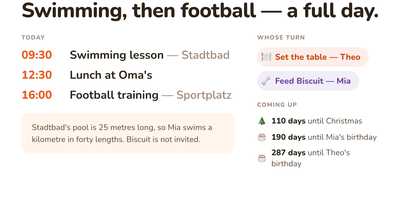
The family calendar nobody opens helps nobody, so DinkyDash puts it on a screen the household walks past. Paste in iCal links from Google, iCloud and Outlook calendars and the board merges them into one agenda in time order, big enough to read from across the kitchen, with tomorrow tucked underneath when the day leaves room. A personal calendar can share only the events marked for a partner and keep work and private appointments to itself. Chores answer the daily argument on their own: whose turn it is moves on with the date, so nobody ticks anything off. Birthdays, holidays and special dates count down in the corner, and once a day the board gets a fresh headline written about your actual day, with a useful note parked under the agenda. Light and dark themes come from the settings page, and that same settings page on your phone edits the configuration file directly, comments preserved. A preview page shows the board at Pi, TV and tablet sizes side by side before you mount anything. There is deliberately no login: it assumes your home network, rewards you with a board you never sign into, and asks to stay behind a VPN or an authenticated proxy if you view it away from home. Running on a dedicated VPS on RepoCloud with guaranteed CPU, RAM, and SSD, full root SSH access, and a browser serial console. MIT licensed.