FossFLOW
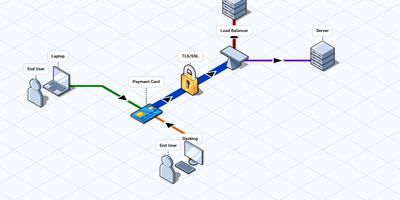
Infrastructure diagrams do not have to look like a ransom note of boxes and arrows: FossFLOW draws your network as a clean isometric map in the browser. Drag servers, routers, databases, and cloud services from the component library onto the angled grid, then link them with connectors that snap between nodes in click or drag mode. Multiplexed connectors bundle parallel links into tidy runs, rectangles and freehand annotations mark zones and notes, and text labels explain the flow. A diagram of a messy production network becomes a picture a new hire can read in one sitting. Work saves automatically every few seconds, exports to a JSON file you can keep in version control, and imports back just as easily. Run it as a shared team instance and diagrams persist on the server, filed under the project name, protected by optional basic authentication. The editor also installs as an offline-capable progressive web app, so the canvas keeps working on a plane and syncs nothing anywhere you did not send it. Documentation authors use the exported views in architecture guides, and engineers sketch proposals before touching real hardware. Running on a dedicated VPS on RepoCloud with guaranteed CPU, RAM, and SSD, full root SSH access, and a browser serial console. MIT licensed.
Homelab Atlas
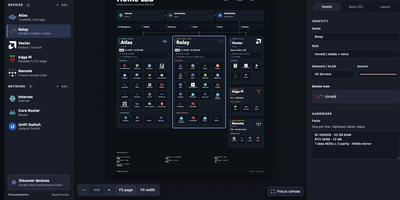
Every homelab eventually earns the question "so what is actually running on all those boxes," and Homelab Atlas turns the answer into a diagram worth posting. Add your servers, the services grouped on each one, and the network gear between them, and the canvas lays everything out automatically with real application logos instead of gray rectangles. Searchable logo pickers work offline, uploads accept your own PNG, JPG, WebP, or SVG marks, and Arrange mode lets you drag and resize cards when the automatic composition is not the story you want to tell. Discovery spares you the typing: point it at Docker or import a saved scan, then review every found device and app, all starting unchecked, before anything joins the diagram as one undoable change. Connections express logical relationships and VLANs, hardware details ride on each card, and your project autosaves in the browser with a downloadable JSON file as the durable copy. When it is time to share, export previews render PNG or SVG with addresses, URLs, and emails hidden by default, plus literal terms you name yourself. Running on a dedicated VPS on RepoCloud with guaranteed CPU, RAM, and SSD, full root SSH access, and a browser serial console. MIT licensed.