Yep Anywhere
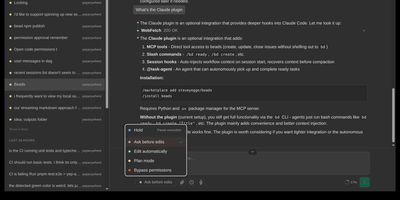
Designed for developers on the go, Yep Anywhere turns any smartphone browser into a full-featured control center for supervising, steering, and reviewing autonomous AI coding agents. Operators can monitor live execution across multiple active projects simultaneously without sitting at a desktop terminal. Real-time reasoning feeds. Instant push alerts for permission prompts. One-tap tool approvals. Developers can unblock pending tasks mid-turn, redirect active workflows, or queue sequential follow-up prompts for automatic delivery at the next safe milestone. An integrated source control viewer displays syntax-highlighted working-tree and commit diffs, allowing reviewers to attach line-level comment bundles directly back into the agent context. Mobile voice transcription lets users dictate instructions straight into running sessions, while photo library integration makes uploading bug screenshots effortless. All agent credentials, CLI configurations, and repository data remain private on the host server without requiring third-party cloud database accounts or proprietary device pairing. Running on a dedicated VPS on RepoCloud with guaranteed CPU, RAM, and SSD, full root SSH access, and a browser serial console. MIT licensed.
Prime Agent
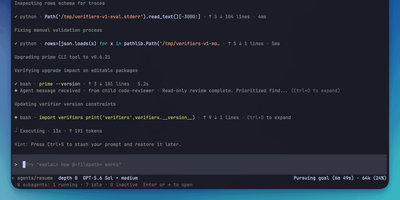
With over 14,000 GitHub stars and 41 releases since its May 2026 launch, Prime Agent delivers a fundamentally different approach to AI coding agents by treating the agent's own operating environment as programmable state that improves through use. The Recursive Language Model architecture provides the model exactly one tool — a persistent IPython kernel — where file operations, shell commands, subagent delegation via rlm() function calls, and context management all happen through code rather than rigid tool-calling schemas. Subagents launch as independent sessions with their own model, kernel, and history, communicating results through agent_message.send() without blocking the parent. The Continual Harness stores supplemental prompts, memories, skill descriptions, and reusable subagent specifications as durable state that the /refine command updates through small, evidence-backed edits with full rollback by ID. Daemon-backed sessions keep running when the terminal disconnects, with automatic context compaction summarizing older messages while preserving recent state. The TUI provides an Agent View for monitoring, switching between, and steering multiple live sessions simultaneously. Autonomous mode operates within configurable turn, token, and time budgets with user-defined quality gates. Persistent goals, heartbeats, and scheduled prompts maintain continuity across terminal sessions. Compatible with Anthropic Claude, OpenAI, Google Gemini, local models via Ollama or vLLM, and Prime Inference endpoints. Install via a single curl command on Linux or macOS. Running on a dedicated VPS on RepoCloud with guaranteed CPU, RAM, and SSD, full root SSH access, and a browser serial console. MIT licensed.
OpenCode
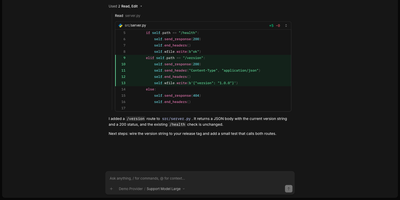
OpenCode puts a capable coding agent in a browser tab, so a project on your server can be worked on from any device. Start a session, describe the change, and watch the agent read files, edit code, and explain what it did in plain language. A review panel lists every changed file with unified or split diffs, a file tree, and a git changes view, so nothing lands without a look. Sessions open as tabs, run in parallel, and keep a searchable history per project. The model picker spans more than 200 providers plus free hosted models, and any OpenAI compatible endpoint can be added from a config file, which keeps local and self-hosted models in reach. Settings offer top tabs, side tabs, or an inbox layout, optional permission auto-accept, steer or queue behavior for follow-up prompts, timeline detail levels, themes, and fonts. Extensions cover MCP servers, plugins, and skills, and custom agents and commands capture the team's habits. One-time pairing links connect a new browser or app to the server in seconds. Running on a dedicated VPS on RepoCloud with guaranteed CPU, RAM, and SSD, full root SSH access, and a browser serial console. MIT licensed.
Coddy
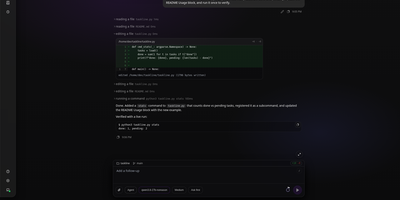
A single static binary is all it takes to put a tireless AI agent on your server, ready to read your codebase, run shell commands, edit files, and report back through a web UI, a terminal console, your editor, or a Telegram chat. Start it as a server and the embedded web interface gives you streaming chat sessions with visible tool calls, session history, plan documents, a background task board, and a visual map of connected nodes. Point any OpenAI-compatible client at its HTTP API, or drive the same sessions from Zed, VS Code, or Obsidian through the built-in ACP editor server. Delegate bounded work to subagents that run in isolated contexts with narrowed permissions, then resume them later in their own sessions if a run stops short. Teach it your project once: rules are picked up from .coddy, .cursor, .claude, and .codex folders, AGENTS.md files are honored as work proceeds, and installable skill packs turn repeatable procedures into slash commands. Schedule recurring jobs as plain Markdown files on a cron timetable, keep long-term memory across conversations, and connect external tool servers over MCP globally or per workspace. A Prometheus exporter reports provider calls, tokens, and task health for the whole fleet. Running on a dedicated VPS on RepoCloud with guaranteed CPU, RAM, and SSD, full root SSH access, and a browser serial console. MIT licensed.
Clay Studio
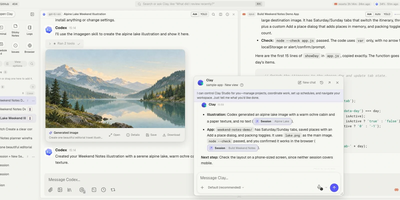
Clay Studio is a self-hosted workspace where your team and its coding agents share projects, live sessions, and project knowledge in one browser interface instead of scattering them across terminals. You organize several repositories in one sidebar and run sessions in parallel while teammates watch live activity, enter the same session, hand work off, and answer permission requests from wherever they are. Ten agent runtimes plug into the same workspace, Claude Code, Codex, Grok Build, Kimi Code, GitHub Copilot CLI, Qwen Code, Junie CLI, Antigravity CLI, OpenCode, and Kiro CLI, each keeping its own authentication and models. Persistent Mates give AI collaborators an identity, instructions, memory, direct messages, and roles in structured debates that survive beyond a single chat. Worktrees, paired sessions, spawned workers, scheduled tasks, and Ralph Loops let background jobs proceed without losing sight of what is running. You browse and edit files, inspect diffs and history, open terminals, install skills, connect MCP servers, and manage project knowledge without leaving the workspace. The installable PWA works on mobile and pushes notifications for approvals, failures, and finished work. Sessions and knowledge stay on your disk as portable JSONL and Markdown, so switching providers never means migrating your workspace. Running on a dedicated VPS on RepoCloud with guaranteed CPU, RAM, and SSD, full root SSH access, and a browser serial console. AGPL-3.0-only licensed.
AIUsage
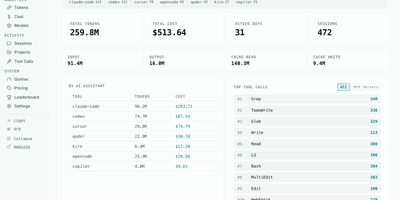
AIUsage shows where your AI coding spend actually went: it reads the session logs that Claude Code, Codex, Cursor, OpenCode, Copilot, Gemini CLI, and many other assistants leave behind, then turns them into one dashboard with tokens, estimated dollars, and activity. The Overview page totals tokens, cost, active days, and sessions for today, this week, this month, or all time, and filters by tool or device. Cost and Tokens pages chart daily spending and input, output, cache, and thinking usage, and Models ranks every model by share. The Sessions table lists duration, tool count, and cost per session, and a detail view walks through each API call and the tools it triggered. Tool Calls shows which built-in, MCP, and skill actions agents use most, Projects ranks directories by spend, and Quotas tracks subscription limits. Optional sync through GitHub, S3, R2, or MinIO merges several machines, and a public leaderboard accepts aggregate totals only. Running on a dedicated VPS on RepoCloud with guaranteed CPU, RAM, and SSD, full root SSH access, and a browser serial console. MIT licensed.
Pithagoras
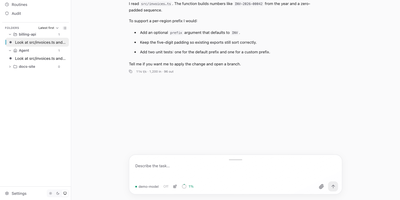
Hand a coding task to an AI agent, close the browser, and come back to find it finished. Pithagoras keeps every run on the server and records each event in a log, so a tab that reconnects days later replays everything it missed and then follows the live output. Chats work in the agent's Home folder or in projects with their own AGENTS.md instructions, and the sidebar groups sessions by folder with a status dot for running, idle, error, or interrupted. Beside the conversation you get panels for browsing and editing files, reviewing Git changes and branches, running a terminal, and watching background jobs. Add model providers from a setup assistant, including local llama.cpp or Ollama servers, OpenRouter, and Anthropic, then adjust tools, skills, MCP servers, and extensions per chat. Reach the same agent from Telegram, Slack, Discord, Signal, or a webhook, with roles, approvals, and an audit log. Scheduled routines report their results to a channel, and voice mode adds local speech in both directions. The portal installs as an app, supports light and dark themes, and speaks English and German. Running on a dedicated VPS on RepoCloud with guaranteed CPU, RAM, and SSD, full root SSH access, and a browser serial console. Apache-2.0 licensed.