LiveCodes
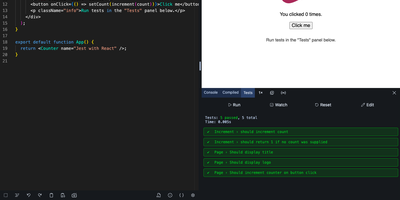
Try an idea in React, Svelte, Python, or SQL without installing anything: LiveCodes is a browser-based playground where code compiles, runs, and previews the moment you type it. Starter templates open ready-made projects for most of the 90+ supported technologies. The desktop editor brings completion, multi-cursor editing, Emmet, and Vim or Emacs bindings, while a lighter touch-friendly editor takes over on phones and tablets. Packages from npm, deno.land/x, jsr, and GitHub import straight into your code, and a console, compiled-code viewer, and test runner show what happens behind the preview. Bring projects in from GitHub gists, GitLab snippets, JS Bin, or zip files, then share them as links or QR codes, export them as HTML, JSON, or zip archives, or send them to CodePen and JSFiddle. Deploy a project to a public URL on GitHub Pages, sync your work across devices, or broadcast your editor and result live to a classroom. An embed builder and SDKs for JavaScript, React, Vue, Svelte, Solid, Preact, and web components place playgrounds inside documentation pages, and prefilled code makes every example editable. Projects stay private by default. Local assets, snippets, themes, and dark or light modes tailor the workspace to each person. Running on a dedicated VPS on RepoCloud with guaranteed CPU, RAM, and SSD, full root SSH access, and a browser serial console. MIT licensed.
RStudio Server
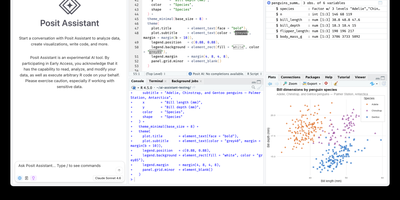
Open a browser tab, sign in, and the whole RStudio workbench is waiting there, running against R on a Linux server instead of your laptop. The familiar four-pane layout holds a source editor, an R console, Environment and History tabs, and Files, Plots, Packages, Help, and Viewer tabs. The editor opens R scripts, R Markdown, Quarto, and Python files, with code completion, diagnostics, section outlines, and a visual mode for Quarto documents. A Terminal tab and a Python console sit beside the R console, and the Data Viewer sorts, filters, and searches data frames and nested lists. Editor breakpoints and tracebacks help debug functions, while Background Jobs run long scripts in separate R sessions so the IDE stays usable. Shiny apps and Plumber APIs run as background jobs with live reload, and a Git pane handles diffs, commits, pushes, and branches. The Connections tab browses databases, and finished reports go to Posit Connect, shinyapps.io, Quarto Pub, or RPubs. Optional Posit Assistant adds an AI chat pane that works with the model provider you choose, and administrators can switch it off. Because everything runs server-side, a class, a lab, or a team can share one large-memory machine and keep computation next to the data without installing anything locally. Running on a dedicated VPS on RepoCloud with guaranteed CPU, RAM, and SSD, full root SSH access, and a browser serial console. AGPL-3.0 licensed.
AgentBox
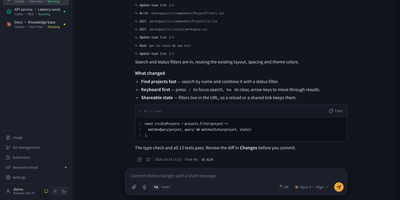
AgentBox is a self-hosted browser workspace that runs Claude Code and Codex CLI on a server you control, so a task goes from chat to reviewed code without leaving one place. Open a workspace from an empty project, an uploaded archive, or a Git clone, then talk to the agent in streaming web chat or drop into its original interactive terminal when you want the CLI itself. Files persist between sessions along with your home configuration and chat history, so a project picked up on a laptop continues on a phone exactly where it stopped. Review per-file diffs line by line before committing, pushing, or opening a pull request, and download the result when no Git connection is configured. Shared files, layered home templates, Claude skills, and MCP configuration carry your setup into every new workspace, with per-workspace overrides when a project differs. A trusted team shares central account pools with per-user scopes, while every model request is recorded with tokens, cache hit rate, cost, and latency, exportable to CSV and optionally capped by credits. An optional tunnel reaches allowlisted repositories and databases on private networks, and six interface styles with light and dark modes keep long sessions comfortable. Running on a dedicated VPS on RepoCloud with guaranteed CPU, RAM, and SSD, full root SSH access, and a browser serial console. Apache-2.0 licensed.
Pi Web
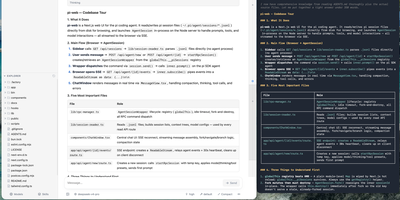
Pi Web is a browser interface for the Pi coding agent ecosystem, providing a visual workspace that reads the same local configuration and session files as the CLI. The session workspace groups conversations by project with running state indicators, context usage percentages, cost tracking, and compaction details, while two branching modes let users create independent session files from earlier messages or fork branches within existing sessions to explore alternative coding directions. Real-time streaming via Server-Sent Events delivers agent responses with structured Markdown rendering, thinking steps, tool call visualization, and image drag-and-drop input. The project file explorer browses working directories with syntax-highlighted source preview, Git diff inspection, and rendering for Markdown, images, audio, PDFs, and DOCX files with automatic refresh. Git worktree support switches checkouts from the sidebar while keeping sessions from the same repository grouped together. The Models panel manages provider authentication via OAuth and API keys, model selection, model smoke tests, and models.json configuration shared bidirectionally with the CLI agent. The Skills panel lists, searches, installs, and toggles agent skills without terminal access. The interface ships with English and Simplified Chinese translations, light and dark themes, a chat minimap, keyboard shortcuts, and completion sounds. Basic Auth protects remote access when binding to non-loopback addresses. Running on a dedicated VPS on RepoCloud with guaranteed CPU, RAM, and SSD, full root SSH access, and a browser serial console. MIT licensed.
code-server
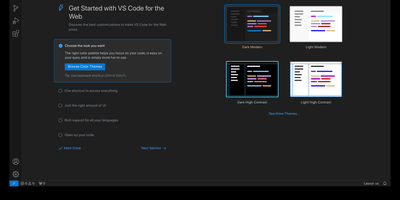
With over 78,000 GitHub stars, 270 contributors, and seven years of continuous development tracking upstream VS Code releases within days, code-server has become the definitive way to run a full Visual Studio Code IDE on any remote machine and access it from any browser on any device. The project applies a curated set of patches to Microsoft's VS Code codebase that add password authentication, sub-path hosting behind reverse proxies, self-contained web views that never call out to Microsoft servers, a built-in proxy for accessing ports on the remote machine directly through the VS Code ports panel, and on-disk settings persistence instead of browser storage. The extension ecosystem works with the Open VSX marketplace by default, giving access to thousands of extensions for Python, JavaScript, Go, Rust, Java, and every other language, along with themes, linters, formatters, and debuggers. The integrated terminal provides direct shell access to the server, Git integration handles version control without leaving the editor, and the debugger supports breakpoints, variable inspection, and step-through execution for Node.js, Python, Go, and other runtimes. DevContainer support enables reproducible development environments defined in JSON configuration files. Installation options include a one-line install script, manual package installation, Docker via the official codercom/code-server image, and DevContainer features. Minimum requirements are a Linux machine with 1GB RAM, 2 vCPUs, and WebSocket support. Running on a dedicated VPS on RepoCloud with guaranteed CPU, RAM, and SSD, full root SSH access, and a browser serial console. MIT licensed.
Zasper
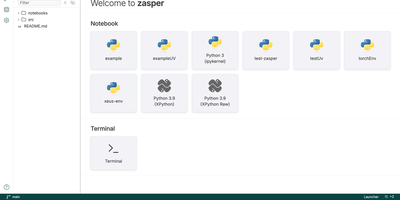
Notebook work gets a lighter home in Zasper, a browser IDE that runs any Jupyter kernel on a fraction of the memory JupyterLab needs. Plotly, ipywidgets, HTML, and Markdown with LaTeX render inline, and saved files match what Jupyter would write byte for byte. A variables panel inspects the running kernel, DataFrames open as a grid that turns into a chart, and SQL cells query the databases you connect. Edits made to the file on disk flow into the open notebook cell by cell, and a run started from another tab or an agent still reaches its cell. A code editor, terminal, and Git panel share the window, and notebook diffs compare cell by cell. Claude Code, Gemini CLI, Codex, or any agent that speaks the Agent Client Protocol can work in a side panel, with each change it makes reviewed and undone from there. A command palette searches files and commands together, trusted folders keep untrusted code from running, and light and dark themes are included. Running on a dedicated VPS on RepoCloud with guaranteed CPU, RAM, and SSD, full root SSH access, and a browser serial console. AGPL-3.0 licensed.
Eclipse Che
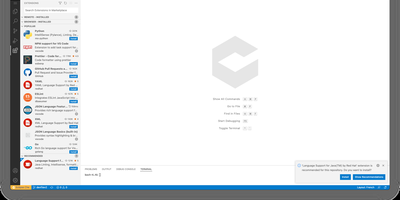
Eclipse Che spins up complete development environments on Kubernetes from a Devfile in the project repository, so new developers click a factory link and open a browser IDE with dependencies, runtimes, and debugging already configured instead of spending their first day installing toolchains. Each workspace runs as a DevWorkspace custom resource in the user's namespace, making environments API-manageable with kubectl and GitOps tooling alike. Developers choose their editor per workspace, from Visual Studio Code Open Source to JetBrains IDEs via Projector, and the 7.124 release adds Orca, an agent development environment for working alongside AI coding agents. Workspaces carry their own containers for build and run, so code executes in a production-like environment with direct Kubernetes API access from the IDE. Teams standardize stacks as Devfile templates, onboard contributors in minutes, and open a fresh workspace per branch or pull request in a new browser tab. The 7.124 release also builds workspace lifecycle commands into chectl, including SSH connections with port forwarding to desktop editors, and DevWorkspace Operator 1.0 adds optional per-workspace NetworkPolicy isolation. Running on a dedicated VPS on RepoCloud with guaranteed CPU, RAM, and SSD, full root SSH access, and a browser serial console. EPL-2.0 licensed.
Vicoa
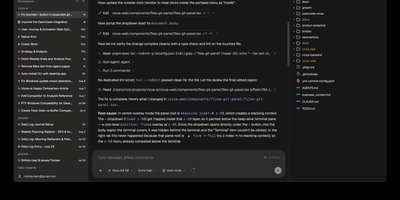
A team of coding agents, run in parallel from your desk, your browser, and your phone: Vicoa is an agentic IDE and control center, so one developer can steer a whole fleet instead of babysitting terminal tabs. Run 40+ coding agents side by side in one workspace: Claude Code, Codex, OpenCode, Gemini, Cursor, GitHub Copilot, Kimi, and more are built in, and 30+ additional agents connect through the Agent Client Protocol. Each agent gets its own git worktree and branch, so several can change one repository without overwriting each other, and every session's status sits in one list. Connect Mac, Windows or Linux machines, a VPS, or a remote server, pick where each session runs, and bring existing subscriptions or API keys. Start a session at your desk and steer it from the iOS or Android app on the train: approve a step, answer a question by dictation, or review the live git diff and file tree from your phone, with push notifications when an agent needs a decision or finishes. Plan work on the task board and start a session straight from a task, schedule cron automations that pick work up on their own, and share a live session link so teammates can watch or prompt alongside you. Host the backend and realtime server yourself with Docker, or drive everything from the CLI. Running on a dedicated VPS on RepoCloud with guaranteed CPU, RAM, and SSD, full root SSH access, and a browser serial console. AGPL-3.0 licensed.
Coder
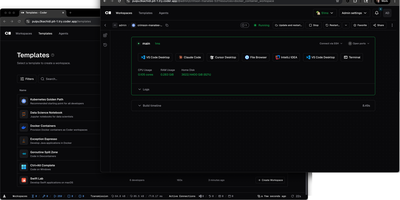
With over 14,000 GitHub stars and enterprise adoption by security-conscious organizations, Coder transforms how development teams provision, manage, and secure their coding environments. Every workspace is defined as a Terraform template, meaning infrastructure engineers can standardize development environments across EC2 instances, Kubernetes pods, Docker containers, or any combination, while developers get self-service provisioning that launches in seconds rather than days of manual setup. The WireGuard-based networking layer establishes encrypted tunnels between developer machines and remote workspaces, providing low-latency access without exposing ports or configuring VPN concentrators. Automatic idle detection shuts down unused workspaces after configurable periods, directly reducing cloud compute costs for organizations running hundreds of developer environments. The Coder Agents feature introduces native AI coding capabilities where the agent loop executes entirely within the control plane on self-hosted infrastructure, keeping LLM API credentials out of individual workspaces and eliminating credential exfiltration risks. Centralized model governance allows platform teams to approve specific AI providers and models, set per-user spend limits, and maintain complete audit logs of all prompts, tool calls, and agent activity. IDE integration supports VS Code through a dedicated extension, JetBrains IDEs via Gateway and Toolbox plugins, and browser-based code-server for web access. The template registry provides pre-built configurations for common development stacks. DevContainer support builds environments from standard devcontainer.json specifications. Deploy on a dedicated VPS on RepoCloud with guaranteed CPU, RAM, and SSD, full root SSH access, and a browser serial console. AGPL-3.0 licensed.
Tabby
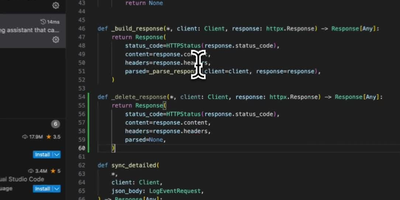
With over 33,000 GitHub stars and a codebase written in 92.9% Rust for maximum performance and memory safety, Tabby is the most widely adopted self-hosted alternative to GitHub Copilot — delivering real-time code completions entirely on your own infrastructure with zero code leaving your network. Deploy a single Docker container on any NVIDIA CUDA, Apple Silicon Metal, AMD ROCm, or CPU-only server and connect VS Code, JetBrains IDEs (IntelliJ, PyCharm, WebStorm, GoLand), Vim, Neovim, and Emacs through native extensions. The completion engine supports a curated registry of models including StarCoder2 (1B to 15B parameters), DeepSeek-Coder, CodeLlama, CodeGemma, Qwen2.5-Coder, and Mistral Code — swappable at runtime through the admin dashboard without redeployment. Repository indexing parses your Git repositories and feeds project-specific types, function signatures, and patterns into completion context via RAG, producing suggestions that understand your codebase rather than generic boilerplate. The Answer Engine provides instant responses to code queries within the IDE, while inline chat enables contextual code editing and explanation without switching windows. The admin dashboard manages per-developer API tokens, usage analytics, and model configuration. Enterprise features include SSO via LDAP, OAuth, and SAML, role-based access control, and audit logging for compliance environments. A single RTX 4090 workstation serves a team of 10-15 developers with sub-500ms completion latency. Running on a dedicated VPS on RepoCloud with guaranteed CPU, RAM, and SSD, full root SSH access, and a browser serial console. Apache 2.0 licensed.
Clay Studio
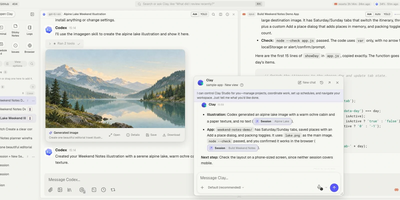
Clay Studio is a self-hosted workspace where your team and its coding agents share projects, live sessions, and project knowledge in one browser interface instead of scattering them across terminals. You organize several repositories in one sidebar and run sessions in parallel while teammates watch live activity, enter the same session, hand work off, and answer permission requests from wherever they are. Ten agent runtimes plug into the same workspace, Claude Code, Codex, Grok Build, Kimi Code, GitHub Copilot CLI, Qwen Code, Junie CLI, Antigravity CLI, OpenCode, and Kiro CLI, each keeping its own authentication and models. Persistent Mates give AI collaborators an identity, instructions, memory, direct messages, and roles in structured debates that survive beyond a single chat. Worktrees, paired sessions, spawned workers, scheduled tasks, and Ralph Loops let background jobs proceed without losing sight of what is running. You browse and edit files, inspect diffs and history, open terminals, install skills, connect MCP servers, and manage project knowledge without leaving the workspace. The installable PWA works on mobile and pushes notifications for approvals, failures, and finished work. Sessions and knowledge stay on your disk as portable JSONL and Markdown, so switching providers never means migrating your workspace. Running on a dedicated VPS on RepoCloud with guaranteed CPU, RAM, and SSD, full root SSH access, and a browser serial console. AGPL-3.0-only licensed.
Ogcode
Ogcode puts a full AI coding agent in a browser tab pointed at your own server, where it maps your codebase semantically before reading it, plans changes across files, runs your builds and test suites, and answers with diagrams and documents alongside the shipped code. Before reading files it maps the project with a semantic index, outlines what matters with exact line ranges, and reads only the parts that count, so unfamiliar code becomes navigable in one session. Ask it to implement a feature or chase a failing test and it plans the work, edits across files, runs your builds and test suites, and investigates failures instead of retrying blindly. You stay in control through per-session permission modes: Ask approves each step, Auto gates by risk, and Yolo lets it run, with every decision remembered when you want it to be. Past decisions are recalled instead of replaying whole transcripts, so long sessions stay focused and affordable, and the agent can research as it goes with built-in web search, reusable SKILL.md workflows, and external MCP servers. Answers come back richer than text when the work calls for it, with diagrams, rendered documents, charts, and downloadable artifacts in the same session. Connect Anthropic, OpenAI, OpenRouter, or a local Ollama endpoint and start working. Running on a dedicated VPS on RepoCloud with guaranteed CPU, RAM, and SSD, full root SSH access, and a browser serial console. AGPL-3.0 licensed.