Kolibri
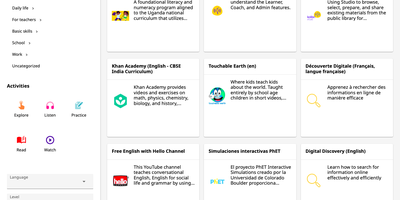
Where the internet is slow or missing, Kolibri still gives learners a library of videos, exercises, books, and interactive apps from one local server. Content arrives as channels, curated collections imported from Kolibri Studio, another Kolibri device on the network, or a USB drive. Learners browse by category, search by keyword, and filter by activity type (Watch, Listen, Practice, Read, or Explore), language, or channel. Most exercises ask for five correct answers in a row, some offer hints, completed resources award points, and bookmarks save a place in any resource. Guest browsing needs no account, or administrators can require sign-in and limit learners to the lessons and quizzes assigned to them. Coaches organize learners into classes and groups, assign lessons and quizzes, and follow an activity feed that flags learners who need help. Reports go down to single answers, and an attendance tool records who was present at each class session. Administrators create learner, coach, and admin accounts, import or export users and classes from CSV files, and download session and summary logs as CSV. Facilities can be imported and synced over a local network, so progress from offline schools reaches one central device. The interface is translated into many languages, including Spanish, French, Swahili, Arabic, and Hindi, and device settings choose the default language, landing page, and storage locations. Running on a dedicated VPS on RepoCloud with guaranteed CPU, RAM, and SSD, full root SSH access, and a browser serial console. MIT licensed.
ILIAS
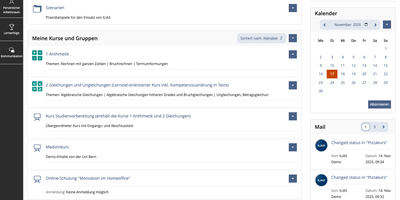
ILIAS is an open-source learning management system that puts courses, SCORM modules, online exams, surveys, wikis, and portfolios on one platform for universities, schools, and companies. Content lives in a repository where categories and courses hold files, learning modules, and tests, and a fine-grained permission system decides who may read, edit, or administer each object. Authors write learning modules, glossaries, and wikis in the browser, import SCORM 1.2 and SCORM 2004 packages, and connect external tools through IMS LTI. The Test and Assessment tool covers everything from self-check quizzes to complete e-exams, and the Scoring tab lets markers work participant by participant or question by question, anonymously if needed, with Markdown feedback. Preconditions unlock the next activity from a test result, so a score of 0 to 30 percent can open one follow-up test while 31 to 50 percent opens another. Study Programmes map whole study and training courses, and an optional progress bar shows learners their completion percentage. Every learner gets a personal workspace for portfolios and blogs, drag-and-drop file upload, profiles, contacts, mail, and chat. Administrators can add guided tours that point at tabs and buttons, assign short links to categories, and export data as XML, CSV, or Excel. The OER Harvester spots Creative Commons material and publishes it in a dedicated category. Running on a dedicated VPS on RepoCloud with guaranteed CPU, RAM, and SSD, full root SSH access, and a browser serial console. GPL-3.0 licensed.