T3 Code
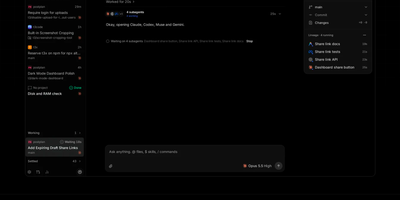
T3 Code puts every coding agent you already pay for behind one control surface, so Claude Code, Codex, Cursor, Grok Build, OpenCode, and Antigravity all run on your server while you direct them from your phone, browser, or desktop. Start a thread, choose the provider and model that fit the job, and watch the agent work in a shared conversation instead of a terminal you have to babysit. Permission modes decide when an agent must stop and ask, and its approvals, questions, and plan reviews arrive in the same thread wherever you happen to be connected from. When the work lands, review it file by file in the built-in diff view, then commit, push, and open pull requests through the Git and GitHub integrations without leaving the app. A real terminal sits beside the chat, and projects, settings, and scheduled tasks stay attached to the machine where the code actually runs. Install it as a background service and reach it from anywhere through T3 Connect, a Tailscale or LAN pairing, or the hosted web client, with a pairing code guarding local access. Outside agents can also drive threads over MCP, launching, messaging, and waiting on work across machines you have linked together. Running on a dedicated VPS on RepoCloud with guaranteed CPU, RAM, and SSD, full root SSH access, and a browser serial console. MIT licensed.
code-server
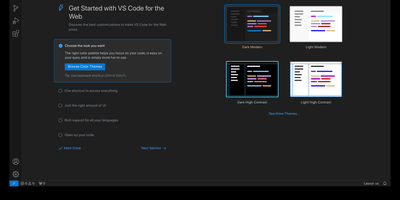
With over 78,000 GitHub stars, 270 contributors, and seven years of continuous development tracking upstream VS Code releases within days, code-server has become the definitive way to run a full Visual Studio Code IDE on any remote machine and access it from any browser on any device. The project applies a curated set of patches to Microsoft's VS Code codebase that add password authentication, sub-path hosting behind reverse proxies, self-contained web views that never call out to Microsoft servers, a built-in proxy for accessing ports on the remote machine directly through the VS Code ports panel, and on-disk settings persistence instead of browser storage. The extension ecosystem works with the Open VSX marketplace by default, giving access to thousands of extensions for Python, JavaScript, Go, Rust, Java, and every other language, along with themes, linters, formatters, and debuggers. The integrated terminal provides direct shell access to the server, Git integration handles version control without leaving the editor, and the debugger supports breakpoints, variable inspection, and step-through execution for Node.js, Python, Go, and other runtimes. DevContainer support enables reproducible development environments defined in JSON configuration files. Installation options include a one-line install script, manual package installation, Docker via the official codercom/code-server image, and DevContainer features. Minimum requirements are a Linux machine with 1GB RAM, 2 vCPUs, and WebSocket support. Running on a dedicated VPS on RepoCloud with guaranteed CPU, RAM, and SSD, full root SSH access, and a browser serial console. MIT licensed.
Eclipse Che
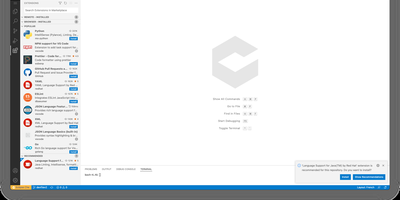
Eclipse Che spins up complete development environments on Kubernetes from a Devfile in the project repository, so new developers click a factory link and open a browser IDE with dependencies, runtimes, and debugging already configured instead of spending their first day installing toolchains. Each workspace runs as a DevWorkspace custom resource in the user's namespace, making environments API-manageable with kubectl and GitOps tooling alike. Developers choose their editor per workspace, from Visual Studio Code Open Source to JetBrains IDEs via Projector, and the 7.124 release adds Orca, an agent development environment for working alongside AI coding agents. Workspaces carry their own containers for build and run, so code executes in a production-like environment with direct Kubernetes API access from the IDE. Teams standardize stacks as Devfile templates, onboard contributors in minutes, and open a fresh workspace per branch or pull request in a new browser tab. The 7.124 release also builds workspace lifecycle commands into chectl, including SSH connections with port forwarding to desktop editors, and DevWorkspace Operator 1.0 adds optional per-workspace NetworkPolicy isolation. Running on a dedicated VPS on RepoCloud with guaranteed CPU, RAM, and SSD, full root SSH access, and a browser serial console. EPL-2.0 licensed.
Pi Pocket
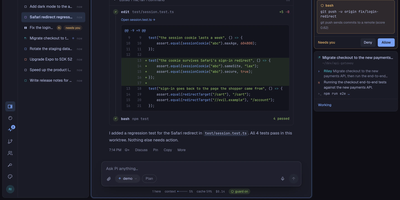
Pi Pocket puts the Pi coding agent in your phone browser, so you can start, steer, and review real coding sessions from anywhere while the work stays on your own server. Open a folder, a fresh Git worktree, or a GitHub repository, pick a model per session, and watch streamed replies with tool calls, queued follow ups, and a stop button when a run wanders. Sessions survive crashes and restarts because every model call, tool call, and subagent step is stored as it happens, and forks let you retry any reply with a different model on another branch. Invite teammates into a live session with presence, roles, and a side chat the agent never sees, or let PiP, the built in assistant, follow your other sessions and report back. GitHub watches and webhooks wake the agent when pull requests, issues, or workflows change, while scheduled messages and cron style goals keep routine work moving overnight. Spend views show cost per person and per session, and owner set limits pause new work instead of quietly burning budget. On a phone you get push notifications, dictation, share sheet intake, and a home screen app, and live reloadable extensions add routes, modules, and commands without a build step. Running on a dedicated VPS on RepoCloud with guaranteed CPU, RAM, and SSD, full root SSH access, and a browser serial console. MIT licensed.
Vicoa
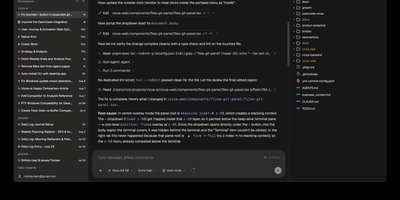
A team of coding agents, run in parallel from your desk, your browser, and your phone: Vicoa is an agentic IDE and control center, so one developer can steer a whole fleet instead of babysitting terminal tabs. Run 40+ coding agents side by side in one workspace: Claude Code, Codex, OpenCode, Gemini, Cursor, GitHub Copilot, Kimi, and more are built in, and 30+ additional agents connect through the Agent Client Protocol. Each agent gets its own git worktree and branch, so several can change one repository without overwriting each other, and every session's status sits in one list. Connect Mac, Windows or Linux machines, a VPS, or a remote server, pick where each session runs, and bring existing subscriptions or API keys. Start a session at your desk and steer it from the iOS or Android app on the train: approve a step, answer a question by dictation, or review the live git diff and file tree from your phone, with push notifications when an agent needs a decision or finishes. Plan work on the task board and start a session straight from a task, schedule cron automations that pick work up on their own, and share a live session link so teammates can watch or prompt alongside you. Host the backend and realtime server yourself with Docker, or drive everything from the CLI. Running on a dedicated VPS on RepoCloud with guaranteed CPU, RAM, and SSD, full root SSH access, and a browser serial console. AGPL-3.0 licensed.
MulmoTerminal
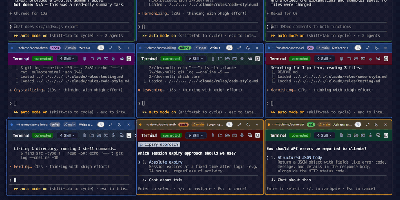
MulmoTerminal is a browser cockpit for running many AI coding agents at once, laying every session out in a color-coded grid so you can see at a glance which agents are working, which are finished, and which are sitting idle waiting on you. Each cell is a real terminal running Claude Code, Codex, Muse, GitHub Copilot CLI, Cursor CLI, Grok, or Antigravity, and its border turns amber with a chime the moment a permission prompt or question blocks progress. Zoom into one session and the cockpit roster keeps the rest in view as one-line summaries with your last prompt, the agent's latest reply, and each branch's pull request phase. Agents hand you more than text: a Canvas panel renders documents, forms, charts, and generated images they produce, while per-session context, token, and cost readouts keep spending legible. Isolate parallel work in one-click git worktrees, review the diff, then commit, push, and open the pull request without leaving the grid. Sessions persist through tmux across restarts, Web Push pings your phone when a task finishes or needs input, and per-directory themes and name badges keep a wall of agents readable. Running on a dedicated VPS on RepoCloud with guaranteed CPU, RAM, and SSD, full root SSH access, and a browser serial console. MIT licensed.
Coder
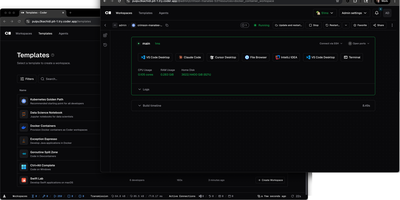
With over 14,000 GitHub stars and enterprise adoption by security-conscious organizations, Coder transforms how development teams provision, manage, and secure their coding environments. Every workspace is defined as a Terraform template, meaning infrastructure engineers can standardize development environments across EC2 instances, Kubernetes pods, Docker containers, or any combination, while developers get self-service provisioning that launches in seconds rather than days of manual setup. The WireGuard-based networking layer establishes encrypted tunnels between developer machines and remote workspaces, providing low-latency access without exposing ports or configuring VPN concentrators. Automatic idle detection shuts down unused workspaces after configurable periods, directly reducing cloud compute costs for organizations running hundreds of developer environments. The Coder Agents feature introduces native AI coding capabilities where the agent loop executes entirely within the control plane on self-hosted infrastructure, keeping LLM API credentials out of individual workspaces and eliminating credential exfiltration risks. Centralized model governance allows platform teams to approve specific AI providers and models, set per-user spend limits, and maintain complete audit logs of all prompts, tool calls, and agent activity. IDE integration supports VS Code through a dedicated extension, JetBrains IDEs via Gateway and Toolbox plugins, and browser-based code-server for web access. The template registry provides pre-built configurations for common development stacks. DevContainer support builds environments from standard devcontainer.json specifications. Deploy on a dedicated VPS on RepoCloud with guaranteed CPU, RAM, and SSD, full root SSH access, and a browser serial console. AGPL-3.0 licensed.
WebCodex
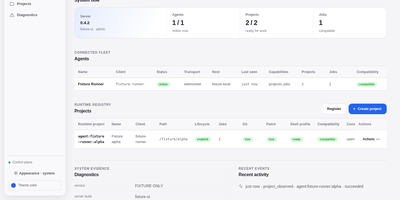
WebCodex gives ChatGPT, Claude, and other MCP clients a real development environment on machines you own, so an AI assistant can edit your actual repositories instead of a pasted snapshot. A self-hosted Server authenticates every request and routes it to a Runner sitting next to your code, where file edits, Git operations, test runs, shell commands, and long jobs execute with your real toolchain. Your projects never move into a hosted workspace; only the tool results you authorize travel back to the model. The browser Runtime Console shows project readiness, the work queue, session activity, and connected Runners, and it is where you decide pending approvals or accept and reject finished work, because the model cannot approve its own changes. Runners join with a short-lived pairing code and stay connected over QUIC, WebSocket, or polling, so machines behind NAT still work. One-command sharing opens a temporary session for a single repository, while durable setups run the Server and Runner as system services behind your own HTTPS domain. Workflow Sessions keep evidence and context across conversations, so long tasks survive closed browser tabs and threads you pick up days later. Running on a dedicated VPS on RepoCloud with guaranteed CPU, RAM, and SSD, full root SSH access, and a browser serial console. Apache-2.0 licensed.