Infinite Canvas
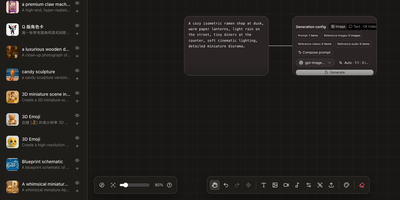
Instead of juggling a chat window, a folder of reference images, and a notebook of half-remembered prompts, Infinite Canvas puts the whole image-making process on one zoomable board. Drop in text, image, video, and generation-settings nodes, then wire them together so every result stays connected to the prompt and references behind it. Add one or several OpenAI-compatible endpoints, choose default text, image, and video models, and set image count, aspect ratio, quality, and transparent backgrounds per node. Batch results arrive as linked nodes that remember their prompt, model, and dimensions, so any of them can be retried later with the same settings. A prompt library searches seven built-in sources plus your own JSON sources and inserts the winner straight onto the board. An asset shelf keeps reusable images, clips, and audio within reach. Projects can be duplicated, exported, and synced between devices over WebDAV. Want a helper? A local Canvas Agent lets Codex read the active board and edit it through MCP, with approvals and permissions shown in a side panel. Plugins add node types, inspectors, and toolbar actions. Running on a dedicated VPS on RepoCloud with guaranteed CPU, RAM, and SSD, full root SSH access, and a browser serial console. MIT licensed.
SD.Next
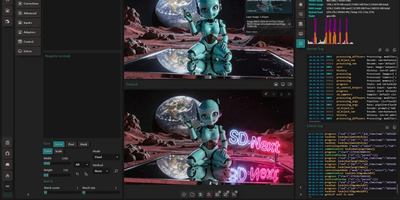
Pick a diffusion model, type a prompt, and SD.Next renders an image or a video clip on hardware you control. It handles text-to-image, image-to-image, text-to-video, and image-to-video, with inpainting, outpainting, a detailer pass, and hires or refine stages for edits. Models come from a reference list that downloads on demand or from your own files, which are detected automatically, and the catalog spans Stable Diffusion, FLUX, Qwen-Image, Wan, and HiDream. LoRA, ControlNet, IP-Adapters, and prompt enhancement steer each result. Kanvas, the built-in editor, offers up to ten stages with painting, a magic wand, text, and masking. Caption and Process tools describe images with vision-language models, interrogate them with CLiP, upscale, remove backgrounds, and turn frame sets into video. A scheduler queues jobs in order, runs them inside an active-hours window, and keeps task history. SDNQ quantization and CPU or GPU offloading fit large models into less memory, and one interface covers NVIDIA CUDA, AMD ROCm, ZLUDA, Intel Arc, OpenVINO, Apple Silicon, or plain CPU. The web UI also offers themes, interface languages, a mobile layout, and a live GPU monitor with server logs. Optional login credentials and TLS certificates protect the web server, and scripts or extensions add more. Running on a dedicated VPS on RepoCloud with guaranteed CPU, RAM, and SSD, full root SSH access, and a browser serial console. Apache-2.0 licensed.
GPT Image Playground
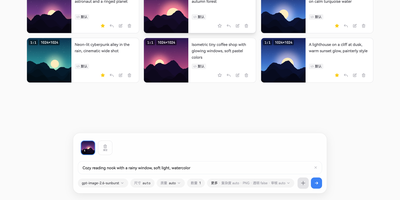
One prompt box, four model families, and a gallery that never leaves your browser: GPT Image Playground turns any compatible image API into a tidy studio for text-to-image and reference-based editing. Attach reference photos by paste, drag, or link, then paint a mask or sketch notes directly on the picture to show the model what to change. Agent mode keeps a multi-turn conversation going, calls the image tool as needed, generates related pictures in parallel, and branches whenever you edit and resend a message. Every task is saved with its size, quality, elapsed time, and the prompt as the model actually rewrote it, so you can compare what you asked for with what happened. Favorites sort into several collections that download as ZIP archives, and failed jobs retry in one click. Saved API configurations switch from a dropdown, covering OpenAI-compatible endpoints, Google, xAI, ByteDance, fal.ai, and custom HTTP providers. Output formats include PNG, WebP, animated GIF, and SVG, with transparent backgrounds on request. Operators can preload configurations through environment variables and route calls through a built-in proxy. Running on a dedicated VPS on RepoCloud with guaranteed CPU, RAM, and SSD, full root SSH access, and a browser serial console. MIT licensed.