OpenBot
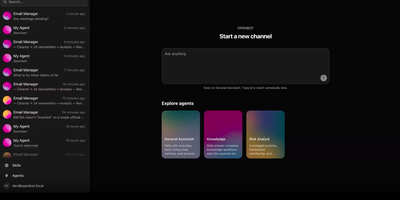
Open source GrokBot, built by the team behind the AG-UI protocol. OpenBot is the open-source enterprise agent platform that gives every AI coworker its own sandboxed computer — a real Chromium browser with its own login sessions, a private filesystem, and only the MCP tools you explicitly grant. The centralized gateway evaluates CEL policy rules against tool name, intent, bot identity, page URL, element attributes, and file paths before any action executes, writing an immutable audit row for every call and outcome. Any agent that speaks AG-UI — LangGraph, Mastra, CrewAI, Pydantic AI, Google ADK, or hand-written endpoints — registers as a Bot and receives its own channel with persistent conversation history. The take-the-wheel system lets humans assume control when an agent encounters login walls or two-factor prompts, recording control transfers as structured audit events. Knowledge documents from Google Drive and OneDrive carry source-based permissions where deny principals always win and ambiguous mappings refuse retrieval entirely. The React and Vite frontend provides live screen viewing of each agent's browser, channel-based chat, admin settings, and component galleries. The Hono API server on port 3001 handles authentication, role-based access, tenant packaging, and credential management backed by PostgreSQL with pgvector. Deploy via Docker Compose with the included supervisor that manages per-bot computer containers. Running on a dedicated VPS on RepoCloud with guaranteed CPU, RAM, and SSD, full root SSH access, and a browser serial console. MIT licensed.
Codync
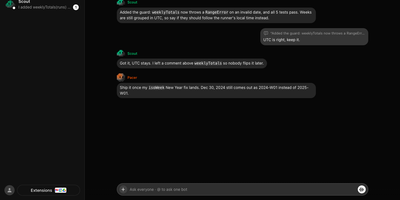
Codync turns the coding agents already installed on your computer into named bots you can message from your phone, so the Claude Code or Codex session on your desk keeps working while you are away. Each bot wraps one agent in one project folder, with its own standing instructions, memory, and approval rules, and several bots run side by side on one machine. Message any bot from the iPhone app, the desktop app, or a terminal; group rooms put bots in one thread, and an @name mention routes a question to exactly one of them. Bots ask each other for reviews inside the room and quote-reply to specific messages. File changes arrive as approval cards naming the file and computer, with Allow once, Always allow, or Deny; finished and blocked work both ping you as push notifications. The connection between phone and computer is end-to-end encrypted through a free relay, your own relay, or directly over the same Wi-Fi or Tailscale. Watch the computer's screen from your phone, hand a bot a computer-use tool, or talk to it in a voice call, and approve every new device per computer with a six-digit code. Your existing agent subscription does the work; Codync never calls a provider API with your login, and there is no paid tier. Running on a dedicated VPS on RepoCloud with guaranteed CPU, RAM, and SSD, full root SSH access, and a browser serial console. Apache-2.0 licensed.
OpenSuperBot
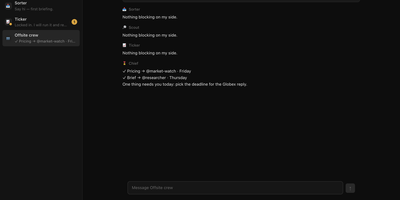
Always-on AI teammates that each get a real computer of their own, with a browser, files and a terminal, working from your hardware instead of a vendor cloud: that is OpenSuperBot. You hire a teammate from the sidebar with a name and a one-line job, and it works inside its own sealed computer with a browser, shell and persistent workspace. At a login wall the bot asks you to take over its live screen and sign in once inside its own browser profile, so passwords never pass through the gateway. Group threads let you ask the whole room at once: everyone answers in parallel, the chief of staff closes with a dispatch table, and @names pick which teammates respond. Nothing leaves the workspace without your say-so, because outward actions stop at a draft-and-hold approval chip. Standing approvals cover repeat sends to one destination for an hour or a day, and money and bookings always ask. Memory is a visible file you control: tell a bot a rule and it posts the exact change as a chip, and forget removes it the same way. Routines come from plain conversation, so a daily digest, a secret webhook trigger or a quiet status-page watch can be scheduled in chat. Each teammate runs a model you pick, with daily token budgets and live step cards for every action. Running on a dedicated VPS on RepoCloud with guaranteed CPU, RAM, and SSD, full root SSH access, and a browser serial console. MIT licensed.
OpenGrokBot
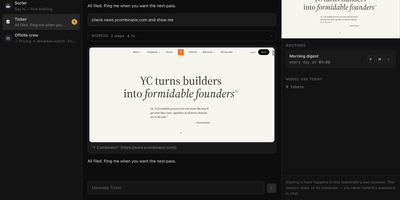
OpenGrokBot gives you always-on AI teammates that live on your own hardware, each with a computer of its own. Every teammate is a folder with a persona and hard boundaries, a thread in your sidebar, and a contained machine with its own browser profile, workspace, and persistent memory that survives between asks. You manage the crew from a workbench-style web client: message one teammate or the whole group, watch its browser screen live, set routines like a morning digest, and check what each one used today. The safety model is the point: credentials live inside the teammate's own browser profile, so at a login wall it asks you to take over its screen instead of asking for a password; standing instructions change only through a diff you approve; and a teammate cannot approve its own holds. Teammates hand work to each other under an allowlist with a hop limit, optional daily token ceilings stop spending for the rest of the day, and a stop button kills even a shell command mid-flight. Computers can be a Docker container per teammate, or Docker-free local browsers with sandboxed commands. Running on a dedicated VPS on RepoCloud with guaranteed CPU, RAM, and SSD, full root SSH access, and a browser serial console. MIT licensed.