Fava
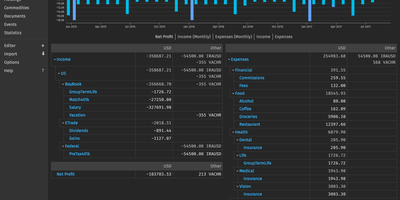
If your books live in a plain-text Beancount ledger, Fava turns that file into a browsable dashboard of statements, charts, and a built-in editor. Income Statement, Balance Sheet, Trial Balance, Journal, Holdings, and Statistics reports render as tables and charts, with stacked or single bars, monthly breakdowns, and at-cost conversion. Three top-bar filters narrow every report. Match by date, account pattern, #tag, ^link, payee, metadata, or amount; spaces require all conditions, commas accept any. The Query page runs Beancount Query Language statements like bean-query. Two-column results become line or treemap charts, and every result exports to CSV, plus XLSX and ODS with the Excel extra. The browser editor autocompletes accounts, payees, and tags. Press n for a quick-add form that records a new transaction. Drag a receipt onto an account name to file it in that account's documents folder, or onto a Journal row to attach it to the transaction. Budget directives from daily to yearly show remaining amounts in charts and reports. Colored indicators flag passed or failed balance checks on opted-in accounts. Importers feed a review list; extensions add custom report pages. Gmail-style keyboard shortcuts speed up daily use. Running on a dedicated VPS on RepoCloud with guaranteed CPU, RAM, and SSD, full root SSH access, and a browser serial console. MIT licensed.
hledger
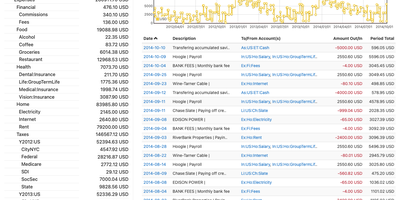
Keep your books in a plain text file, then ask hledger for balance sheets, income statements, and a browsable web ledger whenever you need them. Entries follow double-entry rules with any account hierarchy you like, and a single journal can hold several currencies, investments, cryptocurrencies, and even hours of time. The web interface, hledger-web, shows an account tree with balances beside a per-account register and a balance chart, plus a journal view of whole transactions. A search box takes queries on account names, dates, descriptions, amounts, tags, status, and currencies, and searches can be bookmarked. An add-transaction form autocompletes from your existing journal, and an optional edit mode lets you change, upload, or download the journal files. A JSON API serves accounts, transactions, prices, and commodities, and accepts new transactions by PUT request. It also reads timeclock, timedot, CSV, SSV, and TSV files, with rules files that map bank exports to accounts. Periodic rules forecast future cash flow. Reports leave as text, HTML, CSV, JSON, or SQL, and the journal format is largely compatible with Ledger and largely interconvertible with Beancount. Each web edit writes a numbered backup, and changes made in a text editor appear on the next page load. Several people can share one journal behind an authenticating reverse proxy such as Caddy or Apache. Running on a dedicated VPS on RepoCloud with guaranteed CPU, RAM, and SSD, full root SSH access, and a browser serial console. GPL-3.0-or-later licensed.
FireFlyIII
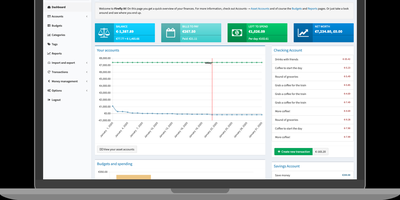
With over 24,000 GitHub stars and active development since 2014, Firefly III is the self-hosted personal finance manager that gives you complete control over your financial data without ever contacting external servers. The double-entry bookkeeping system tracks every transaction with source and destination accounts, ensuring accurate balance calculations and audit trails across checking, savings, credit card, cash, and asset accounts. Budget management sets monthly spending limits by category with visual progress tracking and rollover support for unused allocations. Rule-based transaction automation applies categorization, tags, and budget assignments automatically based on configurable conditions matching description, amount, source, and destination patterns. Recurring transactions schedule regular bills, subscriptions, and income entries with automatic creation on configured dates. Piggy banks divide savings accounts into virtual sub-accounts for goal tracking with target amounts and deadlines. Financial reports include income versus expense summaries, budget performance charts, category breakdowns, tag reports, and net worth tracking with weekly, monthly, and yearly time ranges. Multi-currency support handles any currency with configurable exchange rates for international finance tracking. The REST JSON API covers nearly every feature for integration with external tools, import utilities, and the companion Firefly III Data Importer for bank statement processing. Two-factor authentication provides account security. Self-hosting deploys via Docker containers or directly on PHP 8.5+ with MySQL or PostgreSQL. Running on a dedicated VPS on RepoCloud with guaranteed CPU, RAM, and SSD, full root SSH access, and a browser serial console. AGPL-3.0 licensed.
Paisa
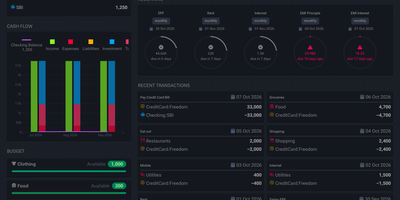
A plain text journal is all Paisa needs to put your net worth, cash flow, expenses, and investment returns on one set of dashboards. Write entries in the built-in editor. It brings syntax highlighting, auto completion, error checking, and auto formatting to double-entry journals. Bank and credit card statements in CSV, Excel, or PDF import through reusable templates that categorize every transaction. Price providers track mutual funds, NPS holdings, and stocks. Manual prices revalue a house, a car, or a plot of land. Budgets set a limit for each category and track spending against it. Allocation targets show how far a debt and equity split has drifted. Goals compute a completion date from monthly savings. The retirement planner works from a safe withdrawal rate and yearly expenses. A calendar marks recurring bills as cleared, late, past due, or upcoming, and Liabilities pages cover credit cards, loan repayment, and interest. Live Sheets calculate taxes and EMIs from ledger data. Journals and settings stay in plain text files that can be version controlled or shared, and ledger, hledger, and beancount are all supported. Running on a dedicated VPS on RepoCloud with guaranteed CPU, RAM, and SSD, full root SSH access, and a browser serial console. AGPL-3.0-or-later licensed.
MoneyMatter
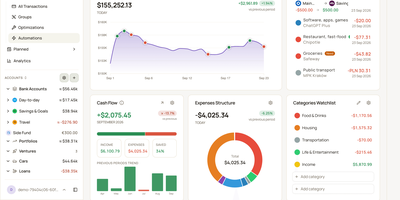
Your bank balance is only part of what you own, and MoneyMatter adds the rest: cash accounts, brokerage portfolios, cars, loans, and private deals roll into one net worth figure in your base currency. Add transactions by hand, import CSV, OFX, QFX, YNAB, Wallet, or Microsoft Money files, or let an AI model you provide parse a statement, while Monobank, SimpleFIN, Lunch Flow, and Walutomat connections sync accounts automatically. Each transaction can carry categories, tags, payees, notes, attachments, and splits, transfers and refunds link to their counterparts, and automation rules tidy new entries. Envelope-style budgets assign money to lines with Assigned, Activity, and Available columns and rollover rules, savings goals read progress from account balances, subscriptions and bills send reminders, and loans show payoff projections. Stocks, ETFs, and crypto are priced daily, vehicles depreciate along a curve, and a FIRE planner estimates years to Lean, Regular, Fat, Barista, and Coast FIRE. A customizable dashboard, cash flow, money flow, net worth history, trends comparison, and pivot table chart the results. Share accounts with a household member, export JSON, CSV, or XLSX, back up everything, or connect Claude, ChatGPT, or Claude Code through the built-in MCP server. Running on a dedicated VPS on RepoCloud with guaranteed CPU, RAM, and SSD, full root SSH access, and a browser serial console. AGPL-3.0 licensed.
Kresus
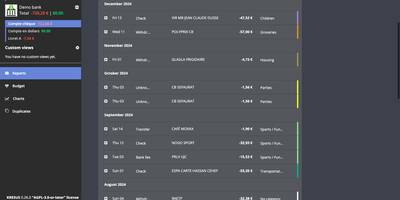
Kresus is a self-hosted personal finance manager that fetches your bank transactions overnight and turns them into categorized history, budgets, and charts, with no third-party aggregator holding your bank login. Banks with an open-source Woob connector sync automatically (mostly French ones), and each night Kresus re-reads the previous month so late postings are not missed; everything else works through manual accounts or OFX and JSON imports. Transactions can be renamed, sorted into color-coded categories, and moved to the previous or following budget month, and auto-categorization rules handle repeat merchants. The Budget page compares planned amounts with actual spending per category. Charts plot spending by category, balance over time, and monthly money received, spent, and saved. Recurring transactions like rent appear every month to preview your future balance. The Duplicates page lists suspected double imports for manual merging. Search by period, category, amount, or date, and group same-currency accounts into custom views. Email reports, balance and transaction alerts, and Apprise notifications to Telegram, Slack, or Gotify switch on once your administrator enables them. The interface comes in English, French, Spanish, and Turkish. The whole instance exports as JSON without bank passwords or, when enabled, as a password-encrypted file. Running on a dedicated VPS on RepoCloud with guaranteed CPU, RAM, and SSD, full root SSH access, and a browser serial console. AGPL-3.0-or-later licensed.