ControlR
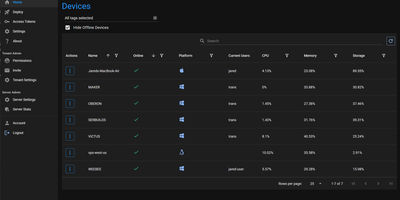
Helping someone fix their computer should not start with a phone call full of instructions nobody can follow: ControlR puts every machine you look after into one browser tab. Install the agent on Windows, Mac, or Linux machines once, and they appear in your device grid with their status ready for action. Open a remote desktop session and see and control the screen as if you were sitting there, drop into a cross-platform PowerShell terminal when a fix is faster typed than clicked, browse the file system to fetch a log or drop off a file, or just open chat when a quick question is all that is needed. Devices are organized with tags, and access follows them: a technician sees the machines their tags cover, while roles decide who can install agents, manage installer keys, administer the tenant, or reach every device. Agent logs stream to the server in real time, which turns bug reports into something you can actually read. Run one tenant for your own fleet, or enable public registration and let each new account become its own isolated tenant, with the database keeping every tenant's devices and users apart. Sensitive settings can arrive through Docker Secrets instead of environment variables, and the whole server runs from a single compose file. Running on a dedicated VPS on RepoCloud with guaranteed CPU, RAM, and SSD, full root SSH access, and a browser serial console. MIT licensed.
CortenDesk
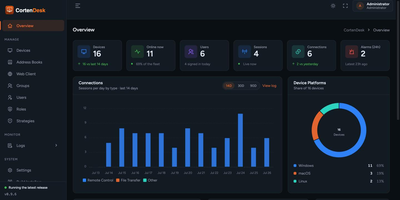
Point your RustDesk clients at CortenDesk and the bare open-source server turns into a managed fleet console with a real address book, real access control, and a remote client that lives in the browser. One container runs the ID server, the relay, and the console together, and existing key pairs and device IDs move in unchanged, so migration is a hostname change rather than a rebuild. The fleet view shows live presence, platform, aliases, owners, and last-seen for every machine, organized into folders that double as the unit of access control. People see only their own devices plus the groups granted to them, and the same scoping is enforced in the RustDesk client API, not just the web pages. Policies push client settings over the heartbeat, covering permissions, password rules, and capture behavior, and enforced policies revert local changes automatically. Five audit logs record connections, file transfers, sign-ins, security alarms, and console actions, all filterable and exportable to CSV. When a browser is all you have, the built-in web client views and controls machines with file transfer, clipboard, audio, and multi-monitor switching, no installer required. Running on a dedicated VPS on RepoCloud with guaranteed CPU, RAM, and SSD, full root SSH access, and a browser serial console. AGPL-3.0 licensed.
FileCat
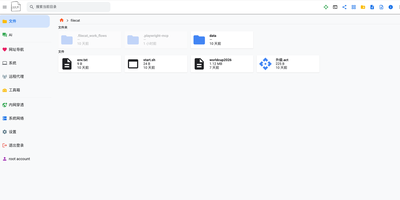
One browser tab can run your whole server, and FileCat is the tab: a self-hosted web file manager that also serves as a lightweight server operations console. Browse, upload, download, and edit files with inline previews for images, video, and Markdown, then keep writing in a Typora-style WYSIWYG Markdown editor or sketch on the built-in Excalidraw whiteboard. Remote storage stops being remote: SFTP, S3, WebDAV, SMB shares, and Baidu Netdisk mount as ordinary local folders under the same operations, and your own directories publish back out over SMB, WebDAV, and SFTP for Windows Explorer and other clients. A web SSH terminal and in-browser RDP sessions reach servers and Windows desktops without separate tools, and the system dashboard watches CPU, memory, disk, and network in real time. Oversized log files open instantly, deep search digs through names and file contents with regex and filters, and custom command pipelines cover CI/CD routines across machines linked by the built-in network tunneling. An optional AI agent, connected to your own model API and reachable through chat platform bots, assists with operations and file tasks, and multi-user permissions with shareable download links decide who touches what. Running on a dedicated VPS on RepoCloud with guaranteed CPU, RAM, and SSD, full root SSH access, and a browser serial console. Apache-2.0 licensed.
Alma Relay
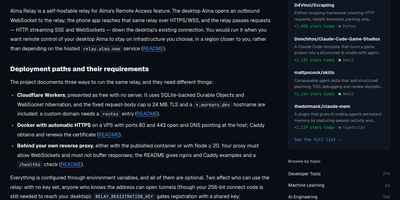
Alma Relay is the relay you run yourself so your phone can reach the Alma on your desktop from anywhere, without port forwarding, a VPN, or a third party sitting in between. Your desktop dials out to the relay and keeps that connection open, and when you open the app on your phone, its requests travel through the relay to the desktop and the answers stream back the same way. Pairing happens with a QR code that carries the relay address, so switching to your own relay takes one fresh scan instead of manual setup on every device. New pairings encrypt the session end to end, so the relay routes encrypted traffic it cannot read, and the routing values it handles are one-way hashes that are never written to disk or logs. When your phone is locked, the relay can pass along the "reply finished" and "Alma has a question" notifications through Apple's or Google's push services, so you hear about finished work without staring at the screen. A live view of the desktop's browser can ride along too, with short-lived credentials issued for the media connection. Sharing the relay with a team works through per-person tokens you can revoke individually, and regenerating your connect code cuts off every paired phone at once. Running on a dedicated VPS on RepoCloud with guaranteed CPU, RAM, and SSD, full root SSH access, and a browser serial console. MIT licensed.
MeshCentral
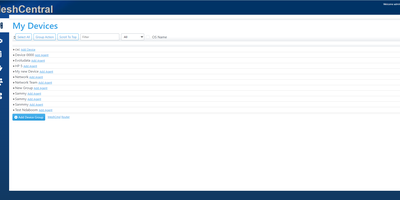
With over 7,000 GitHub stars and continuous development since 2017 by former Intel engineer Ylian Saint-Hilaire, MeshCentral has become the go-to self-hosted alternative to ConnectWise Control and Splashtop for managing devices remotely without per-seat licensing fees. The Node.js server installs via a single npm command and manages Windows, macOS, Linux, and FreeBSD endpoints through lightweight agents that maintain persistent WebSocket connections for real-time remote desktop, terminal access, and file transfer directly in the browser. Intel AMT integration provides out-of-band hardware management including power control and BIOS access even when the operating system is unresponsive. Device groups organize endpoints by location, customer, or function with granular role-based access control for multi-technician environments. Session recording captures remote desktop interactions for compliance auditing, while Wake-on-LAN powers on machines remotely across subnets. The server supports MongoDB for production deployments handling thousands of agents or the embedded NeDB for smaller setups under 200 devices, with a single 8GB VPS comfortably managing 1,500 concurrent agents. Security features include mandatory TLS with automatic Let's Encrypt certificate provisioning, multi-factor authentication via TOTP and FIDO2, SAML-based single sign-on, IP filtering, and HashiCorp Vault integration for secrets management. The web console provides real-time device monitoring with hardware and software inventory, network topology visualization, and customizable branding. TacticalRMM uses MeshCentral as its remote access layer. Running on a dedicated VPS on RepoCloud with guaranteed CPU, RAM, and SSD, full root SSH access, and a browser serial console. Apache-2.0 licensed.
RustDesk Console
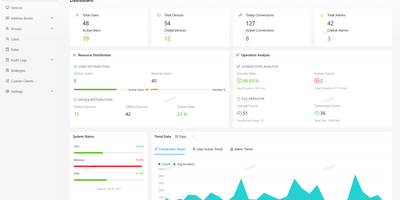
RustDesk Console is a self-hosted management panel for RustDesk that gives administrators one place to oversee devices, address books, access policies, and audit trails across a whole remote desktop fleet. The dashboard opens with overview statistics, trend charts, and real-time monitoring across several metrics. Device pages group machines, track online status, apply batch operations, and force-disconnect a session when something looks wrong. Personal and shared address books carry tags, peer entries, and access rules, so teams can hand out the right connections to the right people. Strategies can be assigned to a device, a user, or a group, with priority resolution deciding which wins and heartbeat delivery pushing settings to clients. Four audit logs record connections, file transfers, security alarms, and console operations for compliance reviews. Sign-in supports TOTP two-factor codes, passkeys, OIDC single sign-on, and email verification. An optional server profile runs hbbs and hbbr beside the console and manages relay nodes from the same interface. Running on a dedicated VPS on RepoCloud with guaranteed CPU, RAM, and SSD, full root SSH access, and a browser serial console. AGPL-3.0 licensed.
LabTether
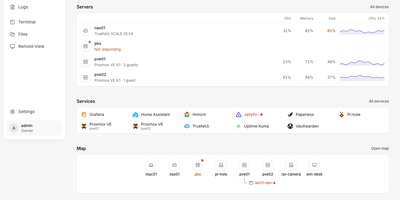
LabTether is a self-hosted control hub that puts every machine, VM, and container in your homelab on one screen. The dashboard surfaces what needs attention first, then lists servers with CPU, memory, disk, and 24-hour charts beside the services you run. Connect Proxmox VE, Proxmox Backup Server, TrueNAS, Portainer, and Home Assistant with an API key, and add agents on Linux, macOS, or Windows machines for live metrics. Open a terminal, a file browser, or a VNC, RDP, SPICE, or WebRTC remote desktop on any node from the browser. Alert rules, notification routes, and maintenance silences group related problems into incidents you can track to the fix, and a dependency map shows what else goes down before you reboot something. Saved actions run on a group or a schedule, webhooks forward hub events, and package updates start with a dry run. A built-in MCP server hands Claude, Cursor, or any MCP client 32 tools, each API key limited to the scopes you allow. Two-factor login, OIDC single sign-on, owner, admin, operator, and viewer roles, and an audit log keep access tidy. Running on a dedicated VPS on RepoCloud with guaranteed CPU, RAM, and SSD, full root SSH access, and a browser serial console. Apache-2.0 licensed.