MiroTalk
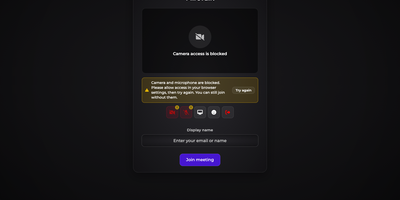
MiroTalk P2P gives your team browser meeting rooms with video, screen sharing, and chat, where the media travels directly between participants instead of through a rented cloud. Create a room, send the link, and guests join from any modern browser with nothing to install and no account to create. Calls carry video at high frame rates, and anyone can share a full screen, one window, or a browser tab to walk through documents and slides. The built-in recording captures screen, camera, and audio in the browser, ready to download and pass along after the meeting. Chat supports Markdown formatting and emoji, and the room also packs a collaborative whiteboard, a shared text editor, live polls, and breakout rooms. Files move between participants inside the call, and speech recognition plus voice commands keep hands free during long sessions. Hosts lock rooms with passwords, hold arrivals in a lobby, and require approval before strangers wander in. Sign-in through OIDC, per-room JWT credentials, and host protection controls keep recurring meetings behind your own identity provider. A full REST API creates rooms from your own tools, Slack and Mattermost commands start calls from chat, and an iframe embed drops meetings into existing pages. The interface speaks 133 languages, and an optional ChatGPT assistant joins rooms to answer questions in the conversation. Running on a dedicated VPS on RepoCloud with guaranteed CPU, RAM, and SSD, full root SSH access, and a browser serial console. AGPL-3.0 licensed.

Galene
Galene is a self-hosted video conferencing system that runs full meetings, lectures, and tutorials in the browser while asking remarkably little of the server it runs on. Every group gets its own page with video tiles, a user list, and a chat pane, and participants join from desktop or mobile browsers with nothing to install. Presenters share a screen or individual windows, stream a video or audio file straight from disk, and switch to blackboard mode when a slide needs resolution more than frame rate. Moderators can warn or remove participants and lock the group, raise-hand status keeps question queues orderly, and anyone can blur their background or exchange files directly with peers. Groups are simple configuration files: set public or private rooms, passwords or login tokens, client limits, and expiry windows, then create users with moderator or presenter privileges using the galenectl command. Automatic subgroups spin up identical breakout rooms on demand, the pattern its author uses to supervise forty students working in pairs during computer science practicals. Calls stay smooth on poor networks because the server adapts video quality per participant, recovers lost packets, and relays media through its built-in TURN server when firewalls block direct paths. Running on a dedicated VPS on RepoCloud with guaranteed CPU, RAM, and SSD, full root SSH access, and a browser serial console. MIT licensed.
Jitsi Meet
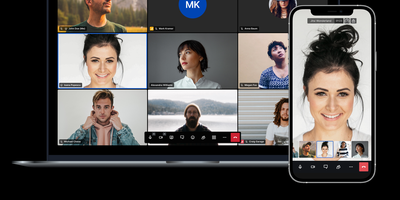
Backed by nearly 30,000 GitHub stars and powering millions of meetings through meet.jit.si, Jitsi Meet is the open-source video conferencing platform that runs entirely in the browser with no plugins or downloads required. The WebRTC-based architecture delivers HD audio and video through the Jitsi Videobridge selective forwarding unit, while Prosody handles XMPP signaling and Jicofo manages conference focus and orechestration. End-to-end encryption uses AES-GCM 128-bit keys exchanged via the Olm protocol, protecting audio, video, and screen sharing through the Insertable Streams API in Chromium-based browsers. Moderators can split participants into breakout rooms with individual password protection, enable lobby waiting rooms for admission control, set meeting passwords, and track speaker statistics with per-participant talk time metrics. Virtual backgrounds leverage TensorFlow.js body segmentation with WebGPU and WebGL acceleration, automatically adapting quality through device tier detection. Server-side recording and YouTube live streaming run through Jibri, while Jigasi provides a SIP gateway for PSTN dial-in and speech-to-text transcription. The platform includes in-meeting chat with private conversations, polls, raise-hand functionality, emoji reactions, and tile and speaker view layouts. Mobile applications for iOS and Android complement the web client, and both web and native SDKs enable embedding video conferences into custom applications. Running on a dedicated VPS on RepoCloud with guaranteed CPU, RAM, and SSD, full root SSH access, and a browser serial console. Apache-2.0 licensed.
Apache OpenMeetings
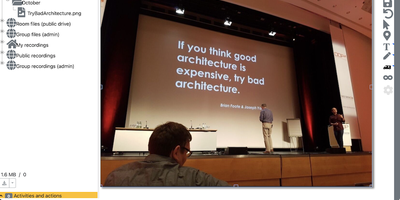
Apache OpenMeetings puts the whole meeting in the browser: cameras, a shared whiteboard, the agenda document, and recording controls, all running on your own server. Participants join rooms with audio and video, audio only, or video only, choose camera resolutions and devices, and present by sharing a screen or a single window at selectable quality. Moderators control the floor person by person: who may draw on the whiteboard, present, share or record the screen, mute others, or speak while everyone else stays muted. Multiple whiteboards hold drawings, text, clip art, and imported documents in PDF, office, and image formats, rescaling to fit every participant's screen, and boards can be saved into the drag-and-drop file explorer for the next session. Every meeting can be recorded with all audio streams exactly as heard, then downloaded as MP4 or played back in the integrated player, and the built-in calendar schedules rooms and sends invitations. Breakout rooms split classes and workshops into groups, polls gather decisions live, private and group chat runs beside the video, and telephone users can dial into rooms through the Asterisk SIP integration. Running on a dedicated VPS on RepoCloud with guaranteed CPU, RAM, and SSD, full root SSH access, and a browser serial console. Apache-2.0 licensed.