NovelVids
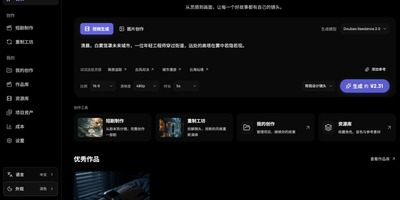
Short dramas and illustrated stories come together in NovelVids, a workbench that carries a project from manuscript import to assembled episode. Import a TXT, Markdown, DOCX, or PDF manuscript, review the chapter boundaries and story analysis, then develop the story chapter by chapter. Characters, locations, and props live in an asset library with reference images, aliases, variants, and voice bindings that stay linked to every shot. The storyboard editor holds shot descriptions, complete prompts, reference media, and generation parameters, and each generated result lands beside its inputs for inspection. An infinite canvas connects assets, videos, and enhanced results, and you can switch between storyboard and workflow views of the same project. Ask the creation assistant to revise selected objects, inspect the recorded diffs, and undo supported edits before anything regenerates. Start image or video clips from the home page by choosing a model, attaching reference images, video, or audio, and reviewing the estimate first. Remake studio analyzes reference videos you are authorized to use and converts their shots into an editable project. Track generation tasks and versions, assemble finished episodes, and optionally enhance resolution at the end. Running on a dedicated VPS on RepoCloud with guaranteed CPU, RAM, and SSD, full root SSH access, and a browser serial console. MIT licensed.
DramaClaw
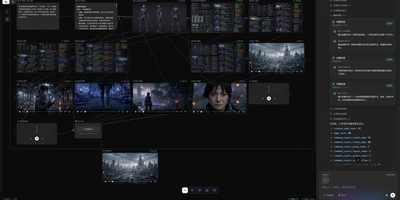
DramaClaw is a self-hosted production line that carries a manuscript or screenplay all the way to a finished AI drama, handling story structure, characters, storyboards, voices, and final cuts inside one workspace. Drop in a novel manuscript or a Fountain screenplay and it builds episodes, characters, and scenes for you, then plans multi-episode arcs and writes scripts in adaptive, literal, or staged modes with review-and-repair loops. The shared asset library keeps every character, scene, prop, and voice organized once, so faces stay consistent across episodes while portraits and per-episode variants handle costume and age changes. Storyboards and first frames are generated beat by beat, emotion-aware voice-over is synthesized per character, and episodes are assembled and exported with subtitles and the full asset pack. For finer control, the XiaHua canvas gives you 18 node types for images, video, audio, scripts, and 3D sets, with a wall of 45 short-drama styles and tools for relighting, outpainting, upscaling, and camera moves. Xia Director, the built-in agent, turns a plain-language brief into a node graph, runs it with progress tracking, and can promote winning results from the canvas back into the series. You pick the models: paste an official gateway key, or route Seedance, Kling, Hailuo, Sora, ComfyUI, and other channels through the bundled gateway, while external agents drive the same pipeline over MCP. Running on a dedicated VPS on RepoCloud with guaranteed CPU, RAM, and SSD, full root SSH access, and a browser serial console. Elastic License 2.0 licensed.
Toonflow
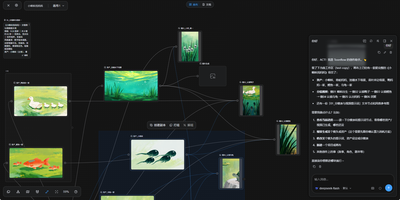
Toonflow, an open-source AI studio for short dramas, animated comics, and short videos, lets you plan, generate, and direct every shot as nodes on a canvas that runs on your own server. Text nodes hold the story, characters, and shot descriptions. Image generation nodes create character sheets with close-up, front, side, and back views. Video generation nodes take numbered reference images. Aspect ratio, resolution, and duration options depend on the selected model. Connectors link the nodes, so a character sheet made once is reusable in every shot. The 3D director's studio blocks a scene with camera framing, lighting, and keyframes. Export the scene as a video node. An assistant panel reads the project and reports which assets and videos have been generated. It offers next steps: generate a shot, revise a prompt, or start a new canvas. Finished images and clips preview on the canvas and download for further production work. Models come from third-party APIs, local ComfyUI workflows, or local language models. Plugins for nodes, skills, tools, and agents install from the marketplace. MCP links external tools and services. Projects, settings, and plugins live in one data directory. The interface offers 21 languages. There is no built-in login, so a firewall or an authenticating reverse proxy decides who can reach it. Running on a dedicated VPS on RepoCloud with guaranteed CPU, RAM, and SSD, full root SSH access, and a browser serial console. MIT licensed.
Mix Studio
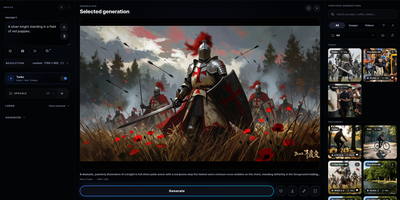
Mix Studio gives ComfyUI a calm, touch-friendly workspace where image and video generation happens through focused controls instead of a fresh node graph for every job. The Create view runs curated families including Krea 2, Flux 2 Klein, and Qwen Image with exact resolution, seed, batching, LoRA, and prompt enhancement controls. Region mode places aspect-correct boxes on the canvas, each carrying an independent prompt, LoRA stack, and reference image, then resolves them into one coherent generation. Edit mode combines whole-image editing, identity editing, and multi-reference Remix flows with masks, inpainting, outpainting, and source preservation. Video workspaces cover text-to-video, first and last frame control, reference-to-video, character animation, face lipsync, and motion transfer driven by a trimmed performance clip. An experimental photo-to-3D path turns a picture into an orbit video and a Gaussian splat you can view interactively and export. Upscaling pairs synchronized pan and zoom with a movable before-and-after divider for detail inspection. The Library keeps generations and uploads searchable with folders, groups, metadata, reusable settings, recoverable trash, and ZIP export, and separate profiles can carry PIN access. Live queue progress, cancellation, guided setup with dependency checks, and automatic backups keep daily operation orderly. Running on a dedicated VPS on RepoCloud with guaranteed CPU, RAM, and SSD, full root SSH access, and a browser serial console. GPL-3.0 licensed.
37Studio
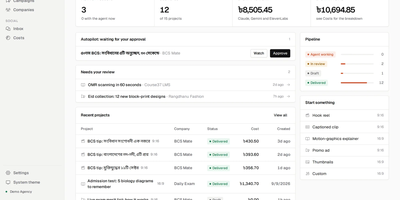
37Studio is a self-hosted AI video studio and social media desk that turns a short brief into on-brand videos, posts them to nine social platforms, and drafts replies to the messages that come back. Paste a company website and it builds a brand library of logos, photos, fonts, and colours, plus a knowledge base every later video and reply draws on. An editor agent builds each video as an animated composition, checks its own rendered frames, and takes revision requests in plain words. The same workflow yields hook reels, captioned clips, explainers, podcast clips, promo ads, and thumbnails, and any finished video can become a template. A two-hour recording becomes a shelf of short clips: transcription runs locally in about 100 languages at no cost, and YouTube or Drive links import directly. Publishing reaches Facebook Pages, Instagram, YouTube, TikTok, LinkedIn, X, Pinterest, Bluesky, and Mastodon in one action, now or scheduled, each with its own caption. Autopilot goes further: state a content plan in one sentence and a fresh video is made before every slot, waiting for one-click approval. Messenger, Instagram, and WhatsApp messages and social comments land in one inbox, with replies drafted in the customer's language under rules each brand sets. Exact AI spend shows on every project, and an MCP server lets your own AI tools run the studio. Running on a dedicated VPS on RepoCloud with guaranteed CPU, RAM, and SSD, full root SSH access, and a browser serial console. MIT licensed.