TeXlyre
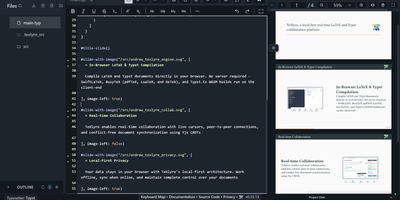
In TeXlyre, two coauthors edit the same LaTeX or Typst file at once, and the PDF compiles inside the browser tab instead of on someone else's server. Start from a template: arXiv preprint, IEEE paper, Tufte book, Beamer deck. pdfTeX, XeTeX, and LuaTeX compile with BibTeX and Biber. Errors turn into readable cards that jump to the failing line. Live cursors show who is typing where. A shared link brings coauthors in, no accounts needed. Chat sits beside the editor, and comments can be discussed and resolved. Tracked insertions and deletions land in a review panel to accept or reject. Draw.io and TikZ editors open inside the project for shared diagrams. MathLive edits a formula under the cursor with a virtual keyboard. A bibliography panel tidies BibTeX, matches DOIs, and imports from Zotero and OpenAlex. Large files travel straight from one collaborator's browser to another. Projects export as ZIP, sync to a local folder, or back up to GitHub, GitLab, Gitea, and Codeberg. Vim, Emacs, and Helix keybindings are one setting away. The app installs as a progressive web app and works offline. Language servers like LTeX LS Plus, Harper, and Tinymist plug in through recipes beside your own signaling and TeX Live package servers. Running on a dedicated VPS on RepoCloud with guaranteed CPU, RAM, and SSD, full root SSH access, and a browser serial console. AGPL-3.0 licensed.
Overleaf
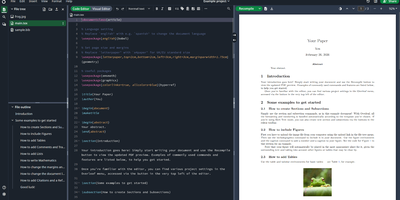
Multiple authors can edit the same LaTeX document simultaneously in the browser with live cursor tracking, conflict-free merging, and instant PDF compilation on every save. Overleaf Community Edition brings the collaborative editing experience that millions of researchers and academics rely on, with no compile time limits, storage quotas, or collaborator caps imposed by the hosted tiers. The web editor provides syntax highlighting, auto-completion, and bracket matching alongside an integrated PDF preview panel powered by a bundled TeX Live distribution supporting pdfLaTeX, XeLaTeX, and LuaLaTeX engines. The file tree panel organizes multi-file projects with separate files for chapters, figures, bibliography references, and style definitions. BibTeX and Biber handle bibliography management, and detailed compilation logs offer clickable error navigation to the exact source line causing each issue. Users upload images, PDFs, and data files directly through the browser, and a template gallery provides starting points for journal articles, conference papers, theses, presentations, and CVs. Over 17,800 GitHub stars and a decade of active development anchor the project. The application runs as containerized microservices including the Node.js web application, MongoDB for persistence, and Redis for session management. Running on a dedicated VPS on RepoCloud with guaranteed CPU, RAM, and SSD, full root SSH access, and a browser serial console. AGPL-3.0 licensed.
Aldine
Paper co-authors usually trade .tex files by email or pay for a hosted editor seat by seat; Aldine replaces both with a self-hosted LaTeX workspace where the whole team types in one document at once and sees a typeset PDF seconds later. Live cursors and presence show who is editing which paragraph, and the underlying sync is conflict-free, so two authors can rewrite the same section without overwriting each other. Every project is a real git repository: branch a draft, edit it independently, and merge it back from the interface when the argument holds together. Connect GitHub, GitLab, Gitea, or Forgejo to push and pull without leaving the editor, watch ahead and behind indicators, resolve conflicts, and open a pull or merge request on the merged result. Moving in is painless, since an exported Overleaf project ZIP dropped on the home screen imports with its root file detected and its first typeset automatic. Citations come from your own Zotero library or a single collection, kept in sync as a .bib file and inserted from a search panel or \cite autocomplete. Reviewers select text and leave anchored, threaded comments, optionally with a suggested replacement the author accepts in one click. Compiles run in a sandboxed container with no network access, warm recompiles land in about two seconds, and errors jump to the offending line. Running on a dedicated VPS on RepoCloud with guaranteed CPU, RAM, and SSD, full root SSH access, and a browser serial console. AGPL-3.0 licensed.
LibrePaper
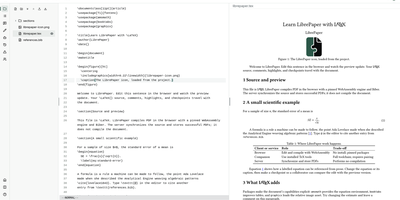
Emailed copies of the same document, each with a different filename and a different set of edits, are where collaborative writing goes to die. LibrePaper keeps one living document in the browser instead: start a project in HTML, Markdown, Typst, LaTeX, or Quarto, or upload an existing one, and the editor renders the compiled result beside the source as you type. Readers highlight the exact passage they mean and comment on it, suggested edits land as tracked changes, and threads resolve on the text in real time. Finished work publishes to its own separate host, so scripts and interactive figures inside a document can never reach a reader's sign-in session. Nobody manages another password: sign-in runs through GitHub, Google, Microsoft Entra ID, ORCID, or any OpenID Connect provider, per-provider lists decide who may publish and who may only comment, and anonymous comments can be switched on for outside reviewers. Every project exports as a complete, independent copy from the command line, which also administers the deployment and can serve a document's tools to an AI agent over MCP. Operators get graphs, account management, and moderation, with per-account storage quotas, upload limits, and retention rules keeping a public instance under control. Four Docker containers behind Caddy with automatic HTTPS, one configuration file, and nightly backups of database and files complete the deployment. Running on a dedicated VPS on RepoCloud with guaranteed CPU, RAM, and SSD, full root SSH access, and a browser serial console. MIT licensed.
AI Researcher
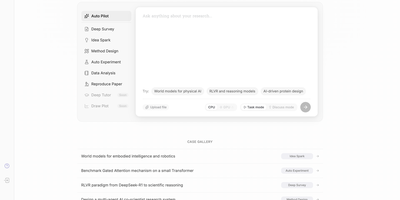
Accepted as a NeurIPS 2025 Spotlight paper and rapidly approaching 6,000 GitHub stars, AI-Researcher from the Hong Kong University Data Science Lab delivers the first fully autonomous scientific research system — a multi-agent platform that takes a list of reference papers and returns a complete research contribution with working code, validated experiments, and a formatted academic manuscript. The pipeline orchestrates five distinct phases: a Resource Collector systematically gathers materials from arXiv, IEEE Xplore, ACM Digital Library, Google Scholar, GitHub, and Hugging Face; an Idea Generator performs gap analysis against semantic embeddings to produce 3-5 novel hypotheses with feasibility scores; an Algorithm Designer transforms concepts into functional implementations; a Validation Engine automates testing, performance evaluation, and iterative optimization; and a Manuscript Creator generates polished full-length papers with figures, tables, and citations. The Gradio-based web GUI provides intuitive tabs for environment configuration, example selection, and real-time monitoring of research progress, while the production deployment at novix.science offers immediate browser access without local setup. Scientist-Bench provides a standardized benchmark comprising state-of-the-art papers across diverse AI research domains for evaluating autonomous research capabilities. The system supports multiple LLM providers including OpenAI, Anthropic, Google Gemini, and OpenRouter models with per-task routing for cost optimization. Deploy via Python with pip dependencies or Docker containerization. Running on a dedicated VPS on RepoCloud with guaranteed CPU, RAM, and SSD, full root SSH access, and a browser serial console. Apache-2.0 licensed.
Open Journal Systems
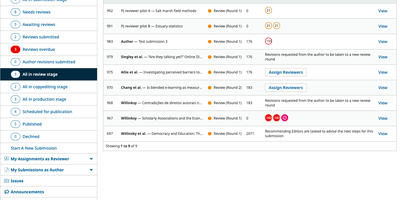
Running a scholarly journal means tracking every manuscript from first submission to published issue, and Open Journal Systems (OJS) keeps that whole journey in one web application. Authors submit through a step-by-step wizard, and editors follow each manuscript on a dashboard with views for submissions that need reviewers, await reviews, are overdue, or sit in copyediting, production, or scheduled stages. Peer review can be double-anonymous, single-anonymous, or open, with due dates, reminders, review forms, and multiple review rounds. Editors assign participants to each submission, request revisions, accept or decline, and manage galleys, the PDF, HTML, or other full-text files readers download, including a JATS XML preview for journals that publish in XML. Articles are grouped into volumes and issues with covers and sections, then published to a mobile-friendly journal website with archives and search. Journal managers pick a theme (Default, Pragma, Manuscript, Classic, Health Sciences, or Immersion) and post announcements. A DOI manager tracks which articles and issues have DOIs and whether they are registered, and indexing support covers Google Scholar, DOAJ, Crossref, DataCite, and PubMed, with OAI-PMH for harvesters. Statistics chart daily or monthly article views by abstract, PDF, and HTML, report editorial trends like days to first decision, and include COUNTER R5 reports. One installation can host several journals, each with its own theme, languages, and roles. Running on a dedicated VPS on RepoCloud with guaranteed CPU, RAM, and SSD, full root SSH access, and a browser serial console. GPL-3.0 licensed.
Dataverse
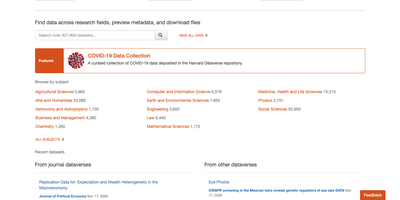
A shared drive full of spreadsheets is not a research data archive; Dataverse is repository software that gives each dataset a citable page, metadata, versions, and a permanent identifier. Universities, libraries, and research groups arrange holdings in nested collections, each with its own branding, featured subcollections, and search facets. Metadata comes from citation, geospatial, social science, astronomy, and life sciences blocks, and administrators add custom fields and controlled vocabularies without writing code. Publishing assigns a DOI through DataCite or Crossref, or a Handle or PermaLink, and each dataset shows a formatted citation with download counts and Make Data Count statistics. Tabular files in CSV, Excel, SPSS, Stata, R, and SAS formats are ingested with variable-level metadata. Previewers show images, text, spreadsheets, maps, and notebooks on the page. Every published change creates a new version, and a versions table lets readers move between them. Roles reach down to individual files, with restricted files and access requests, embargoes, guestbooks, terms of use, and anonymous preview links for peer reviewers. Records export as DDI, Dublin Core, DataCite, schema.org JSON-LD, and Croissant, and OAI-PMH lets installations harvest one another. Deposits can be automated through a REST API, SWORD, and client libraries for Python, R, and Java. Integrations reach Jupyter, Globus, DataLad, and OJS. Running on a dedicated VPS on RepoCloud with guaranteed CPU, RAM, and SSD, full root SSH access, and a browser serial console. Apache-2.0 licensed.
Thesys
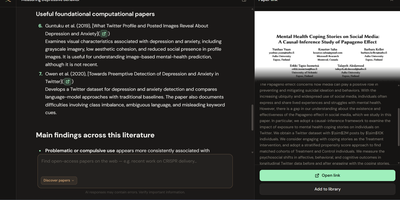
Thesys is a research workspace where you search academic papers, build your own library, and ask questions that answer with citations you can click straight onto the highlighted passage of the PDF. Discovery searches OpenAlex and arXiv in one pool, so a paper you find can be previewed and added to your library without leaving the workspace. Uploaded PDFs are ingested locally, and when you ask a question the answer cites its sources in the document, jumping the preview to the retrieved passage with either a full-passage or a tighter focused highlight. Reader mode opens a paper full-width so you can select any span of text and ask about that exact passage. Document summaries follow a consistent structure of problem statement, methodology, key findings, limitations, and metrics, with citations that still land on the source text. Figures and flowcharts are described during ingest, so questions and summaries can reference them too. When two papers disagree, Compare mode takes one claim and classifies each retrieved pair as corroboratory, contradictory, or neutral, with confidence shown in a side panel. Your bibliography exports as BibTeX, RIS, EndNote, or CSV for whatever reference manager you already use. Papers, embeddings, and chat history stay on your own disk the whole time. Running on a dedicated VPS on RepoCloud with guaranteed CPU, RAM, and SSD, full root SSH access, and a browser serial console. AGPL-3.0 licensed.