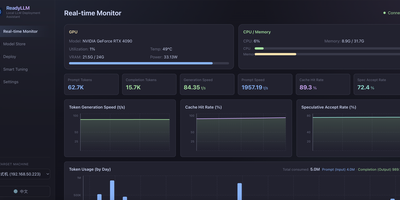
ReadyLLM
Your inference server should not sit mostly idle while a model crawls along at ten tokens per second, so ReadyLLM gives you a visual way to deploy, watch, and tune LLMs until the hardware is actually earning its keep. Add the machine under your desk or a remote box over SSH, let hardware detection read its GPU, VRAM, CPU, and memory, and get model recommendations that fit what you own instead of wishful downloads. A model store catalogs text, image, and video models with parameter counts, precision, resolutions, and real weight filenames, background downloads from multiple sources, and integrity checks when they land. One click starts or stops llama.cpp, vLLM, or SGLang services, installs a missing engine matched to your GPU backend, and leaves runtime parameters open for manual tweaks. Live curves track GPU utilization, memory, throughput, and latency as requests flow. When speed disappoints, two-phase auto tuning searches the knobs that matter, checks VRAM feasibility before it wastes your time, and benchmarks honestly against latency, throughput, or prefill goals; an AI tuning mode can reason through the same loop across several rounds. Beyond chat models, ComfyUI generation covers text-to-image and text-to-video, storyboards, shot-by-shot long video, and upscaling, with prompts optionally expanded first. Running on a dedicated VPS on RepoCloud with guaranteed CPU, RAM, and SSD, full root SSH access, and a browser serial console. MIT licensed.
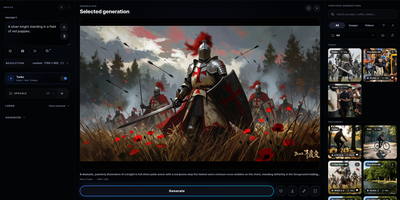
Mix Studio
Mix Studio gives ComfyUI a calm, touch-friendly workspace where image and video generation happens through focused controls instead of a fresh node graph for every job. The Create view runs curated families including Krea 2, Flux 2 Klein, and Qwen Image with exact resolution, seed, batching, LoRA, and prompt enhancement controls. Region mode places aspect-correct boxes on the canvas, each carrying an independent prompt, LoRA stack, and reference image, then resolves them into one coherent generation. Edit mode combines whole-image editing, identity editing, and multi-reference Remix flows with masks, inpainting, outpainting, and source preservation. Video workspaces cover text-to-video, first and last frame control, reference-to-video, character animation, face lipsync, and motion transfer driven by a trimmed performance clip. An experimental photo-to-3D path turns a picture into an orbit video and a Gaussian splat you can view interactively and export. Upscaling pairs synchronized pan and zoom with a movable before-and-after divider for detail inspection. The Library keeps generations and uploads searchable with folders, groups, metadata, reusable settings, recoverable trash, and ZIP export, and separate profiles can carry PIN access. Live queue progress, cancellation, guided setup with dependency checks, and automatic backups keep daily operation orderly. Running on a dedicated VPS on RepoCloud with guaranteed CPU, RAM, and SSD, full root SSH access, and a browser serial console. GPL-3.0 licensed.
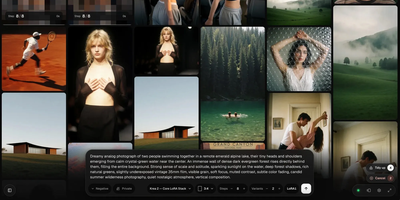
HEISS UI
ComfyUI's node graph is where workflows are built, not where pictures get made, and HEISS UI is the calm studio that sits on top of your ComfyUI server for the daily prompt, wait, look, tweak loop. Thirty model families work out of the box, from SD 1.5 and SDXL to Flux.2, Qwen-Image, Krea 2, and Wan 2.2, and missing text encoders, VAEs, or node packs each get a Download button, with Get all for the lot. Pick 2K and the model draws at 2048 in one run with no upscale in between, or send any finished picture to 2K or 4K with SeedVR2 in one click. Import your own workflow and it becomes clean controls over the same graph, with usual inputs connected and guesses marked for review. Paint over part of a picture and say what it becomes, and only that part changes, with inpainting across 18 image families and no extra nodes. The gallery auto-groups ten takes of one idea into a single tile, and opens on your phone while your rendering machine does the work. A Hidden vault locks private images behind Touch ID, Windows Hello, or a password; new PNGs can carry Civitai-ready metadata, and Zen mode shows only prompt and picture. Run it beside ComfyUI with Docker or npm on port 8787, or point it at ComfyUI on another machine. Running on a dedicated VPS on RepoCloud with guaranteed CPU, RAM, and SSD, full root SSH access, and a browser serial console. MIT licensed.