Judge0
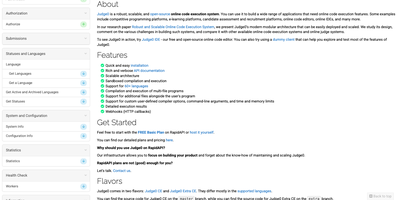
Judge0 is a code execution service that takes source code over a simple HTTP API, compiles and runs it inside a locked-down sandbox, and hands back exactly what the program printed, how long it took, and how much memory it used. Send a snippet in any of more than 90 languages, from Python, JavaScript, Rust, and Go to C, Java, and Haskell, and pick the compiler or interpreter variant you need. Each run accepts standard input, command-line arguments, and custom compiler flags, then reports standard output, errors, and a precise verdict covering accepted, wrong answer, time limit, compilation error, or runtime failure. Per-submission controls cap CPU time, memory, stack size, and output file size, so a fork bomb or an infinite loop dies inside its fence instead of disturbing the host. Submissions run one at a time or in batches, and a synchronous mode answers in the same request for snippets that finish fast. Webhooks call your application the moment a long job completes, which keeps polling loops out of worker queues and classrooms alike. Coding platforms grade student work with it, hiring tools run candidate solutions against hidden tests, and AI agents execute the code they generate before trusting it. Official Python and JavaScript SDKs wrap the raw requests, so most integrations shrink to choosing a language and reading the result fields. Running on a dedicated VPS on RepoCloud with guaranteed CPU, RAM, and SSD, full root SSH access, and a browser serial console. GPL-3.0 licensed.
Hopp
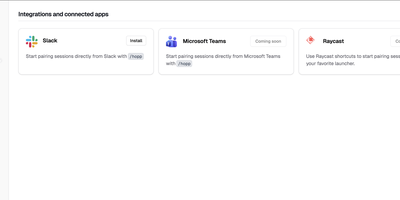
Meeting-app screen sharing was built for slide decks, and it shows when two engineers chase a bug across a codebase together; Hopp rebuilds screen sharing for exactly that job. Click a teammate and their screen opens in under a second: no meeting links, no calendar invites, no "can you see my screen?" ritual. Both sides get real keyboard and mouse control with sub-100ms latency, so guests type, click, and navigate instead of dictating instructions. Rooms hold up to 10 people for mob programming, code reviews, and onboarding, all with shared cursors so everyone can point at the line they mean. When words fail, draw or type annotations directly on the shared screen. The stream defaults to 4K, so small fonts and subtle diffs stay readable, and noise-cancelling audio keeps voices clear with no separate call app. You share any application, not just a browser tab, so debugging in Grafana or reviewing a design works as well as editing code. App Veil hides the windows you pick, such as password managers or chat, from the shared screen. Slack starts sessions with one /hopp command, and custom keyboard shortcuts keep frequent actions in flow. The server is yours: a Docker Compose stack with PostgreSQL, Redis, LiveKit, and Caddy auto-TLS serves the web dashboard and media, and the desktop app points at your backend, not a vendor cloud. Running on a dedicated VPS on RepoCloud with guaranteed CPU, RAM, and SSD, full root SSH access, and a browser serial console. AGPL-3.0 licensed.
RStudio Server
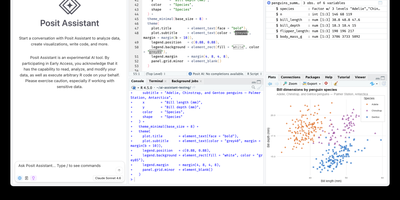
Open a browser tab, sign in, and the whole RStudio workbench is waiting there, running against R on a Linux server instead of your laptop. The familiar four-pane layout holds a source editor, an R console, Environment and History tabs, and Files, Plots, Packages, Help, and Viewer tabs. The editor opens R scripts, R Markdown, Quarto, and Python files, with code completion, diagnostics, section outlines, and a visual mode for Quarto documents. A Terminal tab and a Python console sit beside the R console, and the Data Viewer sorts, filters, and searches data frames and nested lists. Editor breakpoints and tracebacks help debug functions, while Background Jobs run long scripts in separate R sessions so the IDE stays usable. Shiny apps and Plumber APIs run as background jobs with live reload, and a Git pane handles diffs, commits, pushes, and branches. The Connections tab browses databases, and finished reports go to Posit Connect, shinyapps.io, Quarto Pub, or RPubs. Optional Posit Assistant adds an AI chat pane that works with the model provider you choose, and administrators can switch it off. Because everything runs server-side, a class, a lab, or a team can share one large-memory machine and keep computation next to the data without installing anything locally. Running on a dedicated VPS on RepoCloud with guaranteed CPU, RAM, and SSD, full root SSH access, and a browser serial console. AGPL-3.0 licensed.
DOMjudge
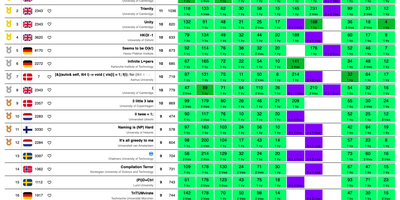
Built for ICPC-style programming contests, DOMjudge takes team submissions, judges them in a restricted sandbox, and posts a live scoreboard. Each team gets its own page. There they read the problem set, submit source code from the browser or a command line client, follow verdicts, and send clarification requests. Judges see every submission, judging run, and output diff. They verify results and rejudge a single submission or everything for a language, problem, team, or judgehost. Administrators schedule activation, start, freeze, end, and unfreeze times, import teams, categories, affiliations, and problems in bulk, and watch a traffic-light status for every team. The public scoreboard freezes for the final stretch and exports as a static HTML page. Judgehosts compile and run each solution with time and memory limits in languages such as C, C++, Java, Python, Kotlin, Go, and Haskell, with custom validators and interactive problems when a task calls for them. Balloon runners get a delivery queue. Clarifications sort into categories. Open contests accept self-registration. The Contest API and event feed connect external scoreboards, and a shadow mode compares results against another system. Running on a dedicated VPS on RepoCloud with guaranteed CPU, RAM, and SSD, full root SSH access, and a browser serial console. GPL-2.0 licensed.
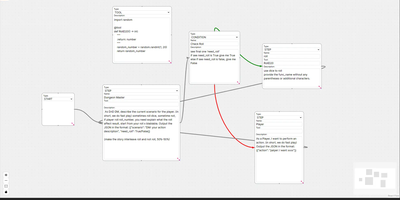
LangGraph GUI
Building LangGraph agents in code means imagining the graph; LangGraph GUI turns that graph into something you draw, wire, and run from the browser instead. You place a start node, add step nodes, and drag edges between ports to define the flow, with cycles created by simply connecting nodes back toward each other. Condition nodes split execution into green true paths and red false paths, info nodes append context to stage output, and subgraph nodes run a whole named graph inside another one. Tool steps call real Python functions that you define in tool nodes with the familiar decorator style, so file saving, lookups, and custom logic sit inside the visual flow. Graphs save to JSON on your computer, load back for editing, and upload to the server as workflow files ready to execute. You configure which LLM to use and its API key in the panel, run against local models through Ollama or hosted APIs, then download every file the run produced in the workspace. Files upload to the server workspace as working environment, and a cache clean clears it between runs. Example graphs for role-playing loops, lottery branch switches, and tool-using flows show patterns you can copy and refine with your own prompts. Running on a dedicated VPS on RepoCloud with guaranteed CPU, RAM, and SSD, full root SSH access, and a browser serial console. MIT licensed.