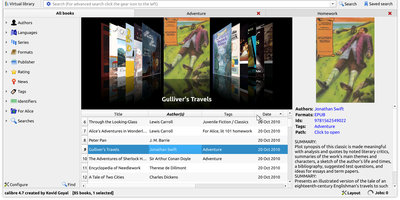
Calibre
Serious readers organize, convert, edit, and serve their e-book libraries with Calibre - the definitive open-source e-book manager. This deployment runs the full Calibre desktop application on your server, accessible from any browser, so your library lives in one authoritative place instead of scattered across devices. Its conversion engine is the best in the business, translating between every major format - EPUB, MOBI, AZW3, PDF, DOCX, and dozens more - with fine control over fonts, margins, metadata, and structure detection. Metadata management downloads covers, descriptions, series info, and identifiers from online sources, and every field is editable in bulk. Beyond cataloging, Calibre includes a full e-book editor for EPUB and AZW3 internals, a news engine that fetches newspapers and magazines from the web on schedule and converts them into e-books, book comparison tools, and device syncing that sends the right format to each connected reader. The built-in content server exposes your library over HTTP so phones, tablets, and e-readers can browse and download remotely. A deep plugin ecosystem extends everything - metadata sources, format support, store integrations. For power users, the complete CLI (calibredb, ebook-convert) enables scripted library automation. Your books, your metadata, your server - permanent and DRM-free storage under your control.
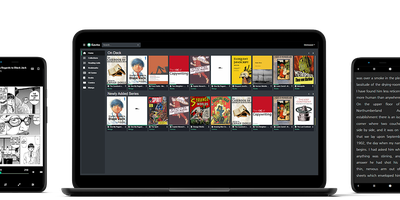
Kavita
Manga, comics, ebooks, and light novels get a streaming-service-style home in Kavita - a fast, cross-platform reading server for the DRM-free collection you share with family and friends. It natively serves CBZ, CBR, CB7, ZIP/RAR/7z archives, raw images, EPUB, and PDF, with hand-crafted web readers per format: webtoon scrolling, single and dual-page spreads with advanced caching for the comic reader, and a book reader with adjustable fonts, spacing, margins, color themes, and column modes. Reading progress tracks per user, so everyone resumes exactly where they stopped on any device. Metadata parses from filenames, ComicInfo.xml, and EPUB fields, feeding index-backed search, smart filters, collections, reading lists with CBL import, and Want to Read queues. Role-based user management covers age restrictions, per-library access, and OIDC authentication. An OPDS feed connects third-party clients - Panels on iOS, Librera on Android, KOReader on e-ink devices - and a comprehensive REST API supports custom integrations. EPUB annotation and highlight support, custom theming, and full localization round it out. Built with .NET and Angular, it handles 50,000+ file libraries without strain; optional Kavita+ adds AniList scrobbling, recommendations, and external metadata.
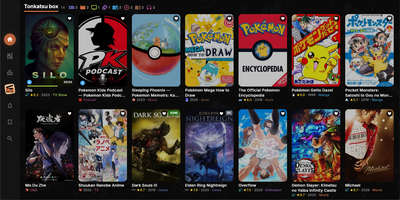
Tonkatsu Box
Tonkatsu Box is a collection manager for games, movies, TV shows, anime, visual novels, manga, books, music, and podcasts that tracks progress, ratings, and shelves for all of them in one place. One search field queries fifteen catalogues, from IGDB, TMDB, and TVmaze to AniList, MangaDex, OpenLibrary, ComicVine, and Podcast Index, and a result can land in several collections at once. Collections organize by platform, genre, or anything else, with grid, list, table, and board views, drag and drop ordering, global tags, and bulk actions across a selection. Progress speaks each medium's grammar: episodes for series, pages for books, chapters for manga, listened track checklists for albums, plus statuses, ratings, dates, and replays. The episode tracker unfolds seasons with posters, stills, air dates, and synopses, and marks one episode, a whole season, or the next unwatched one in a tap. Statistics turn the library into numbers with per type breakdowns, a month by month ribbon, platforms, formats, tags, best against worst, and a shareable summary card. Visual boards arrange posters, notes, and connections on a free canvas, and tier lists and mood grids rank and lay out items for export as PNG. Importers read Steam, Trakt, Simkl, MyAnimeList, AniList, Hardcover, and RetroAchievements libraries, plus JSON and CSV, and collections travel as offline .xcollx packages. Running on a dedicated VPS on RepoCloud with guaranteed CPU, RAM, and SSD, full root SSH access, and a browser serial console. MIT licensed.
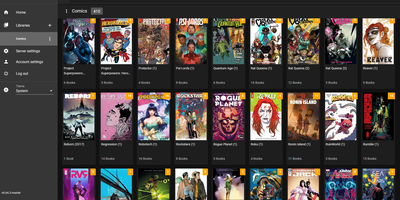
Komga
What Jellyfin is for video, Komga is for comics, manga, BDs, magazines, and eBooks: point it at folders of CBZ, CBR, CBT, PDF, and EPUB files and it becomes a proper library with cover art, embedded metadata import, and per-user reading progress. The responsive web reader handles multiple reading modes - left-to-right for western comics, right-to-left for manga, webtoon scrolling - while collections and read lists organize crossovers and story arcs, with ComicRack .cbl read list import for existing curation. Its openness is the real differentiator: OPDS v1.2 and v2.0 feeds serve virtually every reader app (Panels, Moon+ Reader, Mihon/Tachiyomi, KyBook), with OpenSearch and page-streaming extensions so mobile apps fetch pages on demand instead of whole archives. E-ink support is built in, not bolted on - Kobo devices sync directly against Komga instead of Kobo's servers, with two-way read progress, on-the-fly KEPUB conversion via Kepubify, and optional proxying so official Kobo purchases still work; KOReader sync covers everything else. Multi-user management brings per-library access control, age restrictions, and label restrictions for family setups. Housekeeping tools detect duplicate files and duplicate pages, and a REST API feeds a healthy ecosystem of community scripts. Runs from a single Docker container with embedded SQLite.