MakersVault
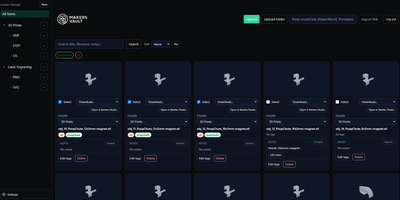
MakersVault gives your scattered 3D print files and creative artwork one searchable home, so you stop loading models into a slicer just to remember what they are. You create folders and subfolders for projects, then drag and drop single files, batches, or whole folders straight into the library from your browser. Every model tile carries a rendered preview, and double-clicking opens an interactive 3D view you can rotate and inspect before downloading anything. Tags attach to any file, batch tagging covers many selected models at once, and tag tabs plus sorting by name, size, type, or folder keep large collections browsable. Notes on individual files record print settings, filament choices, or assembly reminders right beside the model they describe. Imports pull models directly from MakerWorld, Thingiverse, and Printables links, and zip archives prompt you to keep only the files you actually want. Supporting documents ride along with each model and travel inside its ZIP downloads, and prepared print data surfaces printer, material, nozzle, and time estimates on the card. The Open in Slicer button hands a model to your configured slicer through the desktop bridge, and themes from light and dark to neon accents restyle the whole workspace. Running on a dedicated VPS on RepoCloud with guaranteed CPU, RAM, and SSD, full root SSH access, and a browser serial console. MIT licensed.
Deploy