Tiny File Manager
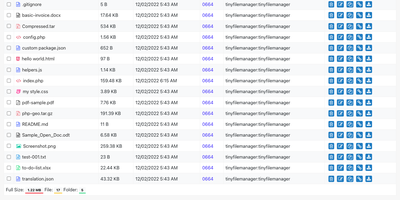
Browse, upload, edit, preview, and archive the files on your server from any web browser, with no FTP client, no shell session, and no database to set up. Tiny File Manager lists every folder in a sortable table showing size, modified date, permissions, and owner, with a search box that filters as you type. Drag files into the upload zone, send several at once, or paste a URL for the server to fetch. Rename items, select several to copy, move, delete, or pack into a zip or tar archive, and extract uploaded archives on the server. Click any text file to open the built-in editor, which offers syntax highlighting for 150+ languages and 35+ color themes, so quick fixes to configs and scripts happen where the files live. Images, audio, video, and text open in a preview without downloading, and every file has a copyable direct link. Give teammates or clients their own accounts, each locked to a root folder you choose, mark accounts read-only, and limit uploads to approved file extensions. Hide folders you never want listed, restrict access with IP allow and block lists, switch between light and dark themes, pick from 35+ interface languages, and use the responsive layout on a phone. Setup is one file copied to a web server, or one Docker container. Running on a dedicated VPS on RepoCloud with guaranteed CPU, RAM, and SSD, full root SSH access, and a browser serial console. GPL-3.0 licensed.
Tessera
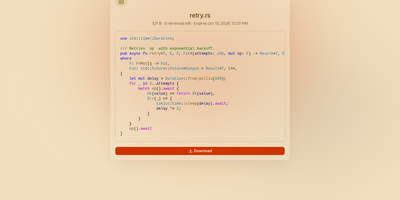
Most file sharing leaves copies lying around forever; Tessera shares things with a built-in goodbye. Drop in a file, a whole folder, a code snippet, or a link and you get back a short code and a URL that anyone can open until it expires or hits the download count you set, at which point it is deleted. Expiry is checked on every request and each retrieval is counted atomically, so a one-time share cannot be raced by two people at once. Passwords can be required before anything is shown, code arrives syntax-highlighted, and images, SVGs, and diagrams preview in the page, with link cards when you paste the URL into chat. Uploads resume after interruptions and stream through the server without ballooning memory at any size. Behind the scenes you choose where bytes live: local disk, S3-compatible storage, Azure Blob, Google Cloud Storage, or WebDAV, several at once, added or retired from the admin panel without a restart. Accounts are optional for a home server, sign-in through OpenID Connect suits a team, and roles with per-account quotas decide who may upload, view everyone's shares, or change settings. Optional malware scanning, anonymous-upload caps, and rate-limited code lookups keep a public instance honest. A CLI and API tokens drive the same endpoints as the web app, so scripts can share and clean up exactly like people. Running on a dedicated VPS on RepoCloud with guaranteed CPU, RAM, and SSD, full root SSH access, and a browser serial console. AGPL-3.0 licensed.
SkySend
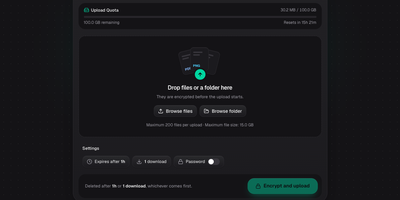
Only the person holding the link can open what you share with SkySend, a self-hosted file and note sharing service that encrypts everything in the browser before it leaves your device. Sending a contract? Drop in the file, several files, or a whole folder, and share the link. Need documents from a client? Send an upload link instead, and whatever comes back is encrypted for you alone. Handing over a password or an SSH key? Write it into a note that burns after reading. Notes can mix text, Markdown, generated passwords, and highlighted code in a single page. Every share can expire by time, stop after a set number of downloads or views, and carry an optional password as a second lock. The command-line client uploads, downloads, and reads notes with the same encryption, and its full-screen mode shows each link as a QR code. No accounts are needed: My Links keeps your shares in the browser, and optional OIDC sign-in limits who may create them. Encrypted uploads sit on local disk or any S3-compatible bucket, and the interface offers 13 languages and three themes. Running on a dedicated VPS on RepoCloud with guaranteed CPU, RAM, and SSD, full root SSH access, and a browser serial console. AGPL-3.0 licensed.
Enclosed
Private text, encrypted before it leaves the browser: Enclosed turns passwords, keys, and other secrets into a link that only its holder can open, with no third-party service in between. Can the server read the note? No. It stores only ciphertext and settings, because the decryption key rides in the part of the link after the # sign, which browsers never send. Want a second lock? Add a password, or generate a random one with a click, and share it by another route. Worried about links lingering in chat history? Pick one hour, one day, one week, or one month, and tick Delete after reading so the first view removes the note, with a warning shown to the recipient beforehand. Need more than text? Attach files by button or drag and drop, and recipients download them one by one or all at once. Sending to a phone? Every finished note offers a QR code, downloadable as SVG or PNG. Setting it up for a team? Restrict note creation to signed-in users, create notes from the command line, and let people read the interface in 17 languages with light, dark, or system themes. Running on a dedicated VPS on RepoCloud with guaranteed CPU, RAM, and SSD, full root SSH access, and a browser serial console. Apache-2.0 licensed.
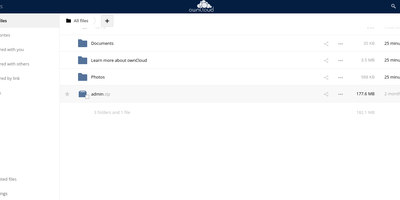
Owncloud
The project that proved organizations could have Dropbox-style convenience with complete data ownership: ownCloud is the original open-source file sync and share platform - the codebase Nextcloud later forked from. This deployment runs the classic ownCloud Server (PHP over PostgreSQL or MariaDB, with Redis caching), the battle-tested edition trusted across enterprises, universities, and public institutions worldwide. The core loop: store files on your server, sync them via desktop clients for Windows, macOS, and Linux plus iOS and Android apps, and access everything through the web interface or standard WebDAV. Sharing is granular - internal users and groups, external recipients via public links with passwords and expiration dates, and federated sharing that connects separate ownCloud instances into one network. Security controls include file firewall rules, multi-factor authentication, encryption, and detailed audit-friendly lifecycle management with versioning and trash-bin recovery. An app marketplace extends the platform, and Web Office integrations bring collaborative document editing through Collabora Online, OnlyOffice, or Microsoft Office Online directly into your files. LDAP and Active Directory integration slots it into existing identity infrastructure. For teams that need a proven, self-hosted alternative to Dropbox or Google Drive - where compliance demands knowing exactly which disk your data sits on - ownCloud remains a foundational choice.
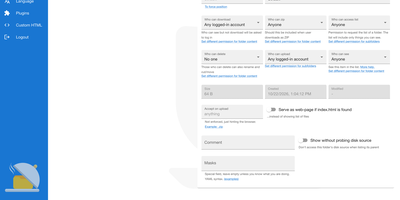
HFS
HFS turns any folder on a server into a file-sharing site that visitors open in a browser, with no upload step and no space or bandwidth cap beyond your own disk. Visitors browse, search, and download single files or whole folders as ZIP archives that start streaming immediately, and interrupted uploads or downloads can resume. A virtual file system lets you arrange and rename what is shared without touching the files on disk, while accounts and per-folder permissions decide who can see, download, upload, or delete. The admin web panel covers HTTPS with built-in certificate generation, bandwidth limits globally or per IP address, geographic blocking by country, and live connection monitoring with disconnect and IP ban. Plugins add thumbnails, share links, LDAP, two-factor sign-in, download quotas, and notifications, and a few lines of JavaScript in the admin panel can change the look or the backend behavior without a restart. The front end speaks 27+ languages, works on phones, and includes a media player for audio and video. Typical uses include sending large files to friends without uploading them first, publishing a download area, and collecting uploads from visitors. Running on a dedicated VPS on RepoCloud with guaranteed CPU, RAM, and SSD, full root SSH access, and a browser serial console. GPL-3.0 licensed.

Chevereto
Build your own image and video sharing site, with public galleries, private albums, and embeddable links, on a server you control. Uploads arrive by drag and drop, clipboard paste, image URL, camera, ShareX, or API, in AVIF, JPEG, PNG, GIF, WebP, BMP, MOV, MP4, and WebM, and chunked transfers handle large files. Lossless JPEG handling fixes orientation and can strip EXIF data. Duplicate detection catches repeat uploads. Tags are created on the fly with autocomplete, camera models become tags automatically, and albums nest into sub-albums with covers, privacy levels, and passwords. Categories, search, and explore views help visitors find things; a bulk importer brings in folders of existing media. Each file gets viewer, direct, thumbnail, and medium links plus HTML, Markdown, and BBCode snippets with one-click copy, and oEmbed lets other sites preview a link. Roles split admin, manager, and user duties, profiles can be private, and two-factor authentication protects accounts. Files sit on local disk or S3-compatible storage, optionally served through a CDN URL. A dashboard tracks usage, color palettes and custom CSS and JavaScript restyle the site, and a single-profile mode suits a personal portfolio. Running on a dedicated VPS on RepoCloud with guaranteed CPU, RAM, and SSD, full root SSH access, and a browser serial console. AGPL-3.0 licensed.
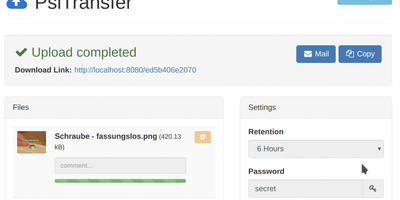
PsiTransfer
Upload files, get a share link, let it expire: PsiTransfer is a self-hosted WeTransfer with no accounts, no logins, and no third-party cloud with size caps and metadata harvesting. The engineering focus is large files over imperfect networks. Uploads use the tus.io resumable protocol, so a dropped connection on a multi-gigabyte video resumes exactly where it stopped once you're back online; downloads support HTTP range headers for the same resilience, and everything streams, so file size is bounded by your disk rather than memory. Files organize into upload buckets with retention you control: expire after a set time (up to weeks) or after a one-time download, with automatic cleanup when links lapse. Recipients need nothing installed - they open the link, preview files in modal views, and grab everything as a zip or tar.gz archive with one click. Buckets can be password-protected (AES-encrypted download lists), and security-through-obscurity is done properly: bucket URLs use hashed UUID tokens and stored filenames are replaced with UUIDs. An optional admin page (enabled by setting an admin password) lists bucket information and storage. The Vue.js frontend ships under 100 KB gzipped and is fully responsive. Honest caveat from the author: no end-to-end payload encryption yet. BSD-licensed, Docker-ready.
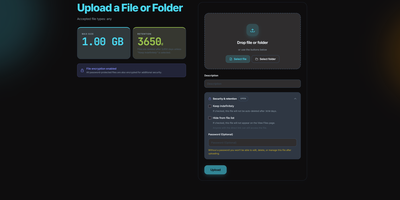
QuickDrop
QuickDrop functions as an ephemeral, self-hosted file distribution node and pastebin that eliminates account requirements for rapid data transfers. Users can drag individual files, paste plain text code snippets, or drop entire folder structures while preserving complete directory hierarchies through automated client manifests. Resumable chunked transfers split multi-gigabyte payloads into resilient blocks, ensuring dependable uploads over unstable network connections. Senders can protect sensitive documents with optional AES encryption at rest, individual passphrase requirements, and automatic metadata stripping that removes GPS coordinates and camera EXIF markers. Granular share token policies restrict access by enforce maximum download quotas, burn-after-reading limits, or strict calendar expiration timestamps. In-browser viewers generate instant previews for code syntax, Markdown documentation, PDF reports, audio tracks, and high-resolution images without downloading files locally. Built-in QR code generators allow mobile devices to retrieve shared payloads instantly across local wireless networks. System operators can govern storage lifecycles through an administrative control panel with configurable retention windows, automated background garbage collection, and custom storage caps. Running on a dedicated VPS on RepoCloud with guaranteed CPU, RAM, and SSD, full root SSH access, and a browser serial console. MIT licensed.
Jirafeau
Upload a file, get a unique download link and a separate delete link - Jirafeau has done exactly this one thing since 2008. It is plain PHP with no database, no mail server, no JavaScript framework, and no external dependencies - files and metadata live on the filesystem, which is why it runs on nearly anything and why it has outlasted most of its imitators. Uploads use the HTML5 file API, so PHP's post_max_size ceiling does not constrain file size, with live progress showing speed, percentage, and time remaining. Every upload takes options: expiration from one minute to a year to unlimited, self-destruct after first download, and password protection with configurable policy - passwords can be optional, required, or server-generated with complexity rules. Server-side encryption (modern builds use XChaCha20-Poly1305) stores files encrypted at rest with the decrypt key embedded only in the download URL, never on the server, so a compromised host cannot read the contents. Unencrypted deployments get file-level deduplication - identical files stored once with multiple links. Upload access can be gated by password lists or IP allowlists, a small admin panel manages stored files, and a CLI cleanup script handles expired files via cron. Recipients can preview supported files in-browser.