Infinite Canvas
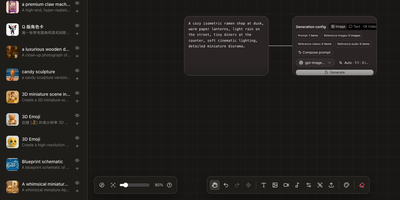
Instead of juggling a chat window, a folder of reference images, and a notebook of half-remembered prompts, Infinite Canvas puts the whole image-making process on one zoomable board. Drop in text, image, video, and generation-settings nodes, then wire them together so every result stays connected to the prompt and references behind it. Add one or several OpenAI-compatible endpoints, choose default text, image, and video models, and set image count, aspect ratio, quality, and transparent backgrounds per node. Batch results arrive as linked nodes that remember their prompt, model, and dimensions, so any of them can be retried later with the same settings. A prompt library searches seven built-in sources plus your own JSON sources and inserts the winner straight onto the board. An asset shelf keeps reusable images, clips, and audio within reach. Projects can be duplicated, exported, and synced between devices over WebDAV. Want a helper? A local Canvas Agent lets Codex read the active board and edit it through MCP, with approvals and permissions shown in a side panel. Plugins add node types, inspectors, and toolbar actions. Running on a dedicated VPS on RepoCloud with guaranteed CPU, RAM, and SSD, full root SSH access, and a browser serial console. MIT licensed.
Toonflow
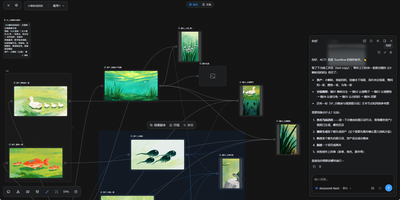
Toonflow, an open-source AI studio for short dramas, animated comics, and short videos, lets you plan, generate, and direct every shot as nodes on a canvas that runs on your own server. Text nodes hold the story, characters, and shot descriptions. Image generation nodes create character sheets with close-up, front, side, and back views. Video generation nodes take numbered reference images. Aspect ratio, resolution, and duration options depend on the selected model. Connectors link the nodes, so a character sheet made once is reusable in every shot. The 3D director's studio blocks a scene with camera framing, lighting, and keyframes. Export the scene as a video node. An assistant panel reads the project and reports which assets and videos have been generated. It offers next steps: generate a shot, revise a prompt, or start a new canvas. Finished images and clips preview on the canvas and download for further production work. Models come from third-party APIs, local ComfyUI workflows, or local language models. Plugins for nodes, skills, tools, and agents install from the marketplace. MCP links external tools and services. Projects, settings, and plugins live in one data directory. The interface offers 21 languages. There is no built-in login, so a firewall or an authenticating reverse proxy decides who can reach it. Running on a dedicated VPS on RepoCloud with guaranteed CPU, RAM, and SSD, full root SSH access, and a browser serial console. MIT licensed.