Hatchdoor
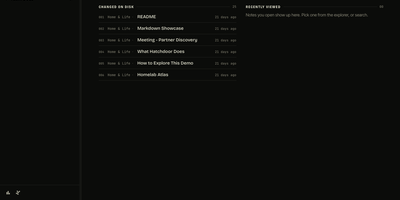
Hatchdoor gives your Markdown notes two front doors at once: a fast web interface for you, and an MCP endpoint where AI agents read and edit the very same vault. Point it at any folder of Markdown files, an existing Obsidian vault included, and it indexes everything into a disposable SQLite read model that rebuilds itself from your files if deleted. In the browser you browse folders, follow wikilinks that survive renames, explore backlinks and graph views, and search by keyword or meaning across every vault you mount. The live editor shows Markdown syntax only on the line you are editing and saves automatically, while concurrency checks refuse a save when the note changed underneath you. Agents connect with their own token and start read-only; turn writes on and Claude Code, Codex, Cursor, or Hermes can create, edit, move, and link notes through the same checked operations the interface uses. Saved queries in Obsidian's Bases syntax render as live tables, attachments preview inline, and optional git integration commits and pushes every change back to your vault's repository. Running on a dedicated VPS on RepoCloud with guaranteed CPU, RAM, and SSD, full root SSH access, and a browser serial console. AGPL-3.0 licensed.
Codever
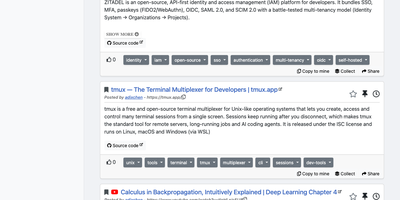
Every developer has a graveyard of browser tabs, chat messages, and stray text files holding links and code worth keeping; Codever replaces the graveyard with a bookmarks, notes, and snippets manager designed for developer workflows. Save a page in two clicks from Chrome or Firefox, drop selected text in as a snippet or note, or use the bookmarklet in any other browser, with title, description, and tags prefilled for you. From IntelliJ IDEA and Visual Studio Code you can push code straight into your library and pull it back without switching to the browser. Bookmarks carry descriptions and tags, and Pinned and Read Later lists sit beside your history so rediscovery takes seconds. Notes are written in Markdown and render with math, tables, and inline code, while snippets keep reusable code one search away with its context attached. Full text search spans bookmarks, notes, and snippets at once, with Brave, Google, Stack Overflow, and Bing one click away when the library comes up empty. Entries can be public, copied into your own collection, or gathered into curated sets for a team or topic. Accounts sign in through Keycloak with GitHub, Google, GitLab, or Stack Overflow, so a self-hosted instance fits the identity setup your team already uses. Running on a dedicated VPS on RepoCloud with guaranteed CPU, RAM, and SSD, full root SSH access, and a browser serial console. MIT licensed.
PenX
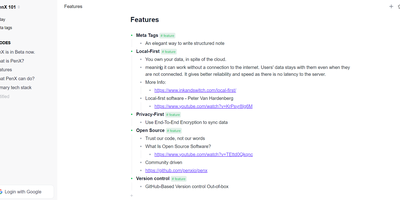
PenX delivers an open-source structured note-taking application that functions as a personal database disguised as an elegant editor — combining the outline workflow of Workflowy and Roam Research with the structured data capabilities of Tana through MetaTags that transform every note into a queryable database record. The local-first architecture stores all data on-device using PGLite, an in-process PostgreSQL-compatible engine, ensuring data ownership regardless of cloud connectivity. End-to-end encryption protects all synchronized data so that even the sync server cannot read your notes, tasks, ideas, or documents. GitHub-based version control provides out-of-the-box backup and history with full commit-level recovery. MetaTags are the core innovation — attaching structured tags to any note converts it into a database entry with typed fields, enabling table views, filters, and queries across your knowledge base without imposing rigid folder hierarchies. The daily notes workflow encourages free-form capture while MetaTags handle organization automatically, letting you record thoughts without deciding physical location upfront. AI-driven features assist with content generation, summarization, and intelligent search across your personal data hub. Real-time sync keeps web, desktop, and mobile in perfect alignment. Cross-platform availability includes web, desktop for Windows, macOS, and Linux, iOS, and Chrome extension. Deploy the web service via Next.js with pnpm using tRPC and Prisma. Running on a dedicated VPS on RepoCloud with guaranteed CPU, RAM, and SSD, full root SSH access, and a browser serial console. AGPL-3.0 licensed.
WikiDocs
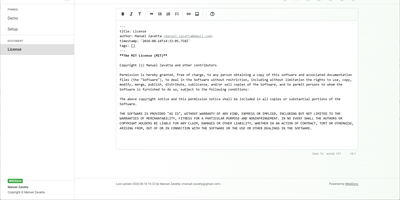
Write your knowledge as plain Markdown files, and WikiDocs turns the folder into a searchable, versioned wiki with no database to set up or back up. Pages carry YAML front matter, so the whole wiki can be copied, archived, or opened in any text editor. An editor with a formatting toolbar handles headings, lists, task lists, links, and images, and pictures can be pasted straight from the clipboard. Math is typeset with KaTeX, Mermaid renders diagrams such as ER models and mind maps, and code blocks get syntax highlighting. Every save keeps a revision, a versions dialog lists them, and deleted pages wait in a trash where they can be restored or erased. Attachments upload and download from any page, namespaces build a page tree in the sidebar with pinned pages on top, and full-text search highlights every match. Public mode publishes a read-only knowledge base, private mode requires sign-in, and administrator and user accounts are managed in the app. Settings cover the wiki title, owner notice, privacy banner, language, timezone, light or dark template, and accent color, and every page has a print button. A desktop app keeps files on your computer and syncs with your self-hosted instance, while a REST API with Swagger documentation lets other tools read and write pages. Running on a dedicated VPS on RepoCloud with guaranteed CPU, RAM, and SSD, full root SSH access, and a browser serial console. MIT licensed.
Nanote
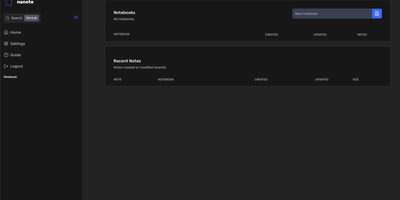
100% portability is Nanote's one non-negotiable principle as a self-hosted note-taking app. There is no database - notebooks are plain folders and notes are plain Markdown files on your filesystem, so the same notes remain fully manageable from a terminal, Notepad, or any other editor, and walking away from Nanote costs nothing because your data was never in a proprietary format to begin with. Built with Nuxt and TypeScript around the Milkdown editor, it layers modern conveniences on that plain-file foundation: fast content search across all notes using OS-optimized tooling (ugrep), native Markdown rendering, image and file attachments, and a mobile-friendly layout for reading and editing on a phone. Clever remark directives make plain text interactive - typing ::file inserts an inline upload picker, while ::today, ::now, and ::tomorrow expand to live dates and times. A fully typed REST API with validation covers automation, and access is protected by a configurable secret key. Deployment is one container with three env vars: paths for notes, uploads, and config, all bind-mountable so your Markdown lives wherever you want it - including inside an existing sync setup. AGPL-licensed and actively daily-driven by its author.
Silicon Notes
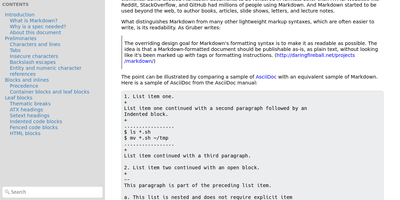
"Somewhat lightweight, low-friction" is how Silicon Notes' author describes the personal knowledge base - written after DokuWiki's editor "drove me mad" and no existing wiki quite fit. The philosophy is that small frequent annoyances compound into cognitive load with no return, so everything here is optimized for frictionless daily use. Notes are written in plaintext Markdown and rendered as clean HTML with Pygments syntax highlighting for code blocks; pages get bi-directional relationships (backlinks), so the knowledge base becomes a connected web rather than a folder tree; and full-text plus title search retrieves anything fast. A table of contents lives in the left sidebar - "where it belongs" - editable while you read without scrolling away. Page history tracks revisions for auditing and rollback, JSON export/import keeps everything portable, and the mobile layout is genuinely usable. The stack is deliberately minimal: Python and Flask with Mistune for Markdown and SQLite for storage - no big frameworks, just a few small dependencies. One honest caveat: there is no built-in authentication, so deploy it behind a VPN, private network, or reverse-proxy auth layer. For a solo engineer's brain, it is exactly enough.
CodeX Docs
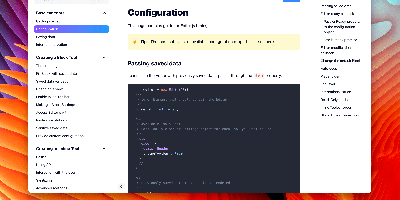
Writing docs should feel like editing a modern document, not wrangling Markdown files - CodeX Docs delivers that on Editor.js, the block-styled editor its CodeX team builds and thousands of products use. Content is composed from clean blocks (headings, lists, code, images, embeds) with a UI that reads well on both desktop and mobile, and pages render statically with human-readable, SEO-friendly URLs. Structure is free-form: pages nest to any depth, so a flat FAQ and a deep product manual coexist in one instance, and the UI tunes to fit - collapse sections, hide the sidebar. The operational footprint is deliberately tiny. No database is required: the default driver persists to a local folder, with MongoDB available when you want it, and the whole app configures through one YAML file (overridable with APP_CONFIG_ environment variables) covering title, start page, auth password, and JWT secret. Editing mode sits behind password authentication. Thoughtful extras are wired in: readers can report misprints straight to your Telegram or Slack, Hawk error tracking catches frontend and backend exceptions, and Yandex Metrica analytics is a one-line config. A ready-made Helm chart covers Kubernetes. Written in TypeScript.
Scoold
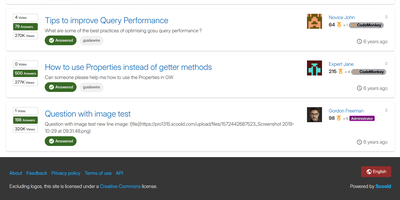
Scoold brings Stack Overflow-style Q&A to a server you control, so answers get voted, accepted, and found again instead of scrolling away in chat. Askers get a Markdown editor with live preview, tags, and emojis, and the form suggests similar questions and flags likely duplicates before anything is posted. Answerers collect upvotes, accepted answers, reputation points, and badges, including custom ones with your own text, icon, and color. Authors and moderators can restore any earlier revision, because every edit is kept. Searchers can use Lucene syntax such as exact phrases, wildcards, and boolean operators. Admins split one site into private spaces, up to ten in the free edition, and choose how people sign in: email and password, LDAP, or social providers such as Google and GitHub. They can also back up and restore data, import a Stack Overflow for Teams export, and follow a dashboard of questions, answers, traffic, and active members. Builders get a REST API with OpenAPI docs, signed webhooks, Zapier and n8n connectors, and an optional MCP server for AI assistants. Color themes include a dark mode, Mermaid diagrams and KaTeX formulas can be switched on, and right-to-left languages are supported. SAML, SCIM, file uploads, and chat integrations are Pro-edition features. Running on a dedicated VPS on RepoCloud with guaranteed CPU, RAM, and SSD, full root SSH access, and a browser serial console. Apache-2.0 licensed.
Atlantis Diagrams
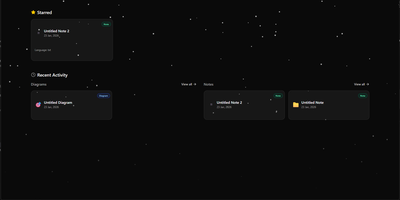
Technical teams frequently struggle to keep software architecture diagrams synchronized with evolving codebases and documentation repositories. Atlantis Diagrams delivers a unified self-hosted workspace that couples code-driven Mermaid.js diagramming with structured Markdown knowledge bases in a responsive web interface. Engineers can compose flowcharts, sequence diagrams, state machines, entity-relationship models, and Gantt schedules using split-view CodeMirror editors with real-time SVG rendering. An integrated version history tracker automatically captures revision checkpoints across the last 15 document states, letting authors compare modifications and restore previous iterations without data loss. The linked notes environment supports rich Markdown editing, LaTeX mathematical formulas, interactive task checklists, tag indexing, and full-text keyword searches across personal documentation libraries. Canvas controls allow users to pan, zoom, inspect individual nodes, and export finalized graphics directly into vector SVG, high-resolution PNG, or printable PDF documents. Storage engines adapt to deployment scale, running on zero-configuration SQLite databases out of the box with optional PostgreSQL, MySQL, and Redis caching layers for high-concurrency environments. Running on a dedicated VPS on RepoCloud with guaranteed CPU, RAM, and SSD, full root SSH access, and a browser serial console. MIT licensed.