MCSManager
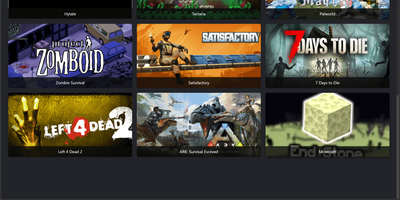
Hosting a Minecraft survival world, a Terraria server, and a Palworld host no longer means juggling SSH sessions and screen windows, because MCSManager puts every instance behind one web panel. A built-in marketplace installs game servers from ready-made templates, filtered by operating system and tagged with the Java version each one needs, while any Docker Hub image, uploaded ZIP archive, or plain process can run as an instance with its own start command, stop command, and live terminal. Docker instances get memory, CPU, port mapping, and volume settings, and each instance can auto start, auto restart, and run scheduled tasks. For Minecraft servers, the plugin and mod manager (Beta) searches Modrinth and CurseForge, and the file manager handles maps, configs, and uploads. Administrators create user accounts and assign instances to them, so friends or paying customers only see their own servers, which suits small hosting businesses that sell game servers. Extra machines join as nodes and connect to the same panel, and the drag-and-drop dashboard can be rearranged to taste. The interface supports many languages. Running on a dedicated VPS on RepoCloud with guaranteed CPU, RAM, and SSD, full root SSH access, and a browser serial console. Apache-2.0 licensed.
Jetlog
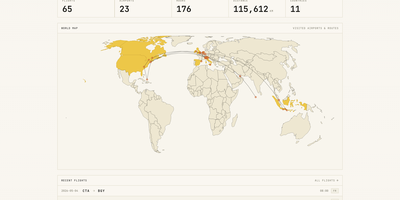
A personal flight logbook you host yourself, Jetlog draws every route you have flown on a pannable world map and turns the totals into charts. The home page opens with counts of flights, airports, hours, distance, and countries above that map, where dots mark visited airports and lines trace each trajectory. Settings let markers and lines grow with visit frequency and shade the countries where you have landed. Logging a flight takes only two airports and a date. Type a flight number and press Fetch to pre-fill the origin, destination, and airline, and a utility links connection flights automatically. Duration and distance are calculated for you and stay editable, with an option to use airport time zones. The All Flights table lists route, times, duration, distance, seat, class, and airline with filters and configurable columns, and each flight opens a detail page with airport data, a route map, tail number, and aircraft. A Statistics page charts flights per month, cumulative distance, most visited airports, most common airlines, ticket class, and seat for any time frame. History arrives through MyFlightRadar24 or custom CSV imports and leaves as CSV or iCal. Family members can share one install with separate logbooks, an admin manages the accounts, and the responsive layout works on a phone at the gate. Running on a dedicated VPS on RepoCloud with guaranteed CPU, RAM, and SSD, full root SSH access, and a browser serial console. GPL-2.0 licensed.