OpenHabitTracker
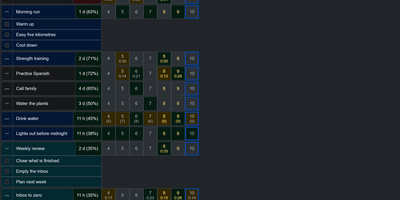
Notes, tasks, and habits in one app, synced only to a server you run yourself. Notes are written in Markdown and render right in the list, so reading one costs no clicks. Tasks get a planned date and time, a duration, a checklist, and a timer. Weekly statistics show what got done and how long it took. Habits are measured by how overdue they are, not by an unbroken streak. A habit on a ten day interval that is two days late reads 120 percent. Charts track progress toward the target for today, this week, this month, this quarter, and this year. They also list the ten longest streaks and what you finish on each weekday. Categories and priorities span all three item types. Search reads note text and checklist items, not only titles. Filter by date, status, or how overdue a habit is, then sort with eleven keys. Pick from 26 themes in dark and light mode and 20 languages, with full keyboard and screen reader support. Import and export JSON, YAML, TSV, or Markdown, or bring in a Google Keep Takeout ZIP. Native apps for Windows, Linux, macOS, iOS, and Android sync with your server. The single-user Docker server also serves an OpenAPI spec, a Scalar UI, and a log page behind the same login. Running on a dedicated VPS on RepoCloud with guaranteed CPU, RAM, and SSD, full root SSH access, and a browser serial console. GPL-3.0 licensed.

DumbPad
With a deliberately minimalist design philosophy and zero database dependencies, DumbPad delivers a self-hosted notepad that stores notes as plain text files with real-time auto-saving every 10 seconds and keyboard-shortcut manual saves. The Node.js Express backend serves a vanilla JavaScript frontend that supports multiple named notepads with direct URL linking and shareable links for instant access to specific notes. The split-view editor displays markdown source on the left and rendered preview on the right with a draggable resize handle, while the full preview mode renders complete markdown with GitHub-style alert blocks for Note, Tip, Important, Warning, and Caution callouts, extended table formatting, fenced code blocks with syntax highlighting via highlight.js covering approximately 180 programming languages, collapsible details sections, and checklist support. Fuzzy search matches across both filenames and file contents for fast navigation across large collections. Optional PIN protection secures access with configurable 4 to 10 digit codes, constant-time comparison to prevent timing attacks, brute force lockout after 5 failed attempts with 15-minute cooldown, and IP-based tracking. The Docker container runs as non-root UID 1000 by default with multi-architecture support, CORS origin restrictions for reverse proxy deployments, and persistent data volumes. Notes can be downloaded as text or markdown files, printed with auto-expanded collapsible sections, and imported by placing text files directly into the data directory. On RepoCloud, deploy DumbPad on a dedicated VPS with Docker, root SSH access, and complete control over your note-taking infrastructure, all under the GPL-3.0 license.
Codever
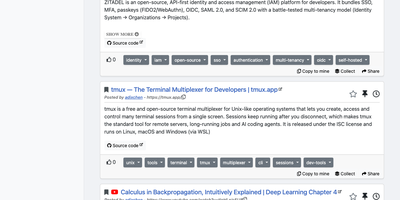
Every developer has a graveyard of browser tabs, chat messages, and stray text files holding links and code worth keeping; Codever replaces the graveyard with a bookmarks, notes, and snippets manager designed for developer workflows. Save a page in two clicks from Chrome or Firefox, drop selected text in as a snippet or note, or use the bookmarklet in any other browser, with title, description, and tags prefilled for you. From IntelliJ IDEA and Visual Studio Code you can push code straight into your library and pull it back without switching to the browser. Bookmarks carry descriptions and tags, and Pinned and Read Later lists sit beside your history so rediscovery takes seconds. Notes are written in Markdown and render with math, tables, and inline code, while snippets keep reusable code one search away with its context attached. Full text search spans bookmarks, notes, and snippets at once, with Brave, Google, Stack Overflow, and Bing one click away when the library comes up empty. Entries can be public, copied into your own collection, or gathered into curated sets for a team or topic. Accounts sign in through Keycloak with GitHub, Google, GitLab, or Stack Overflow, so a self-hosted instance fits the identity setup your team already uses. Running on a dedicated VPS on RepoCloud with guaranteed CPU, RAM, and SSD, full root SSH access, and a browser serial console. MIT licensed.
PenX
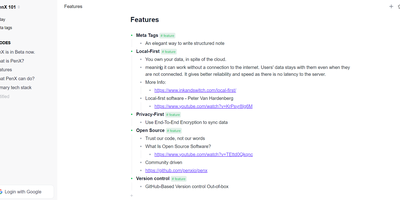
PenX delivers an open-source structured note-taking application that functions as a personal database disguised as an elegant editor — combining the outline workflow of Workflowy and Roam Research with the structured data capabilities of Tana through MetaTags that transform every note into a queryable database record. The local-first architecture stores all data on-device using PGLite, an in-process PostgreSQL-compatible engine, ensuring data ownership regardless of cloud connectivity. End-to-end encryption protects all synchronized data so that even the sync server cannot read your notes, tasks, ideas, or documents. GitHub-based version control provides out-of-the-box backup and history with full commit-level recovery. MetaTags are the core innovation — attaching structured tags to any note converts it into a database entry with typed fields, enabling table views, filters, and queries across your knowledge base without imposing rigid folder hierarchies. The daily notes workflow encourages free-form capture while MetaTags handle organization automatically, letting you record thoughts without deciding physical location upfront. AI-driven features assist with content generation, summarization, and intelligent search across your personal data hub. Real-time sync keeps web, desktop, and mobile in perfect alignment. Cross-platform availability includes web, desktop for Windows, macOS, and Linux, iOS, and Chrome extension. Deploy the web service via Next.js with pnpm using tRPC and Prisma. Running on a dedicated VPS on RepoCloud with guaranteed CPU, RAM, and SSD, full root SSH access, and a browser serial console. AGPL-3.0 licensed.
Insights LM
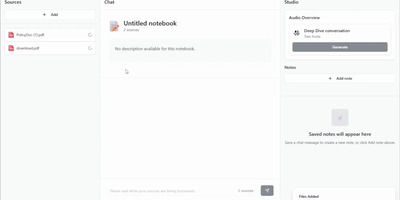
Insights LM gives you a NotebookLM-style research assistant that runs on your own infrastructure and answers strictly from the documents you feed it. Build a notebook for a project, drop in PDFs, pasted text, website links, and audio files, then ask questions in plain language and get answers grounded in those sources rather than the open internet. Every answer carries citations you can click to jump straight to the passage it came from, so verifying a claim takes seconds instead of a fresh search. Findings worth keeping become notes saved alongside the notebook, building a private knowledge base that grows with your research. When reading is too slow, generate an audio overview and listen to two hosts discuss your material like a podcast episode, perfect for absorbing a long report on a walk. Teams use it to interrogate internal documentation, onboard new hires against company knowledge, and brief themselves before meetings without uploading confidential files to a third-party service. Because the whole stack is yours, you choose which AI models do the reading, including local models for fully private work. Running on a dedicated VPS on RepoCloud with guaranteed CPU, RAM, and SSD, full root SSH access, and a browser serial console. MIT licensed.