
DSpace
With DSpace, a library or research office can give every thesis, journal article, and dataset its own permanent web address, a searchable metadata record, and files visitors download from the archive. Content sits in a tree of communities and collections, and each collection decides who may deposit and how many review steps follow; reviewers accept a submission or reject it with a note that sends it back to the author. Embargoes hold files back until a set date, access policies limit other files to chosen groups, and sign-in works through LDAP, Shibboleth, SAML, OpenID Connect, or ORCID. Search covers metadata and the extracted full text of uploaded files, facets narrow the results, and browse pages sort by title, issue date, author, or subject. Editors can correct a published item through the submission form. Administrators inspect an audit trail and rewrite homepage news from an admin form. Entity types for people, organizations, projects, journals, and datasets link each publication to the work behind it, and DOIs can be registered through Crossref. Optional settings let authors keep an email address private on their researcher profile and download their own restricted files. Usage reports count visits, downloads, and top countries per item. REST, OAI-PMH, SWORD, and Google Scholar metadata connect the archive to harvesters, deposit tools, and search engines. Running on a dedicated VPS on RepoCloud with guaranteed CPU, RAM, and SSD, full root SSH access, and a browser serial console. BSD-3-Clause licensed.
phpMyFAQ
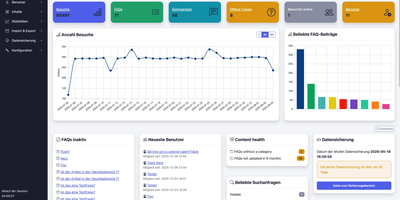
Publish the answers your team keeps repeating as a multilingual, searchable FAQ with phpMyFAQ, a knowledge base whose admin area handles writing, review, and permissions. Organize entries in nested categories that you rearrange by drag and drop, attach files, add tags and related FAQs, and let visitors leave comments. A WYSIWYG editor with an image manager writes each answer, a wiki-style revision history restores earlier versions, and a news system posts announcements. Full-text search covers every language, and optional Elasticsearch or OpenSearch backends handle larger collections. The interface covers more than 40 languages with right-to-left layouts, automatic content negotiation, and translated categories and entries. Privileges work per user and per group, so an editor can change an entry without being allowed to delete it, and categories can be limited to chosen readers. Sign in through LDAP, Active Directory, or Microsoft Entra ID, protect accounts with two-factor authentication, or try experimental passkeys. The dashboard charts 30 days of visits, lists inactive FAQs, and checks installed files against published hashes. Export entries to PDF, publish a dynamic sitemap, back up your content, and filter spam with built-in protections. Dark, light, and high-contrast themes keep the public site comfortable to read. Scripts and AI assistants reach the knowledge base through a REST API with an OpenAPI specification or an experimental MCP server, and plugins extend it. Running on a dedicated VPS on RepoCloud with guaranteed CPU, RAM, and SSD, full root SSH access, and a browser serial console. MPL-2.0 licensed.
Review Board
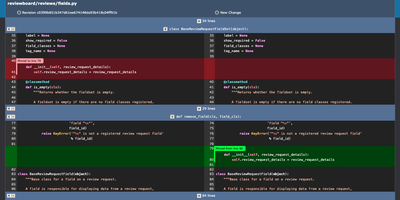
Before a change lands in the main branch, Review Board gives your team a self-hosted code review server where reviewers read the diff, open issues on specific lines, and sign off with a Ship It. Post a review request from the web or with RBTools, either before you commit or after, and every update becomes a new revision that stays in the history. Interdiffs show exactly what changed between revisions, and moved-code detection keeps rearranged blocks from drowning out real edits. Comments can open issues that reviewers later mark fixed or dropped. Images and Markdown files can be reviewed alongside code, with split, onion-skin, color, and side-by-side diffs for pictures. A dashboard with customizable columns separates incoming from outgoing requests by review group. Connect Git, Mercurial, Subversion, or Perforce repositories, including ones hosted on GitHub or GitLab, and review them all on one server. Slack and Discord notifications, Jenkins builds, and Review Bot linters report back inside the review. Private repositories and hidden or invite-only review groups restrict who sees what, with sign-in through Active Directory, LDAP, or SAML 2.0. A REST API, WebHooks, and Python extensions cover custom workflows. Running on a dedicated VPS on RepoCloud with guaranteed CPU, RAM, and SSD, full root SSH access, and a browser serial console. MIT licensed.
EverShop
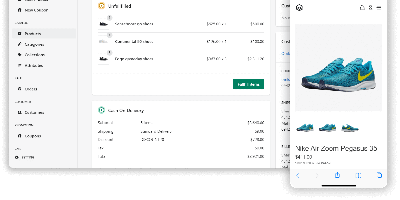
Magento's extensibility without PHP, Shopify's polish without the platform tax: EverShop is the TypeScript-first e-commerce platform built on that promise. Architected as a modular monolith on Node.js, it organizes every piece of business logic - catalog, checkout, customers, your custom extensions - into modules that plug in without touching core code, extended through a disciplined set of mechanisms: registry processors for transforming data across modules, hooks that wrap function calls, async event subscribers (product created, order placed), and route middleware. The storefront and the fully-featured admin panel are both React with server-side rendering and hydration, giving fast first paint and SEO-friendly pages, while a typed GraphQL API (plus REST endpoints) serves exactly the data each view needs - the same API that powers headless and PWA builds. Standard commerce is covered: product management with variants and attributes, category navigation, cart and checkout, order and customer management, coupons, and a theme system built on React components and Tailwind for deep storefront customization. PostgreSQL is the default database, deployment is Docker-friendly with near-zero configuration, and the GPL-3.0 license means the entire stack - types, resolvers, and checkout flow included - is yours to read and modify.
Modoboa
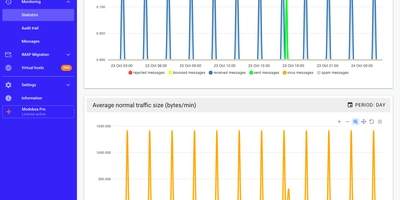
Modoboa turns a bare mail server into a managed hosting platform, with one web console for domains, mailboxes, aliases, and quotas, plus a full webmail for the people using them. Roles separate super administrators, resellers, domain administrators, and ordinary users, with caps on how many mailboxes and aliases each administrator may create and daily sending limits per domain or mailbox. The webmail offers conversation view, folder subscriptions, scheduled sending, attachments, and search across headers and message bodies. Calendars and address books sync with standard clients, and calendars can be shared. Each user writes Sieve filters and autoreplies in the browser. Deliverability checks cover MX records and DNSBL listings, DKIM keys are generated per domain, and DMARC aggregate reports become per-domain visual reports. Amavis quarantine pages and an Rspamd frontend help with spam. Traffic graphs show message volume. Accounts authenticate against the local database, LDAP, Active Directory, or an existing SMTP server, with TOTP codes or WebAuthn security keys as a second factor. Thunderbird and Outlook configure themselves through built-in autoconfig and autodiscover endpoints. An IMAP migration tool pulls mailboxes from another provider as each person signs in. Administrators can brand the console with custom logos, extend it through plugins, and automate it through a documented REST API. Running on a dedicated VPS on RepoCloud with guaranteed CPU, RAM, and SSD, full root SSH access, and a browser serial console. ISC licensed.

Tandoor
The deep end of self-hosted recipe management: Tandoor Recipes is a Django/Vue application that replaces Paprika, AnyList, and ad-choked recipe sites with a database you control. Import is where most people start: paste any URL and Tandoor scrapes schema.org markup for ingredients, instructions, images, times, and nutrition; bulk-paste URLs for batch import; or migrate wholesale from Mealie, Paprika, Nextcloud Cookbook, Pepperplate, and other managers with built-in importers. The structured recipe editor tracks ingredients individually, which is what powers everything downstream: full-text search with trigram similarity, a "what can I make with what's in the fridge" ingredient search, automatic nutrition via OpenFoodFacts, and shopping lists that merge duplicate ingredients across recipes, convert units, scale by servings, and sort by your supermarket's actual aisle layout. The weekly meal planner is drag-and-drop, feeds shopping lists automatically, exports to your calendar, and shows a nutritional summary for the week. Multi-user support comes with a granular permission system - shared household cookbooks, private recipes, even secret ones - and shopping lists sync in real time so two people can shop simultaneously. A full REST API integrates with Home Assistant and Grocy. For households serious about cooking, Tandoor's depth is unmatched.
Navidrome
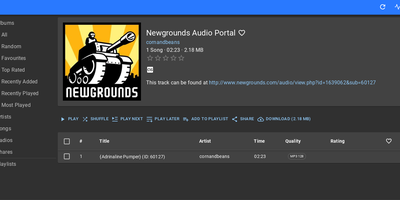
Spotify economics without the subscription or catalog gaps: Navidrome, the reference self-hosted music server, streams your own FLAC, MP3, and ALAC collection from a single Go binary with a React/Material UI web player. Its Subsonic/OpenSubsonic API compatibility is the superpower: 50+ existing clients work out of the box, from Symfonium and DSub on Android to Feishin and Sonixd on desktop, plus Android Auto, CarPlay, and Android TV apps. Transcoding is server-managed and FFmpeg-backed - FLAC direct-plays at home and downsamples to MP3, AAC, or Opus over mobile bandwidth, with the OpenSubsonic transcoding extension letting clients declare capabilities and receive per-track direct-play or transcode decisions automatically. Multi-user support gives every account its own play counts, favorites, ratings, and playlists, and multi-library support scopes different collections to different users. The feature list covers serious listening: Last.fm and ListenBrainz scrobbling, artist bios and images, embedded and external lyrics, audiobook bookmarks, saved play queues that resume on another device, internet radio, jukebox mode, and M3U playlist auto-import kept in sync with your folder. Resource usage is famously low - it runs happily on a Raspberry Pi and scales to six-figure track counts.
Tolgee
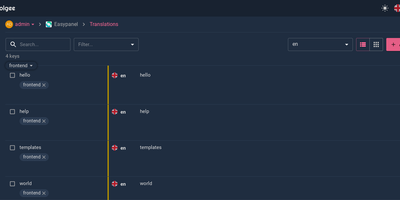
Hold Alt/Option, click any string in your running app, and edit the translation in place: Tolgee is an open-source localization platform built the way developers wish translation worked - changes save straight to the platform with no hunting through JSON or PO files. In-context editing works even in production via the Tolgee Tools browser extension, which injects credentials without touching source code, so a client or colleague with zero coding skills can translate the product inside the product. The SDKs (React, Angular, Vue, Svelte, plus iOS and Android) extract context from each UI element and capture one-click screenshots, giving both human translators and machines the surrounding meaning that raw string files lose. Autonomous translation uses that context: new keys are instantly filled from translation memory or machine translation (DeepL, Google Translate, AWS Translate), with optional human review afterward - shipping no longer waits on a translation agency. A CLI handles import/export, a REST API covers automation, a Figma plugin bridges design, and an MCP server lets AI coding assistants search keys, create translations, and trigger machine translation without leaving the editor. Self-hosting this Crowdin/Phrase/Lokalise alternative keeps every string, screenshot, and API key on your infrastructure.
KeeWeb
Your KeePass vaults, opened from any browser: KeeWeb reads, edits, and creates standard KDBX files, so it works with the same databases as KeePass and KeePassXC without conversion or lock-in. Self-hosting the web app gives you a password manager reachable from any modern browser, including mobile, with no client installation and no third-party cloud in the loop. All KDBX cryptography runs client-side; the server just serves the static app. Open multiple vault files simultaneously and search them all from one box, with advanced options covering specific fields, password history, and regular expressions. Vaults load from local files, your own server (WebDAV), or Dropbox, Google Drive, and OneDrive, with automatic sync - and files are cached for offline use, so a dropped connection never locks you out; changes resync once you're back online. Day-to-day niceties include a configurable password generator, protected fields that stay masked and are held in memory more defensively, entry history, tags with easy input, drag-and-drop attachments, and per-entry icons with favicon fetching. The optional KeeWeb Connect extension (Chrome, Firefox, Edge, Safari) autofills credentials using the keepassxc-protocol. MIT-licensed with matching desktop apps for macOS, Windows, and Linux.

TextBee
TextBee turns an Android phone with a SIM card into an SMS gateway your applications can call, so one-time codes, alerts, reminders, and two-way conversations go out as ordinary texts from a real number. Pair a phone by scanning a QR code in the dashboard, then send messages from the REST API, the dashboard, or the JavaScript SDK. Bulk campaigns load from a CSV file and are paced to stay within carrier limits, and any message can be scheduled up to 72 hours ahead. With several phones or SIM cards attached, each message can name the device and SIM it should use. Every message moves through pending, dispatched, sent, delivered, or failed, and the history view lists all devices together. Incoming texts appear in the dashboard and the API, and webhooks push received messages and delivery reports to your server with an HMAC-SHA256 signature you can verify. An official MCP server lets AI assistants send texts and read replies. API keys, devices, usage, and webhook subscriptions are all managed from one web interface. Running on a dedicated VPS on RepoCloud with guaranteed CPU, RAM, and SSD, full root SSH access, and a browser serial console. MIT licensed.
Paisa
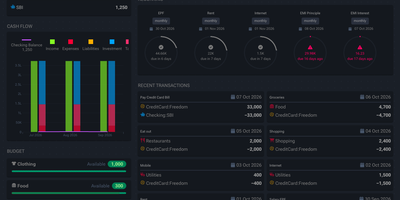
A plain text journal is all Paisa needs to put your net worth, cash flow, expenses, and investment returns on one set of dashboards. Write entries in the built-in editor. It brings syntax highlighting, auto completion, error checking, and auto formatting to double-entry journals. Bank and credit card statements in CSV, Excel, or PDF import through reusable templates that categorize every transaction. Price providers track mutual funds, NPS holdings, and stocks. Manual prices revalue a house, a car, or a plot of land. Budgets set a limit for each category and track spending against it. Allocation targets show how far a debt and equity split has drifted. Goals compute a completion date from monthly savings. The retirement planner works from a safe withdrawal rate and yearly expenses. A calendar marks recurring bills as cleared, late, past due, or upcoming, and Liabilities pages cover credit cards, loan repayment, and interest. Live Sheets calculate taxes and EMIs from ledger data. Journals and settings stay in plain text files that can be version controlled or shared, and ledger, hledger, and beancount are all supported. Running on a dedicated VPS on RepoCloud with guaranteed CPU, RAM, and SSD, full root SSH access, and a browser serial console. AGPL-3.0-or-later licensed.

Countly
Mixpanel, OneSignal, and Crashlytics in one self-hosted stack - Countly is an all-in-one product analytics and engagement platform where every byte of first-party data stays on your server. A Node.js application over MongoDB, it collects through ten battle-tested SDKs spanning iOS, Android, web JavaScript, React Native, Flutter, Unity, and desktop (plus a data write API for anything else), and has powered tens of thousands of mobile, web, and desktop apps since 2012. The analytics core covers sessions, custom events, views, user profiles, and real-time dashboards, with exploration tools built for product managers as much as analysts. What separates Countly from pure analytics tools is acting on the data without third parties: built-in push notifications send automated, transactional, and personalized messages to iOS (APNs), Android (Firebase), and Huawei devices, with the SDK handling token retrieval and permission flows automatically; crash reporting captures symbolicated native crashes on iOS and Android plus JavaScript errors, correlated with the same user and session data. Email reports keep stakeholders updated, and the plugin-based architecture means features load as modules. For GDPR-sensitive products, engagement without piping user data to advertising companies is the entire point. AGPL-licensed server, installable in minutes.
Miniflux
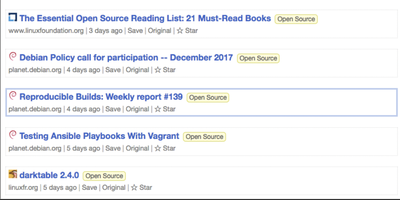
One statically-compiled Go binary over PostgreSQL, no ORM, no framework, static assets embedded in the executable: Miniflux is the minimalist, opinionated feed reader. The opinions are the feature: page layout, fonts, and colors are tuned for reading, and everything else is treated as noise. It consumes Atom, RSS, and JSON Feed formats with OPML import/export, organizes articles with categories and bookmarks, fetches original full-text content for summary-only feeds, and provides Postgres-powered full-text search. Privacy work happens automatically: pixel trackers are stripped, tracking parameters removed from URLs, a media proxy blocks third-party tracking, referrers are never forwarded, and there is zero telemetry. Navigation is keyboard-first - j/k through items, o to open, f to star - with touch gestures on mobile. Podcast, video, and music enclosures are supported, and YouTube videos play inline. Over 25 integrations save articles onward to Wallabag, Readwise Reader, Pinboard, Linkding, Instapaper, Notion, Telegram, Matrix, Ntfy, and more, plus webhooks and a REST API with Go and Python clients; the Google Reader API endpoint supports existing mobile reader apps. Authentication spans local passwords, passkeys (WebAuthn), Google OAuth2, OpenID Connect, and reverse-proxy headers. It is Apache 2.0 licensed, translated into 20 languages, and updates feeds on an internal scheduler.
Wiki-Go
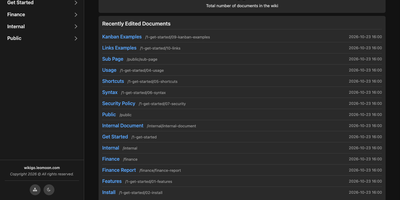
Wiki-Go turns a folder of Markdown files into a searchable team wiki with page history, comments, and access rules, and never asks you to run a database. Pages live in a nested tree with a sidebar and breadcrumbs, and an editor with a preview toggle handles emoji shortcodes, highlighted code, LaTeX math, Mermaid diagrams, collapsible sections, GitHub-style alerts, and embedded YouTube, Vimeo, or MP4 video. Full-text search supports exact phrases in quotes and term inclusion or exclusion, and highlights each match. Each save keeps a revision, up to a configurable limit, and any stored version can be restored later. Attachments such as PDFs, spreadsheets, images, and archives sit beside the page they belong to. Drop a Kanban board into any document for drag-and-drop task tracking with nested tasks, or build a categorized link library that fills in page metadata automatically. Signed-in users comment in Markdown, and admins can remove comments. Admin, editor, and viewer roles, user groups, path-based public or private rules, and an optional private-wiki mode decide who sees what. Branding comes from a custom logo, banner, and favicon, shortcodes such as stats insert live site statistics, and readers can switch between dark and light themes or print any page. A REST API opens content to scripts, and a community tool imports Notion exports. Running on a dedicated VPS on RepoCloud with guaranteed CPU, RAM, and SSD, full root SSH access, and a browser serial console. GPL-3.0 licensed.
Coral
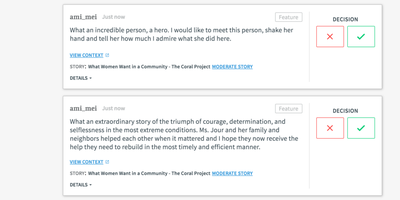
Comment sections at the Washington Post, the Wall Street Journal, and newsrooms across 30 countries run on Coral (also known as Talk) - the platform built by journalists' technologists, started under the Mozilla Foundation and now stewarded by Vox Media as an Apache-2.0 project serving 23 languages. Its founding premise is that online comments are broken and moderation is the fix. Moderators get a full queue system - reported comments, system-held pending comments, and configurable pre-moderation - backed by AI toxicity scoring that warns commenters before posting and holds high-scoring comments for review, Akismet spam detection, banned and suspect word lists, and automatic repeat-offender handling that pre-moderates users whose rejection rate crosses a threshold. Readers get features designed for healthier conversation: journalist badges in threads, muting of annoying voices, notifications, instant new-comment alerts, and timeouts rather than just bans. For publishers the economics are the point - no ads, no trackers, no hidden pixels anywhere in the code, full ownership of audience data, and GDPR compliance beyond requirements. Integration is one embedded script; SSO connects existing registration, and a GraphQL API supports customization and extension.
Infisical
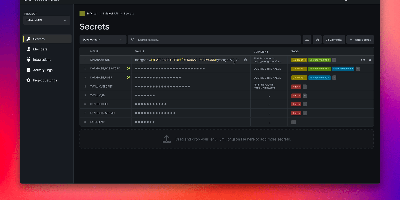
API keys hardcoded in repos, database passwords pasted into CI variables, .env files emailed between developers - Infisical, the open-source platform for secrets, certificates, and privileged access management, is the answer to all three. Secrets live in versioned stores scoped by project, environment, and path, with fine-grained identity-aware access control and full audit logging on every read and change. Delivery covers every consumption pattern: CLI injection into local dev, SDKs for Go, Node.js, and Python, an HTTP API, agents, a Kubernetes Operator, and secret syncs that push to GitHub, GitLab, AWS Secrets Manager, and Vercel. Automatic rotation replaces credentials for PostgreSQL, MySQL, MSSQL, LDAP, AWS IAM, and Azure on a rolling schedule - new credentials issue while old ones stay temporarily valid, so nothing breaks mid-rotation. Dynamic secrets go further, generating ephemeral, time-bound database credentials on demand, and SSH access replaces static keys with short-lived CA-signed certificates that expire automatically. Secrets scanning catches hardcoded credentials in code and pipelines, certificate management automates X.509 issuance and renewal, and a built-in KMS handles encrypt/decrypt with central key control. Self-hosting keeps the keys to everything else on your own infrastructure.
Supertokens Core
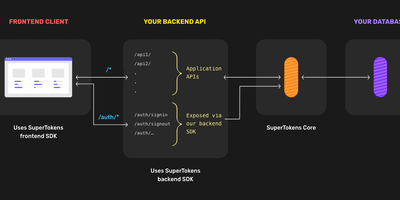
Authentication that lives inside your application rather than behind a redirect to an external identity provider - SuperTokens takes a fundamentally different architecture from Auth0 and AWS Cognito. Three tiers make that work - frontend SDKs (React, Angular, Vue, vanilla JS, React Native) render overridable login UI and manage tokens; backend SDKs (Node.js, Python, Go) expose auth endpoints on your own API domain; and SuperTokens Core, the piece you host here, is the stateless HTTP service handling core auth logic, password hashing, token signing, and database operations against PostgreSQL. The recipe system keeps features decoupled: use email/password, social login, passwordless (magic links, OTP), phone-password, multi-factor authentication (TOTP, WebAuthn), user roles, and microservice auth - individually or combined; you can even use SuperTokens purely for session management alongside another login provider. Sessions are where it shines: rotating refresh tokens with theft detection, automatic access-token refresh, CSRF protection, and secure cookie handling out of the box - the details that become vulnerabilities when hand-rolled. Verification happens locally in your backend via cached JWT signing keys, so the Core stays off the hot path. Self-hosted means no user limits, free forever, with all user data in your database. Apache-licensed.

SQLPage
If you can write a SELECT statement, you can publish a working web app with SQLPage, where each query's results appear on the page as tables, charts, maps, or forms. A .sql file is a page. Name a component in the first row, and the rows after it become lists, cards, data grids, timelines, or step trackers. Tables offer searching, sorting, frozen headers, and per-row edit and delete buttons. Charts cover line, area, bar, pie, scatter, bubble, and heatmap views with a one-click CSV export. Forms feed INSERT and UPDATE statements directly, with validation and file uploads. A complete CRUD tool takes a handful of queries. The map component plots markers and GeoJSON shapes, and the JSON component lets the same data serve other systems as an API. Protect private pages with password logins or single sign-on through Google, Microsoft, or your own identity provider. Connect to SQLite, PostgreSQL, MySQL, SQL Server, or ODBC sources such as DuckDB, Oracle, Snowflake, and BigQuery. Tabs, modals, alerts, breadcrumbs, and carousels shape multi-page sites, and custom templates, CSS, and JavaScript fill any gap. Running on a dedicated VPS on RepoCloud with guaranteed CPU, RAM, and SSD, full root SSH access, and a browser serial console. MIT licensed.