Ovis
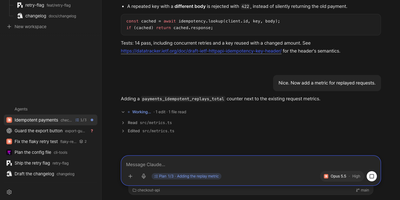
Ovis puts every coding agent running on your machine into your pocket, turning Claude Code, Codex, and a dozen other agent panes into clean phone-friendly chats you can read, answer, and steer from anywhere. Each pane shows the agent's own transcript as a conversation instead of terminal scrollback, with the live terminal one tap away when you need raw output. Permission requests, questions, and plan menus arrive as cards you answer with a tap or a number, and Ovis checks the prompt is still current before sending your answer. Live status for every pane shows which agents are working, which finished, and which are waiting on you. Web push alerts reach you even with the app closed, so a blocked agent never sits idle while you are away from the desk. Install it on your phone as a PWA with a rearrangeable key bar for Esc, Tab, Ctrl, and arrow keys, paired by QR code to your Tailscale address. Dictate replies into chat or terminal with mixed Korean and English speech, review the transcript, then send it to the agent. Open working-tree, staged, or commit comparisons from the file browser and read each file's diff without touching the repository. Reach remote PCs over SSH, queue a message for the agent's next turn, or send it immediately. Running on a dedicated VPS on RepoCloud with guaranteed CPU, RAM, and SSD, full root SSH access, and a browser serial console. MIT licensed.
Ovumcy
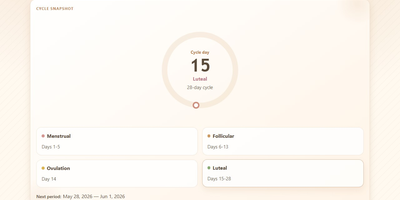
Your cycle history is among the most personal data you will ever record, and Ovumcy keeps it on a server you control instead of a tracker's cloud. Log period days, flow intensity, symptoms, and free-form notes in seconds from any browser, and define your own custom symptoms when the preset list misses something you feel. The calendar view lays out your month with predicted period, ovulation, and fertile-window days marked, while statistics views surface cycle length trends and patterns across months. Predictions come from your own logged history, refined when temperature or cervical-mucus entries sharpen the estimate. Reminders reach you three ways: a dashboard banner before an expected period, a webhook ping to your own ntfy or Gotify server, or a private read-only calendar subscription that drops estimates into the calendar app you already use. Install it to your phone home screen and it opens like a native app, in English, Russian, Spanish, French, German, or Italian. Export the full history as CSV or JSON whenever you want a backup or a change of tools. Optional OIDC sign-in and TOTP two-factor authentication protect access, and the app makes no analytics or telemetry calls at all. Running on a dedicated VPS on RepoCloud with guaranteed CPU, RAM, and SSD, full root SSH access, and a browser serial console. AGPL-3.0 licensed.
LiftTrace
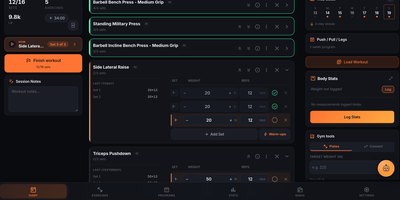
LiftTrace is a self-hosted weightlifting tracker that keeps your entire training history, programs, personal records, and progress photos on your own server in a single Docker container. Log every set with weight, reps, RPE, warm-up markers, and supersets, or type a line like bench 3x5 at 225 and let the Smart Log parser turn plain text or a voice note into structured sets. Follow multi-week programs where each week prescribes its own sets, reps, tempo, rest, and load, and watch the diary prefill today's session from the active template. Browse an exercise library merged from wger, Free Exercise DB, and ExerciseDB, add custom movements, or bulk import your own catalog from a spreadsheet. Automatic PR detection, estimated one-rep maxes, volume and frequency charts, and dated progress photos with a drag-to-compare view show how training is trending. The built-in Trace AI coach reads your workouts, programs, records, and body stats to answer questions, log sessions, and adjust plans through Claude, OpenAI, Gemini, or a local Ollama model. Coaches can prescribe workouts, leave notes on individual sets, and review filmed set videos with comments stamped at the moment that matters, all with explicit consent from the athlete. Import years of history from Strong, Hevy, FitNotes, Jefit, or Garmin FIT files, keep logging offline in the gym, and sign in with OIDC through Authentik, Keycloak, or Authelia. Running on a dedicated VPS on RepoCloud with guaranteed CPU, RAM, and SSD, full root SSH access, and a browser serial console. AGPL-3.0 licensed.
Cooktrace
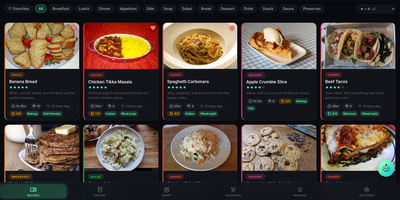
Every home cook keeps a graveyard of recipes scattered across bookmarks, screenshots, chat threads, and one stained index card, and CookTrace gathers the whole mess into one self-hosted library that knows what is in your pantry. Import recipes from URLs, files, or photos, or bring entire Mealie, Paprika, and Tandoor archives in bulk, then cook with live scaling that does fraction-aware ingredient math, per-step photos, and an inline unit converter. A pantry-match pill on every recipe card tells you at a glance what you can actually cook tonight, while barcode scanning and expiration digests keep stock honest. The cook diary and meal planner move from list to month calendar with drag-to-re-plan, and the shopping list generates itself from planned recipes, skipping items you already own and grouping the rest by aisle. Households organize into cookbooks and shared Kitchens with public links, and an optional conversational assistant can log a cook, plan a meal, or import a recipe for you. An opt-in MCP server even exposes your recipes and lists to external AI agents under token-scoped tool tiers. Running on a dedicated VPS on RepoCloud with guaranteed CPU, RAM, and SSD, full root SSH access, and a browser serial console. AGPL-3.0 licensed.
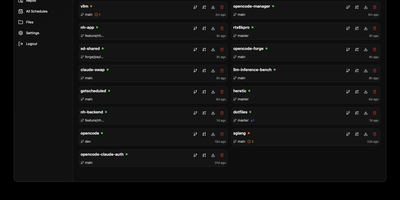
OpenCode Manager
OpenCode Manager is a mobile-first command center for AI coding agents. Install the PWA on your phone or tablet and you get real-time streaming chat, multi-repository Git operations, and scheduled automation right in your pocket. Git integration handles SSH-authenticated repo cloning, worktree management, unified diffs, and branch operations across all your projects in one dashboard. Chat with coding agents through Server-Sent Events streaming that supports slash commands, @-mentions for files, Plan and Build modes, and Mermaid diagram rendering for architecture discussions. Schedule reusable prompts to run against any repository on intervals or cron expressions, with each run tracking history and linking to sessions so you can pick up exactly where automation left off. MCP server configuration adds local and remote HTTP servers with OAuth support, plugging into the broader Model Context Protocol ecosystem. A dedicated assistant workspace provides an isolated AI environment with auto-provisioned skills for managing schedules, notifications, and settings. Multiple AI providers are supported including Anthropic, GitHub Copilot, and OpenAI-compatible services, each configurable with custom system prompts and granular tool permissions. Push notifications alert you to session events, agent questions, errors, and task completions across all managed repositories.
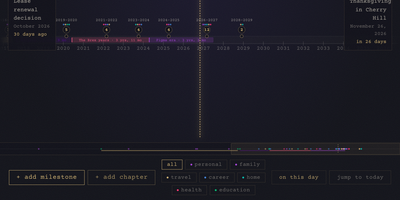
LifeGLANCE
Birthdays, graduations, house moves, weddings, and the trip you keep promising yourself for next year all belong on the same line, and LifeGLANCE draws that line as one zoomable timeline of your life, past and future. Pan smoothly from a single week out to multiple decades, then zoom back in when a dense year needs room; cluster badges keep crowded stretches readable, and a minimap scrubbar jumps you across decades without endless scrolling. Each milestone carries a title, a date at day, month, or year precision, a category, a note, and a link, and you can attach photos, audio, and video directly to the moments they belong to. Birthdays and anniversaries repeat annually with an end year you set. Switch between All, Past, and Future views, search titles and notes in full text, or open On This Day to see what happened on this date in earlier years. A stats panel and summary modal turn the line into counts and patterns. Import calendar events from an ICS file, export the whole timeline as a high-resolution PNG, or back everything up and restore it as JSON. Running on a dedicated VPS on RepoCloud with guaranteed CPU, RAM, and SSD, full root SSH access, and a browser serial console. MIT licensed.
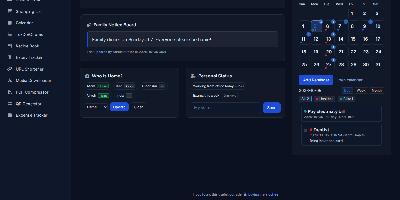
HomeHub
HomeHub gives a household one private page for the everyday coordination that usually scatters across chat threads, fridge notes, and five separate apps. Pin shared notes where everyone sees them, drop files into the shared cloud for the house, and keep one shopping list the whole family edits, with suggestions drawn from what you bought before. Chores become a shared checklist, the calendar holds the dates that matter, and a who's-home view answers the question every family group chat asks in the evening. The expense tracker follows family spending and handles recurring bills like the milk, the newspaper, and subscriptions, while the recipe book and expiry tracker keep the kitchen honest. Small utilities round it out: download media straight to the server, shorten URLs, compress PDFs, generate QR codes, and check the weather without leaving the hub. Every feature toggles on or off in one config file, themes recolor the interface, and there is no account system at all, because the hub trusts your home network instead of a password database. It runs happily on a Raspberry Pi, installs as a PWA on phones, and keeps uploads, media, and data in mounted folders you can back up with any file tool. Running on a dedicated VPS on RepoCloud with guaranteed CPU, RAM, and SSD, full root SSH access, and a browser serial console. MIT licensed.