Whisper Money
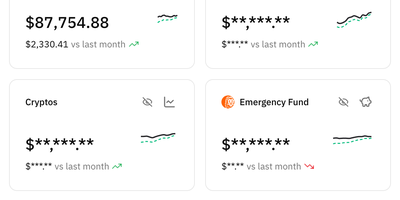
Ditch the spreadsheet for good: Whisper Money is a privacy-first personal finance app you host yourself to see exactly where your money goes, without your data being sold or profiled for ads. Connect multiple bank accounts in one place, fill them by hand or CSV import, and watch transactions categorize themselves automatically. Automation rules handle the repetitive sorting: rent, subscriptions, and transfers land in the right buckets every time. Brokers and exchanges including Indexa Capital, Coinbase, Binance, Bitpanda, Wise, and Interactive Brokers connect with your own API keys, so investments sit beside everyday spending. Optional open banking through EnableBanking can pull a year of movements and keep them current, and it stays switched off until you configure it. AI features suggest categories and rules and summarize your stats reports, and you choose the provider: Gemini by default, or OpenAI, Anthropic, Groq, DeepSeek, Mistral, any OpenAI-compatible endpoint, or a local Ollama server so nothing leaves your infrastructure. Spending pattern insights turn raw transactions into an honest picture of your habits, month after month. Running on a dedicated VPS on RepoCloud with guaranteed CPU, RAM, and SSD, full root SSH access, and a browser serial console. CC BY-NC 4.0 licensed.

mailez
Mail for your own domain stays on your own server with mailez, a self-hosted stack that delivers over SMTP, IMAP, and POP3 and adds a webmail, calendar, contacts, file storage, and an admin console, all started with a single command. Readers get a draggable three-pane webmail that updates itself over a push channel, merges replies into conversations, folds quoted history, and searches with from:, to:, has:attachment, and date terms. Keyboard shortcuts, a command palette, snooze, scheduled send, undo for bulk moves, and quick reply keep daily mail fast, and the interface installs as an offline-capable app with light and dark themes. Privacy-minded users add PGP signing and encryption, two-factor login, and remote-image blocking, and write server-side rules in a Sieve editor. Calendar, contacts, and Drive sit beside mail, with ICS subscriptions, vCard import, CardDAV and CalDAV sync, and share links. Phones and desktop clients configure themselves through autoconfig. Administrators manage domains, mailboxes, aliases, relays, and external mailbox fetching in one console, generate DKIM keys with a click, and follow a DNS wizard and a health page that verify MX, SPF, DMARC, DKIM, blocklists, and MTA-STS. Audit logs and role-based access keep shared servers accountable. The free community edition runs on a single node, while archiving, DLP, LDAP, ActiveSync, and AI features belong to the paid enterprise edition. Running on a dedicated VPS on RepoCloud with guaranteed CPU, RAM, and SSD, full root SSH access, and a browser serial console. AGPL-3.0 licensed.
HRConvert2
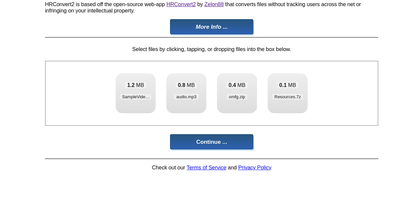
Stop pasting your files into ad-riddled online converters and handing strangers copies of your documents: HRConvert2 runs the whole conversion workshop on your own server instead. Drop a file onto the browser page and pick an output format from a catalogue of 488, covering documents, spreadsheets, presentations, ebooks, comics, images, audio, video, subtitles, and archives. Built-in OCR reads scanned PDFs and images and hands back editable text documents you can search and reuse. It converts 3D models and CAD drawings, renders OpenSCAD projects with their multi-file assemblies resolved, and can even build bootable ISO disk images for x86 and ARM machines from ordinary uploads. Live streams are captured and re-encoded straight from .m3u8 playlists, and every uploaded file can be virus-scanned with ClamAV before or after conversion. Finished files go back out through temporary share links that expire on their own, so sending a converted video to a client takes one click. Each visitor works in an isolated scratch space, files delete themselves when they age out, and nobody needs an account, ever. When traffic spikes, the server watches its own CPU and memory, throttles conversions, and spreads storage across disks so it stays upright. Three interfaces, seven color schemes, and 26 languages let each user shape the page to taste, and the whole thing runs happily on a Raspberry Pi with no database at all. Running on a dedicated VPS on RepoCloud with guaranteed CPU, RAM, and SSD, full root SSH access, and a browser serial console. GPL-3.0 licensed.
WriteFreely
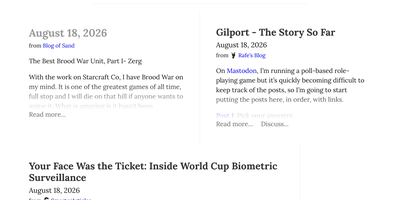
With over 5,100 GitHub stars and a proven track record powering more than 550,000 blogs on the Write.as hosted platform since 2018, WriteFreely strips blogging down to its essential purpose — writing — by removing news feeds, notifications, likes, and engagement metrics that distract from the creative process. The Go binary deploys on any platform as a single executable with SQLite for zero-dependency setups or MySQL and MariaDB for larger installations, consuming minimal system resources and running comfortably on hardware as small as a Raspberry Pi. The auto-saving Markdown editor provides a clean writing environment with instant draft preservation, while published posts render with typography-focused CSS that puts content front and center for readers. ActivityPub federation connects every blog to the fediverse, allowing Mastodon, Pleroma, and other ActivityPub platform users to follow blogs directly, receive new posts in their timelines, and boost or favorite content to their followers. Multi-blog support lets writers maintain separate blogs with distinct pen names from a single account without revealing their association, while OAuth 2.0 integration enables single sign-on onboarding from existing identity providers. Hashtag categorization organizes posts by topic, pinned posts create static pages for permanent content, and draft mode lets writers compose privately before publishing. Blog elements are localized in over 20 languages with first-class right-to-left script support for Arabic, Hebrew, and other RTL languages. Running on a dedicated VPS on RepoCloud with guaranteed CPU, RAM, and SSD, full root SSH access, and a browser serial console. AGPL-3.0 licensed.
EdenText
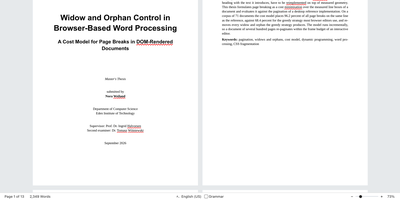
EdenText is a full word processor, from quick notes to full-length books, that opens the docx and odt files you already have and keeps them looking the way Word or LibreOffice made them. Pages are real pages: A4 or Letter sizes, margins, headers and footers, footnotes, columns, and watermarks, with mirrored margins and chapters opening on the right-hand page when you are laying out a book. Paragraph, character, table, and list styles cascade with inheritance and chapter numbering, and tables sort rows and compute spreadsheet-style formulas. The academic toolbox is complete: table of contents, captions, cross-references, citations with bibliography, an alphabetical index, and LaTeX formulas. Reviewing works the way editors expect, with tracked changes, threaded comments in margin balloons, printable markup, spell checking in eight languages, and grammar checking for English. An optional AI assistant answers questions about the document and proposes edits as tracked changes through your own model provider. Nothing waits on a server: documents autosave in the browser, the app installs and works offline, and your words never leave the machine. Running on a dedicated VPS on RepoCloud with guaranteed CPU, RAM, and SSD, full root SSH access, and a browser serial console. AGPL-3.0 licensed.
HitKeep
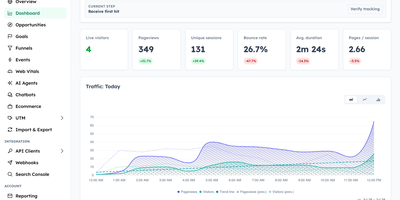
HitKeep is a sovereign web analytics platform that consolidates cookieless visitor telemetry, conversion funnels, e-commerce revenue reports, and AI engine visibility into a privacy-respecting dashboard that replaces Google Analytics and complex tracking clouds. Marketing teams can monitor inbound visitor journeys without installing intrusive consent banners or violating regional GDPR regulations. Custom conversion funnels and goal milestones track user registrations, checkout transactions, newsletter subscriptions, and software downloads with exact revenue attribution. Integrated Google Search Console synchronization brings organic search queries, keyword impression rankings, and click-through metrics directly alongside real-time pageview logs. A dedicated artificial intelligence visibility dashboard monitors crawling bots, retrieval citations, and direct referral visits originating from ChatGPT, Claude, Perplexity, and other generative search agents. Growth analysts can pose natural language questions to an embedded AI reporting assistant, generating instant cohort breakdowns and engagement trends without assembling complex manual filters. Site operators can configure custom tracking domains, whitelist reverse proxy networks, filter out referrer spam, and schedule automated database backups across persistent storage volumes. Complete data sovereignty controls allow teams to export raw event telemetry into open Parquet and CSV archives or stream metrics into external business intelligence warehouses via webhooks. Running on a dedicated VPS on RepoCloud with guaranteed CPU, RAM, and SSD, full root SSH access, and a browser serial console. MIT licensed.
Obsei
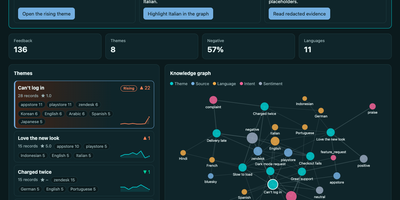
Before any AI model reads a single customer message, Obsei has already stripped out the names, email addresses, card numbers, and ID numbers hiding inside it. Obsei pulls in what customers are saying from App Store and Google Play reviews, Zendesk, Freshdesk, and Intercom tickets, GitHub issues, surveys, YouTube comments, Bluesky, RSS feeds, SQL databases, and even Gong call transcripts. Every record is pseudonymised on the way in and stored in an encrypted database that never phones home. Then the labelling starts: sentiment, intent, language, and your own custom questions, each answered with a confidence score by a zero-shot classifier running locally on your machine, or by an LLM you choose through your own keys. Answers the model is unsure about are escalated to a stronger model or queued for a human instead of being silently wrong. Related complaints roll up into stable themes with week-by-week trends, and anything mentioned by fewer than five people stays hidden, so individuals cannot be picked out of a chart. When a theme spikes, alerts and digests land in Slack, and individual findings can be routed straight into Jira, Linear, or GitHub issues. Your analysts browse it all in the built-in Studio, and your AI agents can ask questions over MCP and get cited, redacted evidence back, with any action they propose waiting for your approval. Running on a dedicated VPS on RepoCloud with guaranteed CPU, RAM, and SSD, full root SSH access, and a browser serial console. Apache-2.0 licensed.
Nametag
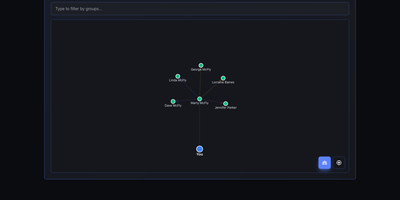
CRM mechanics applied to your actual relationships instead of a sales pipeline: Nametag is a Personal Relationship Manager (PRM). It exists to fix the things you keep forgetting: when you last talked to an old friend, their kids' names, the birthday you missed twice. Contacts are tracked with flexible attributes - names, birthdays, important dates, and free-form notes for everything else - and organized into custom groups. Where it goes beyond a contacts app is relationship mapping: you define how people connect to each other (family, friends, colleagues, or custom relationship types), and an interactive D3.js-powered graph renders your entire personal network so you can see clusters and connections at a glance. Staying in touch is automated: scheduled reminders fire for birthdays, important dates, and reach-out nudges, with optional email delivery via a Resend API key for password resets and reminder notifications. Built with Next.js, it is mobile-responsive, ships with full dark mode, and supports multiple languages including English and Spanish. Because it is self-hosted, there are no account tiers or contact limits - unlimited people and relationships, with every note about your personal life stored on your own server rather than a social-graph company's cloud. A lightweight, single-container deployment makes it one of the easiest personal tools to run.
Tianji
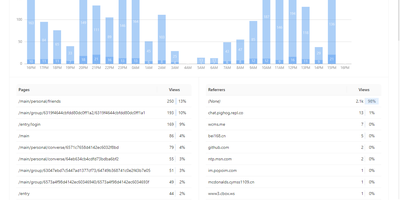
Website analytics, uptime monitoring, and server status - three tools most teams run separately - combined in Tianji, an open-source observability platform. The analytics layer tracks page views, unique visitors, referrers, and UTM parameters with a lightweight cookie-less script, which keeps collection GDPR and CCPA friendly. The uptime monitor checks availability and latency on configurable intervals, accepts passively reported results, and publishes public status pages for incident communication. Server status agents report CPU, memory, disk, and network metrics with threshold-based alerts, and notifications route through webhooks, Slack, Telegram, and other channels with noise control. It also includes anonymous telemetry for tracking deployments of your own open-source projects, surveys, waitlists, team collaboration, and an OpenAPI interface for integrations and exports. The consolidation is the point: traffic analytics, uptime checks, and server metrics share one interface and one alerting layer, so diagnosing an incident does not mean hopping between Google Analytics, Uptime Kuma, and Prometheus - and the built-in public status pages replace a separate paid Statuspage-style subscription. Because collection uses no cookies with IP truncation and aggregation by default, basic traffic measurement requires no consent banner. Built in TypeScript under the Apache 2.0 license and inspired by Umami and Uptime Kuma, it is deliberately right-sized for independent developers and small SaaS teams whose monitoring needs are real but lightweight.
Cryptpad
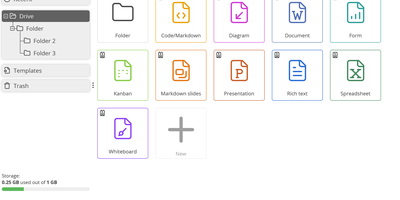
End-to-end encrypted by design, CryptPad is a real-time office suite where teams write documents, plan on kanban boards, collect answers with forms, and draw diagrams without the hosting server ever seeing their content. Rich text pages come with comments, replies, @mentions, and a document outline, while the Markdown editor adds a live preview, Mermaid diagrams, mind maps, and math. Kanban columns hold colored, tagged cards with Markdown bodies, and the diagram editor exports PNG, JPG, SVG, or PDF. Optional ONLYOFFICE editors add spreadsheets, word-processing documents, and presentations that several people can edit together. The form builder offers text, choice, grid, date, ranking, and poll questions, conditional sections, and separate author, auditor, and participant roles. Documents can be shared with contacts or teams, by link, or as embed code, with view, edit, present, or view-once access. Passwords, expiry dates, owner lists, and access lists limit who gets in, and every edit lands in a history you can step through, restore, or pin as a named snapshot. CryptDrive keeps files in folders, tags, templates, and a trash bin, while teams get their own drive, chat, and member roles. Running on a dedicated VPS on RepoCloud with guaranteed CPU, RAM, and SSD, full root SSH access, and a browser serial console. AGPL-3.0 licensed.
Meerkat CRM
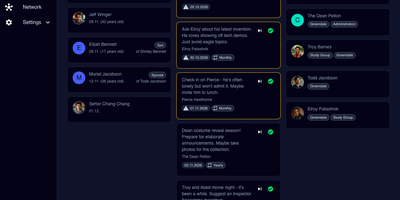
Friends drift away when nobody remembers to call; Meerkat CRM is a self-hosted personal CRM that keeps your relationships warm with birthday and stay in touch reminders, contact notes, and a living map of who knows whom. Organize every contact into circles like family, friends, or work, store spouses and children as linked relationships, and see the whole crowd on an interactive network graph that shows how people connect. Sync the same address book two ways: Meerkat runs its own CardDAV server for your phone and can also act as a CardDAV client against an external server you already use. Against each person you can keep the details that matter, dietary habits, kids names, the last conversation, plus a social style timeline of activities you have shared, from dinners to group projects. Reminders nudge you by email when it has been too long, with upcoming birthdays surfaced on the dashboard, so catching up becomes a habit instead of an afterthought. Move data in and out freely: import CSV, VCF, and even a Monica export, export back to CSV and VCF, connect external calendars, and fire webhooks into your own automations. Use it in English, German, Italian, Spanish, or French with light and dark modes, and SSO for whoever shares the house. Running on a dedicated VPS on RepoCloud with guaranteed CPU, RAM, and SSD, full root SSH access, and a browser serial console. MIT licensed.
Rotki
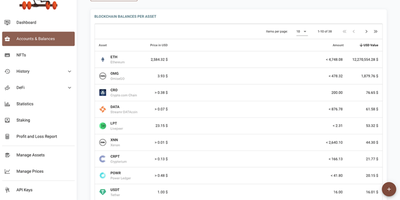
Crypto portfolio tracking that inverts the SaaS model: rotki runs on your own machine, needs no email or account for the free tier, and keeps every wallet address, balance, transaction, and tax event in a local SQLCipher database encrypted with 256-bit AES. By default nothing passes through rotki-operated servers - a design choice that matters when cloud portfolio trackers concentrate exactly the identity-linked holdings data attackers want. Centralized exchanges (Kraken, Binance, Coinbase, Bitstamp, and more) connect through read-only API keys that can see but never withdraw; blockchain accounts cover Ethereum and its L2s, Bitcoin, Solana, Polkadot, and Kusama, with ENS resolution and your choice of RPC endpoint or your own node. rotki decodes on-chain transactions into readable events across major DeFi protocols - Aave, Uniswap, Compound, Curve, Lido - and generates profit-and- loss reports for tax season with customizable accounting settings, including FIFO, LIFO, and HIFO cost-basis methods, plus CSV imports for defunct exchanges. Optional premium sync is zero-knowledge, encrypting the database on-device before upload. AGPLv3-licensed and multiplatform, with a Docker package for server deployment.
Diaspora
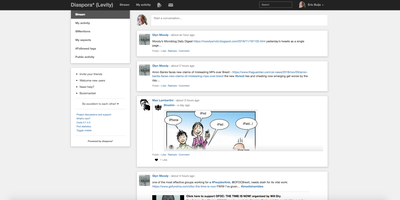
Diaspora lets you run your own social network node that federates with thousands of others, creating a network with no central authority and no advertising engine mining your behavior. The defining feature is aspect-based sharing: organize contacts into groups like Family, Work, and Close Friends, then control exactly who sees each post with granularity that mainstream platforms have never matched. Hashtag-based discovery connects conversations across the entire federation regardless of which pod participants call home, building communities around topics rather than algorithmic engagement bait. The Ruby on Rails backend (now running on Puma with Sidekiq workers instead of the heavier Unicorn configuration) handles federation delivery, media processing, and notifications efficiently. Photo albums, video embedding, Markdown posts, mentions, reactions, and resharing provide familiar social primitives for rich communication. Cross-posting bridges to Twitter and Tumblr maintain your presence on legacy networks while your canonical data lives on your own infrastructure. With 13,700+ GitHub stars and 270+ contributors since its 2010 launch, Diaspora proved early that social media can work without surveillance capitalism. The Docker Compose deployment runs the application alongside PostgreSQL, Redis, Sidekiq workers, and Nginx, providing a production-ready pod for your community.

Telegram Archive
Telegram Desktop's export is a file you make once by hand; Telegram Archive is a self-hosted backup that keeps saving your chats on a schedule and in real time, then lets you read them in a viewer that looks like Telegram. After one login with the code Telegram sends you, it stores messages, photos, videos, voice notes, stickers, documents, and link previews, saving each file once even when several chats share it. A live listener captures new messages, edits, and reactions as they happen, and a daily full pass fills any gaps. Every edit keeps its earlier text as a version, and with deletion tracking switched on, deleted messages stay in the archive marked as deleted. The viewer offers folders, forum topics, archived chats, pinned messages, polls, shared media, and search across every chat, plus a What changed feed of deletions, edits, and transcripts. Voice notes can be transcribed into searchable text by a server you run or rent. Family or colleagues get logins limited to chosen chats, or a share link that opens a single chat. One archive holds several accounts, a Telegram Desktop export can be imported for older history, and twelve themes suit phones and desktops. Running on a dedicated VPS on RepoCloud with guaranteed CPU, RAM, and SSD, full root SSH access, and a browser serial console. GPL-3.0-or-later licensed.
Chitchatter
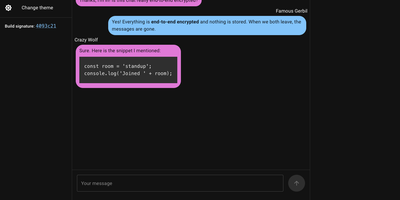
Chitchatter is a browser-based chat room for text, voice, video, screen sharing, and file transfers that exists only while its members are connected and keeps no record of what was said. Every visit starts with a random room name generated on your device, a UUID or a readable passphrase, and you invite people with the link or a QR code. Public rooms admit anyone with the link; private rooms also require a matching password. Messages support Markdown, multiline text, and code blocks, and clicking a name opens a direct conversation. Newcomers to public rooms receive the earlier conversation from peers already there, and typing indicators show who is writing. Start an audio or video call, share your screen to walk a relative through a settings problem, or hand over a file of any size, encrypted before it leaves your browser. Public-key checks verify each peer automatically, with a green lock marking everyone who passes and an icon showing whether the link is direct or relayed. Embed a room in any web page with an iframe or a web component that takes a room name, user name, and color mode. Light and dark themes are built in, and notifications and sounds announce new messages while you work in another tab. Close the tab and the transcript disappears. Running on a dedicated VPS on RepoCloud with guaranteed CPU, RAM, and SSD, full root SSH access, and a browser serial console. GPL-2.0 licensed.

OpenHAB
Over 400 technologies and thousands of smart devices from any manufacturer, unified under one roof: openHAB is the vendor-neutral home automation platform with a pluggable binding architecture. Each binding translates a device or service into openHAB's clean abstraction: Things expose Channels, Channels link to Items, and Items feed a rules engine that runs your home. That engine meets you at your skill level: Blockly gives non-programmers drag-and-drop visual logic, JS Scripting (GraalJS with the openhab-js library) is the modern text-based standard, the classic Rules DSL remains supported, and JSR223 opens the door to Python, Ruby, and Groovy. Time- and event-based triggers, scripts, notifications, and voice control compose into automations of any complexity, and users report decade-old rule sets still running rock solid. The Main UI handles configuration, semantic modeling, and now built-in charting - no external Grafana required. Built in Java on Apache Karaf's OSGi runtime and stewarded by the non-profit openHAB Foundation, it requires no cloud to function: everything runs locally, talking directly to your devices. Optional connectors bridge to Alexa, Google Assistant, and HomeKit, with iOS, Android, and web apps for control from anywhere.
ExpenseOwl
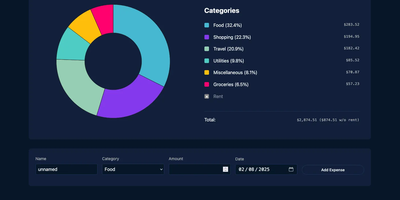
Log a date, amount, and category; get a clean monthly pie chart and a cashflow strip showing income, expenses, and net balance - ExpenseOwl is expense tracking stripped to what actually matters. The MIT-licensed Go application deliberately is not a budgeting system - no envelopes, no accounts, no double-entry, no bank sync - because its author found tools like Firefly III and Actual too heavy for the simple question "where did this month's money go?" The dashboard makes that question fast: click a pie slice to exclude fixed costs like rent and see discretionary spending clearly, then drill into a chronological table view to inspect or delete individual transactions. Recurring transactions handle salaries and subscriptions automatically, optional tags add a second classification axis, and settings cover custom categories, currency symbol, and a configurable month start date for non-calendar pay cycles. CSV import migrates data from virtually any other tool, and CSV export keeps your data portable. It ships as a self-contained binary and multi-architecture Docker image with zero internet interaction, stores data in flat JSON files by default (PostgreSQL optional), and installs as a PWA on phones. Single-user by design; pair it with an authenticating reverse proxy if exposed publicly.
Home Assistant
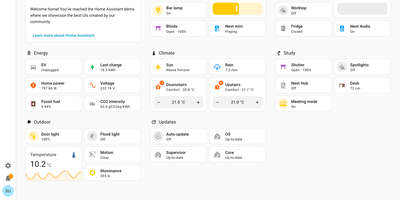
Your house already has lights, locks, sensors, thermostats, and speakers from many brands, and Home Assistant gives them one local control room with no vendor cloud in the loop. To close the shutters when the outdoor temperature holds above 25 °C, or to be alerted when the garage door is left open, build the routine in the visual editor: When, And if, Then do. Scenes, scripts, and blueprints package it for reuse, and run traces show what it did. More than 1,500 integrations cover Zigbee, Z-Wave, Matter, Thread, MQTT, ESPHome, Bluetooth, Hue, and Sonos, and network discovery offers known devices for one-step setup. To see the house at a glance, drag tile, thermostat, gauge, graph, and map cards into a dashboard, then put it on a TV with Home Assistant Cast. The Energy dashboard answers where the power goes, drawing solar, grid, battery, gas, and water as one distribution diagram with cost totals and per-appliance tracking. To talk to the house, use Assist: natural-language commands, wake words, and custom sentences run locally or through Home Assistant Cloud. The map panel shows who is home, plotting people against zones such as Home, Work, and School from the iOS and Android companion apps. Areas and labels keep large setups tidy, and multi-factor authentication guards each account. Running on a dedicated VPS on RepoCloud with guaranteed CPU, RAM, and SSD, full root SSH access, and a browser serial console. Apache-2.0 licensed.