Open Design
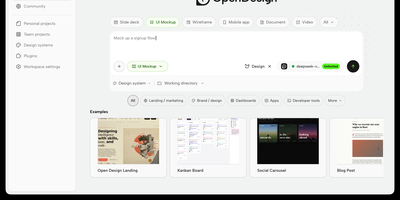
With over 84,000 GitHub stars since its April 2026 launch, Open Design has emerged as the definitive open-source alternative to Anthropic's Claude Design. Rather than shipping its own language model, Open Design acts as an agent-agnostic design orchestration layer that auto-detects 25+ coding CLI executables on your PATH — including Claude Code, Codex, Cursor, Gemini CLI, OpenCode, Qwen, GitHub Copilot CLI, Hermes, and Kimi — or connects to any OpenAI-compatible endpoint via its built-in BYOK proxy at /api/proxy/stream. The platform introduces a file-based protocol where SKILL.md files define composable design workflows and DESIGN.md files establish version-controlled brand systems, currently shipping 31 first-party skills and 72 brand-grade design systems. Output spans web and mobile prototypes, live dashboards, presentation decks, raster images, video, and HyperFrames motion graphics, with export pipelines for HTML, PDF, PPTX, MP4, and ZIP. The daemon architecture uses SQLite for project state and serves a sandboxed iframe preview renderer with vendored React and Babel for JSX artifacts. Deployment options include the native desktop app for macOS, Windows, and Linux, local daemon mode via pnpm tools-dev, a single-container Docker Compose path serving both API and Next.js frontend on port 7456, and Vercel deployment for the web layer. On RepoCloud, deploy Open Design on a dedicated VPS with full root SSH access, persistent storage for your design systems and generated artifacts, and complete control over which AI providers and agent CLIs your instance connects to, all under the Apache-2.0 license.
AutoGen Studio
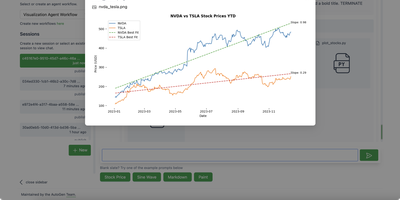
Prototype multi-agent AI systems without writing orchestration code: AutoGen Studio is Microsoft's low-code interface over the AutoGen AgentChat framework. You compose teams of LLM-powered agents in a visual Team Builder, either by drag-and-drop from a component library or by editing the declarative JSON specification directly. Each agent gets a model, a prompt, tools (Python functions), and the team gets termination conditions and an orchestration pattern, sequential or LLM-driven. The Playground runs teams interactively with live message streaming between agents, a visual control-transition graph, tool-call and code-execution tracking, and pause/stop controls, which makes it a practical debugger for agent behavior. Finished teams export as JSON for use in any Python application via the TeamManager class, or serve as an API endpoint. Any OpenAI-compatible model endpoint works, including local servers like Ollama or vLLM. Microsoft labels it a research prototype: use it for prototyping and evaluation, and build production systems on the underlying AutoGen framework.
OpenUI
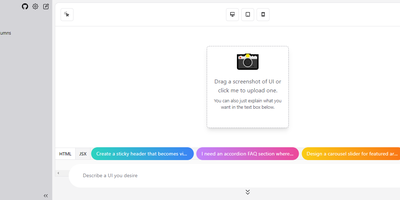
Describe a component in natural language and watch it render: OpenUI, from Weights & Biases, is an open alternative to Vercel's v0. Type a prompt like "a dark-themed dashboard with a sidebar and charts" and the LLM renders working HTML with Tailwind styling live in the browser. You then iterate conversationally, asking for changes until the design is right, and convert the result to React, Svelte, or Web Components for use in a real project. The backend is Python with LiteLLM routing, so it works with OpenAI, Anthropic, Gemini, Groq, and Mistral API keys, or fully offline against local Ollama models, including vision models like LLaVA that can generate UI from screenshot input - feed a screenshot and the model reproduces or riffs on an existing interface. Generated markup is inspectable at any point, with light and dark mode toggles, theme selection, and responsive previews across device sizes. The practical effect is compressing the mockup-review-revise loop from hours to minutes: a described layout renders in seconds and iterates through follow-up prompts, and because output converts to real framework code, prototypes feed directly into production codebases instead of staying trapped in a design tool. Self-hosting keeps unreleased product interfaces and prompts on your own server, and LiteLLM routing lets you pick the model per task - a cheap fast model for rough drafts, a stronger one for final passes, or free local models for unlimited experimentation.
Draw a UI
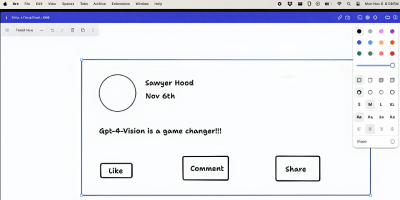
Sketch a wireframe, get working code: Draw a UI turns hand-drawn layouts into web interfaces. It pairs the open-source tldraw canvas with an OpenAI vision model: you sketch a layout - boxes, labels, buttons, arrows, whatever communicates the idea - select the drawing, and click Make Real. The app snapshots your selection as a PNG, sends it to the vision API with instructions to return a single HTML file styled with Tailwind CSS, and renders the result in an iframe directly on the canvas next to your sketch. The loop is iterative: annotate the generated prototype or redraw parts of it, select both the sketch and the previous result, and generate again - the model receives the earlier HTML as context and produces an updated version. Built by Figma engineer Sawyer Hood as one of the first viral GPT-4 Vision demos and the basis for tldraw's "Make Real", it is a Next.js app that runs against your own OpenAI API key. Self-hosting matters here: the upstream demo ships without authentication, so a private deployment keeps your API key from being drained by strangers. MIT-licensed.
Quant-UX
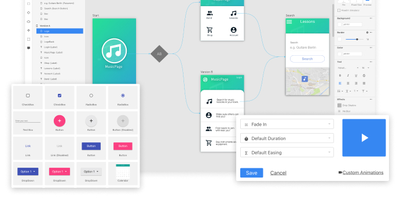
Most design tools stop at prototyping; Quant-UX also measures how real users actually perform with the prototype. The visual editor creates prototypes that behave like real apps - functional input widgets, animations, form validation, data binding across screens, and business logic modeled with REST requests and decision elements. Design systems are first-class, with components, design tokens, and master screens; if you design elsewhere, drop in image files or import from Figma. Testing is a shared link or QR code - no installs on the tester's side. Define user tasks up front, and Quant-UX records every session: click heatmaps show where users found (or missed) actionable elements, user journey graphs expose lost users, drop-off charts reveal where tasks stall, and success rates and task KPIs are extracted automatically into a dashboard. An A/B test operator wires two design variants into one prototype and compares task duration, success rate, and interaction counts. In-prototype surveys collect qualitative feedback alongside the numbers, and an AI assistant generates prototype fragments like styled forms on request. The RepoCloud deployment runs the full stack - frontend, backend, and WebSocket server containers over MongoDB - so all test recordings and research data stay on your infrastructure.