Colanode
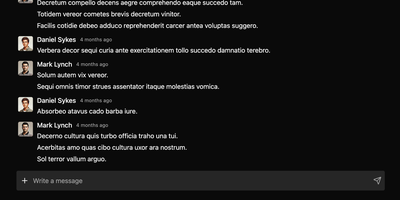
With nearly 5,000 GitHub stars and a Hacker News launch that garnered 147 points, Colanode delivers the first genuinely local-first alternative to both Slack and Notion in a single self-hosted workspace — writing every operation to a client-side SQLite database before syncing to your server, so teams work at full speed offline, on planes, or through intermittent connections without ever losing a draft. The real-time chat system provides channels and direct messages with instant delivery via WebSocket, while the rich text editor offers Notion-style block-based pages for documents, wikis, meeting notes, and knowledge bases with headings, code blocks, embeds, and nested hierarchies. Customizable databases organize structured data with custom fields and three dynamic views — table for spreadsheet-style browsing, kanban for visual workflow boards, and calendar for time-based planning. Conflict-free Replicated Data Types powered by Yjs handle concurrent editing across pages and database records: multiple users modify the same document simultaneously and the system merges changes automatically without manual conflict resolution. File management supports upload, sharing, and organization within workspaces using pluggable storage backends including local filesystem, S3-compatible services, Google Cloud Storage, and Azure Blob Storage with TUS resumable uploads for large files. The server runs Fastify with Zod validation on Node.js 20+, persists to PostgreSQL with pgvector extension, uses Redis for event broadcasting, and deploys via a single Docker image. Running on a dedicated VPS on RepoCloud with guaranteed CPU, RAM, and SSD, full root SSH access, and a browser serial console. Apache-2.0 licensed.
PodFetch
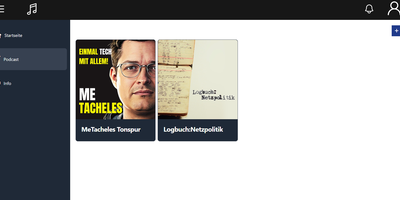
Podcast enthusiasts and homelab archivers automate digital episode preservation and stream personal audio feeds using PodFetch, an open-source self-hosted podcast manager that combines scheduled RSS downloads, Podcasting 2.0 transcript indexing, and browser playback into a modern listening platform. Listeners can subscribe to international podcast channels through direct feed URLs, Apple Podcasts directory searches, or bulk OPML subscription imports, configuring background polling timers to download new releases automatically upon publication. The integrated audio player supports variable speed playback, episode bookmarks, listening histories, and fullscreen visualization modes directly inside responsive desktop and mobile browser sessions. Advanced search capabilities leverage Podcasting 2.0 synchronized transcripts and automated speech-to-text generation via OpenAI-compatible Whisper APIs, allowing collectors to run full-text keyword searches across every spoken phrase in their audio archive. Built-in GPodder API synchronization maintains subscription lists and playback positions across popular smartphone apps like AntennaPod and native companion clients without relying on commercial cloud accounts. Server operators can assign multi-user accounts with private favorites lists, export customized RSS aggregation streams, and route storage paths between fast solid-state drives and large secondary mechanical hard disks. Running on a dedicated VPS on RepoCloud with guaranteed CPU, RAM, and SSD, full root SSH access, and a browser serial console. Apache-2.0 licensed.
2FAuth
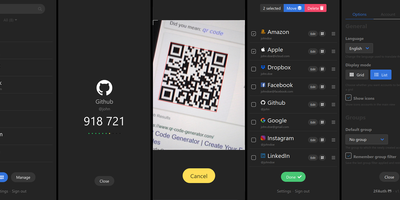
2FAuth generates TOTP, HOTP, and Steam Guard codes from any web browser, freeing your two-factor authentication from dependence on a single smartphone or app. Lose your phone, switch devices, or sit at a desktop computer, and your 2FA codes remain accessible through the web interface. The Laravel and Vue.js application stores account secrets in an encrypted SQLite database that backs up as a single file. Adding accounts works through camera-based QR scanning or manual secret key entry for services that only provide text codes. Group organization with drag-and-drop sorting keeps large collections navigable, categorized however you prefer. WebAuthn authentication with FIDO2 hardware keys protects vault access with phishing-resistant passwordless login, meaning the tool that secures your accounts is itself secured by the strongest available method. Automatic screen lock triggers after configurable idle time, and OTP obfuscation dots out generated codes until you tap to reveal them, preventing shoulder surfing in shared spaces. The REST API enables browser extensions and external applications to request codes programmatically. Import compatibility with Google Authenticator, Aegis, and 2FAS ensures painless migration without re-enrolling every account from scratch. PWA installation places 2FAuth on your device home screen for native-app-like instant access. Runs on a dedicated RepoCloud VPS with guaranteed resources and full root SSH access. AGPL-3.0 licensed.
RStudio Server
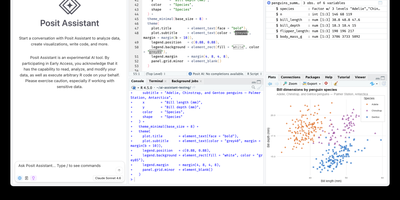
Open a browser tab, sign in, and the whole RStudio workbench is waiting there, running against R on a Linux server instead of your laptop. The familiar four-pane layout holds a source editor, an R console, Environment and History tabs, and Files, Plots, Packages, Help, and Viewer tabs. The editor opens R scripts, R Markdown, Quarto, and Python files, with code completion, diagnostics, section outlines, and a visual mode for Quarto documents. A Terminal tab and a Python console sit beside the R console, and the Data Viewer sorts, filters, and searches data frames and nested lists. Editor breakpoints and tracebacks help debug functions, while Background Jobs run long scripts in separate R sessions so the IDE stays usable. Shiny apps and Plumber APIs run as background jobs with live reload, and a Git pane handles diffs, commits, pushes, and branches. The Connections tab browses databases, and finished reports go to Posit Connect, shinyapps.io, Quarto Pub, or RPubs. Optional Posit Assistant adds an AI chat pane that works with the model provider you choose, and administrators can switch it off. Because everything runs server-side, a class, a lab, or a team can share one large-memory machine and keep computation next to the data without installing anything locally. Running on a dedicated VPS on RepoCloud with guaranteed CPU, RAM, and SSD, full root SSH access, and a browser serial console. AGPL-3.0 licensed.
Manage My Damn Life
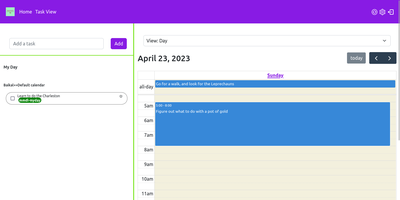
Manage My Damn Life is a personal productivity platform and CalDAV task manager that gives individuals and teams a full-featured web workspace for coordinating todos, calendar agendas, and project schedules without relying on proprietary productivity software. Users can connect multiple CalDAV server backends including Nextcloud, Radicale, and Baikal to synchronize tasks, events, and subtasks across their self-hosted infrastructure. The interface offers multiple interactive perspectives, letting planners switch between nested task checklists, full monthly calendar grids, and dynamic Gantt chart roadmaps with customizable timeline scales. Keyboard-driven operators can rapidly log action items via intuitive Quick Add syntax that parses due dates, priority tiers, and category labels from inline text triggers. A versatile filter manager allows users to save custom query views matching due dates, completion statuses, parent task hierarchies, and color-coded labels. Team members can establish reusable task templates for recurring administrative workflows, assign multi-level checklist items, and manage individual calendar visibility across shared workspaces. System administrators can configure user authentication through native accounts or integrate enterprise Single Sign-On using OpenID Connect providers like Keycloak, Authentik, and Google. Client-side state caching accelerates navigation while background sync preserves CalDAV compliance. Running on a dedicated VPS on RepoCloud with guaranteed CPU, RAM, and SSD, full root SSH access, and a browser serial console. GPL v3 licensed.
KeeWeb
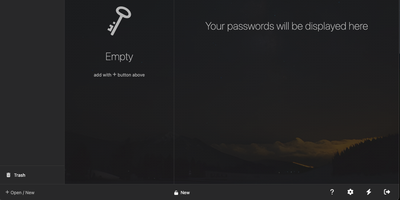
Your KeePass vaults, opened from any browser: KeeWeb reads, edits, and creates standard KDBX files, so it works with the same databases as KeePass and KeePassXC without conversion or lock-in. Self-hosting the web app gives you a password manager reachable from any modern browser, including mobile, with no client installation and no third-party cloud in the loop. All KDBX cryptography runs client-side; the server just serves the static app. Open multiple vault files simultaneously and search them all from one box, with advanced options covering specific fields, password history, and regular expressions. Vaults load from local files, your own server (WebDAV), or Dropbox, Google Drive, and OneDrive, with automatic sync - and files are cached for offline use, so a dropped connection never locks you out; changes resync once you're back online. Day-to-day niceties include a configurable password generator, protected fields that stay masked and are held in memory more defensively, entry history, tags with easy input, drag-and-drop attachments, and per-entry icons with favicon fetching. The optional KeeWeb Connect extension (Chrome, Firefox, Edge, Safari) autofills credentials using the keepassxc-protocol. MIT-licensed with matching desktop apps for macOS, Windows, and Linux.
CubeSandbox
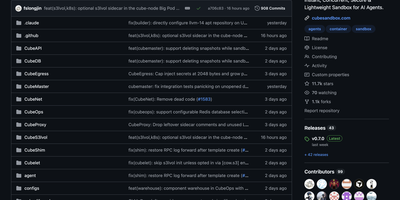
CubeSandbox gives every AI agent its own hardware-isolated MicroVM with a dedicated Linux kernel — not a shared-kernel container but a true KVM virtual machine — booting in under 60ms with less than 5MB of memory overhead per instance, enabling thousands of concurrent sandboxes on a single server via kernel sharing and Copy-on-Write memory. The Rust-built CubeProxy exposes an E2B SDK-compatible REST API on Axum, so existing E2B Cloud applications switch by changing one environment variable with zero client code changes. CubeMaster orchestrates cluster-level scheduling in Go while Cubelet manages node-local sandbox lifecycles including create, run, pause, resume, snapshot, and destroy operations. CubeVS, the eBPF-powered network layer, enforces per-sandbox isolation with LPM trie-based egress policies entirely in kernel space — no userspace context switches — while CubeEgress provides an L7 security proxy with per-domain, per-path, and per-method allowlists plus automatic credential injection that keeps secrets invisible to sandbox code. Hundred-millisecond-granularity snapshots enable checkpoint, rollback, and parallel fork from any saved state. The volume framework supports E2B-compatible pluggable storage with independent lifecycle and cross-sandbox sharing. Production deployment uses Terraform on Tencent Cloud or Helm charts on Kubernetes, K3s, or TKE, with full ARM64 support alongside x86_64 and AutoPause/AutoResume for cost optimization. Running on a dedicated VPS on RepoCloud with guaranteed CPU, RAM, and SSD, full root SSH access, and a browser serial console. Apache 2.0 licensed.

Standard Notes
Standard Notes keeps your notes, files, and tags encrypted on your device before anything touches the network, meaning the server stores only ciphertext it cannot read. Cross-platform sync across desktop, mobile, and web delivers fast, conflict-free updates on unlimited devices with the same zero-knowledge guarantee that only your password can decrypt your content. The V2 server architecture condenses everything into four Docker containers consuming roughly 570MB RAM total (down from 13 containers and 1.7GB in the legacy setup), with startup under one minute. Revision history automatically preserves every version of every note, so recovering deleted text or reverting to a previous state never depends on manual backups. A nested tag system organizes thousands of notes with hierarchical categorization that goes well beyond flat folder structures, while search operates entirely on client-side decrypted content. File attachments of any type encrypt and sync alongside notes with identical end-to-end protection. Multiple editor options span plain text, Markdown with preview, and rich formatting to fit different writing workflows. Two-factor authentication via TOTP with email backup codes adds a second barrier beyond your password. An optional separate container serves the web frontend, providing browser access to your encrypted vault without depending on standardnotes.com infrastructure. With 5,500+ GitHub stars and active development, the project continues expanding editor plugins and sync improvements.
LanQin Email
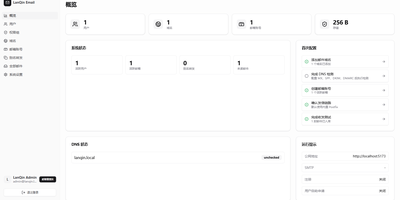
Running your own mail server usually means assembling five services and praying over DNS records; LanQin Email ships the whole stack in one container. Readers switch between mailboxes, search, label, star, and file messages into folders, then compose with a rich-text editor that handles fonts, colors, code blocks, attachments, emoji, and scheduled sending. Contacts, signatures, inbox rules with automatic forwarding, sender blacklists, and mail statistics make it a daily client rather than a demo. Administrators run the postal side from the same panel: add domains and generate DKIM keys, follow the DNS record checklist the system verifies for you, create mailboxes, set delivery aliases and catch-all addresses, and audit every message on the server. Accounts sign in with passwords or OAuth single sign-on, protected by TOTP two-factor codes and bot checks, while permission groups cap attachment size, sending rate, and mailbox count per user. Users can even request their own mailbox and wait for approval instead of filing a ticket. For programs, an Open API with bearer tokens sends mail idempotently and reports delivered, bounced, complained, rejected, and deferred events back through webhooks. External Gmail and Outlook accounts can be aggregated over IMAP, and a client-configuration page shows every IMAP, POP3, and SMTP setting in one place. A multi-container layout remains for debugging the stack piece by piece. Running on a dedicated VPS on RepoCloud with guaranteed CPU, RAM, and SSD, full root SSH access, and a browser serial console. GPL-3.0 licensed.
Pluton
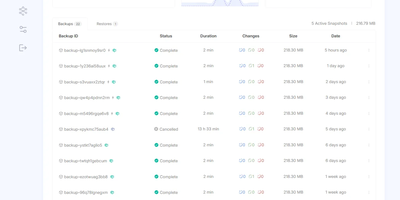
On a schedule you choose, Pluton backs up your folders to cloud storage and other disks, then lets you verify and restore every snapshot and see exactly what happened in a clean, self-hosted web dashboard. Three copies: every plan writes to a primary storage and can replicate to up to two more, so the 3-2-1 rule is a toggle in the plan wizard rather than a weekend project. Two kinds of media: pair a local disk or mounted drive with Backblaze B2, Cloudflare R2, Google Drive, Dropbox, pCloud, SFTP, S3-compatible buckets, or any of 70+ connectors, and press Verify to test a connection before trusting it. One place to look: the plan page charts file counts and sizes over a selectable range, a health strip colors recent runs, and a live panel counts files, bytes, and time remaining while each mirror initializes and replicates. Zero mysteries: every backup keeps a timestamped event timeline from dry run to pruning, and plan logs filter by level and task, search messages, and download as a file. Schedules run from every few minutes to monthly, including chosen weekdays; retention keeps daily, weekly, and monthly snapshots; and scripts can run before or after a job. Alerts reach you by email, Slack, Discord, or ntfy, and optional two-factor sign-in guards the dashboard. Running on a dedicated VPS on RepoCloud with guaranteed CPU, RAM, and SSD, full root SSH access, and a browser serial console. Apache-2.0 licensed.
MantisBT
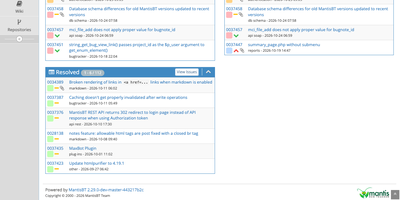
Every bug a team finds, from the first report to the day it is marked resolved, lives in one shared list in MantisBT, an open-source issue tracker. Reporters file issues with a summary, steps to reproduce, severity, and attachments, and email notifications reach the reporter, the handler, monitors, and note authors. Six access levels, from viewer to administrator, can be overridden project by project, and private projects stay hidden from users below the configured level. Administrators define their own status values, workflow transitions, and custom fields. Sub-projects inherit versions and categories from their parents, and issues link as related, parent and child, or duplicates. @mentions pull colleagues into a discussion, tags group related work, and a chronological history records who changed what. Triage works from stored and shared filters, the My View page, and summary charts, while a roadmap and changelog track what each version contains. Reporting comes through CSV and Excel export, optional time tracking with billing totals, and RSS feeds. Sign-in can use LDAP or Active Directory, scripts reach the tracker through REST and SOAP APIs, plugins extend the interface, and 50 languages are included. Running on a dedicated VPS on RepoCloud with guaranteed CPU, RAM, and SSD, full root SSH access, and a browser serial console. GPL-2.0-or-later licensed.
Countly
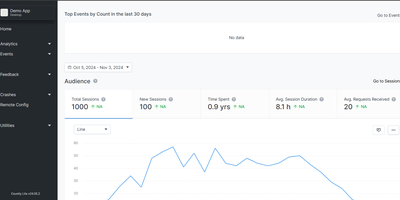
Mixpanel, OneSignal, and Crashlytics in one self-hosted stack - Countly is an all-in-one product analytics and engagement platform where every byte of first-party data stays on your server. A Node.js application over MongoDB, it collects through ten battle-tested SDKs spanning iOS, Android, web JavaScript, React Native, Flutter, Unity, and desktop (plus a data write API for anything else), and has powered tens of thousands of mobile, web, and desktop apps since 2012. The analytics core covers sessions, custom events, views, user profiles, and real-time dashboards, with exploration tools built for product managers as much as analysts. What separates Countly from pure analytics tools is acting on the data without third parties: built-in push notifications send automated, transactional, and personalized messages to iOS (APNs), Android (Firebase), and Huawei devices, with the SDK handling token retrieval and permission flows automatically; crash reporting captures symbolicated native crashes on iOS and Android plus JavaScript errors, correlated with the same user and session data. Email reports keep stakeholders updated, and the plugin-based architecture means features load as modules. For GDPR-sensitive products, engagement without piping user data to advertising companies is the entire point. AGPL-licensed server, installable in minutes.
TG-Spam
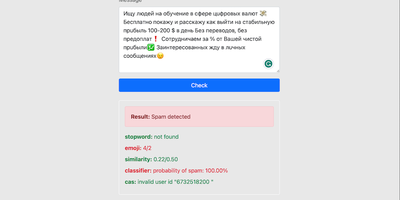
Spam bots flood busy Telegram groups with crypto scams and phishing links faster than human admins can delete them; TG-Spam watches every message and removes the junk before your members see it. Each message is scored by several checks at once: similarity to known spam samples, a stop-word dictionary, emoji and link counts, and a lookup against the Combot Anti-Spam database of known spammers. For borderline cases you can add OpenAI or Gemini as an extra judge, or write your own detection rules as Lua plugins that run inside the bot. The bot learns while you moderate: when admins approve a flagged message or ban a user it missed, the samples update, so the same trick fails next time. Members can report spam with a reply, repeat offenders accumulate warnings toward an automatic ban, and an admin chat gives your team one place to review borderline calls. Turn on the built-in server and the same engine answers spam checks over HTTP for your other tools, with a web UI to test messages, manage samples and dictionaries, and control the approved-user list. Running on a dedicated VPS on RepoCloud with guaranteed CPU, RAM, and SSD, full root SSH access, and a browser serial console. MIT licensed.
Sage Wiki
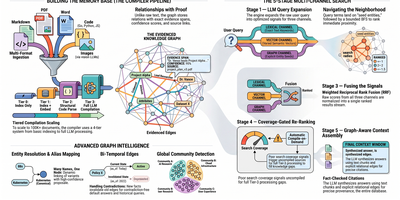
Sage Wiki turns a pile of unstructured documents into a fully interlinked, searchable wiki by running them through a five-pass LLM compiler pipeline. Inspired by Andrej Karpathy's vision of LLM-compiled knowledge bases, the pipeline processes source files through diff detection, summarization, concept extraction, image captioning, and cross-reference discovery, with parallel LLM calls and checkpoint/resume for vaults scaling to 100,000+ documents. The typed ontology graph stores entities and relations with BFS traversal, configurable relation types, multilingual synonyms, and a promotion/demotion lifecycle backed by grounding verification and consensus scoring. Multi-format ingestion handles Markdown, PDF, Word, Excel, PowerPoint, EPUB, email, CSV, images, and code files without manual tagging. LLM provider support spans Anthropic, OpenAI, Gemini, Ollama, and any OpenAI-compatible API, with per-pass model routing enabling cost optimization by assigning cheaper models to simpler tasks. The built-in MCP server exposes 17 tools over SSE transport for integration with Claude, Cursor, and any MCP-compatible agent, while native Obsidian vault overlay ensures existing note workflows remain undisrupted. Team deployment supports Git-synced shared wikis, centralized server access, and hub federation across multiple projects. Ships as a single Go binary with Docker Compose multi-arch images serving the web UI on port 3333. Running on a dedicated VPS on RepoCloud with guaranteed CPU, RAM, and SSD, full root SSH access, and a browser serial console. MIT licensed.
Observal
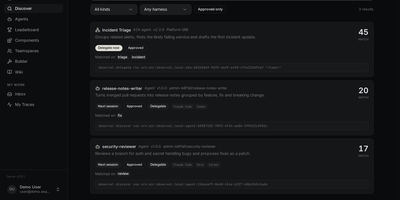
To pull a team's skills, MCP servers, hooks, prompts, and agent files out of scattered Git repositories, Observal keeps them in one reviewed registry and traces real sessions to show which ones help. Build an agent visually, with a live config preview for every harness. Submissions wait in an admin review queue, where reviewers inspect side-by-side version diffs before approving a release. Teamspaces give each team its own namespace, and approved releases can be forked into independent drafts. One pull command then writes the right config for Claude Code, Cursor, Kiro, Codex, Copilot, Pi, OpenCode, Antigravity, or Goose. Every approved resource is discoverable through the open Agentic Resource Discovery standard, and a running agent can hand part of its task to another approved agent or a remote Agent2Agent service. Hooks record each session as a trace of prompts, tool calls, MCP round trips, tokens, and errors, with turn-by-turn replay for debugging and audits. Insight reports, generated through providers such as Anthropic, OpenAI, or Ollama, list what is working, what is hindering, and quick wins. A dashboard follows adoption, cost, and department usage, a leaderboard ranks agents by downloads, and audit logs, SAML single sign-on, and SCIM provisioning are included. Running on a dedicated VPS on RepoCloud with guaranteed CPU, RAM, and SSD, full root SSH access, and a browser serial console. Apache-2.0 licensed.
Agentic Resource Registry
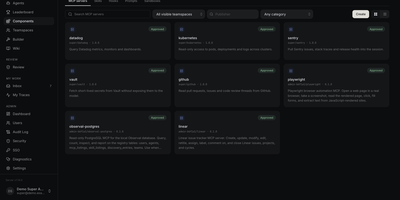
Every team building with coding agents has the same drawer problem: the best Skill, MCP server, or agent file lives in one person's repo, undocumented, while three colleagues rebuild it from scratch. Agentic Resource Registry is the internal catalog that ends the duplication, a self-hosted registry where your organization publishes Skills, MCP servers, hooks, prompts, agent files, and sandboxes in one searchable place. Browse by teamspace, publisher, category, or harness and see at a glance what each resource supports and how often it has been pulled. Authors build agent files in a four-step builder with a live summary and draft readiness checks, then submit them into a review queue where admins inspect the full prompt and version diffs before approving. Forking an approved release creates your own draft with pinned components, and reviewers can compare it against upstream line by line. The companion CLI installs any approved resource into Claude Code, Cursor, Codex, Kiro, Copilot, OpenCode, Pi, and more, generating the correct config for each harness automatically. Approved resources are also discoverable over the open ARD standard, so a running agent can hand part of its task to another approved agent or a remote A2A service. Running on a dedicated VPS on RepoCloud with guaranteed CPU, RAM, and SSD, full root SSH access, and a browser serial console. Apache-2.0 licensed.
Forge
Forge intercepts failing LLM tool calls and fixes them before they derail your agent workflow, applying rescue parsing, retry nudges, response validation, and step enforcement between your AI clients and local model backends. The proxy server mode drops in as a transparent intermediary speaking both the OpenAI chat-completions API and the Anthropic Messages API, so tools like Aider, Claude Code, Continue, and opencode connect through it without configuration changes. Under the hood, the WorkflowRunner provides a complete agentic loop manager with system prompt injection, tool execution, context compaction with configurable thresholds, and VRAM budgeting for consumer GPUs with 12-32 GB. SlotWorker enables priority-queued access to shared inference slots with automatic preemption for multi-agent architectures. The guardrails middleware exposes a two-method check-and-record API that wraps into any existing orchestration loop, providing malformed tool-call rescue parsing, retry nudge generation, required step enforcement, and prerequisite ordering without taking over execution control. Backend adapters support generic OpenAI-compatible endpoints, Ollama, llama-server, Llamafile, vLLM, and Anthropic with automatic model discovery and health checking. Architecture Decision Records document every design choice. Launched February 2026, already at 2,200+ GitHub stars. MIT licensed.
Omni
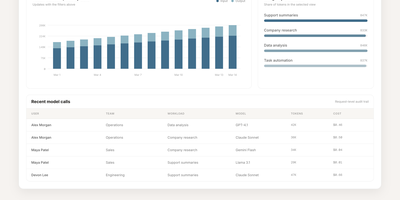
Omni is an open-source workplace AI agent and enterprise search platform that unites your company's scattered tools into a single context-aware workspace where team members can find answers and automate cross-application workflows. Employees can query connected knowledge sources including Google Drive, Gmail, Slack, Jira, GitHub, Confluence, and HubSpot to locate project specifications, customer records, and operational documents without jumping across tabs. The integrated AI assistant answers complex multi-step inquiries, summarizes lengthy email threads, and cites exact source passages so workers can verify factual accuracy before making business decisions. Granular permission inheritance mirrors existing access controls across every connected service, guaranteeing that sensitive personnel files, financial statements, and confidential repositories remain hidden from unauthorized staff. Engineers can construct bespoke data connectors and define automated agent skills through the extensible Python and TypeScript software development kits, triggering multi-service actions directly from interactive chat dialogues. Administrators can monitor background synchronization jobs, inspect audit trails, manage single sign-on access, and configure custom extraction pipelines using centralized operational dashboards. Running on a dedicated VPS on RepoCloud with guaranteed CPU, RAM, and SSD, full root SSH access, and a browser serial console. Apache 2.0 licensed.