OCI Core
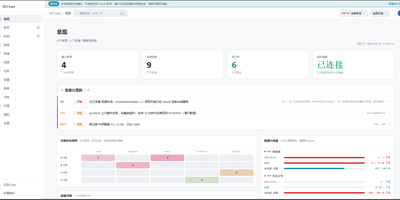
Anyone juggling several Oracle Cloud accounts knows the tab-switching ritual; OCI Core ends it by pulling every tenancy's instances into one self-hosted panel. The cross-account list shows state, shape, volumes, and public IPs for each machine, and you can start, stop, resize, rename, or terminate instances without opening Oracle's console. A creation wizard offers every shape in an availability domain, not just the free presets, while long operations such as IP swaps, resizes, and terminations run as background jobs with visible progress. Capacity hunting watches Oracle's read-only capacity reports and retries creation until a scarce shape appears, notifying you when it lands. Networking tools edit VCNs, subnets, and security rules visually, swap public IPs, enable IPv6, and manage extra network cards. Storage views resize boot and block volumes, and a rescue mode moves a broken system disk to a healthy machine for repair. Billing breaks spend down by service and region, tracks the monthly free egress allowance, and shows real usage for free-tier accounts. Accounts are checked for connectivity, quotas, and credential health, with emails, IPs, and OCIDs masked by default and revealed only on demand. Alerts reach Telegram, WeCom, DingTalk, email, or webhooks, and access is guarded by argon2id passwords, TOTP two-factor sign-in, session controls, and an audit log. Running on a dedicated VPS on RepoCloud with guaranteed CPU, RAM, and SSD, full root SSH access, and a browser serial console. MIT licensed.
BorgWarehouse
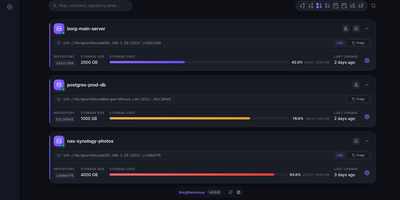
Centralizing BorgBackup usually means hand-creating Unix users, wiring SSH keys, and remembering which machine stopped backing up three weeks ago; BorgWarehouse replaces that terminal work with a dashboard built for exactly this job. Add a repository and it provisions the dedicated user, authorized key, and storage quota for you, then hands back ready-to-paste client commands so a new machine is backing up in minutes. Every repository carries a freshness threshold: when no modification lands within the window you set, its status dot turns red and an alert goes out by SMTP email, through Apprise to Discord, Telegram, Slack, Gotify, or ntfy, or as a signed webhook POST to tools like n8n and Uptime Kuma, rate-limited to one alert per repository per day. Append-only mode is enforced on the server, so even a fully compromised client can add archives but never destroy existing ones, which is the property that keeps ransomware from eating your backup history. The monitoring view tracks storage consumption against each quota, a setup wizard walks new clients through onboarding (with a LAN variant for local transfers), and sign-in can delegate to GitHub, Google, Microsoft, GitLab, or any OIDC provider. A versioned REST API automates provisioning, and your passphrase never reaches the server: backups stay end-to-end encrypted on the clients. Running on a dedicated VPS on RepoCloud with guaranteed CPU, RAM, and SSD, full root SSH access, and a browser serial console. AGPL-3.0 licensed.
PodFetch
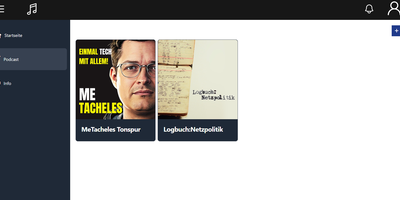
Podcast enthusiasts and homelab archivers automate digital episode preservation and stream personal audio feeds using PodFetch, an open-source self-hosted podcast manager that combines scheduled RSS downloads, Podcasting 2.0 transcript indexing, and browser playback into a modern listening platform. Listeners can subscribe to international podcast channels through direct feed URLs, Apple Podcasts directory searches, or bulk OPML subscription imports, configuring background polling timers to download new releases automatically upon publication. The integrated audio player supports variable speed playback, episode bookmarks, listening histories, and fullscreen visualization modes directly inside responsive desktop and mobile browser sessions. Advanced search capabilities leverage Podcasting 2.0 synchronized transcripts and automated speech-to-text generation via OpenAI-compatible Whisper APIs, allowing collectors to run full-text keyword searches across every spoken phrase in their audio archive. Built-in GPodder API synchronization maintains subscription lists and playback positions across popular smartphone apps like AntennaPod and native companion clients without relying on commercial cloud accounts. Server operators can assign multi-user accounts with private favorites lists, export customized RSS aggregation streams, and route storage paths between fast solid-state drives and large secondary mechanical hard disks. Running on a dedicated VPS on RepoCloud with guaranteed CPU, RAM, and SSD, full root SSH access, and a browser serial console. Apache-2.0 licensed.
HotHost
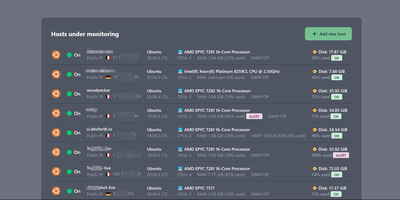
HotHost answers the only two questions that matter about every server you own, is it up and is the disk about to fill, before your users ask them instead. One web container collects metrics from a tiny agent you paste onto each host as a Docker or shell snippet, and the fleet lands in a single table: hostname, public IP, RAM and disk usage, CPU model and cores, swap state, and country. Disk and RAM get loud ALERT badges at a configurable threshold, ninety percent by default, and notifications fire on failure and again on recovery, so a resolved incident closes its own loop. The same console watches your websites directly, requesting each URL on your interval and checking the status code, a required keyword in the response, or basic auth behavior. SSL certificates get an expiration reminder fourteen days out by default, long before the browser warnings start. When memory climbs, the top ten RAM-consuming processes are charted over the last two days, turning "something is eating the box" into a named culprit. Alerts route through Email, Slack, Telegram, or Gmail plugins, and the plugin system accepts your own notifiers. Running on a dedicated VPS on RepoCloud with guaranteed CPU, RAM, and SSD, full root SSH access, and a browser serial console. MIT licensed.
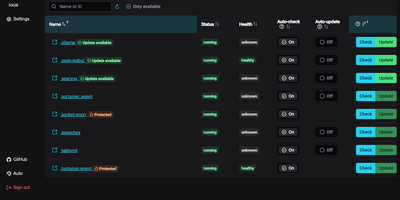
Tugtainer
Tugtainer delivers a visual command center for Docker environments that automates container image updates, monitors registry releases, and manages application lifecycles across multiple servers without command-line intervention. System administrators can inspect running containers across all connected hosts, trigger immediate image pulls, and configure automated cron schedules for recurring health and registry checks. Flexible update policies allow teams to flag production databases as notification-only while automatically updating stateless web applications whenever new image tags publish. When updating linked services, the platform analyzes Docker Compose project definitions and custom dependency labels to stop and restart containers in strict dependency order, preventing broken network links and orphaned volume mounts. Administrators can authenticate private container registries, browse image layers and tags, and view real-time container log streams directly within the browser console. Automated pruning jobs continuously reclaim server disk space by deleting obsolete, untagged images and dangling build layers after successful deployments. Multi-channel alerting integrates with over fifty notification providers, delivering real-time update summaries and error warnings directly to Discord, Telegram, Slack, and email webhooks. Running on a dedicated VPS on RepoCloud with guaranteed CPU, RAM, and SSD, full root SSH access, and a browser serial console. MIT licensed.

Nowen Video
Nowen Video turns the hard drive of films and series sitting on your NAS into a streaming service your family actually wants to open, posters, seasons, and all. Point it at your media folders and it scans the usual formats, reads streams with FFprobe, and scrapes rich metadata from TMDb, Douban, TheTVDB, Bangumi, and Fanart.tv, recognizing movie, season, and episode naming as it goes. NFO files and external subtitles are honored, filesystem watching keeps the library current, and collections plus episode navigation make a big archive feel curated rather than dumped. Pressing play is where the engineering shows: a server-side planner decides per client whether to direct play, remux, or transcode to HLS on demand, with automatic fallback when the first choice fails. Hardware acceleration through the GPU keeps transcoding cheap, subtitle and speed controls ride along in the player, and a local analysis pass can surface highlight clips from your own footage. Every family member gets favorites, watch history, and continue-watching progress under their own account, while library permissions decide who sees what. An Emby-compatible API even lets clients like Infuse connect as if it were an Emby server. Running on a dedicated VPS on RepoCloud with guaranteed CPU, RAM, and SSD, full root SSH access, and a browser serial console. GPL-3.0 licensed.
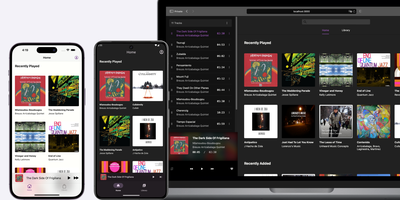
Black Candy
With 4,300+ GitHub stars and native mobile apps on three platforms, Black Candy transforms any VPS into a private Spotify-style streaming service for your personal music collection. The Ruby on Rails 7 backend with Hotwire Turbo and Stimulus delivers a responsive single-page-feeling web player supporting album browsing, artist views, playlists, favorites, and queue management without full page reloads. Point it at a media directory containing MP3, FLAC, OGG, AAC, or WAV files and Black Candy indexes metadata, fetches album artwork from Discogs API, and begins streaming immediately with on-the-fly transcoding that adapts bitrate to client bandwidth. Multi-user support gives each account independent playlists, favorites, and listening history while sharing the same music library — ideal for families or shared households. Native iOS, Android, and F-Droid apps maintained as separate repositories provide offline caching, background playback, and server discovery for mobile listening. The admin panel manages user accounts, configures media paths, and sets Discogs API tokens for automatic cover art retrieval. Deployment requires one Docker command — `docker run -p 80:80 ghcr.io/blackcandy-org/blackcandy:latest` — with persistent storage volumes for the SQLite database and media directory. For larger deployments, switch to PostgreSQL via environment variables with dedicated database URLs for ActionCable, SolidQueue, and SolidCache. Running on a dedicated VPS on RepoCloud with guaranteed CPU, RAM, and SSD, full root SSH access, and a browser serial console. MIT licensed.

Urocissa
Urocissa is a self-hosted photo and video gallery engineered to browse, search, and filter a million-image library in under a second on modest hardware. Its photo stream scrolls endlessly without pagination or lazy loading, flying past the browser DOM height limit that breaks other galleries long before a million items. Search understands boolean operators, so a query mixing and, or, and not narrows a lifetime of photos in milliseconds, and select-all is equally instant across the whole collection. Point it at folders and it watches them for new arrivals, importing photos and videos automatically while duplicate detection keeps redundant copies out. EXIF data is extracted for every image, and your own tags layer manual organization on top, with timeline navigation and rotation built in. Albums share collections with family or clients, a read-only mode publishes a public gallery safely, and videos play inline without leaving the page. The index that makes this fast lives in memory at roughly half a gigabyte per million photos, and the whole application ships as a binary of about 25 megabytes, optionally protected by a password. Running on a dedicated VPS on RepoCloud with guaranteed CPU, RAM, and SSD, full root SSH access, and a browser serial console. MIT licensed.

Nanocl
One server, treated properly: Nanocl runs your containers and full virtual machines from a single declarative Statefile, reconciling what is running against what the file says, so a lone host gets cluster discipline without cluster ceremony. Containers group into Cargoes with replica counts, ordered init containers, and health-aware restarts; finite jobs run to completion and stop. When a workload needs a real kernel or a custom disk image, it boots as a QEMU virtual machine beside the containers instead of forcing a second platform. Publishing is built in: the proxy controller terminates TLS and routes HTTP and TCP traffic, and the DNS controller keeps service names resolving while workloads come and go. Secrets for registries, certificates, and environment variables attach where they are used, never inside the file itself. The daily loop is a CLI and an API: list processes, follow logs, exec into a container, watch events, and back up the entire deployment state before you change it. Namespaces keep projects apart on the same host, and Statefile arguments, templates, and sub-states carry one definition from staging to production. Running on a dedicated VPS on RepoCloud with guaranteed CPU, RAM, and SSD, full root SSH access, and a browser serial console. MIT or Apache-2.0 licensed.
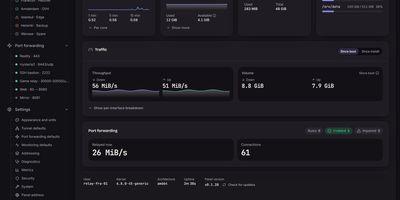
Tunnel Panel
Tunnel Panel manages GRE tunnels and port forwarding on Linux servers from a web panel that previews every change before it runs and verifies the result against the kernel. Create GRE, GRETAP, IP6GRE, and IP6GRETAP tunnels and see the exact commands, unit file, and rollback before anything is applied. The far end configures itself from a pairing code, as text or QR, with the sides flipped automatically so the two ends cannot disagree by a typo. Native ICMP probing with hysteresis keeps a single dropped packet from flapping a tunnel between down and back, and when ICMP is filtered the panel knocks over TCP and says so instead of crying wolf. Forward any TCP or UDP port, or a whole range, with round-robin, source-hash, or weighted balancing across destinations, and a backend that stops answering its health knock leaves the ruleset until it recovers. Watch every connection crossing the relay, who connected, which destination took them, and how much has moved, and set traffic limits per tunnel, rule, or destination. When something breaks, diagnostics reach a verdict with evidence and a suggested fix, backed by a streaming manual probe and a path-MTU search that offers to apply its findings. The panel reads your kernel's relay limits, recommends values from the host's memory and cores, and refuses changes that would lock you out of your own server. Running on a dedicated VPS on RepoCloud with guaranteed CPU, RAM, and SSD, full root SSH access, and a browser serial console. AGPL-3.0 licensed.
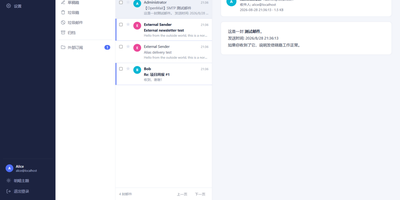
OpenMail
Your entire mail system can live in one self-hosted suite with OpenMail, from SMTP, IMAP, and POP3 delivery to three-pane webmail and the admin console that runs it. Standard clients such as Thunderbird, Apple Mail, and phone apps connect over SMTP ports 25, 587, and 465, IMAP ports 143 and 993, and POP3 ports 110 and 995, while people use the three-pane webmail with folder tree, conversation list, and reading pane at port 3000. You read, write, reply, forward, batch-organize, drag messages between folders, filter stars, search sender, subject, and body text, and follow conversations threaded automatically by their References headers. The rich-text composer autocompletes recipients, accepts dragged attachments and pasted screenshots, saves drafts every 12 seconds, sends on a schedule, and inserts reusable templates imported from HTML or generated with AI. Any OpenAI-compatible endpoint can draft replies, translate mail into twelve languages, and summarize messages, with provider keys encrypted on your server. Administrators get real-time mail statistics with 14-day send and receive trends, user quotas and bans, multi-domain aliases and catch-all addresses, outgoing queue visibility, and audit logs. Adding a domain generates DKIM keys and copy-ready SPF, DKIM, and DMARC DNS records with one-click checks, while rule-based spam scoring, TOTP two-factor authentication, and role-based permissions protect accounts in ten interface languages including right-to-left Arabic and Urdu. Running on a dedicated VPS on RepoCloud with guaranteed CPU, RAM, and SSD, full root SSH access, and a browser serial console. MIT licensed.
Statainer
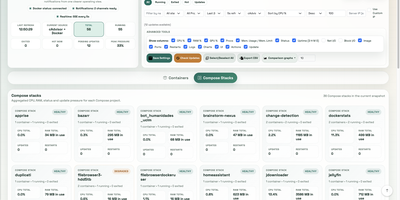
Monitoring and safeguarding Docker infrastructure without heavy enterprise software overhead is the primary mission of Statainer, an open-source management control center for container hosts. System operators inspect live CPU loads, memory consumption, network throughput, and disk I/O metrics across individual containers or comparative top-ranking charts. The interface groups containers by Compose projects, enabling administrators to start, stop, or restart entire application stacks and inspect real-time log streams without opening SSH sessions. The built-in Update Manager detects available image tags, executes single-click container updates, and maintains persistent deployment history with automated rollback capabilities for failed recreations. Custom alert configurations trigger instant notifications to Telegram, Discord, Slack, Pushover, or generic webhook endpoints whenever resource thresholds are breached or container health states change. Developers can provision scoped API keys with token authentication to automate container state transitions and export performance telemetry into custom monitoring workflows. Running on a dedicated VPS on RepoCloud with guaranteed CPU, RAM, and SSD, full root SSH access, and a browser serial console. MIT licensed.
ContainerFlow
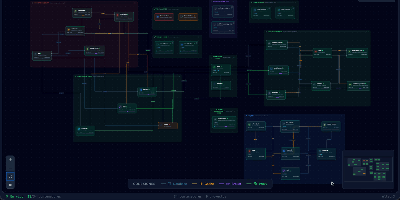
Your database container is probably not at 98 percent memory, whatever docker stats claims, because most of that figure is reclaimable page cache; ContainerFlow subtracts the full cache and shows the memory your containers actually hold. Point it at a Docker socket and it draws the whole estate as a living map: every Compose project discovered automatically, services grouped and colour coded, and the connections between them inferred, app to database, proxy to app, worker to broker. CPU and memory refresh every three seconds, the graph flashes when a container starts, stops, or restarts, and seven days of metric history wait in a local store when you need to know what happened overnight. Click any node and a detail panel opens with live logs you can filter by stream, an inline terminal that runs commands inside the container, and buttons to start, stop, restart, rebuild, recreate, or remove it. The same panel teaches as it works, flagging containers that run with no memory limit, no CPU limit, or no restart policy, while Discord webhooks fire when a container you care about crosses a threshold you set. Running on a dedicated VPS on RepoCloud with guaranteed CPU, RAM, and SSD, full root SSH access, and a browser serial console. AGPL-3.0 licensed.

Ubuntu VPS
A minimal Ubuntu 24.04 LTS virtual private server — no pre-installed applications, no opinionated configuration, just the operating system and root access. Start from a clean slate and install exactly what you need: web servers, databases, development toolchains, CI runners, monitoring stacks, VPN endpoints, game servers, or anything else that runs on Linux. The server ships with apt package management, systemd service supervision, and standard networking configured out of the box, giving you access to over 36,000 packages in the Universe repository alone. Connect via SSH with the key you select during deployment; a dedicated IPv4 address is included with every server at no extra charge. A browser-based serial console in the RepoCloud dashboard provides emergency access without an SSH client. Snapshots let you capture the server state before risky changes and roll back with one click. Resize CPU and RAM on demand without reinstalling. Canonical's standard security maintenance covers this LTS release through May 2029 — five years of patches for the Main repository. Ubuntu Pro extends that to ten years with additional Universe coverage, kernel livepatching, and compliance tooling, available free for up to five machines.
Substreamer
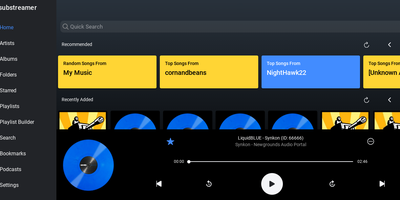
A free, polished web client for Subsonic-compatible music servers: Substreamer is the browser-based frontend you point at your existing streaming backend to play your own library from anywhere. It speaks the Subsonic API (v1.13 and higher), which makes it compatible with the whole ecosystem that has grown around that protocol: the original Subsonic server, its forks Airsonic and Madsonic, and modern implementations like Navidrome and Ampache. That decoupling is the point - your music files, transcoding, and library indexing live on whichever server you prefer, while Substreamer provides the listening experience: browse by artist, album, and genre, build and manage playlists, search your collection, and stream on demand. This RepoCloud deployment runs the containerized web edition, so the same interface is available from any browser without installing a native app, and it pairs with the Substreamer mobile apps that made the client popular. For anyone assembling a self-hosted Spotify replacement - typically Navidrome for the backend plus a good client - Substreamer fills the client half with a clean, familiar player UI. Because it is a stateless client, the container is lightweight and low-maintenance: connect it to your server's URL and credentials, and your entire collection is streaming in minutes, with no subscription and no catalog that can disappear.