PsiTransfer
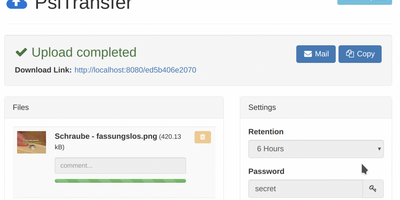
Upload files, get a share link, let it expire: PsiTransfer is a self-hosted WeTransfer with no accounts, no logins, and no third-party cloud with size caps and metadata harvesting. The engineering focus is large files over imperfect networks. Uploads use the tus.io resumable protocol, so a dropped connection on a multi-gigabyte video resumes exactly where it stopped once you're back online; downloads support HTTP range headers for the same resilience, and everything streams, so file size is bounded by your disk rather than memory. Files organize into upload buckets with retention you control: expire after a set time (up to weeks) or after a one-time download, with automatic cleanup when links lapse. Recipients need nothing installed - they open the link, preview files in modal views, and grab everything as a zip or tar.gz archive with one click. Buckets can be password-protected (AES-encrypted download lists), and security-through-obscurity is done properly: bucket URLs use hashed UUID tokens and stored filenames are replaced with UUIDs. An optional admin page (enabled by setting an admin password) lists bucket information and storage. The Vue.js frontend ships under 100 KB gzipped and is fully responsive. Honest caveat from the author: no end-to-end payload encryption yet. BSD-licensed, Docker-ready.
Hasty Paste
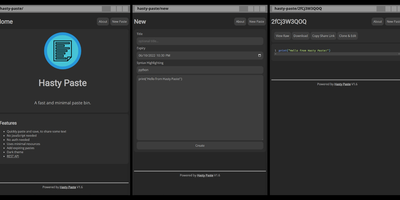
Paste some text, hit save, share the link - Hasty Paste is a fast, minimal pastebin written in Python on the async Quart framework, named, by its author's own admission, "because you use it so fast without a care in the world." No accounts, no authentication, no friction - built for the everyday case of handing a debug log, config snippet, or stack trace to someone in tech support or a chat channel. Pastes get randomly generated IDs, with an optional "long" ID mode that makes brute-force URL guessing impractical, and expiry times ensure throwaway content actually gets thrown away. Optional Pygments syntax highlighting makes code readable, a dark theme spares your eyes, and the whole interface works without JavaScript - it renders in terminal browsers and under the strictest script blockers. Storage is a custom flat-file system (no database), caching runs internally or through Redis for busier instances, and a REST API plus the companion "Hastily Paste It" CLI script enable piping command output straight into a paste from the terminal. The Alpine-based Docker image is tiny, resource usage is minimal, and the license is AGPL.
Hammond
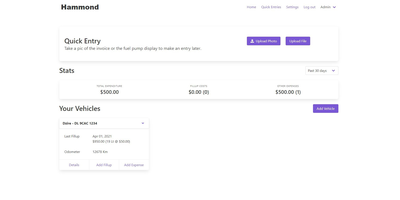
When Clarkson, the once-popular fuel logger, stopped receiving updates, Hammond stepped in as its logical successor - a self-hosted vehicle expense tracker. Written in Go with a Vue.js interface and SQLite storage - a single lightweight container, no external database - it tracks every cost your vehicles generate: fuel fill-ups with cost, volume, and odometer readings; maintenance and repairs; and arbitrary other expenses, each attachable with photos and documents stored against the vehicle. The multi-user, multi-vehicle design is what sets it apart from phone apps: a household or small business adds all its vehicles and all its drivers, shares vehicles across users, and every fill-up lands in one ledger no matter who was driving. The Quick Entries feature respects how expenses actually happen - snap a photo of the receipt or pump screen at the gas station, then complete the structured entry later when you have a minute. Reporting works at both the vehicle level (cost per distance, fuel economy trends) and across the whole fleet. Migration matters here: importers for Clarkson, Fuelly, and Drivvo bring years of fill-up history along, so switching does not mean starting your data over.

Hiccup
"Get to your most important links, FAST" - Hiccup's README states its whole mission in that one line, and the static start page delivers it. It is a client-side React single-page app - no backend, no database, no accounts - driven entirely by a config.json that defines featured link cards, categorized sections, and search providers. The search bar is the power feature: it queries your own links by name, URL, and tag while simultaneously offering external providers like Google, DuckDuckGo, and Amazon (plus custom URL-template providers you define), with arrow-key navigation and Enter to launch, so muscle memory replaces mousing. Editing happens in the browser - drag and drop links and background images, tweak cards in edit mode - with changes persisting to localStorage; a built-in config manager exports the JSON for hosting, and remote profile loading pulls a shared config across every browser and device you use. Multiple profiles keep home-server, work, and dev-tool link sets separate. PWA support installs it on a phone home screen, caching strategies keep it fast offline, read-only mode suits kiosk displays, and Cmd/Ctrl+/ reveals the full hotkey reference. Serve it from any static host and point your new tab at it.
Jirafeau
Upload a file, get a unique download link and a separate delete link - Jirafeau has done exactly this one thing since 2008. It is plain PHP with no database, no mail server, no JavaScript framework, and no external dependencies - files and metadata live on the filesystem, which is why it runs on nearly anything and why it has outlasted most of its imitators. Uploads use the HTML5 file API, so PHP's post_max_size ceiling does not constrain file size, with live progress showing speed, percentage, and time remaining. Every upload takes options: expiration from one minute to a year to unlimited, self-destruct after first download, and password protection with configurable policy - passwords can be optional, required, or server-generated with complexity rules. Server-side encryption (modern builds use XChaCha20-Poly1305) stores files encrypted at rest with the decrypt key embedded only in the download URL, never on the server, so a compromised host cannot read the contents. Unencrypted deployments get file-level deduplication - identical files stored once with multiple links. Upload access can be gated by password lists or IP allowlists, a small admin panel manages stored files, and a CLI cleanup script handles expired files via cron. Recipients can preview supported files in-browser.
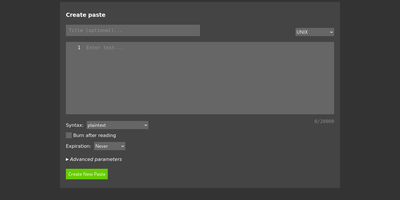
Lenpaste
Share code snippets, logs, configs, and notes without registration, tracking, or ads: Lenpaste is a minimal, self-hosted, anonymous alternative to pastebin.com. It is deliberately spartan in the right ways: no accounts, no JavaScript required (the entire site works in text browsers and hardened setups), and cookies used solely to store display preferences. Pastes support syntax highlighting across a long list of languages (from ApacheConf and Arduino to mainstream stacks), configurable expiration from minutes to unlimited, one-use "burn after reading" pastes that self-delete on first view, optional author attribution, and iframe embedding for dropping pastes into other pages. The form-encoded HTTP API covers everything the UI does - create pastes with title, syntax, expiration, and line-ending normalization, fetch them by ID, and query server capabilities - making it trivial to pipe command output to your paste server from shell scripts. Server operators control maximum title and body lengths, maximum paste lifetime, rate limits for viewing and creation, search-engine indexing policy, and can lock private instances behind HTTP Basic authentication. It deploys as a single lightweight Docker container, giving your team a snippet-sharing endpoint where the content never touches a third-party service.