Traccar
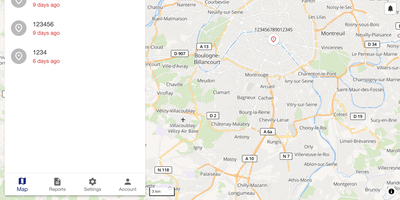
Whether it is a delivery van, a trailer in a storage yard, or a dog on a hike, Traccar is the GPS tracking server that puts it on one live map you host and control. Every position and event lands in your own SQL database. Over 200 protocols covering 2000+ tracker models decode out of the box, so a Teltonika fleet unit and a budget dongle share one device list. Pick a device to see speed, address, ignition, and total distance. Routes replay on a timeline slider, and a ruler tool measures distances. Geofences can be polygons, polylines, or circles, linked to devices or groups, colored as you like, and limited by calendar schedules. Alerts for overspeed, fuel drops, offline devices, alarms, and maintenance arrive by web, email, push, SMS, Telegram, or WhatsApp. Reports cover trips, stops, summaries, charts, events, and positions, with Excel export and scheduled email delivery. Commands go out over the tracker's own connection or by SMS, queued for offline devices. Computed attributes derive ignition or fuel values from raw inputs using expressions. Resellers get admin, manager, user, and read-only roles with device limits, plus white-label branding. Traccar Client lets a smartphone report as a tracker, and Traccar Manager monitors devices from mobile. Teams who want AI assistants to query their devices can add the MCP endpoint, which is optional. Running on a dedicated VPS on RepoCloud with guaranteed CPU, RAM, and SSD, full root SSH access, and a browser serial console. Apache-2.0 licensed.

LubeLogger
Vehicle maintenance records shouldn't live in a homemade spreadsheet and a shoebox of receipts - LubeLogger exists because of exactly that. It's a self-hosted .NET web application (from Hargata Softworks) that gives every vehicle in your garage a complete digital history: service, repair, and upgrade records categorized and searchable, with invoices and receipts attached as documents; fuel fill-ups that compute economy in MPG, UK MPG, L/100KM, or KM/L without spreadsheet tedium; taxes, odometer logs, inspections, equipment, and supplies inventory for tracking the parts and fluids on your shelf. The reminder system is what saves engines: recurring reminders trigger by date, odometer reading, or whichever comes first - exactly how real service intervals work - so oil changes and timing belts stop relying on memory. A dashboard summarizes expenses by year, month, and category, a planner tracks to-dos by type, priority, and progress, and professional vehicle reports print a full history - genuinely useful when selling a car. Collaboration is built in: invite household members as collaborators on shared vehicles, with single sign-on support. Custom fields adapt records to your needs, CSV import/export moves data freely, an API enables automation, and the mobile-tested UI installs as a PWA on iOS and Android. MIT-licensed.
TeslaMate
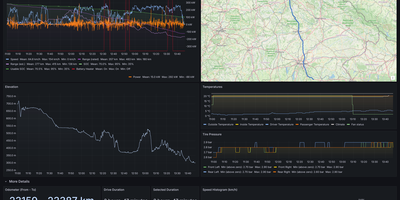
Logging every drive, charge, and idle stretch of a Tesla to a database you own, TeslaMate shows where the battery went, including degradation, vampire drain, and charging cost. Battery health comes first: the dashboard estimates usable capacity, range lost, and degradation against mileage. Idle losses come next, with Vampire Drain listing how much charge disappears during every idle period and a States view recording every online, asleep, and offline stretch. The car is left alone to fall asleep, so logging adds no extra vampire drain. Charging sessions show curves, energy added and used, efficiency, and cost, using per-location prices attached to geo-fences drawn on a map. Each drive records second-by-second speed, power, elevation, and temperature, plotted on a route map beside tire pressure and consumption charts. Trip, Drives, Efficiency, Drive Stats, Mileage, Updates, Statistics, and a lifetime driving map fill in the rest. Live vehicle data goes out over MQTT to Home Assistant, Node-RED, and Telegram, and old history imports from TeslaFi or tesla-apiscraper. Several vehicles on one Tesla account work together, addresses are looked up automatically, and the web interface offers light, dark, or system themes in 19 languages. Sign-in uses Tesla access and refresh tokens that TeslaMate encrypts with a key you set. It works best on an always-on server. Running on a dedicated VPS on RepoCloud with guaranteed CPU, RAM, and SSD, full root SSH access, and a browser serial console. AGPL-3.0 licensed.
Hammond
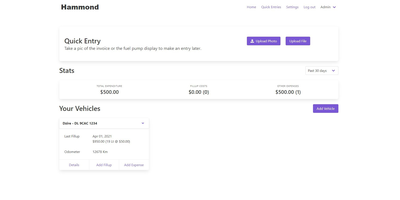
When Clarkson, the once-popular fuel logger, stopped receiving updates, Hammond stepped in as its logical successor - a self-hosted vehicle expense tracker. Written in Go with a Vue.js interface and SQLite storage - a single lightweight container, no external database - it tracks every cost your vehicles generate: fuel fill-ups with cost, volume, and odometer readings; maintenance and repairs; and arbitrary other expenses, each attachable with photos and documents stored against the vehicle. The multi-user, multi-vehicle design is what sets it apart from phone apps: a household or small business adds all its vehicles and all its drivers, shares vehicles across users, and every fill-up lands in one ledger no matter who was driving. The Quick Entries feature respects how expenses actually happen - snap a photo of the receipt or pump screen at the gas station, then complete the structured entry later when you have a minute. Reporting works at both the vehicle level (cost per distance, fuel economy trends) and across the whole fleet. Migration matters here: importers for Clarkson, Fuelly, and Drivvo bring years of fill-up history along, so switching does not mean starting your data over.