RustFS
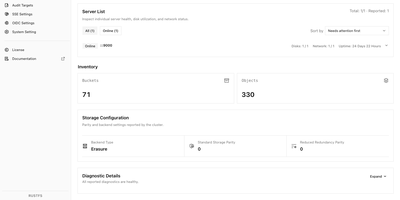
Tools and applications that already speak S3 can use RustFS as their storage backend, so backup jobs, data pipelines, and services keep working while the data stays on infrastructure you control. A built-in web console on port 9001 manages buckets, object uploads and downloads, access keys, users, groups, and IAM policies, with a status page for cluster health, capacity, and scanner activity. Versioning, Object Lock retention, bucket quotas, and server-side encryption with Vault or AWS KMS backends protect objects once they land. Lifecycle rules expire or transition data, and tiering moves cold objects to remote targets such as Amazon S3 or Wasabi. Bucket replication and site replication keep clusters in sync, and event notifications call webhooks when objects change. Single-node mode suits a lab or small server, while distributed mode adds erasure coding, bitrot protection, background healing, and pool expansion or decommissioning as capacity grows. Sign-in works with local users, OIDC single sign-on, or OpenStack Keystone, and FTPS and WebDAV are available by default, with SFTP and the Swift API as opt-in builds. A preview of S3 Tables exposes an Iceberg REST catalog for tools such as DuckDB and PyIceberg, and a documented migration path moves existing MinIO deployments across. Typical uses include backups, container registries, logs and traces, data lakes, and AI training sets. Running on a dedicated VPS on RepoCloud with guaranteed CPU, RAM, and SSD, full root SSH access, and a browser serial console. Apache-2.0 licensed.
CapRover
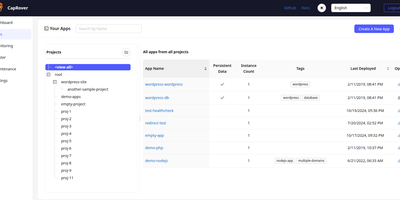
With over 15,000 GitHub stars and nearly nine years of active development, CapRover is the self-hosted PaaS that replaces Heroku's pricing with your own infrastructure while keeping the deploy-and-forget simplicity. The web dashboard manages application lifecycle from deploy through scaling — configure custom domains, environment variables, persistent volumes, instance counts, and nginx templates without touching config files or SSH. The CLI tool enables scriptable deployments with a single command from your terminal or CI/CD pipeline, while webhook-based deployment triggers automated builds from Git pushes. The one-click app marketplace provides over 100 pre-configured services including WordPress, Ghost, PostgreSQL, MySQL, MongoDB, Redis, Grafana, Portainer, and dozens more, each deployed as a Docker container with volumes and environment variables preconfigured. Automatic HTTPS provisions and renews Let's Encrypt certificates for every custom domain with one-click HTTP-to-HTTPS redirects. Under the hood, Docker Swarm orchestrates containers across multiple nodes for horizontal scaling and load balancing, while nginx handles routing with fully customizable EJS-generated configuration templates per application. Deployment supports four methods: CLI push, tarball upload through the web UI, Docker image reference, and Git repository connection. The build system supports Dockerfiles, captain-definition files with build packs, and direct Docker image pulls. NetData integration provides real-time server monitoring dashboards. Running on a dedicated VPS on RepoCloud with guaranteed CPU, RAM, and SSD, full root SSH access, and a browser serial console. Apache 2.0 licensed.
AutoXpose
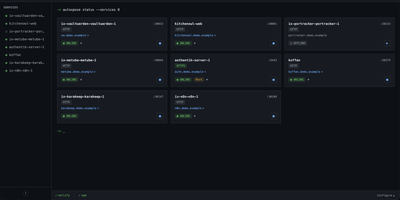
Tag a Docker container with two labels, and AutoXpose turns it into a published service with a DNS record, a reverse proxy route, and HTTPS, without you opening a single provider dashboard. From the web dashboard you connect one of six DNS providers, Cloudflare, Netlify, DigitalOcean, Porkbun, Aliyun, or Tencent DNSPod, and point it at the Nginx Proxy Manager or Caddy instance you already run. It watches your containers continuously after that: a new label creates the record, propagation is verified before the service shows as live, and removing the container removes its public entries too. Auto-expose mode publishes containers the moment they appear, while manual mode stages them in the dashboard for approval first. Color-coded service tags sort what you run into web, database, and media groups at a glance, and dashboard warnings flag misconfigurations before they become broken links. Nginx Proxy Manager access lists attach by label, so an admin panel stays reachable only from the networks you trust. When containers vanish, orphaned cleanup hunts down the stale DNS records and proxy hosts they left behind. Settings and state live inside the same single container, so the publishing pipeline for a homelab or a small fleet stays one compose service you can back up as a unit. Running on a dedicated VPS on RepoCloud with guaranteed CPU, RAM, and SSD, full root SSH access, and a browser serial console. MIT licensed.

Ubuntu VPS
A minimal Ubuntu 24.04 LTS virtual private server — no pre-installed applications, no opinionated configuration, just the operating system and root access. Start from a clean slate and install exactly what you need: web servers, databases, development toolchains, CI runners, monitoring stacks, VPN endpoints, game servers, or anything else that runs on Linux. The server ships with apt package management, systemd service supervision, and standard networking configured out of the box, giving you access to over 36,000 packages in the Universe repository alone. Connect via SSH with the key you select during deployment; a dedicated IPv4 address is included with every server at no extra charge. A browser-based serial console in the RepoCloud dashboard provides emergency access without an SSH client. Snapshots let you capture the server state before risky changes and roll back with one click. Resize CPU and RAM on demand without reinstalling. Canonical's standard security maintenance covers this LTS release through May 2029 — five years of patches for the Main repository. Ubuntu Pro extends that to ten years with additional Universe coverage, kernel livepatching, and compliance tooling, available free for up to five machines.