QBitWebUI
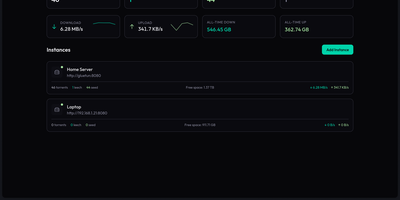
QBitWebUI is a single self-hosted dashboard that manages every qBittorrent instance you run, whether that is one seedbox or five, from one place. Instance cards show each client's status, live speeds, and torrent counts, with aggregate statistics across all of them and quick switching between instances. The torrent list brings sortable, resizable columns you can reorder and hide, filters for status, category, tag, and tracker, multi-select bulk actions with a context menu, and a details panel covering trackers, peers, files, and web seeds. Search your Prowlarr indexers from inside the UI and send results straight to the right instance, then let RSS feeds with regex auto-download rules keep recurring releases flowing in unattended. Browse the downloads directory and pull finished files or whole folders as tar archives, run an automatic cross-seed pass to match torrents across trackers, and check the connection with the network agent's speedtest, IP check, and DNS diagnostics. Edit qBittorrent preferences directly from the settings tabs, pick a color theme, and keep working from your phone with the installable PWA and mobile view. Running on a dedicated VPS on RepoCloud with guaranteed CPU, RAM, and SSD, full root SSH access, and a browser serial console. MIT licensed.
Deploy