Journiv
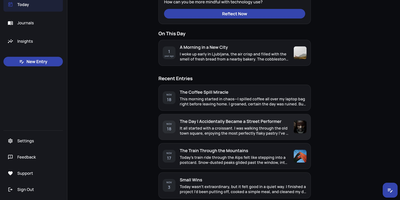
A Day One alternative that keeps your most personal writing on your own server: Journiv is journaling purpose-built for self-hosters. The FastAPI backend runs on SQLite by default with optional PostgreSQL, Redis, and Celery for background work, behind a clean, minimal web UI. Unlike general note-taking apps, it ships the features journaling actually needs: customizable moods and mood groups, activity tracking, goals with automated progress from logged activities, and daily writing prompts filterable by category and difficulty so a blank page never stalls you. Quick Log captures a moment in seconds and expands into a full entry later; "On This Day" resurfaces entries from past weeks, months, and years. Multiple journals separate work, gratitude, and personal writing, with tags and full-text search across everything, plus media uploads with automatic thumbnails and an Immich integration for linking photo-library memories. Analytics chart mood trends and writing patterns over time. Data portability is taken seriously: native import of Day One exports, JSON/Markdown/HTML export, and a standalone HTML viewer that opens your archive in any browser with no server running. OIDC single sign-on works with Authentik or Keycloak, and multi-arch images cover amd64 and arm64.
Jetlog
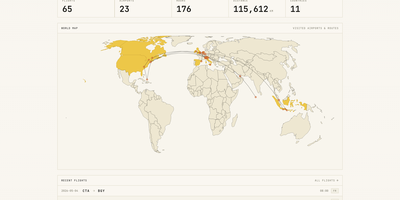
A personal flight logbook you host yourself, Jetlog draws every route you have flown on a pannable world map and turns the totals into charts. The home page opens with counts of flights, airports, hours, distance, and countries above that map, where dots mark visited airports and lines trace each trajectory. Settings let markers and lines grow with visit frequency and shade the countries where you have landed. Logging a flight takes only two airports and a date. Type a flight number and press Fetch to pre-fill the origin, destination, and airline, and a utility links connection flights automatically. Duration and distance are calculated for you and stay editable, with an option to use airport time zones. The All Flights table lists route, times, duration, distance, seat, class, and airline with filters and configurable columns, and each flight opens a detail page with airport data, a route map, tail number, and aircraft. A Statistics page charts flights per month, cumulative distance, most visited airports, most common airlines, ticket class, and seat for any time frame. History arrives through MyFlightRadar24 or custom CSV imports and leaves as CSV or iCal. Family members can share one install with separate logbooks, an admin manages the accounts, and the responsive layout works on a phone at the gate. Running on a dedicated VPS on RepoCloud with guaranteed CPU, RAM, and SSD, full root SSH access, and a browser serial console. GPL-2.0 licensed.