Super Productivity
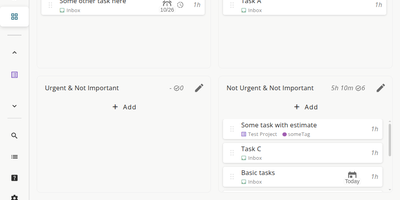
Super Productivity eliminates the context switching between issue trackers, calendars, and timer apps that fragments developer focus, pulling tasks from Jira, GitHub, GitLab, Gitea, OpenProject, Linear, ClickUp, Trello, and Azure DevOps into one local-first interface. With 21,000+ stars and availability across web, desktop, Android, and iOS, it syncs issue status, subtasks, and time logs bidirectionally so sprint planning and worklog submission happen without leaving the app. CalDAV integration pulls calendar events into your task timeline for visual timeboxing. Built-in Pomodoro and Flowmodoro timers enforce focused intervals with configurable break schedules. Data stays under your control in browser IndexedDB by default, with optional AES-encrypted sync via WebDAV, Nextcloud, Dropbox, or the SuperSync server ensuring no task data touches infrastructure you do not own. The extensible plugin system supports JavaScript-based custom panels, automations, and MCP plugins for AI workflows. A REST API on port 3876 enables external script integration for desktop automation. Time tracking generates exportable timesheets compatible with corporate reporting systems. The Docker container serves the Angular PWA through Nginx on port 80, consuming roughly 50 MB of RAM. Running on a dedicated VPS on RepoCloud with guaranteed CPU, RAM, and SSD, full root SSH access, and a browser serial console. MIT licensed.
TimeTracker
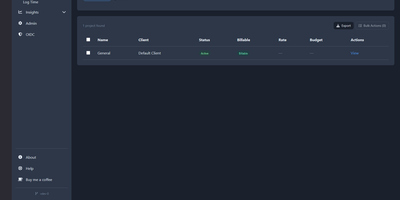
Why export timesheets from one tool, manage Kanban tasks in a second, and copy billable hours into a third just to send a client invoice when TimeTracker handles the entire agency workflow in one self-hosted platform? Start a persistent server-side timer from any browser or log hours manually using saved templates, bulk entry forms, and automatic idle detection. Project managers organize deliverables across drag-and-drop Kanban boards, Gantt timelines, and threaded task comments while monitoring real-time project budgets and cost burn rates. A built-in CRM tracks client contacts, lead scores, and sales pipeline stages before work even begins. When billing day arrives, you convert unbilled hours, reimbursable receipts, mileage logs, and per diem allowances directly into branded multi-currency invoices without double-billing a single minute. Finance teams can customize PDF invoice layouts, automate recurring billing schedules, and transmit EN 16931 compliant electronic invoices via Peppol or embedded ZUGFeRD/Factur-X XML. Interactive analytics dashboards and scheduled CSV or Excel exports give every stakeholder complete visibility into billable utilization. Running on a dedicated VPS on RepoCloud with guaranteed CPU, RAM, and SSD, full root SSH access, and a browser serial console. GPL-3.0 licensed.
Pomodoist
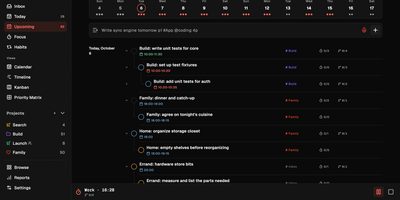
Pomodoist pairs a task manager with a Pomodoro timer, so the list of what to do and the clock that gets it done live in the same app. Type a task the way you would say it and the quick-add bar sets its priority and estimates its Pomodoros as you type, filing it into the Inbox, Today, or Upcoming views. Plan the week on a calendar, drag cards across a kanban board, spread work along a timeline, or sort it into a four-quadrant priority matrix when everything feels urgent. Start a focus session and the timer tracks intervals against the task at hand, with configurable work and break lengths, while a 3D desktop companion focuses, rests, and celebrates along with you. Share a project and the discussion stays beside the tasks, with comments on shared items and the team's focus time visible next to the work itself. Reports chart weekly focus time, completed tasks, and habit streaks, and voice notes can become task checklists when typing is not an option. An MCP endpoint lets your AI tools manage the same projects after an OAuth sign-in, and optional Google Calendar and Telegram integrations meet the planner where you already are. The self-hosted instance unlocks every feature locally, with your own accounts and one-command backups of the whole database. Running on a dedicated VPS on RepoCloud with guaranteed CPU, RAM, and SSD, full root SSH access, and a browser serial console. AGPL-3.0 licensed.
Ever Teams
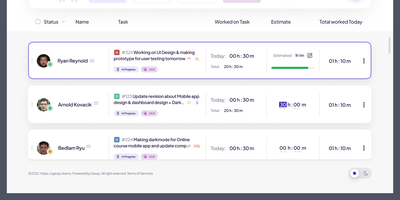
Powering distributed teams seeking full visibility into work patterns and productivity, Ever Teams is an open-source platform unifying time tracking, task management, project coordination, and team collaboration in a single self-hosted application. The real-time timer tracks work against tasks and projects with one-click start/stop, while the Electron desktop app captures periodic screenshots at configurable intervals, monitors keyboard and mouse activity levels, detects idle periods, and syncs offline sessions automatically. Kanban boards with drag-and-drop, calendar views, and daily planning tools organize work across custom statuses, priorities, and sizes. Built-in video conferencing powered by Jitsi or LiveKit enables meetings without leaving the platform. Timesheet management supports submission, review, and approval workflows with configurable time limits and budgets. The backend runs on the Ever Gauzy NestJS platform providing REST and GraphQL APIs, multi-tenant architecture with organization and team scoping, role-based access control, and an integration framework connecting GitHub issues and pull requests bidirectionally plus JIRA import and sync. Infrastructure includes PostgreSQL, Redis for caching and pub/sub, MinIO for S3-compatible storage, Elasticsearch for full-text search, and Cube.js for OLAP analytics. Built with Next.js 16, React 19, Tailwind CSS, and Recoil, with native iOS and Android clients via Expo, Electron desktop apps for Windows, macOS, and Linux, and Plasmo browser extensions for Chrome and Firefox. Internationalization spans 13-plus locales with dark, light, and system themes. Running on a dedicated VPS on RepoCloud with guaranteed CPU, RAM, and SSD, full root SSH access, and a browser serial console. AGPL v3.0 licensed.
Lalabase
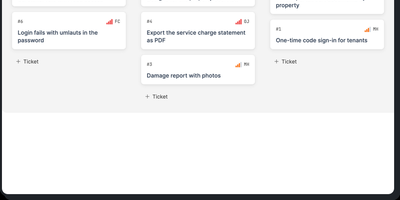
Lalabase is project management built for developers who work with clients, putting tickets, time tracking, documentation, and meetings in one workspace instead of five separate tools. Each client gets an organisation with its own projects and its own access, and roles decide exactly what clients can see. Tasks run as a list or a board with the statuses, priorities, and fields you define per project, rather than the workflow a vendor chose for you. Time tracking records several sessions per ticket, each billable on its own, with exports that go straight into the invoice. Documentation lives beside the work: notes and documents sit in the project, and a folder in your GitHub or GitLab repository becomes the project's docs automatically. Meetings keep their transcript, an AI summary, and the tasks that follow from what was actually said. When you need an answer, the AI assistant takes one question across tickets, comments, documents, hours, and meetings, and it cites the ticket, page, or conversation every answer came from. It even reads your repository's indexed code structurally, so questions about what is implemented get answered against the code. The assistant stays off until you enable it with your own provider key or a model in your own network. An MCP server and REST API let your own agents list, create, and update tickets, comment, and log time. Running on a dedicated VPS on RepoCloud with guaranteed CPU, RAM, and SSD, full root SSH access, and a browser serial console. AGPL-3.0 licensed.
TimeTagger
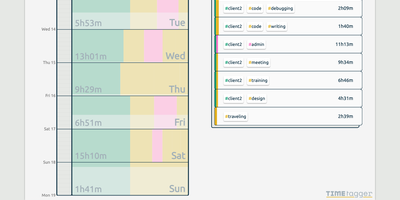
Freelancers, consultants, and solo workers get an accurate record of their hours from TimeTagger, a time tracker that logs tagged tasks on an interactive timeline and summarizes them as billable reports. Press S, type a description, and hit Enter to start the clock without the mouse, or drag across the timeline to log finished work. Hashtags in a description become autocompleting tags, with no projects to set up. Renaming a tag updates every record that uses it. Drag a record's edges to fix its times, then zoom the timeline out to a week or month with mouse, touch, or arrow keys. An overview panel totals time per tag combination for the selected range, and the Report button saves it as a client-ready PDF or a CSV with decimal hours. Daily, weekly, and monthly targets track progress toward your goals, and an optional Pomodoro timer alternates work and break periods with an alarm and a notification. Settings add a dark theme, local date notations, a Monday-to-Friday week, and a day offset for night shifts. The interface adapts from desktop to phone, installs as a progressive web app, works offline, and syncs records across devices once the connection returns. A web API and a command-line client let you query, create, and update records from scripts or the terminal. Running on a dedicated VPS on RepoCloud with guaranteed CPU, RAM, and SSD, full root SSH access, and a browser serial console. GPL-3.0 licensed.