Termix
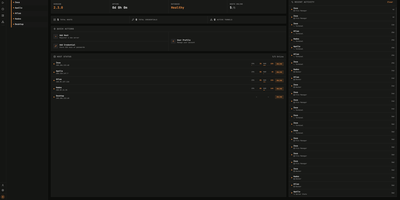
Termix delivers a unified, self-hosted infrastructure control center that consolidates SSH terminals, remote desktop streaming, and fleet automation into an intuitive browser workspace that replaces proprietary tools like Termius. Administrators connect to Linux servers and desktop environments using embedded RDP, VNC, and Telnet protocols powered by Apache Guacamole without requiring local client installations. The multi-panel terminal interface supports four-way split screens, allowing operators to broadcast keystrokes simultaneously across multiple production hosts or execute saved reusable script snippets with dynamic parameters. Real-time multiplayer session sharing lets engineers invite teammates via secure, time-limited links with configurable read-only or collaborative write permissions for troubleshooting incidents. Advanced networking layers handle SSH jump hosts, SOCKS5 proxy chains, Warpgate relays, and port knocking sequences to access segmented private networks securely. Integrated SFTP file managers provide drag-and-drop file transfers with editable path bars, inline text editing, and folder synchronization across remote machines. Background telemetry monitors CPU loads, memory utilization, disk IOPS, and container statuses, while built-in session recording captures complete terminal sessions for compliance auditing. Running on a dedicated VPS on RepoCloud with guaranteed CPU, RAM, and SSD, full root SSH access, and a browser serial console. Apache 2.0 licensed.
Borg UI
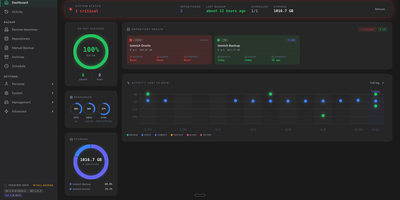
Borg UI is a self-hosted web management interface for BorgBackup that eliminates complex command-line syntax by organizing deduplicated backups, automated pruning schedules, and interactive file restorations into an intuitive graphical control center. System administrators connect local drives, remote SSH hosts, and SFTP endpoints to establish resilient storage repositories guarded by client-side encryption and cryptographic authentication. The centralized dashboard visualizes storage capacity, compression ratios, deduplication savings, and the health status of active backup jobs in real time. Configurable backup plans schedule automated cron jobs with granular retention rules, executing pre-backup database dumps and filesystem snapshots before running incremental syncs and background integrity checks. Users browse multi-version archive filesystems directly from the web browser, searching file trees and extracting individual files or entire folders without manual command line extraction. The platform orchestrates remote fleet backups by deploying SSH keys across client machines, tracking connection health, and executing non-disruptive background operations. Comprehensive alert routing dispatches real-time job status notifications, failure warnings, and storage alerts across Discord, Telegram, Slack, and email using integrated multi-channel messaging services. Running on a dedicated VPS on RepoCloud with guaranteed CPU, RAM, and SSD, full root SSH access, and a browser serial console. GNU AGPLv3 licensed.
Backrest
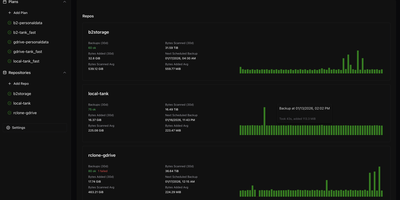
Backrest turns the command-line restic backup engine into a visual, browser-managed disaster recovery platform that schedules encrypted snapshots, orchestrates repository maintenance, and restores individual files from a unified web dashboard. Import existing restic repositories or initialize new encrypted backup stores across Amazon S3, Backblaze B2, Google Cloud Storage, Azure Blob Storage, SFTP servers, local directories, and any storage provider supported by rclone. Define granular backup plans with directory inclusion lists, glob exclusion rules, and flexible schedules driven by cron expressions, hourly intervals, or last-run-time clocks that prevent missed backups after server downtime. Automated retention policies handle snapshot forgetting, repository pruning, and cryptographic integrity checks in the background without manual intervention. When a file is accidentally deleted or corrupted, open the interactive snapshot tree browser to inspect historical directory structures and download or restore specific files directly to disk. Pre-backup and post-backup shell command hooks let administrators dump databases or pause containers before snapshots start, while configurable alerts dispatch status reports to Discord, Slack, Gotify, Healthchecks, and Shoutrrr endpoints whenever an operation succeeds or fails. Running on a dedicated VPS on RepoCloud with guaranteed CPU, RAM, and SSD, full root SSH access, and a browser serial console. GPL-3.0 licensed.
Rackula
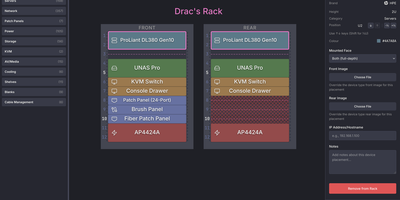
Before lifting a heavy four-unit storage server or rewiring a cramped network closet, you can map every unit of cabinet space in Rackula, an interactive drag-and-drop rack layout designer and capacity planner. Instead of staring at generic grey rectangles in a spreadsheet, you pull switches, routers, patch panels, UPS battery banks, and rackmount chassis from a hardware catalog populated with authentic front and rear faceplates from the NetBox device library. Equipment snaps cleanly to standard EIA-310 rack unit boundaries, while half-width gear and mini PCs nest inside one-unit carrier shelves and mounting brackets. Audiovisual technicians can group bayed cabinets side by side to plan amplifier racks, signal processor chains, and patch bays across multi-rack installations. Network engineers and data center operators can rearrange hardware with full undo and redo history, attach custom device graphics, and export crisp diagrams as PNG, SVG, or PDF files for runbooks and change control tickets. Sharing a proposed cabinet topology with a colleague in the field takes seconds using an encoded URL or a scannable QR code that opens on mobile browsers. Server-side persistence stores your rack definitions as portable YAML files and supports optional local accounts or OpenID Connect single sign-on for shared infrastructure teams. Running on a dedicated VPS on RepoCloud with guaranteed CPU, RAM, and SSD, full root SSH access, and a browser serial console. MIT licensed.
Borg Backup Server
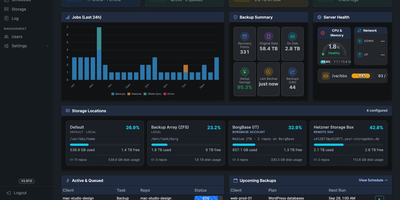
Every connection starts at the endpoint, never at the server, so Borg Backup Server can back up Linux, Mac, and Windows machines behind NAT and firewalls without opening a single inbound port. A lightweight agent on each machine polls for tasks over HTTPS, pushes deduplicated archives over SSH, and reports live progress. Append-only SSH access means an endpoint can add and restore archives but never prune or delete them. The dashboard shows backup charts, server stats, and active jobs at a glance. Plans run from hourly to monthly, several per client, built from reusable directory templates for common server roles, with per-plan retention from hourly to yearly. Lost a file? Browse the archive tree in your browser, tick what you need, and restore it to the client or download a .tar.gz. MySQL and PostgreSQL dumps run before each backup and restore as a copy or a replacement. Repositories can live on the server, on BorgBase, Hetzner, or rsync.net, and mirror to S3-compatible storage such as AWS, Wasabi, or Backblaze B2. Apprise alerts reach more than 100 services, and a nightly report lands in your inbox. Two-factor login and role-based access guard the console. Upgrades roll out to the server and every agent together, and the server backs itself up daily. Running on a dedicated VPS on RepoCloud with guaranteed CPU, RAM, and SSD, full root SSH access, and a browser serial console. MIT licensed.