DB-GPT
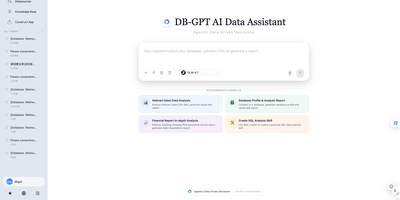
DB-GPT lets a team talk to its data: ask a business question in plain English, and an AI agent plans the work, writes the SQL, runs it, and hands back charts and a written report. Connect MySQL, PostgreSQL, SQL Server, ClickHouse, DuckDB, Doris, StarRocks, or MaxCompute, or drop in CSV and Excel files, including several at once. Every step appears in a live task view with its query, result table, code, and console output, and the agent pauses to ask clarifying questions, with answer options, when the data cannot settle the matter. Reusable skills package proven procedures, including CSV analysis, SQL analysis, and financial report analysis, and a skill creator helps write new ones. Code executes in a sandbox, parallel sub-agents split larger jobs, and an agentic knowledge-base search answers questions over uploaded documents. Scheduled tasks run saved conversations on a cron timetable with on/off switches and execution history, while MCP connectors link tools like Notion, Linear, Tavily, and GitHub. Pick OpenAI, DeepSeek, Qwen, SiliconFlow, Ollama, or vLLM for the model, then use the application and AWEL workflow tools to build data apps of your own. Running on a dedicated VPS on RepoCloud with guaranteed CPU, RAM, and SSD, full root SSH access, and a browser serial console. MIT licensed.
Apache NiFi
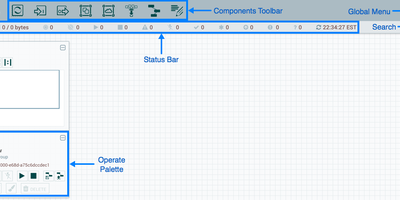
Deployed at thousands of enterprises across financial services, healthcare, government, and telecommunications, Apache NiFi is the industry-standard platform for building automated data pipelines through a visual drag-and-drop browser interface that requires zero coding for common integration patterns. The flow-based programming model connects over 300 built-in processors covering relational databases via ExecuteSQL and PutDatabaseRecord, Apache Kafka with PublishKafka and ConsumeKafka, HTTP endpoints through InvokeHTTP and ListenHTTP, cloud storage for AWS S3, Azure Blob, and Google Cloud Storage, SFTP/FTP file transfers, and JSON, XML, CSV, and Avro transformations. Data provenance tracking logs every routing decision, transformation, and delivery for every FlowFile, creating a searchable lineage graph from source to destination with full content replay capability for auditing and debugging. Guaranteed delivery uses configurable backpressure thresholds, prioritized queuing with latency or throughput optimization, and automatic retry with exponential backoff, ensuring no data loss even during downstream outages. The zero-leader clustering architecture distributes processing across nodes with automatic load balancing, while site-to-site protocol enables secure data transfer between NiFi instances across network boundaries. Security includes OpenID Connect and SAML 2.0 single sign-on, role-based access control with fine-grained policies per component, and TLS encryption for all communication. Custom processors can be written in Java and packaged as NAR bundles, or implemented directly in Python through the native scripting framework. Running on a dedicated VPS on RepoCloud with guaranteed CPU, RAM, and SSD, full root SSH access, and a browser serial console. Apache 2.0 licensed.
Apache APISIX
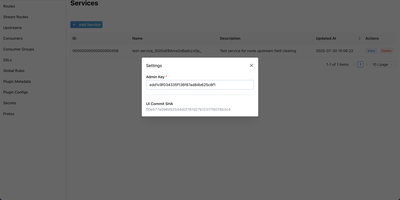
With 17,000 GitHub stars, 460+ contributors, and deployments across telecommunications, automotive, and financial services running on over 10,000 CPU cores at the largest known installations, Apache APISIX delivers a fully dynamic API gateway achieving 140,000 QPS on eight cores with sub-millisecond latency through NGINX's event-driven architecture and LuaJIT-compiled plugin execution. The 100+ open-source plugins cover authentication (JWT, OAuth 2.0, OIDC, Keycloak, LDAP), observability (Prometheus, Datadog, SkyWalking, OpenTelemetry), traffic management (rate limiting, circuit breaking, canary releases, traffic splitting), and security (CORS, IP restriction, CSRF protection) — all hot-reloadable without process restarts via etcd-based real-time configuration synchronization. Multi-protocol support handles HTTP, gRPC, MQTT, TCP, UDP, and WebSocket traffic for both north-south API access and east-west service mesh communication. AI gateway capabilities proxy requests to 20+ LLM providers with semantic caching, token-aware rate limiting, provider failover routing, and content moderation. Custom plugins extend the gateway in Lua, Go, Java, Python, or WebAssembly. Radixtree route matching handles 100,000+ routes without performance degradation. Functions as a Kubernetes ingress controller with native service discovery for Consul, Nacos, and Eureka. Deploy via Docker or Helm charts with horizontal scaling through etcd cluster coordination. Running on a dedicated VPS on RepoCloud with guaranteed CPU, RAM, and SSD, full root SSH access, and a browser serial console. Apache 2.0 licensed.
Hasura
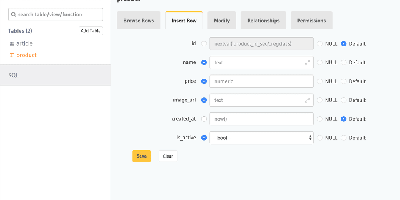
A PostgreSQL database becomes a production-grade GraphQL API the moment Hasura GraphQL Engine points at it: track tables and relationships - existing schemas included - and full query, mutation, and subscription types appear with where, order_by, limit, offset, and on_conflict arguments, no resolvers or boilerplate written. Its Haskell core compiles GraphQL to efficient SQL, and any query becomes a real-time live query with a single keyword, powering dashboards and collaborative UIs over standard GraphQL subscriptions. Authorization is where Hasura earns its enterprise reputation: role-based access control with row- and column-level permission policies driven by session variables from JWTs, auth webhooks, or headers - each role effectively sees its own GraphQL schema containing only what it may touch, integrating cleanly with Auth0, Firebase, or homegrown auth. Event triggers fire webhooks on inserts, updates, and deletes for asynchronous business logic; Actions extend the schema with custom REST handlers; remote schema stitching merges external GraphQL services into one endpoint; and auto-generated REST endpoints serve clients that skip GraphQL. A browser console handles data modeling and API exploration, the CLI manages migrations and metadata as code, and deployment is a single stateless Docker container beside Postgres.

Nocobase
CRMs, project trackers, inventory tools - NocoBase is an open-source no-code/low-code platform for building business systems like these. Its architecture is data-model driven: you define collections and relationships first, then compose any number of interface blocks (tables, forms, kanban, charts) on top of the same model, so data structure is never coupled to a particular view. The core is a microkernel where every feature is a plugin, WordPress-style; you enable official plugins, install marketplace ones, or write your own as npm packages with server and client parts. Data sources include the main PostgreSQL or MySQL database, external databases, and third-party APIs - so you can build admin panels over existing production data instead of migrating it. Built-in infrastructure covers role-based permissions down to collection, record, and field level, workflow automation with approval steps and scheduled triggers, and audit logs; a one-click switch flips between usage and configuration modes. Because custom features live in isolated plugins with a documented lifecycle, core upgrades do not overwrite your customizations, and swapping UIs never requires data migrations since interfaces sit on independent models. Written in TypeScript on Node.js, Koa, and React under the AGPL license, it is light enough for one person to run and extend - and where no-code SaaS platforms charge per seat and per app, a self-hosted instance runs unlimited applications for unlimited users at hosting cost alone.
Umbraco CMS
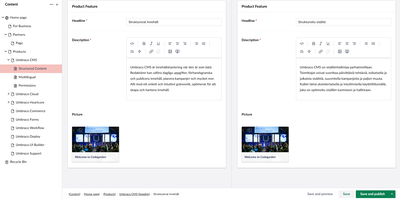
If editors should publish without waiting on developers, and developers should keep full control of the design, Umbraco is the free content management system built around that split. A page begins in the Block Grid editor, where reusable blocks nest inside Areas and each block is sized on a column and row grid. Live preview shows the result before anything goes out. Publish and unpublish times can be scheduled in the editor's own time zone, and any page can roll back to an earlier version from its Info tab. One content node can exist in several languages, and split view puts two of them side by side. The Media section holds images, video, and other files. Visitors can register and log in as members, new members can be placed in member groups, and pages can be hidden from anyone not logged in. On the code side, templates and partial views shape the front end, while the opt-in Content Delivery API returns content items as JSON for mobile apps and any other front end. Webhooks notify outside services when content is published, unpublished, or deleted. Custom dashboards and property editors extend the backoffice, and the Marketplace lists open-source and commercial packages for the rest. Running on a dedicated VPS on RepoCloud with guaranteed CPU, RAM, and SSD, full root SSH access, and a browser serial console. MIT licensed.
TencentDB Agent Memory
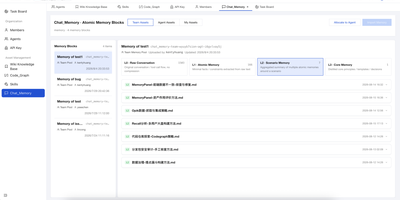
TencentDB Agent Memory provides a team-level memory hub that transforms AI agent conversations, documents, and codebases into four governed, shareable memory assets: Chat Memory for conversation history, Skills extracted from completed tasks, LLM-Wiki built from document ingestion, and Code-Graph generated from codebase analysis. The four-tier semantic pyramid structures long-term memory from L0 raw conversation capture through L1 episodic extraction and L2 scenario aggregation to L3 persona synthesis, enabling hierarchical drill-down via node and result references instead of flat vector recall. The Node.js Gateway sidecar handles capture, extraction, storage, recall, and pipeline scheduling through RESTful HTTP v2 endpoints on port 8420, while the Memory Proxy intercepts Anthropic-format API calls to inject team memory context into Claude Code, CodeBuddy, and other coding agents transparently. Local SQLite with the sqlite-vec extension provides the default storage backend with hybrid BM25 keyword plus vector embedding plus reciprocal rank fusion retrieval requiring zero external API dependencies. Teams manage ownership, versions, status, visibility, usage counts, and agent bindings through the Memory Hub dashboard with role-based access control separating System Admin and team-level Admin and Member permissions. Official TypeScript and Python SDKs provide programmatic access for custom framework integration beyond the built-in OpenClaw plugin and Hermes Agent adapter. Running on a dedicated VPS on RepoCloud with guaranteed CPU, RAM, and SSD, full root SSH access, and a browser serial console. MIT licensed.
Matomo
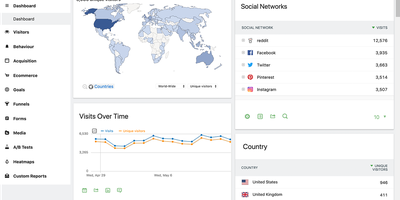
Several EU data protection authorities have ruled Google Analytics deployments unlawful; Matomo (formerly Piwik) is the most complete open-source replacement - a full analytics platform with 30+ report types across visitors, actions, referrers, goals, and ecommerce. The self-hosted PHP/MySQL edition is free and keeps every byte of visitor data on your infrastructure, which matters more each year: several EU data protection authorities have ruled Google Analytics deployments unlawful, while Matomo configured for cookieless tracking is approved by France's CNIL for use without a consent banner. All reporting runs on 100% unsampled data - no extrapolation at high traffic volumes. The GDPR Manager handles data subject requests and deletion, with IP anonymization, retention controls, and Do Not Track support built in. A dedicated importer pulls your historical Google Analytics data so years of trends survive the migration. Core analytics cover campaigns, custom variables and dimensions, entry/exit pages, downloads, site search, and full ecommerce tracking with a comprehensive HTTP API for reporting and ingestion. Premium plugins extend the platform into Hotjar-class behavioral tooling - click and scroll heatmaps, session recordings, conversion funnels, form analytics, A/B testing - plus a tag manager and SAML SSO. For teams that need GA-equivalent depth with actual data ownership, Matomo is the realistic drop-in replacement.
Web-Check
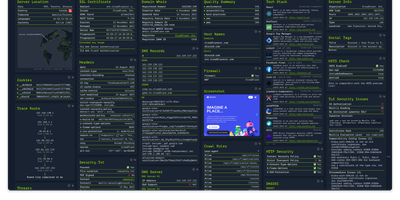
Enter a URL and get a dashboard of everything publicly discoverable about its security posture, server architecture, and technology stack: Web-Check is an all-in-one OSINT tool for analyzing any website. One scan surfaces IP info and server location, the full SSL certificate chain with issuing authority and validity, DNS records (A, MX, NS, CNAME, TXT) with DNSSEC status, HTTP response headers interpreted for security directives like HSTS, CSP, and X-Frame-Options, cookies and their flags, WHOIS domain info, robots.txt crawl rules, a sitemap-derived page map, the redirect ledger, open ports, traceroute, detected technologies, third-party trackers, associated hostnames, site performance, and even carbon footprint. Each card explains what the data means and why it matters, which makes the tool double as a security education resource - junior engineers learn headers and attack surfaces by scanning real sites. Practical uses span pre-deployment security audits (catch missing headers and misconfigurations before they ship), privacy compliance checks (identify trackers and cookie behavior for GDPR work), competitive tech-stack research, and network debugging via DNS and redirect inspection. Built by Lissy93 in TypeScript, it deploys as a single Docker container, and self-hosting keeps your reconnaissance targets and audit activity off third-party services.

Ubuntu VPS
A minimal Ubuntu 24.04 LTS virtual private server — no pre-installed applications, no opinionated configuration, just the operating system and root access. Start from a clean slate and install exactly what you need: web servers, databases, development toolchains, CI runners, monitoring stacks, VPN endpoints, game servers, or anything else that runs on Linux. The server ships with apt package management, systemd service supervision, and standard networking configured out of the box, giving you access to over 36,000 packages in the Universe repository alone. Connect via SSH with the key you select during deployment; a dedicated IPv4 address is included with every server at no extra charge. A browser-based serial console in the RepoCloud dashboard provides emergency access without an SSH client. Snapshots let you capture the server state before risky changes and roll back with one click. Resize CPU and RAM on demand without reinstalling. Canonical's standard security maintenance covers this LTS release through May 2029 — five years of patches for the Main repository. Ubuntu Pro extends that to ten years with additional Universe coverage, kernel livepatching, and compliance tooling, available free for up to five machines.
Diaspora
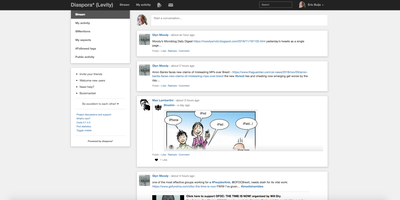
Diaspora lets you run your own social network node that federates with thousands of others, creating a network with no central authority and no advertising engine mining your behavior. The defining feature is aspect-based sharing: organize contacts into groups like Family, Work, and Close Friends, then control exactly who sees each post with granularity that mainstream platforms have never matched. Hashtag-based discovery connects conversations across the entire federation regardless of which pod participants call home, building communities around topics rather than algorithmic engagement bait. The Ruby on Rails backend (now running on Puma with Sidekiq workers instead of the heavier Unicorn configuration) handles federation delivery, media processing, and notifications efficiently. Photo albums, video embedding, Markdown posts, mentions, reactions, and resharing provide familiar social primitives for rich communication. Cross-posting bridges to Twitter and Tumblr maintain your presence on legacy networks while your canonical data lives on your own infrastructure. With 13,700+ GitHub stars and 270+ contributors since its 2010 launch, Diaspora proved early that social media can work without surveillance capitalism. The Docker Compose deployment runs the application alongside PostgreSQL, Redis, Sidekiq workers, and Nginx, providing a production-ready pod for your community.
Logseq
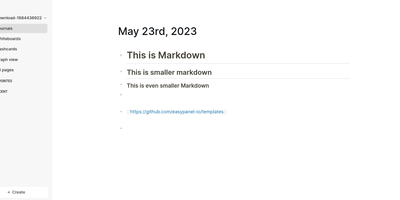
Every line an indentable bullet, every bullet a first-class block that can be referenced, embedded, and queried anywhere: Logseq is a privacy-first, local-first knowledge platform built around the block outliner. The daily journal is the system's beating heart - each day opens a fresh date-stamped page where tasks, meeting notes, and fleeting ideas land as blocks without filing decisions, then connect later through [[wikilinks]] with automatic bidirectional backlinks and ((block references)) that transclude any bullet into any page. Everything persists as plain Markdown or Org-mode files on disk - git-friendly, greppable, and owned forever, with sync via iCloud, Dropbox, Syncthing, Git, or an optional end-to-end encrypted service. Built-in tooling goes beyond notes: TODO/DOING task states with scheduling, native PDF annotation with area highlights, spaced-repetition flashcards, whiteboards for visual thinking, Zotero integration for researchers, and Datalog-powered queries that build dynamic views across the entire graph. A marketplace of hundreds of community plugins and themes adds AI chat, Ollama local-model integration, and custom workflows. Written in Clojure/ClojureScript, AGPL-3.0 licensed with 320+ contributors, and completely free - the local-first Roam for people who refuse subscriptions and lock-in.
Frappe HR
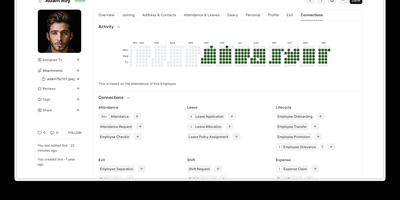
Stitching together separate SaaS subscriptions for applicant tracking, time-off requests, expense approvals, and monthly payroll creates fragmented employee records and costly per-seat bills; Frappe HR consolidates over 13 human resource modules into one self-hosted platform. People operations teams manage the complete employee lifecycle from job openings, interview assessments, and offer letters through structured onboarding, internal transfers, promotions, and exit interviews. Shift planners organize rotational rosters and capture geolocation-verified attendance check-ins, while employees request leave against regional holiday calendars and multi-tier policies. Finance and payroll managers build custom salary structures, configure regional income tax slabs, process regular or off-cycle payslips, and reconcile employee expense claims and cash advances directly with ERPNext accounting ledgers. Goal tracking and appraisal cycles align individual key result areas (KRAs) with self-evaluations and manager feedback scores. A progressive web app interface lets staff submit leave requests, log attendance, and file expense receipts from their phones. Running on a dedicated VPS on RepoCloud with guaranteed CPU, RAM, and SSD, full root SSH access, and a browser serial console. GPL-3.0 licensed.
MeterSphere
MeterSphere is the open-source continuous testing platform that brings test management, API testing, and AI-powered automation into a single self-hosted environment. The Spring Boot Java backend handles test execution with the JMeter engine while the Vue.js frontend delivers a responsive interface for managing test cases, plans, defects, and reports across projects. The built-in AI assistant leverages large language models to auto-generate functional test cases and API interface definitions, reducing manual test creation effort. Test management covers the complete lifecycle from writing and reviewing cases in list or mind-map views, through test plan creation with single plans and plan groups, to defect tracking with customizable templates and workflow rules. API testing combines Postman-like ease of use with JMeter-level flexibility, supporting interface debugging with server-side and local execution, API definition with visual request and response editors, interface mocking with configurable headers and body parameters, scenario automation with visual orchestration, and detailed test reports with automatic generation. The system-organization-project hierarchy supports up to 30 users in the community edition with role-based access control, file management, and configurable notification channels. MySQL stores application data, Kafka handles message queuing, MinIO provides S3-compatible object storage, and Redis manages caching. The plugin marketplace extends testing capabilities and enables DevOps pipeline integration. On RepoCloud, deploy MeterSphere on a dedicated VPS with Docker, root SSH access, and complete control over your testing infrastructure, all under the GPLv3 license.
Neo4j
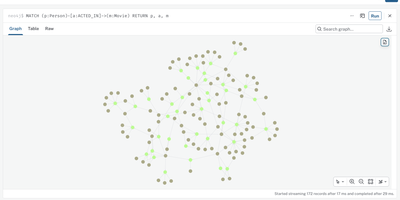
Some questions are really about how things connect, and Neo4j is the graph database that stores your data as nodes and relationships so those connections become the thing you query. Model people, products, accounts, devices, or transactions as labeled nodes with properties, then draw typed, directed relationships between them and traverse multi-hop paths in a single Cypher query instead of stacking SQL joins. The built-in Neo4j Browser renders query results as interactive node diagrams, so you can expand a fraud ring, a dependency chain, or a recommendation neighborhood visually and share the picture with your team. Cypher reads like the picture it queries: MATCH patterns describe shapes in the graph, filters narrow them, and aggregations roll up counts, sums, and shortest paths. Store embeddings as node properties and build vector indexes over them, then combine similarity search with graph traversal so matches can be filtered by owner, connections, or freshness. Full-text indexes search names, descriptions, and documents, while uniqueness constraints keep identifiers honest at write time. Bulk-load millions of nodes from CSV files with the offline import tool, then keep data flowing in through official drivers for Python, JavaScript, Java, Go, and .NET applications. Fraud teams trace shared phones and cards between accounts, platform teams map microservice dependencies before a migration, and security analysts hunt lateral movement through identity graphs. Running on a dedicated VPS on RepoCloud with guaranteed CPU, RAM, and SSD, full root SSH access, and a browser serial console. GPL-3.0 licensed.
Apache Zeppelin
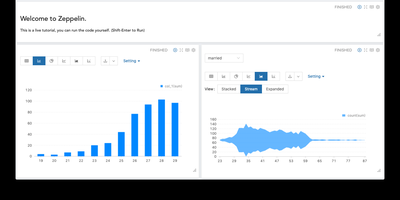
Analysts explore data where it lives with Apache Zeppelin, a web notebook where each paragraph can speak a different language: run Spark in Scala, query through SQL, prototype in Python, and plot the results without leaving the page. Pluggable interpreters connect notebooks to Spark, Flink, JDBC databases, Neo4j, Elasticsearch, and dozens of other engines, all sharing variables through the ZeppelinContext so a DataFrame built in one paragraph feeds the next in another language. Built-in visualizations turn query output into bar, pie, line, and scatter charts with pivot controls, while dynamic forms add dropdowns and inputs that make notebooks reusable reports for colleagues. Multiple Spark and Scala versions coexist in one instance, with interpreter binding modes from globally shared to isolated per note, and execution on local, standalone, YARN, or Kubernetes clusters. Teams collaborate through multi-user support with authentication and note permissions, schedule notebooks as jobs, and drive everything through a REST API. The 0.12.1 maintenance release hardens JWT validation and path traversal defenses, upgrades the Angular frontend, and stabilizes the Spark, Flink, Python, Neo4j, and File interpreters. Running on a dedicated VPS on RepoCloud with guaranteed CPU, RAM, and SSD, full root SSH access, and a browser serial console. Apache-2.0 licensed.
Element
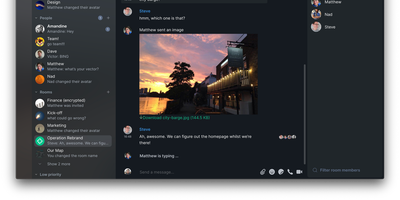
Matrix's flagship client, built by the protocol's creators: Element brings the decentralized open standard for real-time communication to web, desktop, iOS, and Android. Paired with a Matrix homeserver, it delivers Slack-quality team messaging where you own every message, file, encryption key, and byte of metadata. End-to-end encryption is on by default, built on Olm and Megolm - the Double Ratchet algorithm family Signal popularized, extended for large-room scalability and publicly audited by NCC Group. Messages encrypt per-device with cross-signed device verification, so even a compromised server yields nothing readable. Federation is the defining capability: like email, users on different homeservers converse seamlessly, and 30+ bridges connect Matrix rooms to Slack, Discord, WhatsApp, and Telegram, so moving to sovereign infrastructure doesn't sever contact with anyone. Rooms support threads, reactions, file sharing, and voice and video calls via Element Call. The result is digital sovereignty chosen by governments and enterprises across Europe: your data sits on your server in your jurisdiction, portable to any other Matrix host because the protocol is an open standard. Apache-2.0 licensed, with no per-user fees at any scale.
Invoice Ninja
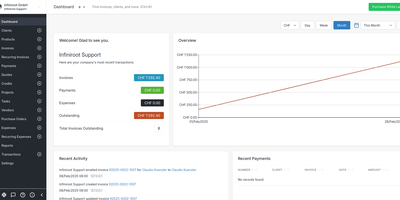
With nearly 10,000 GitHub stars and over a decade of development since 2013, Invoice Ninja is the most complete source-available invoicing platform for freelancers and small businesses — combining professional invoicing, online payments, expense tracking, and project management in a single self-hosted application. The Laravel API backend powers a React web portal and Flutter native applications for Windows, macOS, Linux, iOS, and Android, delivering a consistent experience across every device. Create professional invoices and quotes with real-time PDF preview, product libraries, custom templates, and automatic tax calculations. Clients receive branded emails and access their dedicated portal at your custom domain to view documents, approve quotes with e-signatures, and pay with one click via Stripe, PayPal, Square, GoCardless, Authorize.net, Braintree, or Mollie. Recurring invoices with auto-billing charge saved payment methods on schedule — weekly, monthly, or annually — with automatic reminders and late fee calculations. The built-in project management suite includes Kanban boards for task organization, billable time tracking with start/stop timers, and vendor expense management with receipt attachments. Bank account synchronization via Yodlee or GoCardless automatically imports transactions for reconciliation. E-invoicing with PEPPOL network integration supports electronic invoicing standards for European and government compliance. Reports cover invoices, expenses, profit and loss, tax summaries, and aged receivables. Running on a dedicated VPS on RepoCloud with guaranteed CPU, RAM, and SSD, full root SSH access, and a browser serial console. Elastic License v2.