BookHeaven Server
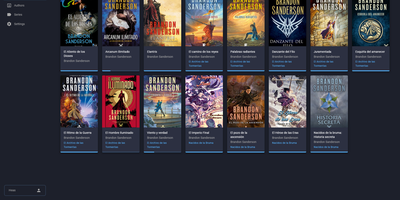
BookHeaven Server turns a scattered folder of EPUB files into a proper library you can browse, organize and read from anywhere, with your progress following you between devices. Import books by copying them into a watched folder or uploading them, and the server reads metadata straight from each file, grouping everything by author, series, collection and tag. When a title, author or cover is wrong, you fix it in the browser and the correction is written back into the EPUB itself, so edits survive even if the file moves elsewhere; missing covers can be fetched from the internet. Each person gets a profile with its own reading progress, including start date, last read date, percentage, elapsed time and finished date, and progress can also be corrected manually. Any OPDS reader app can browse and download from the built-in catalog at /opds/v1, while KOReader devices sync progress by pointing at your server and signing in with a profile name. Upload your favorite fonts once and every connected device can download them, with styles and weights mapped per file or split from a single font. The companion Android reader, built for e-ink screens, discovers the server automatically on your network and downloads books for offline reading. Running on a dedicated VPS on RepoCloud with guaranteed CPU, RAM, and SSD, full root SSH access, and a browser serial console. GPL-3.0 licensed.
Bookshelf
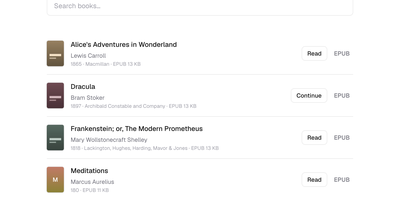
Bookshelf turns a folder of EPUBs and PDFs you already own into a private library you can browse and read from any browser, at home or on your own server. Drop books into a folder, run the sync, and the shelf appears with covers extracted, titles searchable, and accents forgiven, so typing Bronte finds Brontë. Each reader in the house gets a profile that remembers their place in every book, and picking a book up on your phone resumes where the laptop left it, with a Continue button waiting on the shelf. EPUBs open chapter by chapter instead of downloading the whole archive, and PDFs stream in small ranged reads, so even a large scanned book opens quickly. Choose a two-page spread, a single page, or continuous scroll, then set paper, sepia, or night tints for longer sessions. E-readers join through the OPDS catalog, which lets a Kobo or Kindle-side client browse and download from the same shelf. There is no database to run and no account system to manage; the library is plain files you can back up with the volume. Running on a dedicated VPS on RepoCloud with guaranteed CPU, RAM, and SSD, full root SSH access, and a browser serial console. MIT licensed.