LibreChat
Every major model provider behind one ChatGPT-style interface: LibreChat spans OpenAI, Anthropic, Google, Azure, AWS Bedrock, Vertex AI, Groq, Mistral, OpenRouter, DeepSeek, and any OpenAI-compatible endpoint including local Ollama. You can switch models mid-conversation and compare providers without changing tools. Its Agents framework builds no-code custom assistants with tool access via Model Context Protocol servers, file search over uploaded documents through an optional pgvector-backed RAG service, and a sandboxed Code Interpreter that executes Python, JavaScript, Go, C++, Java, PHP, and Rust. Artifacts render React components, HTML, and Mermaid diagrams directly in chat, and image generation works through DALL-E and other configured providers. Multi-user support is enterprise-grade, with OAuth, SAML, LDAP, and two-factor authentication, per-user conversation history in MongoDB, and Meilisearch-powered search across all messages and files, plus reusable presets, forkable threads, and persistent memory across conversations. The economics favor teams: instead of a ChatGPT Plus seat per person, everyone shares one instance billed per API token, with access to every provider rather than one - and providers see individual API calls, not your accumulated organizational knowledge. Deployment is Docker Compose; API keys and endpoints are configured through .env and librechat.yaml.
SourceWeft
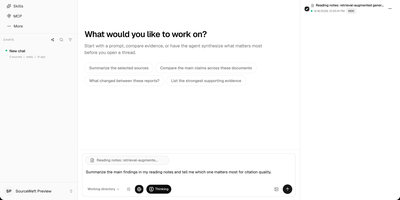
SourceWeft is an AI workstation you host yourself, where agents, your documents, and your model keys work in one place instead of scattering across chat tabs you do not control. Describe a job and a lead agent breaks it down, handing research, exploration, and execution to focused sub-agents that share the same working context and files. Agents draw on a skill library covering presentations, HTML pages, images, meeting summaries, and study guides, and you can add your own skills so good workflows become repeatable. MCP servers, web search, and web extraction connect agents to outside tools, while approved commands run inside a sandboxed environment that cannot touch the rest of your server. Feed it PDFs, web pages, notes, YouTube videos, Notion, Drive, Gmail, or Slack, then follow citations from any answer back to the source material it came from. Bring your own keys for the chat and indexing models you prefer, organize the team into workspaces with roles and access controls, and pick up any conversation from the web app or desktop clients. Running on a dedicated VPS on RepoCloud with guaranteed CPU, RAM, and SSD, full root SSH access, and a browser serial console. Apache-2.0 licensed.
Docker Registry UI
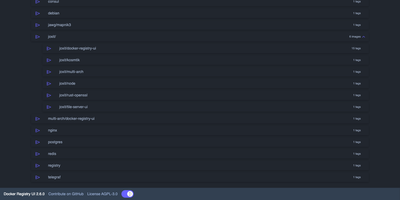
Instead of querying a private registry with curl and its HTTP API, open Docker Registry UI and click through repositories, tags, digests, and layers in a browser. The catalog groups images by namespace, shows tag counts, and filters as you type in the search bar, which Ctrl+F or F3 focuses. Each repository's tag list shows creation date, size, content digest, and CPU architecture, sorts numerically, and copies a ready-made pull reference with one click. A history page expands any tag into its operating system, entrypoint, environment variables, exposed ports, and layer-by-layer build steps, and a Dockerfile view reconstructs the file from those steps. The same view also covers multi-architecture images and OCI Helm exports. When the registry allows deletion, tags go one at a time or in bulk with checkboxes, Alt+Click for a whole page, and Shift+Click for a range. One interface can switch between several registries from its menu, or be locked to a single registry with your own title. Basic authentication passes through the browser, and a built-in proxy option forwards requests to your registry container so CORS needs no configuration. Light, dark, and automatic themes come with color variables for custom branding, and a weekly notice announces newer releases. Running on a dedicated VPS on RepoCloud with guaranteed CPU, RAM, and SSD, full root SSH access, and a browser serial console. AGPL-3.0 licensed.
Chat UI
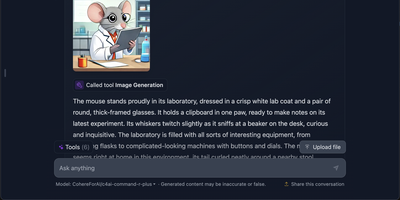
Self-hosting a language model is only half the job; people still need somewhere pleasant to talk to it, and Chat UI is that window, the same interface that powers HuggingChat. Point it at any OpenAI-compatible endpoint, your own Ollama or llama.cpp server, the Hugging Face router, or a hosted gateway like OpenRouter, and the models it serves appear in the picker automatically, with no per-model configuration. Conversations are saved to your database and stay browsable in the sidebar, so a thread from last week can be reopened, continued, and compared against a fresh answer from another model. Multimodal models accept image uploads right in the composer, and models that support it can call MCP tools mid-conversation to fetch data or run actions. For a shared team deployment, OpenID Connect sign-in keeps individual histories and settings separate, and per-user defaults travel with each account. Everything a consumer chatbot would keep on someone else's servers, prompts, uploaded files, and usage history, stays in the MongoDB you control on the same machine. Running on a dedicated VPS on RepoCloud with guaranteed CPU, RAM, and SSD, full root SSH access, and a browser serial console. Apache-2.0 licensed.
Imp
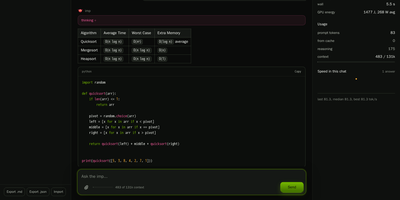
Imp runs large AI chat models privately on one NVIDIA RTX 50 or RTX PRO graphics card, exposing them through OpenAI and Anthropic compatible APIs plus a built-in browser chat. Start it with a single Docker command, point it at a model, and the chat opens in your browser with saved conversations and a live readout of generation speed. Coding agents such as Claude Code and Codex connect by changing one base URL, so your editor talks to the model on your own hardware instead of a rented cloud endpoint. Tool calls, structured JSON output, streaming responses, and reasoning models all work over the wire, and requests can be protected with an API key, per-IP rate limits, and concurrency caps. Load GGUF files you already have or NVFP4 and FP8 SafeTensors checkpoints straight from Hugging Face with no conversion step before the first answer. When a model is bigger than the card, mixture-of-experts weights stay in system RAM while the busiest experts are cached on the GPU, so a 123.6 GiB model still answers from a 32 GB card. Supported models can also read images alongside text, and tokenize, health, and model listing endpoints make the server easy to wire into scripts and monitors. Running on a dedicated VPS on RepoCloud with guaranteed CPU, RAM, and SSD, full root SSH access, and a browser serial console. MIT licensed.
Typing Mind
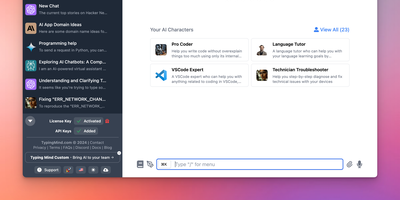
Bring your own API keys and work with OpenAI GPT models, Anthropic Claude, Google Gemini, Mistral, DeepSeek, Grok, Azure endpoints, and local models in one organized workspace: TypingMind is a unified chat frontend for large language models, replacing a browser tab per provider. Parallel chat sends the same prompt to multiple models and compares answers side by side, and models can be switched mid-conversation. A prompt library stores reusable, tagged prompts with variables, and the AI Agents system builds specialized assistants that bundle a base model, custom instructions, assigned plugins, and uploaded knowledge files for RAG. Plugins extend every connected model with web search, image generation (DALL-E, Stable Diffusion), Deep Research, URL reading via Firecrawl, and Zapier automation - plus MCP server integrations for Notion, Atlassian, and other external tools, and a JavaScript extension API for custom behavior. Chats store locally by default with optional sync. Self-hosting puts the interface on your own domain and, for teams, adds branding, member access limits, and shared prompt and agent libraries.
NextChat
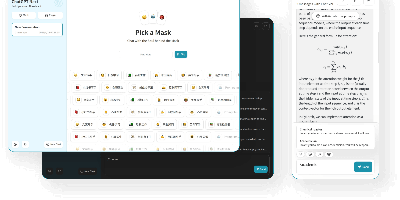
Thirteen-plus LLM providers, one unified client: NextChat (formerly ChatGPT-Next-Web) is an open-source AI chat interface built on Next.js that spans OpenAI GPT-4, Anthropic Claude, Google Gemini, DeepSeek, Groq, Azure endpoints, and self-hosted backends like Ollama, LocalAI, and RWKV-Runner. Its defining trait is minimalism - the first screen loads in about 100 KB, the desktop client is roughly 5 MB, and there is no database or user system to operate; chat history lives locally in the browser with optional WebDAV or UpStash Redis sync. The Mask system saves reusable prompt-template personas you can share and debug, long conversations auto-compress to fit context windows, and Markdown rendering covers LaTeX, Mermaid diagrams, and code highlighting with streaming responses. Plugins add web search and calculators, MCP support enables external tool calling, and Artifacts previews generated content in a separate pane. Ships as a web app, Docker image, and Tauri desktop builds for Windows, macOS, and Linux, translated into 20+ languages. MIT-licensed.
Halcyon Video
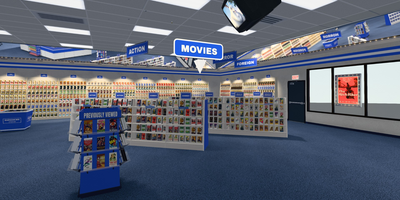
Friday night, 1994: you are standing in the Action aisle deciding what the weekend looks like, except the shelves are stocked with your own library and the store lives in your browser. Halcyon Video rebuilds that ritual in 3D around your Jellyfin, Plex, or Emby server, turning libraries into aisles and genres into signed sections you can walk. Pick a case off the shelf and it comes up in your hand at true rental proportions; flip it over for the synopsis, cast, runtime, ratings, and a technical table read from the actual file. Seasons arrive as box sets, popular titles sit deeper on the shelf, and the clerk behind the counter searches by title, director, or genre and recommends from your catalog and watch history. Carry an armful to the checkout and she bags them in plastic that folds around the cases, receipt and all. A RomM connection opens a games department with platform-correct cartons and clamshells, while Jellyseerr requests appear as discovery cases you can order in-store. Drive it from the couch with a TV remote, gamepad, keyboard, or phone, or let attract mode tour the floor past the ceiling CRTs. Running on a dedicated VPS on RepoCloud with guaranteed CPU, RAM, and SSD, full root SSH access, and a browser serial console. GPL-3.0 licensed.