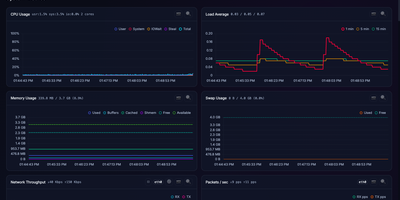
Kula
Kula watches a Linux server every second and turns CPU, memory, disks, network, containers, and applications into a live dashboard you can open before trouble becomes downtime. Follow total and per-core CPU, load averages, memory and swap pressure, disk I/O, filesystem space, temperatures, GPU load, and network throughput as charts update live in the browser. Drag to zoom into history, switch to focus or TV mode for a wall display, and check the System Info page when you need the hardware story behind a spike. Watch Docker, Podman, and cgroup containers beside host metrics, then add PostgreSQL, MySQL or MariaDB, nginx, and Apache monitoring or define custom metrics for the odd service only your team understands. Scrape the Prometheus endpoint into an existing observability stack, open the terminal UI over SSH for a quick live read, or ask the optional local Ollama assistant to discuss charts without sending data to a cloud service. Protect the dashboard with optional Argon2id logins and multiple users, schedule storage snapshots, and keep the whole tool working on closed networks with no external calls. Running on a dedicated VPS on RepoCloud with guaranteed CPU, RAM, and SSD, full root SSH access, and a browser serial console. AGPL-3.0 licensed.
Cockpit
Cockpit puts Linux server administration in a web browser, rendering storage, networking, containers, and virtual machines as visual panels you click through instead of command-line syntax you memorize. It ships in every major Linux distribution and activates through systemd socket activation, consuming zero resources until someone connects on port 9090. What makes it different from other admin panels: every change through the web interface appears instantly at the command line, and every terminal change reflects in the browser in real time. No abstraction layer sits between the UI and the operating system, which means no configuration drift. Storage management covers disk partitioning, RAID arrays, LUKS encryption, LVM volumes, and NFS shares. Network configuration handles bonds, bridges, VLANs, and firewall zones through visual editors. Native Podman integration pulls images, creates containers, manages pods, and provides terminal access into running processes. KVM/libvirt support handles VM creation, cloning, snapshots, and live migration with console access. A built-in terminal provides shell access when the web interface is not enough, and the journal viewer filters systemd logs by severity and unit. Multi-server management connects additional hosts over SSH, presenting a unified dashboard across your entire infrastructure from one browser tab. Runs on a dedicated RepoCloud VPS with full root SSH access and browser serial console. LGPL licensed.
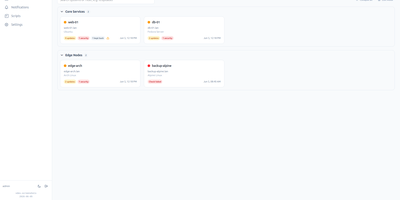
Linux Update Dashboard
Linux Update Dashboard is a self-hosted web app that lets you check and apply package updates across a whole fleet of Linux servers from one browser dashboard, over SSH, with no agent installed on any managed machine. It discovers each server's package managers, operating system, installed packages, reboot state, and distribution lifecycle, then lets you refresh, upgrade selected packages, run full upgrades, autoremove leftovers, cancel running work, or reboot remotely while watching real-time command output stream into the page. Groups with health badges and explicit priorities organize fleets for clear overviews and ordered Upgrade All batches that run as waves across eligible systems. An encrypted SSH credential vault stores reusable passwords, private keys, and OpenSSH certificates with AES-256-GCM, and you can view or edit repository source files through sudoedit with diff review and activity history. Cron-based schedules automate refreshes, updates, autoremove, reboots, and notifications for chosen systems, while alerts go out by email, Gotify, MQTT, ntfy.sh, Telegram, or webhooks, with Home Assistant MQTT discovery entities for every server. Sign-in supports passwords with optional TOTP, passkeys and WebAuthn, OpenID Connect SSO, and API tokens, and the interface speaks ten languages with dark and light themes and custom branding. Because this tool can run commands on your servers, keep it on trusted networks behind TLS, a reverse proxy, or a VPN. Running on a dedicated VPS on RepoCloud with guaranteed CPU, RAM, and SSD, full root SSH access, and a browser serial console. AGPL-3.0 licensed.
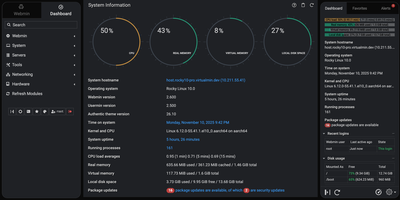
Webmin
Skip the shell and the configuration file: Webmin handles user accounts, disk quotas, services, and server software on Linux and Unix machines from a browser tab. More than 100 standard modules sit under seven menus: Webmin, System, Servers, Tools, Networking, Hardware, and Cluster. System covers Users and Groups, Scheduled Cron Jobs, Running Processes, System Logs, Log File Rotation, Disk Quotas, Filesystem Backup, and systemd Bootup and Shutdown, plus Software Package Updates, which can hold selected packages on APT and DNF systems. Servers edits Apache, Nginx, BIND DNS, Postfix, Dovecot, MySQL and MariaDB, and PostgreSQL through forms. Networking brings an nftables firewall editor, Fail2Ban jails, and IPsec VPN settings. Tools adds File Manager, Custom Commands, and a Terminal that opens right in the browser. Hardware lists firmware, PCI, USB, storage, and sensor details. The dashboard keeps live CPU, memory, and disk gauges, stats history graphs, and a pending updates alert in view. Webmin Users limits each account to the modules it needs, while two-factor authentication, IP access control, and SSL settings guard the panel itself. Cluster modules reach other hosts registered in the Webmin Servers Index and run cron jobs, shell commands, and package installs on many servers at once. Running on a dedicated VPS on RepoCloud with guaranteed CPU, RAM, and SSD, full root SSH access, and a browser serial console. BSD-3-Clause licensed.
Uyuni
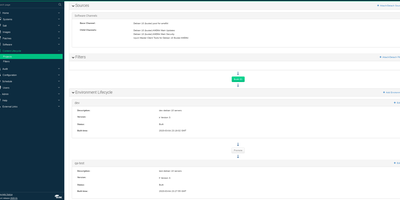
Four hundred servers need a security patch, they run five different Linux distributions, and a spreadsheet says which ones were done. Uyuni replaces that spreadsheet: one server inventories your fleet, mirrors the software channels each machine subscribes to, and shows exactly which patches and errata apply where. Administrators register clients manually, by bootstrap script, or automatically through activation keys, then group them into systems sets so an action aimed at a group lands on staging first and production on schedule. Patch management creates and applies errata with CVE context, and CVE audits check systems against vulnerability data so you can prove a fix landed instead of believing it did. Configuration channels push files, directories, and symbolic links rendered with Jinja templates through the built-in Salt master, which also runs remote commands and orchestration across tens of thousands of clients. The Content Lifecycle Manager promotes package sets from development through testing to production channels, so every environment consumes tested content in order. Provisioning reinstalls or network-boots machines through PXE with AutoYaST, Kickstart, or cloud-init profiles, proxies cache content for branch offices, and built-in Prometheus and Grafana monitoring watches the management server itself. Running on a dedicated VPS on RepoCloud with guaranteed CPU, RAM, and SSD, full root SSH access, and a browser serial console. GPL-2.0 licensed.

Ubuntu VPS
A minimal Ubuntu 24.04 LTS virtual private server — no pre-installed applications, no opinionated configuration, just the operating system and root access. Start from a clean slate and install exactly what you need: web servers, databases, development toolchains, CI runners, monitoring stacks, VPN endpoints, game servers, or anything else that runs on Linux. The server ships with apt package management, systemd service supervision, and standard networking configured out of the box, giving you access to over 36,000 packages in the Universe repository alone. Connect via SSH with the key you select during deployment; a dedicated IPv4 address is included with every server at no extra charge. A browser-based serial console in the RepoCloud dashboard provides emergency access without an SSH client. Snapshots let you capture the server state before risky changes and roll back with one click. Resize CPU and RAM on demand without reinstalling. Canonical's standard security maintenance covers this LTS release through May 2029 — five years of patches for the Main repository. Ubuntu Pro extends that to ten years with additional Universe coverage, kernel livepatching, and compliance tooling, available free for up to five machines.