Nebula
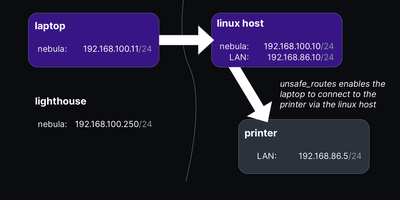
Give every laptop, server, and cloud VM you own one private address that works from anywhere, and that is exactly the overlay network Nebula builds. Each machine runs a single small binary, presents a certificate signed by your own certificate authority, and joins a peer-to-peer layer-3 mesh where tunnels form on demand between hosts that need to talk. Lighthouse nodes, the piece you park on a VPS, keep track of where every peer can be reached and introduce hosts to each other, so machines find each other without any central VPN concentrator carrying their traffic. UDP hole punching and keepalive packets open direct tunnels through home routers and office NAT, and when two hard NATs refuse to cooperate, a relay host forwards the encrypted traffic until a better path appears. Every host enforces its own firewall, default deny on all overlay traffic, with rules keyed to certificate groups, so laptops in the user-endpoint group can reach a server's web port while other groups cannot. Ordinary hosts need no inbound ports at all, and the same binary runs on Linux, macOS, Windows, phones, and FreeBSD, making the mesh feel identical at home, in a datacenter, or across three clouds. Unsafe routes can even pull an existing office subnet into the overlay, giving legacy hardware that will never run Nebula an address on the private network. Running on a dedicated VPS on RepoCloud with guaranteed CPU, RAM, and SSD, full root SSH access, and a browser serial console. MIT licensed.
Certimate
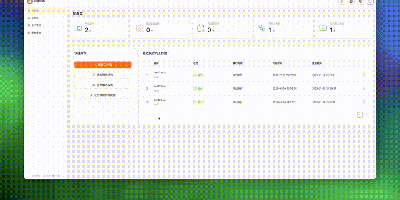
Automate your entire SSL and TLS lifecycle with Certimate, an infrastructure-grade certificate management platform that handles domain verification, ACME issuance, scheduled renewals, and multi-cloud deployment from one unified control plane. A drag-and-drop workflow designer lets administrators construct visual pipelines linking domain validation, certificate issuance from Let's Encrypt or ZeroSSL, and automated distribution to edge destinations. Built-in automation interfaces connect with over seventy DNS providers to handle automated DNS-01 challenge record creation and cleanup without manual API scripting. Engineers can deploy renewed certificates directly to Nginx, Apache, Traefik, and Caddy instances via automated SSH commands or native webhooks. Cloud delivery workflows push updated certificates to AWS CloudFront, Cloudflare, Alibaba Cloud, Tencent Cloud, and Kubernetes Ingress secrets without service interruption. The web management console tracks expiration dates across multiple domains, highlights failing renewal attempts, and dispatches instant alerts through email, Telegram, DingTalk, and enterprise webhooks before outages occur. Running on a dedicated VPS on RepoCloud with guaranteed CPU, RAM, and SSD, full root SSH access, and a browser serial console. MIT licensed.
Homelable
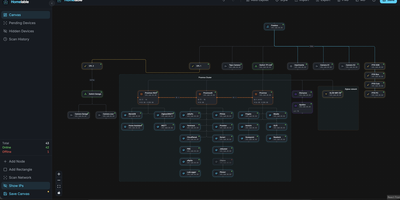
Homelable turns your entire homelab into a live, interactive network canvas where every device, link, and service shows its real-time status at a glance. Run an nmap-powered network scan against your subnets and the tool fingerprints services, queues unknown devices for review, and drops approved hosts onto a drag-and-drop canvas with 15 native node types covering routers, switches, hypervisors, NAS boxes, IoT sensors, and more. Import your full Zigbee2MQTT mesh (controllers, routers, end devices with link quality indicators) and Z-Wave JS device trees in one click, preserving the actual RF topology without manual wiring. Proxmox integration pulls in hosts, VMs, and LXC containers so you can nest virtual machines inside their parent hypervisor node on the canvas. The Rack Canvas mode documents the physical side of your lab: create racks with configurable U-height, mount gear into slots, and patch ports across devices to track your cabling. Health checks run every 60 seconds using ping, HTTP, HTTPS, TCP, SSH, or Prometheus scrape endpoints, with WebSocket push delivering green, red, or pending status pulses directly to the canvas. Split your infrastructure across multiple canvases organized by site, rack, or purpose, and share a read-only Live View URL with anyone on your network. A built-in Model Context Protocol server lets AI assistants like Claude query and modify your topology through natural language. Deploy on a dedicated VPS on RepoCloud with guaranteed CPU, RAM, and SSD, full root SSH access, and a browser serial console. MIT licensed.
SpiderFoot
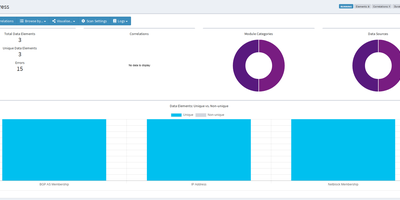
SpiderFoot is an open-source OSINT automation platform, replacing hours of manual reconnaissance with automated intelligence gathering across more than 200 data collection modules. The platform accepts ten distinct target types including IP addresses, domains, hostnames, network subnets, ASNs, email addresses, phone numbers, usernames, person names, and Bitcoin addresses, then feeds them through a publisher-subscriber event bus where each module's findings trigger downstream analysis automatically. SpiderFoot queries Shodan, VirusTotal, HaveIBeenPwned, AlienVault OTX, Censys, crt.sh, WHOIS databases, social media platforms, breach databases, and dozens more sources, with most modules requiring no API keys and many offering free tiers for those that do. The YAML-configurable correlation engine applies 37 pre-defined rules to identify relationships between discovered data points, flagging patterns like shared infrastructure, credential exposure, and domain reputation anomalies. Results export in CSV, JSON, and GEXF graph formats for integration with external analysis tools. TOR integration enables dark web searching, and SpiderFoot can invoke external tools including DNSTwist, Whatweb, Nmap, and CMSeeK for deeper technical assessment. The embedded web server delivers an intuitive dashboard for scan management, data visualization, and result exploration alongside a full command-line interface for scripted automation. Running on a dedicated VPS on RepoCloud with guaranteed CPU, RAM, and SSD, full root SSH access, and a browser serial console. MIT licensed.
Akvorado
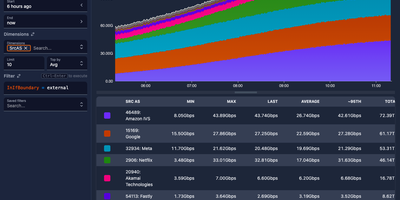
Point your routers at Akvorado and every NetFlow, IPFIX, and sFlow record crossing your network becomes a chart you can interrogate. The web console opens on a live summary of flows per second, exporter count, and traffic split by autonomous system, port, protocol, country, and address family. From there, the visualize page turns stored flows into stacked, line, grid, and heatmap time series, plus Sankey diagrams that show how traffic moves between networks, interfaces, and countries. Filters use a simple SQL-like syntax, so a question like which customers pulled traffic over a transit link last night becomes a query, not a support ticket to your future self. Because the outlet polls each exporter with SNMP or gNMI, flows arrive wearing real interface names, descriptions, and speeds instead of raw ifIndex numbers nobody can read. GeoIP lookups attach country and city to addresses, classification rules tag providers, peers, and connectivity types, and optional BMP sessions add AS paths and BGP communities to every flow. Retention is tiered: raw flows keep full detail for recent days while one-minute, five-minute, and hourly rollups stretch summaries across a year of history. A Grafana plugin is available too, so the same flow data can sit on the dashboards your team already watches. Running on a dedicated VPS on RepoCloud with guaranteed CPU, RAM, and SSD, full root SSH access, and a browser serial console. AGPL-3.0 licensed.
Mistgate
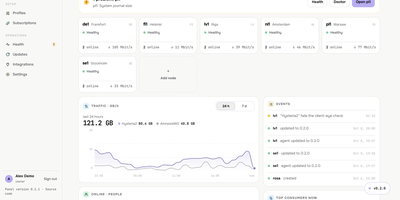
Running a VPN for family, friends, or a small team usually means babysitting servers one SSH session at a time, and Mistgate replaces that with one panel that keeps the whole fleet configured. Add a server from the browser by typing its address and root password: the panel pins the host key, checks the host, opens the ports, and installs the signed node agent for you. Each person gets one subscription link that their app turns into the server list, or a personal AmneziaVPN key per device, so a lost phone can be revoked without touching anyone else. Groups decide which protocol profiles a person receives, while per-user traffic quotas, expiry dates, device limits, and per-device speed limits keep sharing fair. Hysteria2 brings QUIC-based speed with port hopping, obfuscation, and certificate options; VLESS REALITY and AmneziaWG 2.0 and 3.1 cover networks where one protocol gets blocked, and Cloudflare WARP can serve as the exit for all three. Every five minutes the panel connects to each server the way a real client app would, a doctor on every node runs host checks with safe fixes, and alerts reach you on Telegram before your users notice. The public address shows strangers a decoy site while the admin hides behind a secret path, and encrypted backups go to your Cloudflare R2 bucket on a schedule. Running on a dedicated VPS on RepoCloud with guaranteed CPU, RAM, and SSD, full root SSH access, and a browser serial console. AGPL-3.0 licensed.
Tailscale
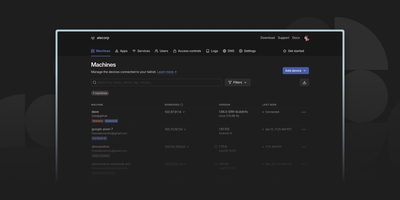
With over 34,000 GitHub stars and backing from a well-funded engineering team, Tailscale has fundamentally simplified how developers and system administrators think about secure networking. The client daemon establishes WireGuard tunnels directly between devices using sophisticated NAT traversal techniques, achieving direct peer-to-peer connections in the vast majority of network configurations without requiring port forwarding, firewall rules, or VPN concentrators. When direct connections prove impossible due to restrictive network environments, DERP relay servers provide encrypted fallback paths. MagicDNS assigns human-readable hostnames to every device on the network, eliminating the need to remember IP addresses across a tailnet. Subnet routing allows nodes to advertise access to entire local networks, enabling remote access to office resources, home labs, or cloud VPCs through a single gateway node. Exit node functionality routes all internet traffic through a designated device for privacy protection or geographic flexibility. Access control lists define granular policies for which devices and users can communicate with which services, enforced cryptographically at the network layer. The authentication layer integrates with identity providers including Google, Microsoft, GitHub, Apple, and OIDC-compliant systems for single sign-on access. Taildrop enables direct encrypted file transfers between devices without cloud intermediaries. The tailscale CLI provides complete network management from the terminal including status monitoring, route advertisement, and node configuration. Running Tailscale on a dedicated VPS on RepoCloud with guaranteed CPU, RAM, and SSD, full root SSH access, and a browser serial console provides a permanent, always-on node in your mesh network. BSD-3-Clause licensed with an active open-source community.
zrok
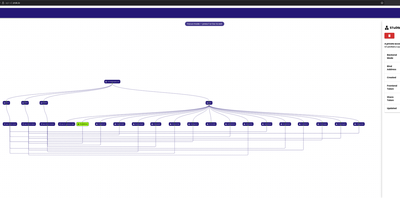
zrok puts services that live behind NAT and firewalls onto the public internet with a shareable URL, without opening a single inbound port. The machine being shared dials out to an OpenZiti overlay network, so a web app on your desk, a Raspberry Pi at home, or a staging box inside a corporate network becomes reachable through your instance while its firewall stays closed. One command shares an HTTP service publicly; add a name from one of your namespaces and the URL stays stable even when you move the backend to a different machine, and an ephemeral name can be promoted to a reserved one when a quick demo turns into a keeper. Private shares skip the public internet entirely and reach only the users you grant, including raw TCP and UDP services, while web and drive backend modes publish static sites or whole folders, with OAuth, password auth, and an interstitial warning page available on public shares. The long-running agent keeps every share and access under one process, restarts the named ones after a reboot, and offers a localhost console for point-and-click sharing; the account-wide web console maps your environments, shares, and accesses as a navigable graph or a sortable table with live activity. Operators get invite-based accounts, InfluxDB-backed usage metrics, and configurable limits that warn or cut off accounts that exceed their quotas. Running on a dedicated VPS on RepoCloud with guaranteed CPU, RAM, and SSD, full root SSH access, and a browser serial console. Apache-2.0 licensed.

Flarum
Flarum gives support communities, open-source projects, and hobby groups a discussion forum that loads like a modern app but keeps every thread findable for years. Members browse discussions by primary tags that act like categories or follow finer secondary labels such as Solved, and sticky posts pin the important threads at the top. The editor accepts Markdown or rich text, and mentions, likes, and in-browser notifications keep conversations moving without a page refresh. Private conversations between members are built in, and new messages arrive live, so quick questions do not have to become public threads. Moderators get flags for reported posts, approval queues, suspensions, and a tamper-resistant audit log that records logins, permission changes, deletions, and edits with the actor and IP address. Administrators shape access with groups and per-tag permissions, restyle the forum with themes, custom CSS, and dark mode, and install hundreds of community extensions from the built-in manager. Search covers posts as well as discussion titles, finds members from any part of their name, and even segments Chinese, Japanese, and Korean text properly. Optional realtime updates, email digests with unsubscribe links, and a board-style Deck view round out the ways members can follow along. Running on a dedicated VPS on RepoCloud with guaranteed CPU, RAM, and SSD, full root SSH access, and a browser serial console. MIT licensed.
TLSPROXY
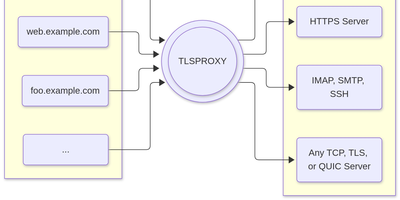
TLSPROXY puts automatic Let's Encrypt TLS in front of every service on your server, so many names can share one port while each backend gets exactly the encryption treatment it needs. Terminate TLS and hand plain text to a local service. Pass raw TLS straight through when the proxy should see nothing. Or terminate and re-encrypt towards a TLS backend, with client certificates checked on the way in. QUIC and HTTP/3 connections terminate here too, and Encrypted Client Hello keeps even the handshake private. Certificates arrive and renew by themselves through http-01 and tls-alpn-01 challenges, PROXY protocol headers preserve real client addresses, and SNI routing with round-robin balancing spreads names across backends. People get in with OpenID Connect, SAML, or passkeys; the same sign-in can mint short-lived SSH user certificates, and built-in certificate authorities manage client and backend credentials for you. Static sites can be served straight from disk, TPM-backed keys keep private material in hardware, and a built-in console shows what the proxy is doing. Running on a dedicated VPS on RepoCloud with guaranteed CPU, RAM, and SSD, full root SSH access, and a browser serial console. MIT licensed.
3X-UI
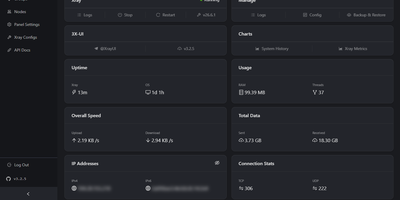
3X-UI is the most popular open-source Xray management panel, providing a full-featured web interface for deploying and monitoring proxy and VPN protocols on Linux servers. The Go backend manages Xray-core instances supporting VLESS, VMess, Trojan, Shadowsocks, WireGuard, Hysteria2, HTTP, SOCKS, Dokodemo-door, and TUN inbounds across TCP, mKCP, WebSocket, gRPC, HTTPUpgrade, and XHTTP transports secured with TLS, XTLS Vision, and REALITY. The Clients page tracks each user with individual traffic quotas, expiration dates, concurrent connection limits, and live online status indicators, while one-click share links, QR codes, and a built-in subscription server distribute configurations in multiple output formats. The multi-node architecture manages and scales deployments across multiple servers from a single panel instance. The Panel Settings page configures listen address, port, URI path, session duration, trusted proxy CIDRs, authentication, and Telegram bot integration for remote monitoring and management alerts. Outbound routing supports WARP, NordVPN, custom rules, load balancers, and proxy chaining. Xray Configs provides template-level control over the core configuration, while the API Docs page exposes a complete RESTful API with in-panel Swagger documentation. Data persists in SQLite by default or PostgreSQL for larger deployments, with database export and import from the panel. Fail2ban integration enforces per-client IP limits. On RepoCloud, deploy 3X-UI on a dedicated VPS with Docker, root SSH access, and complete control over your proxy infrastructure, all under the GPL-3.0 license.
HashiCorp Consul
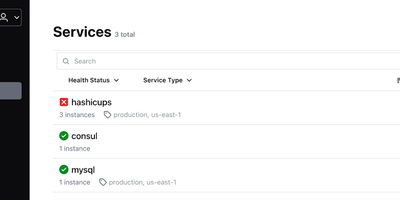
With nearly 30,000 GitHub stars and deployment across organizations including Criteo, Pandora, and Barclays, HashiCorp Consul is the industry-standard platform for service discovery, service mesh, and distributed configuration across dynamic multi-cloud and multi-datacenter infrastructure. Services register themselves and become discoverable via a built-in DNS interface on port 8600 or an HTTP API on port 8500, with health checks ensuring only healthy instances receive traffic through automatic catalog deregistration and service-level circuit breaking. The service mesh capabilities use Envoy sidecar proxies with Transparent Proxy mode to establish automatic mTLS encryption for all service-to-service communication, while identity-based intentions define fine-grained authorization rules controlling which services can communicate. The integrated API Gateway manages north-south traffic into the mesh with configurable routing rules, TLS termination, and header-based matching policies. Consul's distributed key-value store provides hierarchical configuration storage accessible via CLI, HTTP API, and the built-in web UI, with blocking queries enabling watch-based configuration updates without polling. Multi-datacenter federation connects Consul clusters across regions through WAN gossip and RPC forwarding, enabling cross-datacenter service discovery and failover with configurable prepared queries. The Raft consensus protocol provides strong consistency for the service catalog and KV store, with anti-entropy mechanisms ensuring agent state converges with the server catalog. Consul integrates natively with Kubernetes via Helm charts with automatic sidecar injection, Nomad for workload orchestration, Vault for secrets management, and Terraform for infrastructure provisioning. Running on a dedicated VPS on RepoCloud with guaranteed CPU, RAM, and SSD, full root SSH access, and a browser serial console. BUSL 1.1 licensed.
PowerDNS-Admin
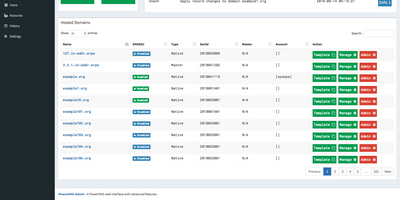
Raw zone files and API calls become something a whole team can operate safely once PowerDNS-Admin puts its web interface in front of a PowerDNS authoritative server. It's a Python/Flask application covering full forward and reverse zone management, with the touches that matter in daily DNS work: zone templates for stamping out consistent new domains, easy IPv6 PTR record editing (reverse zones by hand are misery), full IDN/Punycode support for internationalized domains, and DynDNS 2 protocol support so routers and scripts can update records the way they would against a commercial dynamic-DNS service. Access control is enterprise-grade: local users, LDAP against OpenLDAP or Active Directory, SAML, and OAuth via Google, GitHub, Azure, or OpenID Connect, hardened with TOTP two-factor authentication. Role-based permissions extend to zone-specific access control - hand a developer their project's zone without exposing the rest of your namespace - and activity logging records who changed which record when, the audit trail bare PowerDNS never gives you. The dashboard monitors PDNS service configuration and statistics, and its own API exposes zone and record management for automation on top of the UI. Runs against MySQL/MariaDB or PostgreSQL, talking to PowerDNS through its REST API. MIT-licensed.

Pixelfed
With nearly 7,000 GitHub stars and instances spanning hundreds of federated servers, Pixelfed has become the leading open-source alternative to Instagram — delivering ad-free, algorithm-free photo sharing across the Fediverse. Built on Laravel with a Vue.js frontend, Pixelfed provides a polished, mobile-responsive interface where users upload photos and videos, apply built-in filters, create multi-image posts with alt text, share ephemeral stories, organize content into curated collections, and exchange direct messages — all without tracking, algorithmic manipulation, or targeted advertising. Federation through the ActivityPub protocol means Mastodon, Pleroma, and other Fediverse users can follow Pixelfed accounts, view photo posts in their timelines, and interact through likes, boosts, and replies, while Pixelfed users can discover content through both local and federated timelines. Instance administrators control registration policies, content moderation rules, federation blocklists and allowlists, storage backends including local or S3-compatible options, and server-wide settings. The Mastodon-compatible API enables third-party mobile app support alongside the built-in Progressive Web App experience. Advanced features include blurhash image placeholders for smooth loading, federated groups for community building through FEP-400e and FEP-1b12 extensions, HTTP Signatures with Authorized Fetch for secure federation, and comprehensive data export for full portability. Deployment requires PHP 8.1+, MySQL or PostgreSQL, Redis, and a reverse proxy, with Docker Compose configurations available for streamlined setup. Running on a dedicated VPS on RepoCloud with guaranteed CPU, RAM, and SSD, full root SSH access, and a browser serial console. AGPL-3.0 licensed.
ZTNET
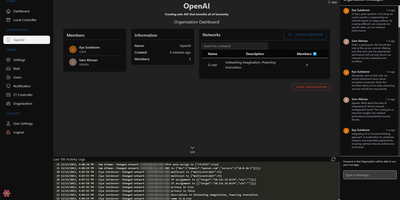
ZTNET provides a polished web dashboard for running your own ZeroTier network controller, covering network creation, member authorization, IP assignment, flow rule editing, and real-time node monitoring entirely from the browser. The organization system supports multi-tenant deployments where teams manage separate network pools with role-based permissions and customizable email notification templates for events like member joins, departures, IP changes, and authorization updates. Each network view displays connected members with their ZeroTier addresses, assigned IPs, last-seen timestamps, physical endpoints, and protocol versions in a clean tabular layout. The admin panel provides platform-wide user management, SMTP configuration for transactional emails, and system-level settings. Built on the T3 stack with Next.js, Prisma ORM, tRPC, TypeScript, and Tailwind CSS with DaisyUI components, the application supports both PostgreSQL and SQLite for persistence and communicates directly with the ZeroTier controller daemon through its native API. Dark and light themes adapt to user preference, and responsive layouts make network management practical from any device. Docker Compose bundles the web application alongside the ZeroTier controller service. Over 100,000 Docker pulls confirm steady community adoption. GPL-3.0 licensed.
Mox
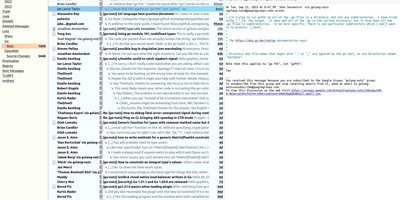
Mox offers a complete mail server stack in a single Go binary requiring no external dependencies. The quickstart command configures a working mail server with SMTP, IMAP4, webmail, and full DNS authentication in under ten minutes. SMTP handling includes a delivery server on port 25, a submission server for authenticated clients, and a queue with automatic retries and DKIM signing. IMAP4rev2 implementation provides full mailbox synchronization with CONDSTORE and QRESYNC for efficient offline clients, NOTIFY for multi-mailbox monitoring, MULTISEARCH across mailboxes, and TLS client certificate authentication via the EXTERNAL SASL mechanism. The built-in webmail provides browser-based reading and composing with message threading, attachments, and HTML rendering without requiring a separate web client. Email authentication implements SPF validation, DKIM signing and verification with automatic key rotation, DMARC policy enforcement with aggregate and failure reporting, DANE with DNSSEC-protected TLSA records, and MTA-STS for certificate verification. Junk filtering combines reputation-based sender scoring with Bayesian content analysis trained per account. The web administration interface manages domains, accounts, DNS records, TLS certificates, delivery queue, and real-time log viewing. Internationalized email addresses with EAI and IDNA support handle non-ASCII domains and mailboxes. Account autoconfiguration publishes settings for Thunderbird autoconfig and Outlook autodiscover. Running on a dedicated VPS on RepoCloud with guaranteed CPU, RAM, and SSD, full root SSH access, and a browser serial console. MIT licensed.
Poweradmin
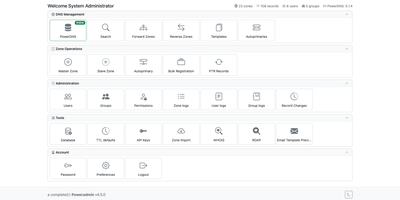
PowerDNS answers the queries; Poweradmin gives you a browser-based control panel for its zones, records, DNSSEC keys, and users, with a REST API for automation. Create master, native, and slave zones, and let zone templates stamp predefined record sets onto new ones. Edit records inline with filters, or open the optional Record Wizard for DMARC, SPF, DKIM, CAA, TLSA, and SRV. Reverse zones link to their forward zones. The batch PTR tool fills whole network ranges, bulk add takes one CSV line per record, and secondary zones can be imported over AXFR. For DNSSEC, manage keys and copy DS and DNSKEY records for your registrar; changes are applied or rectified through the PowerDNS API so signed zones stay consistent. Every record and zone edit is logged with before and after snapshots, and the logs can be filtered and exported. The panel is translated into 43 languages, including right-to-left ones. Permission templates, users, and groups control who touches which zones, sign-in works through LDAP, OIDC, or SAML, and administrators can switch on authenticator-app or email two-factor codes. API keys can be read-only, limited to chosen operations, or restricted to specific zones, and companion projects link Terraform, ExternalDNS, cert-manager, and Certbot. Dynamic DNS clients such as ddclient and inadyn update records through a dyndns2-compatible endpoint. Running on a dedicated VPS on RepoCloud with guaranteed CPU, RAM, and SSD, full root SSH access, and a browser serial console. GPL-3.0 licensed.
Web-Check
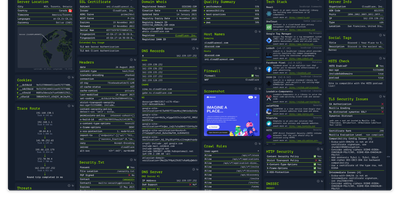
Enter a URL and get a dashboard of everything publicly discoverable about its security posture, server architecture, and technology stack: Web-Check is an all-in-one OSINT tool for analyzing any website. One scan surfaces IP info and server location, the full SSL certificate chain with issuing authority and validity, DNS records (A, MX, NS, CNAME, TXT) with DNSSEC status, HTTP response headers interpreted for security directives like HSTS, CSP, and X-Frame-Options, cookies and their flags, WHOIS domain info, robots.txt crawl rules, a sitemap-derived page map, the redirect ledger, open ports, traceroute, detected technologies, third-party trackers, associated hostnames, site performance, and even carbon footprint. Each card explains what the data means and why it matters, which makes the tool double as a security education resource - junior engineers learn headers and attack surfaces by scanning real sites. Practical uses span pre-deployment security audits (catch missing headers and misconfigurations before they ship), privacy compliance checks (identify trackers and cookie behavior for GDPR work), competitive tech-stack research, and network debugging via DNS and redirect inspection. Built by Lissy93 in TypeScript, it deploys as a single Docker container, and self-hosting keeps your reconnaissance targets and audit activity off third-party services.