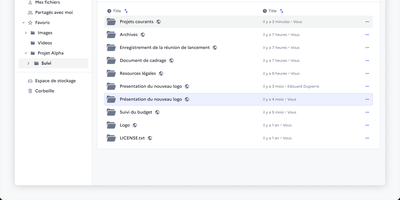
Drive
Somewhere in every organisation there is a folder called FINAL_v2 that nobody dares delete, and Drive from La Suite exists to end that. It gives teams a shared file space where uploads land in organised workspaces, versions stay findable through search, and every file or folder carries its own access list. You preview PDFs, images, audio, and video in the browser, and office documents open for editing through Collabora or OnlyOffice without downloading a thing. Sharing reaches outside the organisation too: invite external partners by link, even without an account, and revoke access the moment a project ends. Uploads pass malware scanning before they touch storage, a trash bin restores accidents, and quotas with usage metrics keep big archives honest. Administrators plug in their own OIDC identity provider, so logins follow the same single sign-on as the rest of the stack, while an embeddable file picker lets other internal apps reuse Drive as their document library. Because the data lives in your own S3-compatible storage, sovereignty requests stop being an argument with a vendor and become a setting. Running on a dedicated VPS on RepoCloud with guaranteed CPU, RAM, and SSD, full root SSH access, and a browser serial console. MIT licensed.
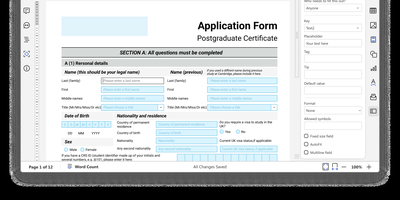
OnlyOffice
With 6,800 GitHub stars and over a decade of development since its 2014 release, ONLYOFFICE Docs delivers a self-hosted Microsoft Office replacement with pixel-perfect OOXML rendering and real-time collaborative editing supporting both Fast (character-by-character) and Strict (manual save) co-authoring modes. The suite encompasses five full-featured editors — Document Editor for DOCX/ODT/EPUB/HTML, Spreadsheet Editor with 500+ functions and pivot tables, Presentation Editor with animations and transitions, Form Creator for fillable PDF forms with field validation, and PDF Editor for annotation and conversion — all operating within a unified web interface. Format support spans 50+ types including DOCX, XLSX, PPTX, ODT, ODS, ODP, PDF, CSV, RTF, TXT, and Markdown with server-side conversion between any supported pair. The JavaScript plugin API enables extending editor functionality through a marketplace of ready-made plugins for ChatGPT integration, speech-to-text, OCR, Zotero citations, and Thesaurus. Ready-to-use connectors integrate with Nextcloud, ownCloud, Seafile, Moodle, Odoo, Confluence, SharePoint, Alfresco, Liferay, and Chamilo, while WOPI protocol compliance enables integration with any WOPI-compatible platform. JWT authentication secures all API communications between host applications and the document server. Deploy via Docker with a single command or DEB/RPM packages on Ubuntu, Debian, CentOS, or RHEL. Running on a dedicated VPS on RepoCloud with guaranteed CPU, RAM, and SSD, full root SSH access, and a browser serial console. GNU AGPL v3 licensed.
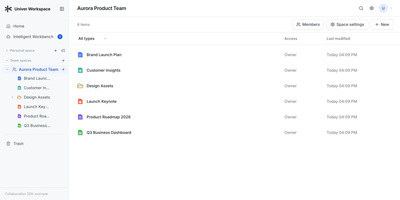
Univer Workspace
A budget model, the launch document that explains it, and the slides that present it can live side by side in one self-hosted office workspace that people and AI agents edit together. Personal and Team Spaces organize Sheets, Docs, Slides, relational Bases, and Boards, with Recent, Trash, file import, and export views keeping everyday housekeeping close at hand. Sharing follows role and node aware access control, including anonymous viewing, so a single table or document can be opened to a reader without exposing the whole space. Data and references stay connected across artifacts as the workspace changes, which keeps a figure corrected in a sheet consistent with the document that quotes it. The Workspace Agent drafts and revises content in isolated Worktrees, verifies its own changes, and hands the result to a person for review before anything reaches the trunk. Several review rounds can happen while humans keep editing in the Browser, and nothing merges until someone approves it. The Workspace CLI connects existing agents to your deployment, so automation can create content, inspect data, render screenshots and PDFs, and run layout checks before review. Sign-in accepts passwords, GitHub, Discord, or application OAuth, and files move in and out as XLSX, DOCX, PPTX, and CSV without a separate conversion project. Running on a dedicated VPS on RepoCloud with guaranteed CPU, RAM, and SSD, full root SSH access, and a browser serial console. Apache-2.0 licensed.
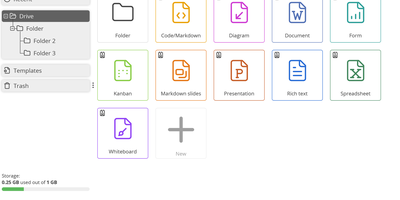
Cryptpad
End-to-end encrypted by design, CryptPad is a real-time office suite where teams write documents, plan on kanban boards, collect answers with forms, and draw diagrams without the hosting server ever seeing their content. Rich text pages come with comments, replies, @mentions, and a document outline, while the Markdown editor adds a live preview, Mermaid diagrams, mind maps, and math. Kanban columns hold colored, tagged cards with Markdown bodies, and the diagram editor exports PNG, JPG, SVG, or PDF. Optional ONLYOFFICE editors add spreadsheets, word-processing documents, and presentations that several people can edit together. The form builder offers text, choice, grid, date, ranking, and poll questions, conditional sections, and separate author, auditor, and participant roles. Documents can be shared with contacts or teams, by link, or as embed code, with view, edit, present, or view-once access. Passwords, expiry dates, owner lists, and access lists limit who gets in, and every edit lands in a history you can step through, restore, or pin as a named snapshot. CryptDrive keeps files in folders, tags, templates, and a trash bin, while teams get their own drive, chat, and member roles. Running on a dedicated VPS on RepoCloud with guaranteed CPU, RAM, and SSD, full root SSH access, and a browser serial console. AGPL-3.0 licensed.
Nextcloud
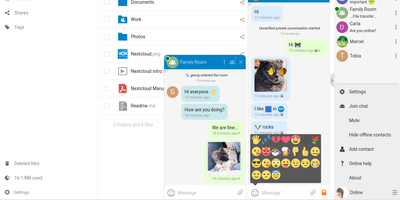
Google Workspace and Microsoft 365, replaced by a platform you actually control: Nextcloud is the self-hosted digital workspace. Files is the core: file storage and sync across desktop, mobile, and web clients, with sharing, versioning, and collaboration built in. Around it, Talk provides private text chat, audio/video conferencing with screen sharing, SIP integration, and persistent voice rooms; Groupware bundles calendar, contacts, and mail with delegation support; and Office offers two collaborative suites - the Collabora-based option with deep ODF support, and Euro-Office, whose local-processing architecture delivers strong Microsoft Office compatibility and fast browser rendering with reduced server load. The Nextcloud Assistant threads AI through the platform via a context-aware sidebar, Whiteboard covers visual collaboration, Flow handles automation, and an app ecosystem of hundreds of extensions adds everything from Kanban boards to end-to-end encryption. Hub 26 brings a lighter UI with a unified app switcher and Nextcloud Governance for organizations under strict regulatory requirements. This is the flagship of data sovereignty: your files, chats, calendars, and documents live on your server, under your jurisdiction, with GDPR compliance by architecture rather than by contract.
Collabora Office
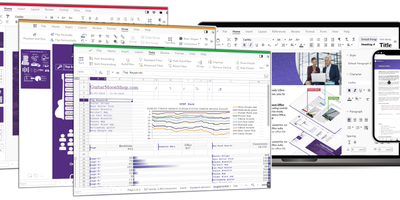
Real LibreOffice document engineering in the browser: Collabora Online is built by the company employing much of the former SUSE LibreOffice team - not a reimplementation. This deployment runs CODE (Collabora Online Development Edition), the collabora/code server that renders and edits documents entirely server-side while browsers get high-fidelity WYSIWYG output, so layout and formatting survive round-trips that break lesser converters. Four editors ship in one container: Writer for text documents (comments, track changes with comparison and restoration, form handling), Calc for spreadsheets (advanced formulas, macros, pivot tables, per-user sheet views, server-enforced cell protection), Impress for presentations, and Draw for Visio-class diagrams. Format compatibility spans DOCX, XLSX, PPTX, the ODF family, PDF, and dozens more - including Visio and Publisher import. Real-time collaborative editing supports multiple simultaneous editors with visible cursors and commenting. The architectural point: documents are processed on your server and never leave it, which is why Collabora is the engine behind Nextcloud Office and integrates with ownCloud, Seafile, and any WOPI-speaking host - or embeds in your own application via the SDK. An admin console monitors sessions and memory. For organizations that need Google Docs-style collaboration with actual data sovereignty, this is the reference open-source answer.